
MCP BaoStock Server
Description
[](https://mseep.ai/app/huggingagi-mcp-baostock-server) # MCP BaoStock Server [](https://mseep.ai/app/huggingagi-mcp-baostock-server) # MCP BaoStock Server [](https://archestra.ai/mcp-catalog/huggingag…
Details
- Author
- HuggingAGI
- GitHub stars
- 113
- Downloads
- 352
- Categories
- Other
Jump to
- Query basic stock information (listing date, industry, etc.)
- Retrieve historical K‑line data (with forward adjustment)
- Look up industry classification data
- Access dividend and share distribution data
- Obtain quarterly financial indicators (profitability, operation, growth)
- Query index data (e.g., CSI 300 daily quotes)
- Get valuation indicator data (P/E, P/B, etc.)

Setting up with Highlight
This MCP is not yet compatible with Highlight’s one-click setup. However, you can still use it with Highlight by following these steps:
- Download and install Highlight from highlightai.com/download
- Navigate to the plugins tab and select "Add Custom Plugin"
-
Configure the plugin with the settings below
Plugin Name
MCP BaoStock ServerCommand (node, npx, python, etc.)Please refer to the README for specific instructions on how to obtain API keys or other required environment variables.
- Enable "Start Automatically" if you want the plugin to start when Highlight launches





From the repository
Install and run the server using uv run mcp-baostock-server. The server requires Python 3.10+ and the baostock and pandas libraries. Once running, it exposes several tools that can be invoked by an MCP client to retrieve market data.
Claude Desktop / Cursor
Paste into your MCP client config file to install this server.
{
    "mcpServers": {
        "mcp baostock server": {
            "mcp-baostock-server": {
                "command": "uv",
                "args": [
                    "run",
                    "mcp-baostock-server"
                ]
            }
        }
    }
}McpServers
{
    "mcp-baostock-server": {
        "command": "uv",
        "args": [
            "run",
            "mcp-baostock-server"
        ]
    }
}
MCP BaoStock Server
一个基于BaoStock的股票数据服务器,提供了多个接口用于获取股票市场数据。
功能特点
- 提供股票基本信息查询
- 支持K线历史数据获取
- 行业分类数据查询
- 分红派息数据查询
- 季度财务指标数据(盈利能力、营运能力、成长能力)
- 指数数据查询
- 估值指标数据查询
安装与使用
依赖要求
- Python 3.10+
- baostock
- pandas
使用说明
安装使用
uv run mcp-baostock-server
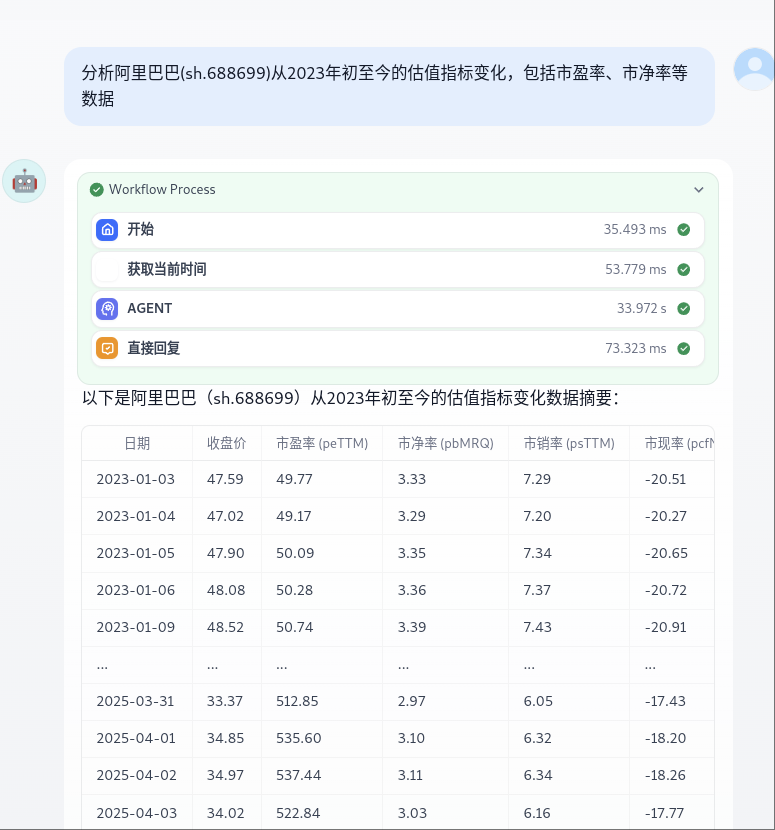
接口测试用例
以下是各个接口的测试用例示例:
1. 获取股票基本信息
```pythonSign in to leave a review
Use Google, GitHub, or an email account so ratings stay tied to real people.
No reviews posted yet.





