
How does it work
About
Demo application showcasing how to build and secure MCP servers and clients with Pomerium using contextual access policies.
Details
- Author
- pomerium
- GitHub stars
- 51
- Downloads
- 350
- Categories
- Other
Jump to
- Secures local HTTP MCP servers with Pomerium’s OAuth 2.1 gateway
- Supports upstream OAuth flows for services like GitHub or Google Drive
- External clients never see upstream OAuth tokens (TI)
- MCP servers can remain stateless and token‑free
- Provides an endpoint to list available MCP servers and their connection status
- Allows redirecting users to complete upstream OAuth authentication

Setting up with Highlight
This MCP is not yet compatible with Highlight’s one-click setup. However, you can still use it with Highlight by following these steps:
- Download and install Highlight from highlightai.com/download
- Navigate to the plugins tab and select "Add Custom Plugin"
-
Configure the plugin with the settings below
Plugin Name
How does it workCommand (node, npx, python, etc.)Please refer to the README for specific instructions on how to obtain API keys or other required environment variables.
- Enable "Start Automatically" if you want the plugin to start when Highlight launches





From the repository
Set up the required environment variables in .env-mcp-app-demo (an OpenAI API key), configure Pomerium routes in pomerium-config.yaml with your domain, and run docker compose up -d. The demo includes a SQLite MCP server. After signing in at https://mcp-app-demo.YOUR-DOMAIN/, you can query the database via natural language.
Claude Desktop / Cursor
Paste into your MCP client config file to install this server.
{
    "mcpServers": {
        "how does it work": {
            "mcp-app-demo": {
                "command": "docker",
                "args": [
                    "compose",
                    "up",
                    "-d"
                ]
            }
        }
    }
}McpServers
{
    "mcp-app-demo": {
        "command": "docker",
        "args": [
            "compose",
            "up",
            "-d"
        ]
    }
}
How does it work
See Model Context Protocol Capability Overview for more details.
Token Vocabulary
- External Token (TE):
An externally-facing token issued by Pomerium that represents the user's session. This token is used by external clients (such as Claude.ai, OpenAI, or your own apps) to authenticate requests to Pomerium-protected MCP servers.
Example: The token you provide to an LLM API or agentic framework to allow it to call your MCP server.
- Internal Token (TI):
An internal authentication token that Pomerium obtains from an upstream OAuth2 provider (such as Notion, Google Drive, GitHub, etc.) on behalf of the user. This token is never exposed to external clients. Pomerium uses this token to authenticate requests to the upstream service when proxying requests to your MCP server.
Pomerium acts as a secure gateway between Model Context Protocol (MCP) clients and servers. It provides authentication and authorization for local HTTP MCP servers, using OAuth 2.1 flows. This setup is especially useful when your MCP server needs to access upstream APIs that require OAuth tokens (such as Notion, Google Drive, GitHub, etc.).
It also enables you to build internal applications that use agentic frameworks or LLM APIs capable of invoking MCP servers, as demonstrated in this repository.
To understand this setup, let's look at how an MCP client communicates with MCP servers that are protected by Pomerium.
1. Exposing an Internal MCP Server to a Remote Client
https://github.com/user-attachments/assets/c7a809ad-6f0a-4ea3-94a2-6cf22ea6d27b
Suppose you want to allow an external MCP client (like Claude.ai) to access your internal MCP server, but you want to keep it secure. Pomerium sits in front of your server and manages authentication and authorization for all incoming requests.
This means you can safely share access to internal resources (like a database) with external clients, without exposing them directly to the internet.
You configure your Pomerium Route as usual with an additional mcp property that signifies that this route represents a Model Context Protocol server route.
routes:
  - from: https://my-mcp-server.your-domain.com
    to: http://my-mcp-server.int:8080/mcp
    name: My MCP Server
    mcp:
      server: {}
sequenceDiagram
  actor U as User
  participant C as MCP Client
  participant P as Pomerium
  participant S as MCP Server
  U ->> C: Adds a server URL
  C ->> P: Registers client, initiates auth
  P ->> C: Sign-in URL
  C ->> U: Redirect to sign-in URL
  U ->> P: Sign-in
  P ->> C: Redirect to client
  C ->> P: Obtain Token
  C ->> P: GET https://mcp-server Authorization: Bearer Token
  P ->> S: Proxy request to MCP Server
2. MCP Server Needs Upstream OAuth
If your MCP server needs to access an upstream service that requires OAuth (for example, GitHub or Google Drive), Pomerium can handle the OAuth flow for you. Here’s how the process works:
1. The user adds the MCP server URL in the client (e.g., Claude.ai).
2. The client registers with Pomerium and starts authentication.
3. Pomerium gives the client a sign-in URL, which is shown to the user.
4. The user signs in to Pomerium, then is redirected to the upstream OAuth provider.
5. The user authenticates with the upstream provider. The provider returns an Internal Token (TI) to Pomerium.
6. Pomerium finishes the sign-in and redirects the user back to the client.
7. The client receives an External Token (TE) from Pomerium.
8. The client uses TE to make requests to the MCP server.
9. Pomerium refreshes the upstream token (TI) as needed and proxies requests to the MCP server, passing TI in the Authorization header.
Key benefits:
- External clients (like Claude.ai) never see your upstream OAuth tokens.
- Your MCP server always receives a valid upstream token.
- The MCP server can remain stateless and does not need to manage OAuth flows or tokens.
Route configuration:
routes:
  - from: https://github.your-domain
    to: http://github-mcp.int:8080/mcp
    name: GitHub
    mcp:
      server:
        upstream_oauth2:
          client_id: xxxxxxxxxxxx
          client_secret: yyyyyyyyy
          scopes: ['read:user', 'user:email']
          endpoint:
            auth_url: 'https://github.com/login/oauth/authorize'
            token_url: 'https://github.com/login/oauth/access_token'
sequenceDiagram
  actor U as User
  participant C as MCP Client
  participant O as Upstream OAuth
  participant P as Pomerium
  participant S as MCP Server
  U ->> C: Adds a server URL
  C ->> P: Registers client, initiates auth
  P ->> C: Sign-in URL
  C ->> U: Redirect to sign-in URL
  U ->> P: Sign-in
  P ->> U: Redirect to upstream OAuth
  U ->> O: Authenticate with upstream OAuth
  O ->> P: Return Internal Token (TI)
  P ->> C: Redirect to client
  C ->> P: Obtain External Token (TE)
  C ->> P: GET https://mcp-server Authorization: Bearer (TE)
  P ->> O: Refresh (TI) if necessary
  P ->> S: Proxy request to MCP Server, Bearer (TI)
3. Calling internal MCP server from your app
Some inference APIs, such as the OpenAI API and Claude API, now support direct invocation of MCP servers. This trend is expected to grow, and many agentic frameworks are adding support for MCP server calls. You can also implement MCP tool calls manually in your app using LLM function calling capabilities. All these approaches require providing an Authorization: Bearer External Token (TE) for the MCP server so that requests can be securely routed through Pomerium.
If you are building your own internal application and need to obtain such a token, Pomerium offers a _client MCP mode_ for routes. By setting the mcp.pass_upstream_access_token option, Pomerium will supply your upstream application with an Authorization: Bearer External Token (TE) representing the current user session. You can then pass this token to external LLMs or agentic frameworks, allowing them to access MCP servers behind Pomerium according to your authorization policy.
The following flow illustrates this process, assuming the user is already authenticated with Pomerium:
sequenceDiagram
  actor U as User
  participant P as Pomerium
  participant C as Your App Backend
  participant S as MCP Server
  participant I as LLM API
  U ->> P: GET https://mcp-app-demo.your-domain.com
  P ->> C: GET http://mcp-app-demo:3000 Authorization: Bearer (TE)
  C ->> I: call tool https://mcp-server.your-domain Authorization: Bearer (TE)
  I ->> P: GET https://mcp-server.your-domain Authorization: Bearer (TE)
  P ->> S: GET https://mcp-server
Example route configuration:
routes:
  - from: https://mcp-app-demo.your-domain.com
    to: http://mcp-app-demo:3000
    mcp:
      client: {}
    policy:
      domain:
        is: your-domain.com
  - from: https://mcp-server.your-domain.com
    to: http://mcp-server.int:8080/mcp
    name: My MCP Server
    mcp:
      server: {}
    policy:
      domain:
        is: your-domain.com
4. Listing available MCP servers from your app
You can provide users with a dynamic list of MCP servers protected by the same Pomerium instance as your application. To do this, issue an HTTP request to your app backend using the same Authorization: Bearer token your backend received. The response will include the list and connection status of each MCP server upstream available to this Pomerium cluster.
The connected property indicates whether the current user has all required internal tokens for upstream OAuth (if needed):
- true – The user has all required internal tokens from upstream OAuth providers, or none are required for this server.
- false – The user needs to authenticate with the upstream OAuth provider before accessing this MCP server.
A later section will explain how to ensure your user has all required internal tokens.
GET https://mcp-demo-app.yourdomain.com/.pomerium/mcp/routes HTTP/1.1
Accept: application/json
Authorization: Bearer (TE)
Content-Type: application/json

{

    "servers": [

        {

            "name": "DB",

            "url": "https://db-mcp.your-domain.com",

            "connected": true

        },

        {

            "name": "GitHub",

            "url": "https://github-mcp.your-domain.com",

            "connected": false

        }

    ]

}
5. Ensuring your current user has authenticated with an upstream OAuth2 provider
If your target MCP server shows connected: false, the user needs to authenticate with the required upstream OAuth2 provider.
To do this, redirect the user's browser to the special /.pomerium/mcp/connect path on the MCP server route (for example: https://db-mcp.your-domain.com/.pomerium/mcp/connect).
Include a redirect_url query parameter that points back to your application's page—this is where the user should return after authentication, and where you can reload the MCP server list and their connection status.
Note: For security, the redirect_url must be a host that matches one of your MCP Client routes.
After the user completes authentication, the MCP server's connected status should become true.
6. Obtaining User Details
To access the authenticated user's identity and claims, both your MCP client application and MCP server should read the X-Pomerium-Assertion HTTP header.
This header contains a signed JWT with user information, which you can decode and verify to obtain details such as the user's email, name, and other claims.
Monitoring and Auditing MCP Tool Calls
Pomerium provides comprehensive audit logging for all MCP tool calls, allowing you to monitor and analyze how external clients interact with your MCP servers.
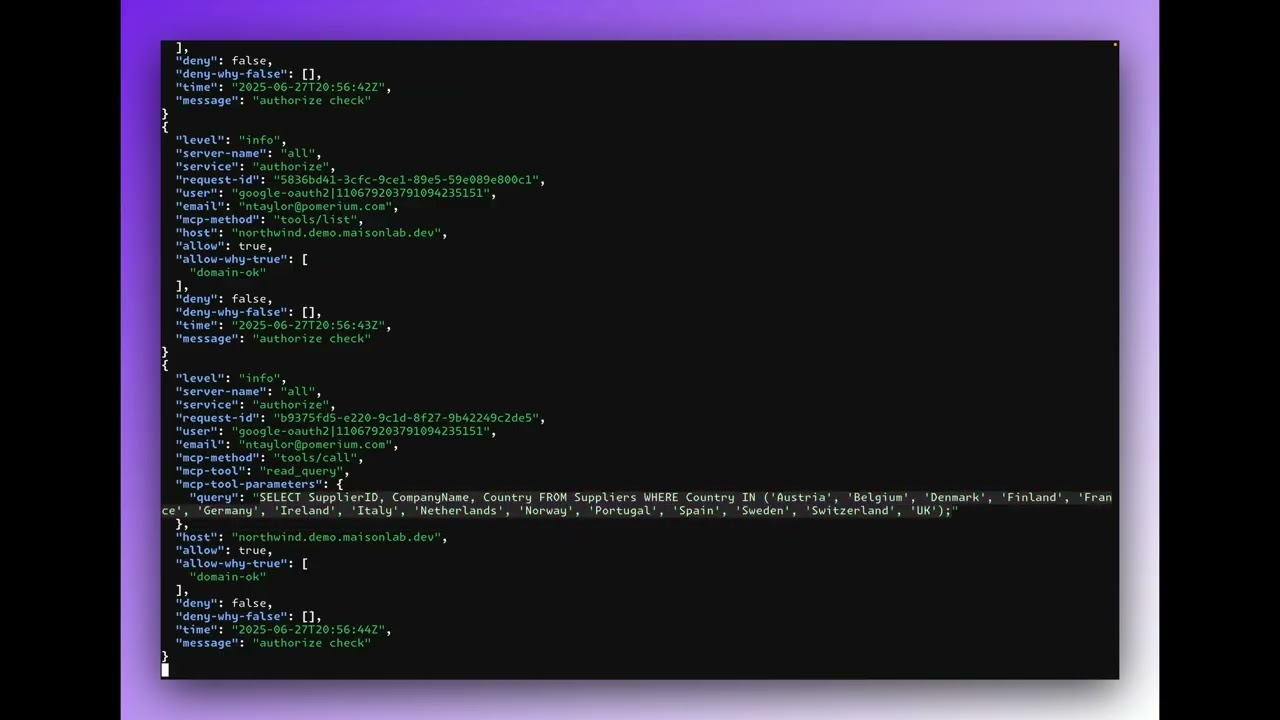
Viewing Audit Logs
You can monitor MCP tool calls in real-time using the following commands:
Raw Log Format
View unfiltered audit logs as they occur:
docker compose logs -f pomerium \
  | grep --line-buffered "authorize" \
  | grep --line-buffered "mcp-"
Pretty-Printed JSON Format
View formatted audit logs with syntax highlighting:
docker compose logs -f pomerium \
  | grep --line-buffered "authorize" \
  | grep --line-buffered "mcp-" \
  | sed -u 's/^[^{]//' \
  | jq -C
Note: You'll need to have jq installed for JSON formatting.
Sample Audit Log Entry
Here's an example of what an MCP tool call audit log entry looks like:
{
  "level": "info",
  "server-name": "all",
  "service": "authorize",
  "request-id": "b9375fd5-e220-9c1d-8f27-9b42249c2de5",
  "user": "google-oauth2|110679203791094235151",
  "email": "mcp@pomerium.com",
  "mcp-method": "tools/call",
  "mcp-tool": "read_query",
  "mcp-tool-parameters": {
    "query": "SELECT SupplierID, CompanyName, Country FROM Suppliers WHERE Country IN ('Austria', 'Belgium', 'Denmark', 'Finland', 'France', 'Germany', 'Ireland', 'Italy', 'Netherlands', 'Norway', 'Portugal', 'Spain', 'Sweden', 'Switzerland', 'UK');"
  },
  "host": "northwind.mcp.pomerium.com",
  "allow": true,
  "allow-why-true": ["domain-ok"],
  "deny": false,
  "deny-why-false": [],
  "time": "2025-06-27T20:56:44Z",
  "message": "authorize check"
}
Configuring MCP Audit Logging
To enable comprehensive MCP audit logging, add the following global section to your Pomerium configuration. Note that mcp- fields are new authorize_log_fields specifically designed to support MCPs:
```yaml
Sign in to leave a review
Use Google, GitHub, or an email account so ratings stay tied to real people.
No reviews posted yet.





