
Context Intelligence Layer for all Coding Agents
About
A local-first context runtime for AI coding agents that compresses file reads and shell output before they reach the LLM, reducing token waste by 60–95% (up to 99% on cached reads). It integrates with any MCP-compatible client across 30+ IDEs and AI tools via a single Rust…
Details
- Author
- yvgude
- Downloads
- 313
- Categories
- Other
Jump to
- Cached, mode-aware file reads (full, map, signatures, diff, …)
- Shell output compression via 95+ patterns (git, npm, cargo, docker, …)
- Multi-edge Property Graph with weighted impact analysis and hybrid search
- PR Context Packs via lean-ctx pack --pr
- Portable context packages (.lctxpkg) with SHA-256 integrity
- Session memory (CCP) persisting task facts across chats
- Streamable HTTP MCP mode (lean-ctx serve)
- Opt-in telemetry; local-first by default
Install via one of curl -fsSL https://leanctx.com/install.sh | sh, brew install lean-ctx, npm install -g lean-ctx-bin, or cargo install lean-ctx. Run lean-ctx setup to auto-detect your AI tools, then lean-ctx doctor to verify. After setup, restart your shell and editor to activate the MCP server and shell hooks.
  ██╗     ███████╗ █████╗ ███╗   ██╗     ██████╗████████╗██╗  ██╗
  ██║     ██╔════╝██╔══██╗████╗  ██║    ██╔════╝╚══██╔══╝╚██╗██╔╝
  ██║     █████╗  ███████║██╔██╗ ██║    ██║        ██║    ╚███╔╝
  ██║     ██╔══╝  ██╔══██║██║╚██╗██║    ██║        ██║    ██╔██╗
  ███████╗███████╗██║  ██║██║ ╚████║    ╚██████╗   ██║   ██╔╝ ██╗
  ╚══════╝╚══════╝╚═╝  ╚═╝╚═╝  ╚═══╝     ╚═════╝   ╚═╝   ╚═╝  ╚═╝
             Context Runtime for AI Agents
<h3 align="center">The context layer for AI coding agents</h3>
<p align="center">
<strong>Reduce token waste in Cursor, Claude Code, Copilot, Windsurf, Codex, Gemini & more by 60–95% (up to 99% on cached reads)</strong><br/>
Shell Hook + MCP Server · 60 tools · 10 read modes · 95+ patterns · Single Rust binary<br/>
<strong>Context Intelligence:</strong> Bounce detection, context gate with graph/intent/knowledge-based mode routing, MCP resources & prompts, dynamic tool categories, client capability detection across 9+ IDEs
</p>
<p align="center">
<a href="https://github.com/yvgude/lean-ctx/actions/workflows/ci.yml"> </a>
</a>
<a href="https://github.com/yvgude/lean-ctx/actions/workflows/security-check.yml"> </a>
</a>
<a href="https://crates.io/crates/lean-ctx">
<a href="https://crates.io/crates/lean-ctx">
<a href="https://www.npmjs.com/package/lean-ctx-bin">
<a href="https://aur.archlinux.org/packages/lean-ctx">
<a href="https://pi.dev/packages/pi-lean-ctx">
<a href="LICENSE"> </a>
</a>
<a href="https://discord.gg/pTHkG9Hew9">
<a href="https://x.com/leanctx">
</p>

<p align="center">
<a href="https://leanctx.com">Website</a> ·
<a href="https://leanctx.com/docs/getting-started">Docs</a> ·
<a href="#get-started-60-seconds">Install</a> ·
<a href="#demo">Demo</a> ·
<a href="#benchmarks">Benchmarks</a> ·
<a href="cookbook/README.md">Cookbook</a> ·
<a href="SECURITY.md">Security</a> ·
<a href="CHANGELOG.md">Changelog</a> ·
<a href="https://discord.gg/pTHkG9Hew9">Discord</a>
</p>
---
> lean-ctx is a local-first context runtime that compresses file reads + shell output before they reach the LLM. Cached re-reads drop to ~13 tokens.
<p align="center"><strong>See it in action:</strong></p>
<table>
<tr>
<td align="center" width="33%">
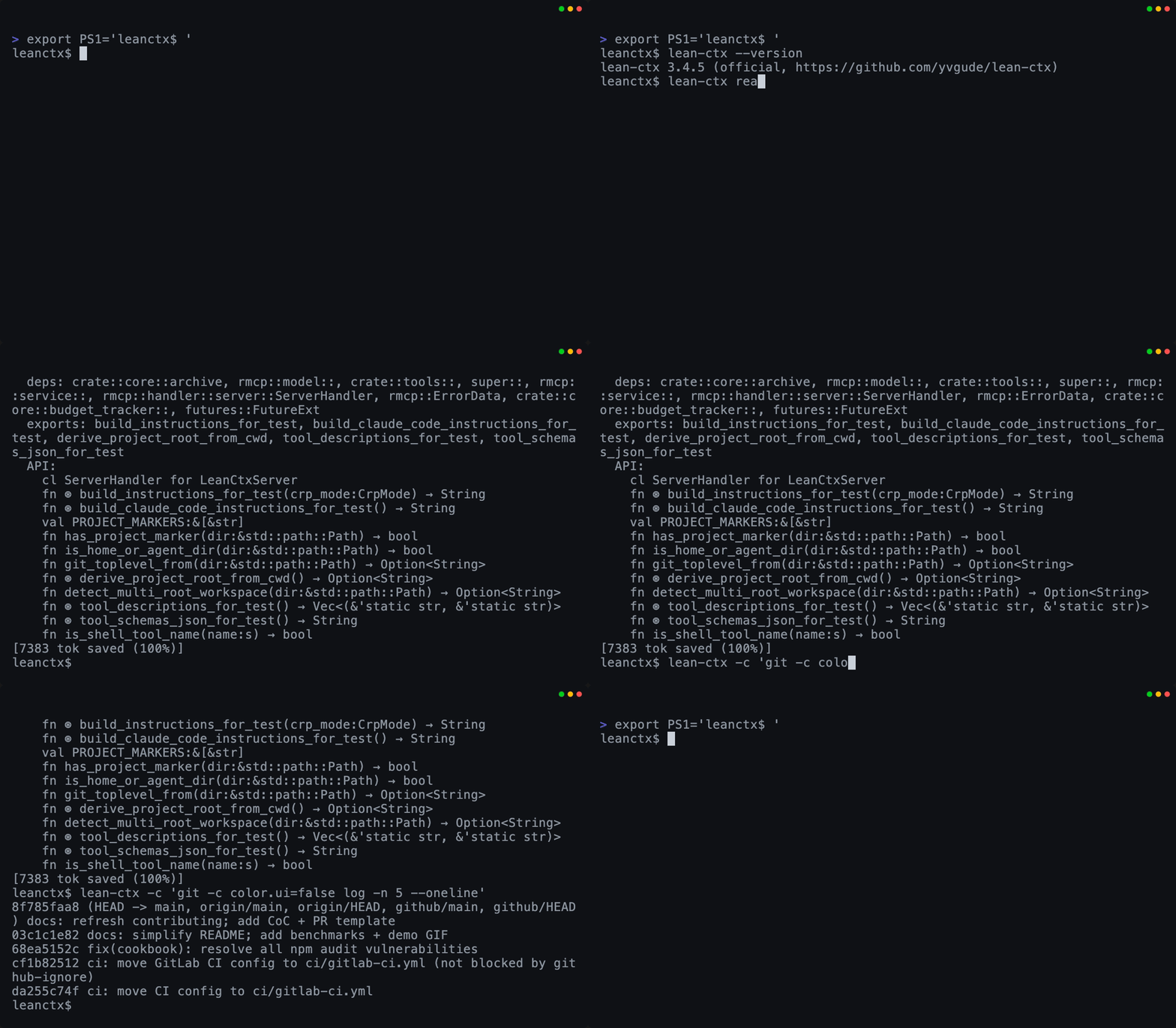
<br/>
<strong>Read + Shell</strong>
<br/>
Map-mode reads + compressed CLI output
</td>
<td align="center" width="33%">
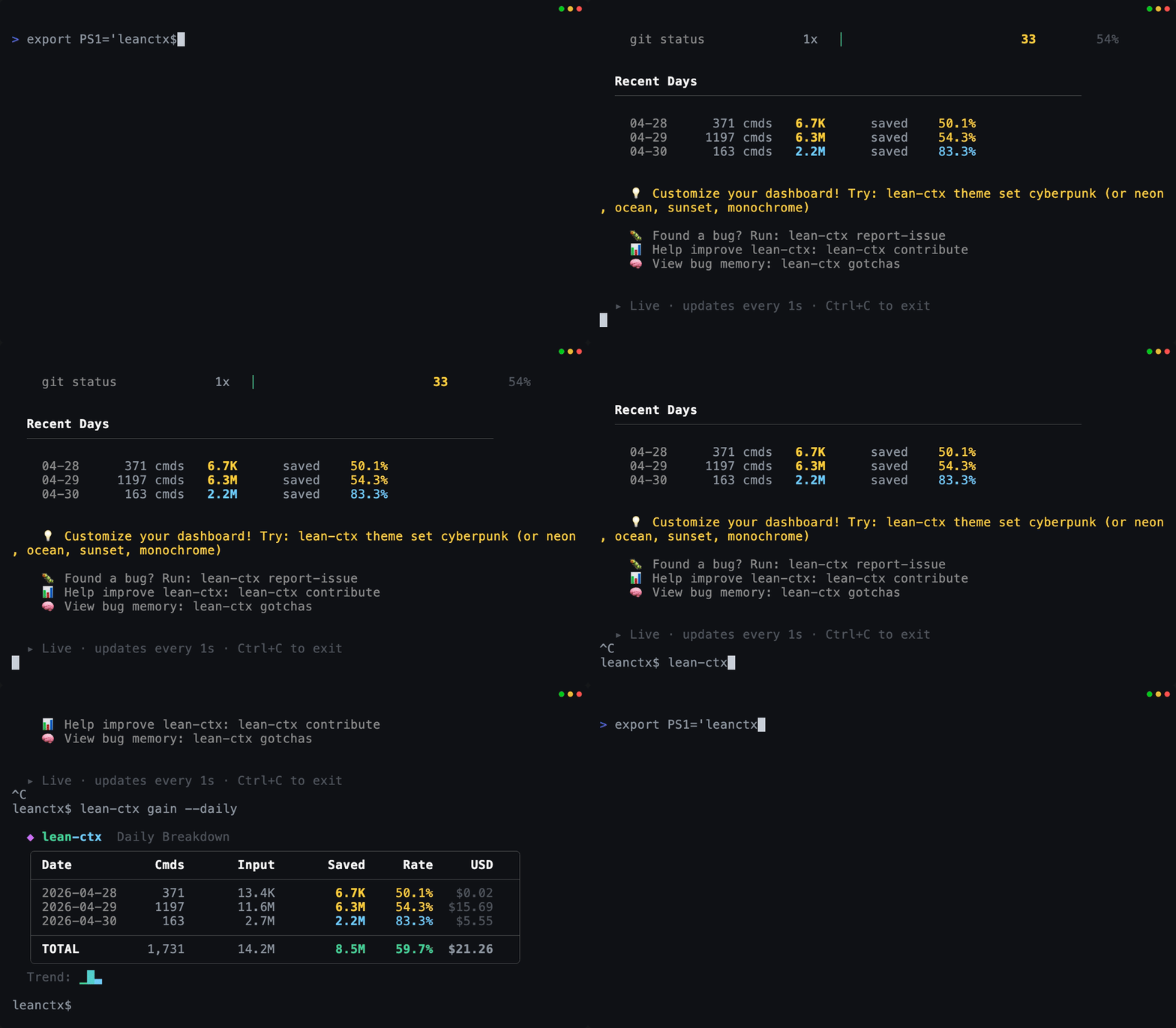
<br/>
<strong>Gain (live)</strong>
<br/>
Tokens + USD savings in real time
</td>
<td align="center" width="33%">
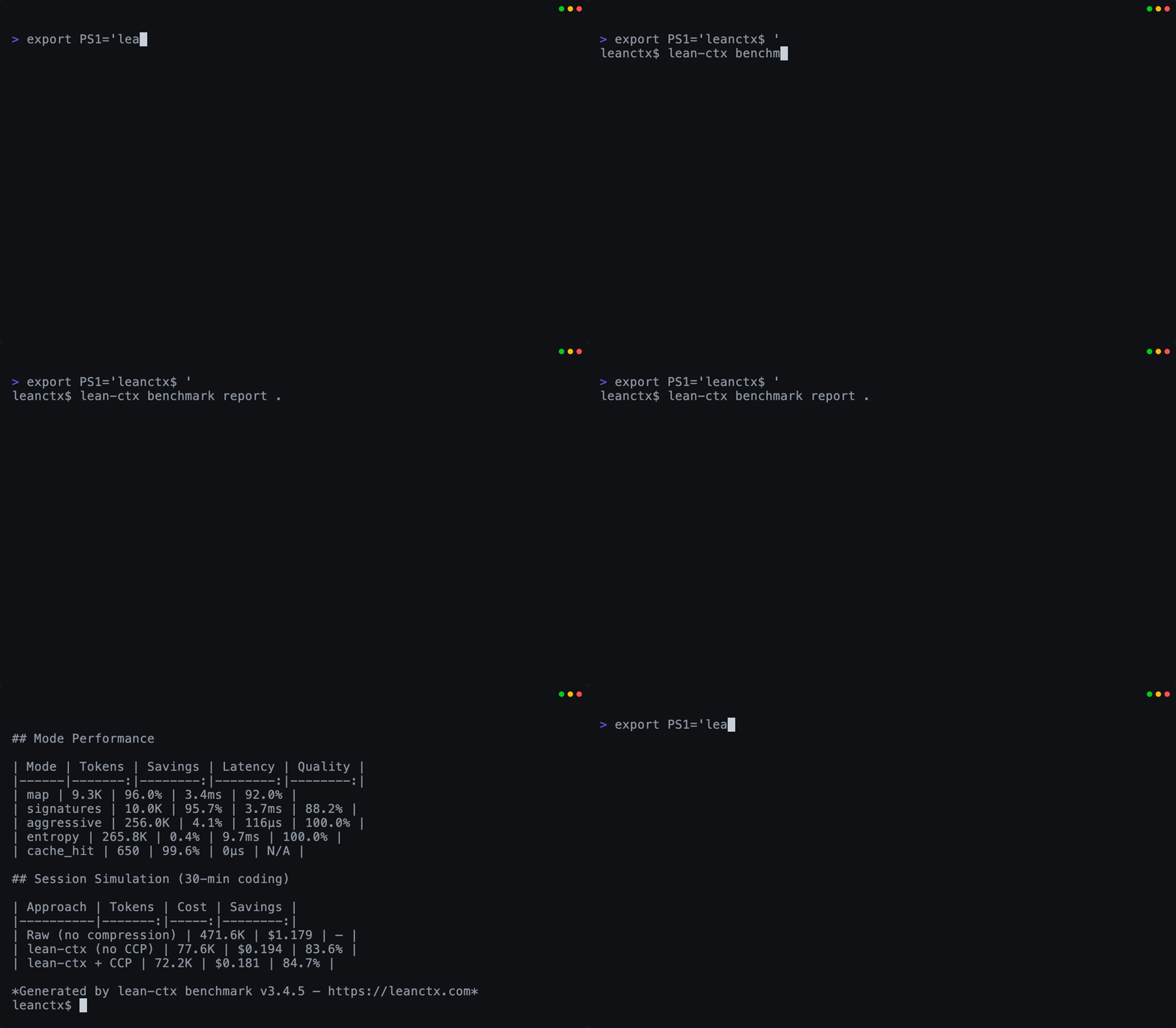
<br/>
<strong>Benchmark proof</strong>
<br/>
Measure compression by language + mode
</td>
</tr>
</table>
<p align="center"><sub>All GIFs are generated from reproducible VHS tapes in <code>demo/</code>.</sub></p>
What it does
- File reads (MCP): cached + mode-aware reads (full, map, signatures, diff, …) with graph-aware related files hints
- Shell output (hook): compresses noisy CLI output via 95+ patterns (git, npm, cargo, docker, …)
- Graph-Powered Intelligence: multi-edge Property Graph (imports, calls, exports, type_ref) with weighted impact analysis, hybrid search (BM25 + embeddings + graph proximity via RRF), and incremental git-diff updates
- PR Context Packs: lean-ctx pack --pr builds a PR-ready context pack (changed files, related tests, impact, artifacts)
- Context Packages: lean-ctx pack create bundles Knowledge + Graph + Session + Gotchas into portable .lctxpkg files — share context across projects/teams with SHA-256 integrity, auto-load on session start, and smart merge (dedup facts, overlay graph)
- Session memory (CCP): persist task/facts/decisions across chats with structured recovery queries surviving compaction
- HTTP mode: lean-ctx serve for Streamable HTTP MCP + /v1/tools/call (used by the Cookbook + SDK)
How it works (30 seconds)
AI tool → (MCP tools + shell commands) → lean-ctx → your repo + CLI
- MCP server: exposes ctx_* tools (read modes, caching, deltas, search, memory, multi-agent)
- Shell hook: transparently compresses common commands so the LLM sees less noise
- Property Graph: multi-edge code graph powers impact analysis, related file discovery, and search ranking
- CCP: persists session state with structured recovery queries so long-running work doesn’t “cold start” every chat
Get started (60 seconds)
# 1) Install (pick one)
curl -fsSL https://leanctx.com/install.sh | sh      # universal (no Rust needed)
brew tap yvgude/lean-ctx && brew install lean-ctx    # macOS / Linux
npm install -g lean-ctx-bin                          # Node.js
cargo install lean-ctx                               # Rust
pi install npm:pi-lean-ctx                           # Pi Coding Agent
2) Setup (shell + auto-detected AI tools)
lean-ctx setup
3) Verify
lean-ctx doctor
4) See the payoff
lean-ctx gain --live
lean-ctx wrapped --week
After setup, restart your shell and your editor/AI tool once so the MCP + hooks are active.
<details>
<summary><strong>Troubleshooting / Safety</strong></summary>
- Disable immediately (current shell): lean-ctx-off
- Run a single command uncompressed: lean-ctx -c --raw "git status"
- Only activate in AI agent sessions: set shell_activation = "agents-only" in ~/.config/lean-ctx/config.toml
- Docker projects sharing /workspace: create .lean-ctx-id with a unique name to prevent context collisions
- Update: lean-ctx update
- Diagnose (shareable): lean-ctx doctor --json
</details>
Supported IDEs & AI tools
lean-ctx is a standard MCP server, so it works with any MCP-compatible client. Three integration modes are auto-selected per agent:
| Mode | How it works | Best for |
|---|---|---|
| CLI-Redirect | Agent calls lean-ctx directly via shell — zero MCP schema overhead | Agents with shell access |
| Hybrid | MCP for cached reads (13 tokens), CLI for shell + search | Mixed environments |
| Full MCP | All 63+ tools via MCP protocol | Protocol-only agents |
Agent compatibility matrix
| Agent | CLI | Hybrid | MCP | Setup |
|---|:---:|:---:|:---:|---|
| Cursor | ● | | | lean-ctx init --agent cursor |
| Codex CLI | ● | | | lean-ctx init --agent codex |
| Gemini CLI | ● | | | lean-ctx init --agent gemini |
| Claude Code | | ● | | lean-ctx init --agent claude |
| CRUSH | | ● | | lean-ctx init --agent crush |
| Hermes | | ● | | lean-ctx init --agent hermes |
| OpenCode | | ● | | lean-ctx init --agent opencode |
| Pi | | ● | | lean-ctx init --agent pi |
| Qoder | | ● | | lean-ctx init --agent qoder |
| Windsurf | | ● | | lean-ctx init --agent windsurf |
| GitHub Copilot | | ● | | lean-ctx init --agent copilot |
| Amp | | ● | | lean-ctx init --agent amp |
| Cline | | ● | | lean-ctx init --agent cline |
| Roo Code | | ● | | lean-ctx init --agent roo |
| Kiro | | ● | | lean-ctx init --agent kiro |
| Antigravity | | ● | | lean-ctx init --agent antigravity |
| Amazon Q | | ● | | lean-ctx init --agent amazonq |
| Qwen | | ● | | lean-ctx init --agent qwen |
| Trae | | ● | | lean-ctx init --agent trae |
| Verdent | | ● | | lean-ctx init --agent verdent |
| Aider | | ● | | lean-ctx init --agent aider |
| Continue | | ● | | lean-ctx init --agent continue |
| JetBrains IDEs | | | ● | lean-ctx init --agent jetbrains |
| QoderWork | | | ● | lean-ctx init --agent qoderwork |
| VS Code | | | ● | lean-ctx init --agent vscode |
| Zed | | | ● | lean-ctx init --agent zed |
| Neovim | | | ● | lean-ctx init --agent neovim |
| Emacs | | | ● | lean-ctx init --agent emacs |
| Sublime Text | | | ● | lean-ctx init --agent sublime |
> Any MCP-compatible client works out of the box — the table above shows agents with first-class auto-setup.
When to use (and when not to)
Great fit if you…
- use AI coding tools daily and your sessions are shell-heavy (git/tests/builds)
- work in medium/large repos (50+ files / monorepos)
- want a local-first layer with no telemetry by default
Skip it if you…
- mostly work in tiny repos and rarely call the shell from your AI tool
- always need raw/unfiltered logs (you can still use --raw, but ROI is lower)
<a id="demo"></a>
Demo
Try these in any repo:
lean-ctx read rust/src/server/mod.rs -m map
lean-ctx -c "git log -n 5 --oneline"
lean-ctx gain --live
lean-ctx benchmark report .
- The repo ships the exact tapes used to render the GIFs in demo/
- Regenerate locally:
vhs demo/leanctx.tape
vhs demo/gain.tape
vhs demo/benchmark.tape
<a id="benchmarks"></a>
Benchmarks
- Latest snapshot: BENCHMARKS.md
- Reproduce:
lean-ctx benchmark report .
Docs
- Getting started: https://leanctx.com/docs/getting-started
- Tools reference: https://leanctx.com/docs/tools/
- CLI reference: https://leanctx.com/docs/cli-reference/
- FAQ: discord-faq.md
- Feature catalog (SSOT snapshot): LEANCTX_FEATURE_CATALOG.md
- Architecture: ARCHITECTURE.md
- Vision: VISION.md
Privacy & security
- No telemetry by default
- Optional anonymous stats sharing (opt-in during setup)
- Disableable update check (config update_check_disabled = true or LEAN_CTX_NO_UPDATE_CHECK=1)
- 40+ security hardening fixes in v3.5.16 (path traversal, injection, CSPRNG, CSP, resource limits — details)
- Runs locally; your code never leaves your machine unless you explicitly enable cloud sync
See SECURITY.md.
Uninstall
lean-ctx-off       # disable immediately (current shell session)
lean-ctx uninstall # remove hooks + editor configs + data dir
Remove the binary (pick your install method)
brew uninstall lean-ctx
npm uninstall -g lean-ctx-bin
cargo uninstall lean-ctx
pi uninstall npm:pi-lean-ctx                        # Pi Coding Agent
Contributing
Start with CONTRIBUTING.md. Easy first PR: propose a new CLI compression pattern via the issue template.
License
Apache License 2.0 — see LICENSE.
Portions of this software were originally released under the MIT License. See LICENSE-MIT and NOTICE.
Sign in to leave a review
Use Google, GitHub, or an email account so ratings stay tied to real people.
No reviews posted yet.





