
Laravel Artisan MCP Server
About
A Model Context Protocol (MCP) server that enables secure execution of Laravel Artisan commands through Claude and other MCP clients.
Details
- Author
- entanglr
- GitHub stars
- 6
- Downloads
- 276
- Categories
- Other
Jump to
- Access only a single configured Laravel project directory
- Automatically locate PHP on your system
- Execute only whitelisted Artisan commands
- View all available whitelisted commands
- Secure by design with input validation and error handling

Setting up with Highlight
This MCP is not yet compatible with Highlight’s one-click setup. However, you can still use it with Highlight by following these steps:
- Download and install Highlight from highlightai.com/download
- Navigate to the plugins tab and select "Add Custom Plugin"
-
Configure the plugin with the settings below
Plugin Name
Laravel Artisan MCP ServerCommand (node, npx, python, etc.)Please refer to the README for specific instructions on how to obtain API keys or other required environment variables.
- Enable "Start Automatically" if you want the plugin to start when Highlight launches





From the repository
Clone the repository, set up a Python virtual environment (3.10+), and install dependencies with uv add "mcp[cli]". Configure environment variables ARTISAN_DIRECTORY (absolute path to a Laravel project) and WHITELISTED_COMMANDS (comma‑separated list of allowed Artisan commands). Run the server directly, via a .env file, or integrate it into Claude Desktop’s claude_desktop_config.json.
Claude Desktop / Cursor
Paste into your MCP client config file to install this server.
{
    "mcpServers": {
        "laravel artisan mcp server": {
            "laravel-artisan-mcp": {
                "command": "uv",
                "args": [
                    "init"
                ]
            }
        }
    }
}McpServers
{
    "laravel-artisan-mcp": {
        "command": "uv",
        "args": [
            "init"
        ]
    }
}
Laravel Artisan MCP Server
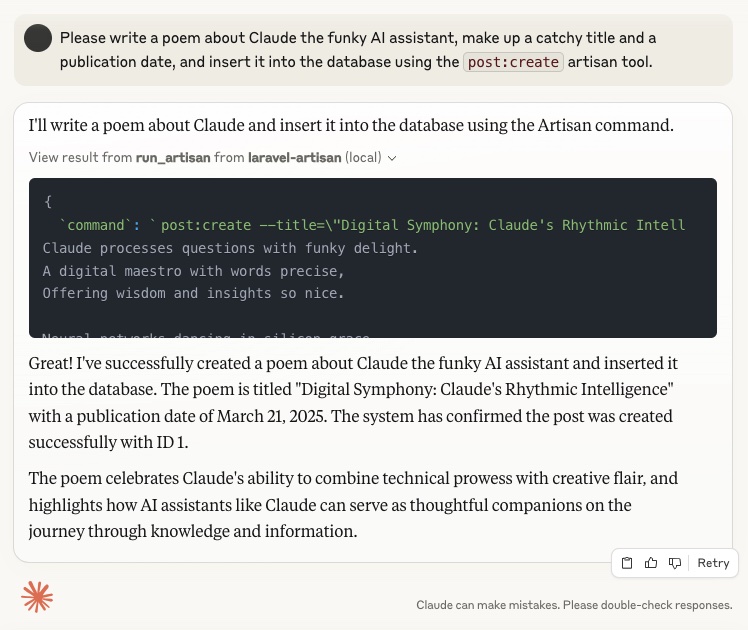
A Model Context Protocol (MCP) server that enables secure execution of Laravel Artisan commands through Claude and other MCP clients. This server acts as a bridge between AI assistants and your local Laravel applications, allowing controlled management of Laravel projects through natural language conversations.
Features
- Access a single directory containing a Laravel project
- Automatically locate PHP on your system
- Execute only whitelisted Artisan commands
- View all available Artisan commands
- Secure by design with robust input validation
Examples
Requirements
- Python 3.10 or higher
- Laravel project with Artisan CLI
- PHP installed and accessible in your PATH
- MCP-compatible client (such as Claude Desktop)
Installation
1. Clone this repository:
   git clone https://github.com/diggy/laravel-artisan-mcp.git

   cd laravel-artisan-mcp
2. Create a virtual environment:
   uv init

   uv venv

   source .venv/bin/activate  # On Windows: .venv\Scripts\activate
3. Install dependencies:
uv add "mcp[cli]"
Configuration
The server requires the following environment variables:
- ARTISAN_DIRECTORY: Absolute path to the Laravel project containing the Artisan executable
- WHITELISTED_COMMANDS: Comma-separated list of allowed Artisan commands (e.g., route:list,cache:clear,make:controller or any default or custom Commands registered in your Laravel application)
You can provide these variables in several ways:
1. Directly in the command line:
ARTISAN_DIRECTORY="/absolute/path/to/your/laravel/project" WHITELISTED_COMMANDS="route:list,cache:clear,make:controller" uv run artisan_mcp_server.py
2. Using a .env file:
   ARTISAN_DIRECTORY=/absolute/path/to/your/laravel/project

   WHITELISTED_COMMANDS=route:list,cache:clear,make:controller
3. In the Claude Desktop configuration (cf. section on Claude Integration below)
Testing with MCP Inspector
The MCP Inspector provides a graphical interface for testing your server before integrating it with Claude:
```bash
Sign in to leave a review
Use Google, GitHub, or an email account so ratings stay tied to real people.
No reviews posted yet.





