
langchain-box-mcp-adapter
About
This sample implements the Langchain MCP adapter to the Box MCP server.
Details
- Author
- box-community
- GitHub stars
- 1
- Downloads
- 331
- Categories
- AI
Jump to
- Langchain integration using ChatOpenAI model.
- Connects to Box MCP server via stdio transport.
- Dynamically loads tools from the MCP server.
- Creates a React-style agent for user prompts.
- Provides rich console output with markdown and typewriter effects.

Setting up with Highlight
This MCP is not yet compatible with Highlight’s one-click setup. However, you can still use it with Highlight by following these steps:
- Download and install Highlight from highlightai.com/download
- Navigate to the plugins tab and select "Add Custom Plugin"
-
Configure the plugin with the settings below
Plugin Name
langchain-box-mcp-adapterCommand (node, npx, python, etc.)Please refer to the README for specific instructions on how to obtain API keys or other required environment variables.
- Enable "Start Automatically" if you want the plugin to start when Highlight launches





From the repository
Clone the repository, install dependencies with uv sync, create a .env file with the required credentials (LangSmith, OpenAI, Box), and ensure the Box MCP server is accessible. Update the StdioServerParameters path in src/simple_client.py or src/graph.py with the correct path to your MCP server. Run the simple client with uv run src/simple_client.py or the graph-based agent via langgraph dev.
Claude Desktop / Cursor
Paste into your MCP client config file to install this server.
{
    "mcpServers": {
        "langchain-box-mcp-adapter": {
            "langchain-box-mcp-adapter": {
                "command": "uv",
                "args": [
                    "run",
                    "src/simple_client.py"
                ]
            }
        }
    }
}McpServers
{
    "langchain-box-mcp-adapter": {
        "command": "uv",
        "args": [
            "run",
            "src/simple_client.py"
        ]
    }
}
langchain-box-mcp-adapter
This sample project implements the Langchain MCP adapter to the Box MCP server. It demonstrates how to integrate Langchain with a Box MCP server using tools and agents.
Features
- Langchain Integration: Utilizes Langchain's ChatOpenAI model for AI interactions.
- MCP Server Communication: Connects to the Box MCP server using stdio transport.
- Tool Loading: Dynamically loads tools from the MCP server.
- Agent Creation: Creates a React-style agent for handling user prompts and tool interactions.
- Rich Console Output: Provides a user-friendly console interface with markdown rendering and typewriter effects.
Requirements
- Python 3.13 or higher
- Dependencies listed in pyproject.toml:
- langchain-mcp-adapters>=0.0.8
- langchain-openai>=0.3.12
- langgraph>=0.3.29
- rich>=14.0.0
Setup
1. Clone the repository:
   git clone <repository-url>
   cd langchain-box-mcp-adapter
2. Install dependencies:
uv sync
3. Create a .env file in the root of the project and fill in the information.
LANGSMITH_TRACING = "true"
LANGSMITH_API_KEY =
OPENAI_API_KEY =
BOX_CLIENT_ID = ""
BOX_CLIENT_SECRET = ""
BOX_SUBJECT_TYPE = "user"
BOX_SUBJECT_ID = ""
3. Ensure the MCP server is set up and accessible at the specified path in the project.
4. Update the StdioServerParameters in src/simple_client.py or src/graph.py with the correct path to your MCP server script.
server_params = StdioServerParameters(
command="uv",
args=[
"--directory",
"/your/absolute/path/to/the/mcp/server/mcp-server-box",
"run",
"src/mcp_server_box.py",
],
)
Usage

Running the Simple Client

To run the simple client:
uv run src/simple_client.py
This will start a console-based application where you can interact with the AI agent. Enter prompts, and the agent will respond using tools and AI capabilities.
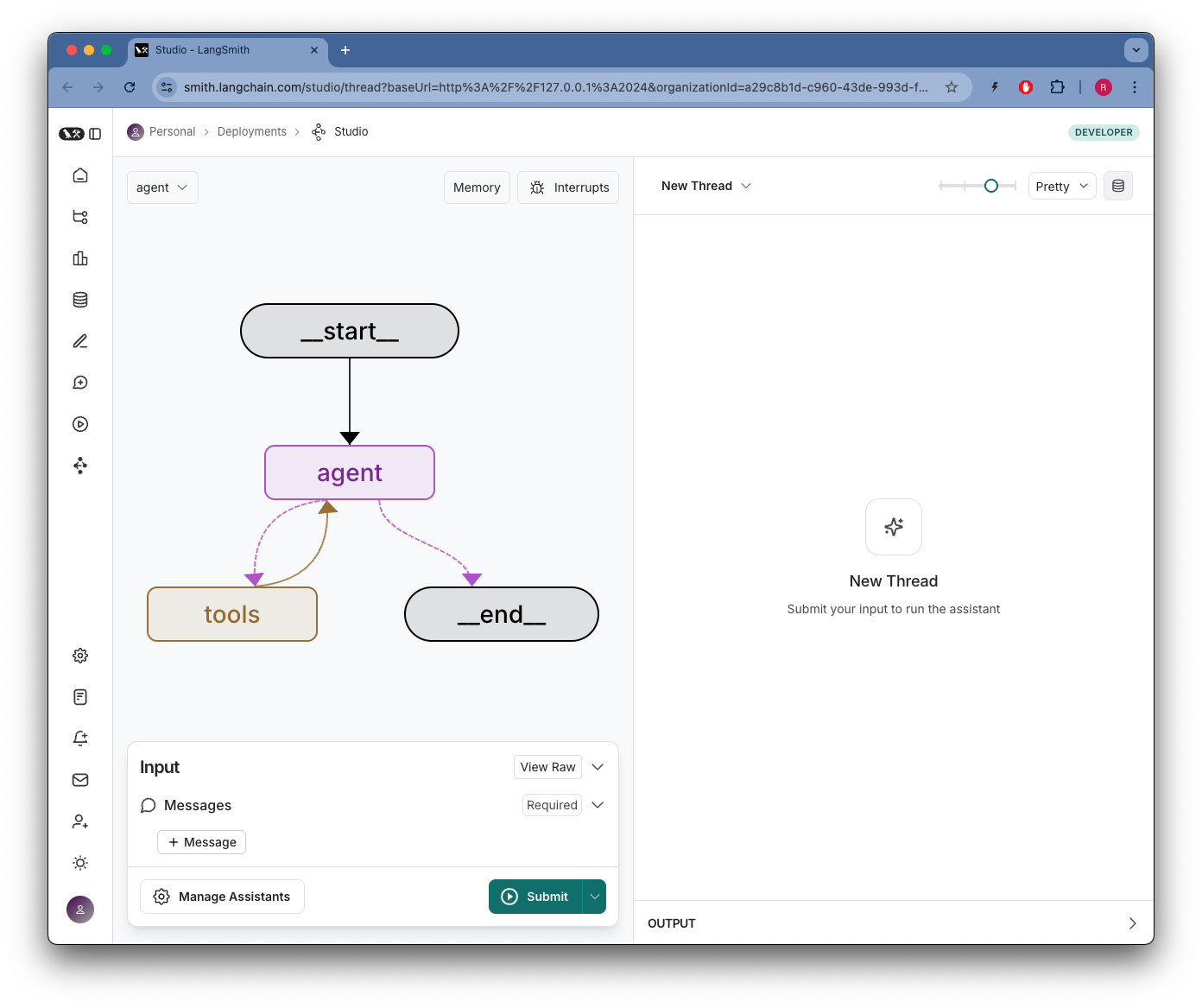
Running the Graph-Based Agent (LangGraph)
The graph-based agent can be used by invoking the make_graph function in src/graph.py. This is useful for more complex workflows.
Project Structure
- src/simple_client.py: Main entry point for the simple client. - src/graph.py: Contains the graph-based agent setup. - src/console_utils/console_app.py: Utility functions for console interactions. - src/langgraph.json: Configuration for the LangGraph integration.License
This project is licensed under the MIT License. See the LICENSE file for details.Contributing
Contributions are welcome! Please open an issue or submit a pull request for any improvements or bug fixes.Sign in to leave a review
Use Google, GitHub, or an email account so ratings stay tied to real people.
No reviews posted yet.



