
Muppet Kit
About
Muppet Kit is a collection of tools for testing and debugging MCP (Model Context Protocol) servers. It is designed for developers who build or maintain MCP servers and need a graphical interface to inspect, test, and secure their implementations.
Details
- Author
- muppet-dev
- GitHub stars
- 59
- Downloads
- 321
- Categories
- Other
Jump to
- Explorer: Browse MCP server capabilities with AI assistance.
- Playground: Test the MCP server with different LLMs and configurations.
- MCP Scan: Scan the MCP server for vulnerabilities and security issues.
- Tracing: Trace requests and responses between client and server (supports tunneling).
- History: View a session history of all requests and responses.

Setting up with Highlight
This MCP is not yet compatible with Highlight’s one-click setup. However, you can still use it with Highlight by following these steps:
- Download and install Highlight from highlightai.com/download
- Navigate to the plugins tab and select "Add Custom Plugin"
-
Configure the plugin with the settings below
Plugin Name
Muppet KitCommand (node, npx, python, etc.)Please refer to the README for specific instructions on how to obtain API keys or other required environment variables.
- Enable "Start Automatically" if you want the plugin to start when Highlight launches





From the repository
Run npx muppet-kit inspector in your terminal to launch the Inspector tool. You can optionally configure it by creating a muppet.config.js or muppet.config.ts file in your project root.
Claude Desktop / Cursor
Paste into your MCP client config file to install this server.
{
    "mcpServers": {
        "muppet kit": {
            "kit": {
                "command": "npx",
                "args": [
                    "muppet-kit",
                    "inspector"
                ]
            }
        }
    }
}McpServers
{
    "kit": {
        "command": "npx",
        "args": [
            "muppet-kit",
            "inspector"
        ]
    }
}
Muppet Kit
It is a collection of tools for testing and debugging MCPs.
Inspector
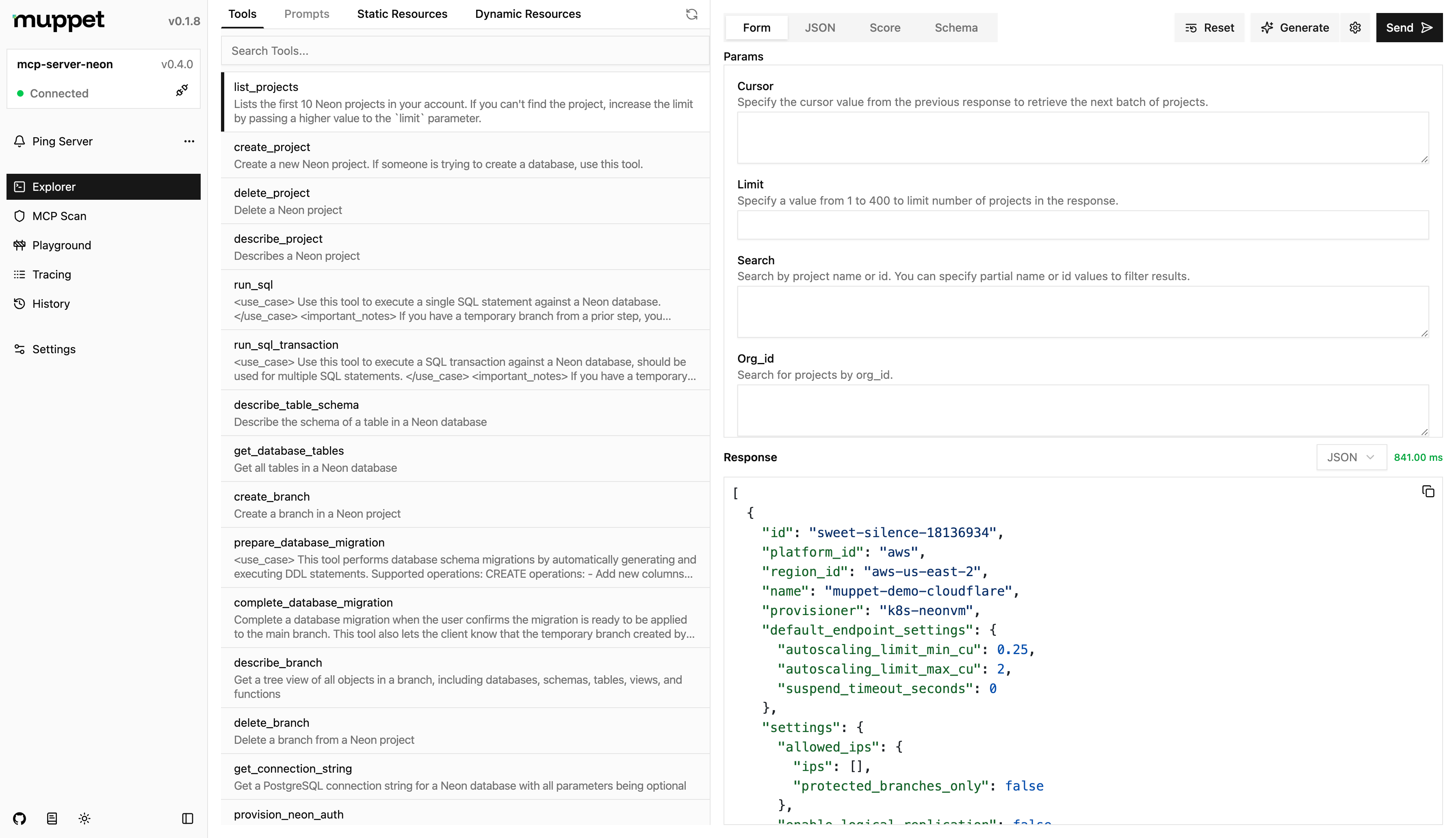
It is a devtool for testing and debugging MCPs servers.
Usage
npx muppet-kit inspector
Features
- Explorer - Explore the MCP server's capabilities, while leveraging AI to assist you.
- Playground - Test the MCP server with different LLMs and configurations.
- MCP Scan - Scan the MCP server for vulnerabilities and security issues.
- Tracing - Trace the requests and responses between the client and server. Tunneling is also supported for connecting to remote clients.
- History - View the history of requests and responses between the client and server for the current session.
Configuration
You can configure the inspector by creating a muppet.config.js/muppet.config.ts file in the root of your project. The configuration file should export an object with the following properties:
import { defineInspectorConfig } from "muppet-kit";
import { ngrok } from "muppet-kit/tunnel";
import { openai } from "@ai-sdk/openai";
export default defineInspectorConfig({

  // ...

  models: [openai("gpt-4.1-nano")],

  // You can either pass the API key here or have it in .env as NGROK_API_KEY

  tunneling: ngrok(),

});
Credits
The idea for this project was inspired by the official MCP Inspector and their amazing work.
Sign in to leave a review
Use Google, GitHub, or an email account so ratings stay tied to real people.
No reviews posted yet.





