

Kiln
About
Describe it or draw it — Kiln makes it real. The open-source MCP server for 3D printing: AI agents (Claude, Codex, Cursor, or any MCP client) design, generate, slice & print on Bambu Lab, Prusa, Creality, Klipper/Moonraker, OctoPrint, Elegoo & any Marlin printer.
Details
- Author
- codeofaxel
- GitHub stars
- 31
- Downloads
- 409
- Categories
- Other, AI
Jump to
- Pre-flight checks validate printer state, temperatures, and files before every print
- G-code validation blocks dangerous commands (firmware reset, unsafe temperatures)
- Temperature limits enforce safe maximums (300 °C hotend, 130 °C bed)
- Confirmation required for destructive operations (cancel, raw G-code)
- Optional authentication with scope-based API keys for multi-user setups

Setting up with Highlight
This MCP is not yet compatible with Highlight’s one-click setup. However, you can still use it with Highlight by following these steps:
- Download and install Highlight from highlightai.com/download
- Navigate to the plugins tab and select "Add Custom Plugin"
-
Configure the plugin with the settings below
Plugin Name
KilnCommand (node, npx, python, etc.)Please refer to the README for specific instructions on how to obtain API keys or other required environment variables.
- Enable "Start Automatically" if you want the plugin to start when Highlight launches





From the repository
The README includes setup instructions such as | kiln | CLI + MCP server for multi-printer control (OctoPrint, Moonraker, Creality, Bambu, Prusa Link, Elegoo, Direct USB) | kiln or .
Claude Desktop / Cursor
Paste into your MCP client config file to install this server.
{
    "mcpServers": {
        "kiln": {
            "kiln": {
                "command": "python3",
                "args": [
                    "-m",
                    "kiln",
                    "serve"
                ]
            }
        }
    }
}McpServers
{
    "kiln": {
        "command": "python3",
        "args": [
            "-m",
            "kiln",
            "serve"
        ]
    }
}
<!-- mcp-name: io.github.codeofaxel/kiln -->
<p align="center">

</p>
<p align="center">
<a href="https://pypi.org/project/kiln3d/">
<a href="https://pepy.tech/projects/kiln3d">
<a href="https://pypi.org/project/kiln3d/">
<a href="https://github.com/codeofaxel/Kiln/blob/main/LICENSE">
<a href="https://github.com/codeofaxel/Kiln/blob/main/policies/SIGNING.md">
<a href="https://glama.ai/mcp/servers/codeofaxel/kiln"></a>
</p>
---
The open-source MCP server for 3D printing.
Kiln lets AI agents (Claude Desktop, Claude Code, Codex, or any custom MCP client) drive real 3D printers end to end — Bambu Lab, Creality, Prusa, Elegoo, Voron, Sovol, AnkerMake, Artillery, FlashForge, QIDI, RatRig, and SparkX, over OctoPrint, Moonraker/Klipper, PrusaLink, and Direct USB.
In a single conversation, an agent can design a part, slice it, queue it on the right printer, monitor the camera, recover from failures, and ship the result. No human in the middle.
pip install kiln3d
<p align="center">
</p>
<p align="center">

</p>
<p align="center">
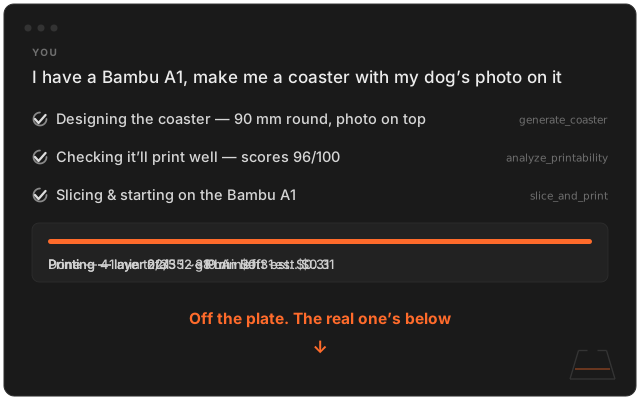
<em>"a coaster with a photo of my dog Ash" — start to finish, from one sentence.</em><br>
<a href="https://kiln3d.com#demo">Watch the demo →</a>
</p>
<p align="center">
<sub>Kiln's built in the open. If it made your printing more fun, or just saved you a headache, a ⭐ on the repo helps the next maker find it.</sub>
</p>
Quick Start
Three steps. Then ask your AI to make something.
1. Install
pip install kiln3d
2. Connect your AI — Kiln sets itself up inside Claude Desktop, Claude Code, and Codex:
kiln signin        # create your free account
kiln install-mcp   # connects Kiln to your AI apps
Restart your AI app and it can run your printer. (Claude Code and Codex can even run this whole setup for you — the one-prompt version lives at kiln3d.com/install.) Using a different MCP client? kiln install-mcp --print prints the config — or paste it yourself:
<details>
<summary><strong>Manual MCP config (any client, no sign-in needed)</strong></summary>
{
  "mcpServers": {
    "kiln": {
      "command": "python3",
      "args": ["-m", "kiln", "serve"]
    }
  }
}
Drop this into Claude Desktop, Claude Code, Codex, Cursor, or any MCP-capable agent. Runs on the free tier until you sign in.
</details>
3. Ask — paste a sentence like this into your agent. Kiln does the rest:
> I have a Bambu A1, make me a coaster with my dog's photo on it
That's the whole happy path. Your AI does the designing, slicing, and printing — you never touch a CLI. OS-specific walkthrough (Windows, WSL 2, Linux) at kiln3d.com/install.
> [!TIP]
> kiln doctor checks your whole setup and tells you exactly what to fix. kiln self-update upgrades in place when a new release lands.
<details>
<summary><strong>Prefer to drive it yourself? (CLI tour)</strong></summary>
# Discover printers on your network (mDNS + HTTP probe)
kiln discover
Add your printer (see the printer table under "Supported Printers")
kiln auth --name my-printer --host http://octopi.local --type octoprint --api-key YOUR_KEY
Other types:
kiln auth --name prusa  --host http://192.168.1.100      --type prusalink --api-key YOUR_KEY
kiln auth --name klipper --host http://192.168.1.100:7125 --type moonraker
kiln auth --name bambu  --host 192.168.1.100             --type bambu --access-code LAN_CODE --serial SERIAL
kiln status                       # Printer state + job progress

kiln upload model.gcode           # Upload a file

kiln print model.gcode            # Start printing

kiln slice model.stl --print-after  # Slice an STL and print in one step

kiln print *.gcode --queue        # Batch print

kiln wait                         # Monitor a running print

kiln snapshot --save photo.jpg    # Webcam snapshot

kiln history --status completed   # Print history
Every command supports --json for agent consumption
kiln status --json
Global option: --printer <name> targets a specific printer per command. The full command reference is in Project Docs.
</details>
<details>
<summary><strong>Connect a specific agent (Claude Code, Claude Desktop, env vars)</strong></summary>
Claude Code — add to .claude/settings.json (project) or ~/.claude/settings.json (global):
{
  "mcpServers": {
    "kiln": { "command": "kiln", "args": ["serve"] }
  }
}
Claude Code uses your ~/.kiln/config.yaml for printer credentials (set via kiln setup or kiln auth). No env vars needed if a printer is already configured.
Claude Desktop — add to ~/.config/Claude/claude_desktop_config.json:
{
  "mcpServers": {
    "kiln": {
      "command": "python3",
      "args": ["-m", "kiln", "serve"],
      "env": {
        "KILN_PRINTER_HOST": "http://192.168.1.100",
        "KILN_PRINTER_API_KEY": "your_key",
        "KILN_PRINTER_TYPE": "prusalink"
      }
    }
  }
}
Set KILN_PRINTER_TYPE to your backend: octoprint, moonraker, bambu, prusalink, elegoo, or serial — or skip env vars entirely if you've run kiln setup.
Any other LLM (OpenRouter) — Kiln works with any model that supports OpenAI-compatible function calling, not just Claude:
export KILN_OPENROUTER_KEY=sk-or-...
kiln agent --model openai/gpt-4o
kiln agent --model meta-llama/llama-3.1-70b-instruct --tier essential
Tool tiers auto-match model capability: essential (16 tools) for smaller models, standard (61 tools) for mid-range, full (133 tools) for stronger models. All <!-- KILN_MCP_TOOL_COUNT:OLD --> 840 tools are available over MCP via kiln serve.
</details>
<details>
<summary><strong>Platform & printer setup notes (Linux/WSL 2, Ethernet-only, Bambu)</strong></summary>
Prerequisites by printer type
| Printer | --type | What you need |
|---------|----------|---------------|
| Prusa MK4/XL/Mini+ | prusalink | IP + API key (Settings › Network › PrusaLink on the LCD) |
| OctoPrint (any printer) | octoprint | OctoPrint URL + API key (Settings › API) |
| Klipper/Moonraker | moonraker | Moonraker URL (usually http://<ip>:7125) |
| Creality K1/K2/Hi/Ender V4/V3 KE | creality | IP + printer_model (e.g. creality_k1_max); probes local Moonraker ports |
| Bambu Lab | bambu | IP + LAN access code + serial number (all on the LCD) |
| Elegoo (SDCP) | elegoo | IP only — no auth. Neptune 4 / OrangeStorm Giga use moonraker. |
| Direct USB (Marlin) | serial | USB cable only — no network. Ender 3, Prusa MK3, CR-10, any Marlin/RepRap printer. |
Kiln only needs IP reachability on your LAN. Ethernet-only printers are fully supported.
…
Sign in to leave a review
Use Google, GitHub, or an email account so ratings stay tied to real people.
No reviews posted yet.





