
Biomart
About
Integrates with Biomart to enable advanced biological data queries, including gene information retrieval, ID translation, and dataset exploration using the pybiomart package.
Details
- Author
- jzinno
- Repository
- jzinno/biomart-mcp
- GitHub stars
- 4
- Downloads
- 120
- License
- MIT License
- Categories
- Database, Other, Design, Developer Tools, AI, Infrastructure, Knowledge Base, Frontend
- Tags
- #integration
Jump to
Biomart-MCP provides several tools to interact with Biomart databases:
- Mart and Dataset Discovery: List available marts and datasets to explore the Biomart database structure
- Attribute and Filter Exploration: View common or all available attributes and filters for specific datasets
- Data Retrieval: Query Biomart with specific attributes and filters to get biological data
- ID Translation: Convert between different biological identifiers (e.g., gene symbols to Ensembl IDs)

Setting up with Highlight
This MCP is not yet compatible with Highlight’s one-click setup. However, you can still use it with Highlight by following these steps:
- Download and install Highlight from highlightai.com/download
- Navigate to the plugins tab and select "Add Custom Plugin"
-
Configure the plugin with the settings below
Plugin Name
BiomartCommand (node, npx, python, etc.)uvArguments-
Argument 1
run -
Argument 2
--with -
Argument 3
mcp[cli] -
Argument 4
--with -
Argument 5
pybiomart -
Argument 6
mcp -
Argument 7
run -
Argument 8
/your/path/to/biomart-mcp.py
Please refer to the README for specific instructions on how to obtain API keys or other required environment variables.
-
Argument 1
- Enable "Start Automatically" if you want the plugin to start when Highlight launches





From the repository
To install Biomart MCP for Claude Desktop automatically via Smithery:
npx -y @smithery/cli install @jzinno/biomart-mcp --client claude
uv venv
Claude Desktop / Cursor
Paste into your MCP client config file to install this server.
{
    "mcpServers": {
        "biomart": {
            "env": {},
            "args": [
                "run",
                "--with",
                "mcp[cli]",
                "--with",
                "pybiomart",
                "mcp",
                "run",
                "/your/path/to/biomart-mcp.py"
            ],
            "shell": false,
            "command": "uv"
        }
    }
}Linux
{
    "env": [],
    "args": [
        "run",
        "--with",
        "mcp[cli]",
        "--with",
        "pybiomart",
        "mcp",
        "run",
        "/your/path/to/biomart-mcp.py"
    ],
    "shell": false,
    "command": "uv"
}
Macos
{
    "env": [],
    "args": [
        "run",
        "--with",
        "mcp[cli]",
        "--with",
        "pybiomart",
        "mcp",
        "run",
        "/your/path/to/biomart-mcp.py"
    ],
    "shell": false,
    "command": "uv"
}
Windows
{
    "env": [],
    "args": [
        "run",
        "--with",
        "mcp[cli]",
        "--with",
        "pybiomart",
        "mcp",
        "run",
        "/your/path/to/biomart-mcp.py"
    ],
    "shell": false,
    "command": "uv"
}
Biomart MCP

A MCP server to interface with Biomart
Model Context Protocol (MCP) is an open protocol that standardizes how applications provide context to LLMs developed by Anthropic. Here we use the MCP python-sdk to create a MCP server that interfaces with Biomart via the pybiomart package.
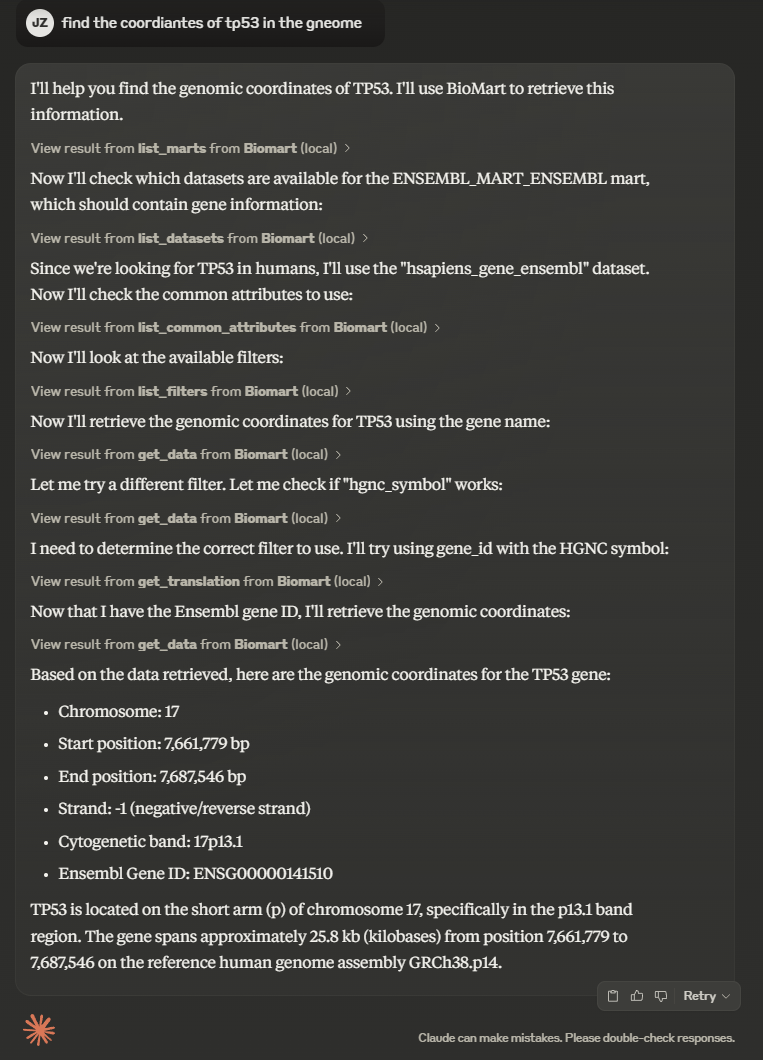
There is a short demo video showing the MCP server in action on Claude Desktop.
Installation
Installing via Smithery
To install Biomart MCP for Claude Desktop automatically via Smithery:
npx -y @smithery/cli install @jzinno/biomart-mcp --client claude
Clone the repository
git clone https://github.com/jzinno/biomart-mcp.git
cd biomart-mcp
Claude Desktop
uv run --with mcp[cli] mcp install --with pybiomart biomart-mcp.py
Cursor
Via Cusror's agent mode, other models can take advantage of MCP servers as well, such as those form OpenAI or DeepSeek. Click the cursor setting cogwheel and naviagate to MCP and either add the MCP server to the global config or add it to the a project scope by adding .cursor/mcp.json to the project.
Example .cursor/mcp.json:
{
    "mcpServers": {
        "Biomart": {
            "command": "uv",
            "args": [
                "run",
                "--with",
                "mcp[cli]",
                "--with",
                "pybiomart",
                "mcp",
                "run",
                "/your/path/to/biomart-mcp.py"
            ]
        }
    }
}
Glama
<a href="https://glama.ai/mcp/servers/v5a3mlxviu">
</a>
Development
```bash
Sign in to leave a review
Use Google, GitHub, or an email account so ratings stay tied to real people.
No reviews posted yet.





