
Xero Accounting
About
Integrates with Xero Accounting Software to access financial data including accounts, transactions, contacts, invoices, and more through authenticated API connections for financial analysis and bookkeeping tasks.
Details
- Author
- john-zhang-dev
- Repository
- john-zhang-dev/xero-mcp
- GitHub stars
- 12
- Downloads
- 1,549
- License
- MIT License
- Categories
- Productivity, Design, Developer Tools, API, Infrastructure, Security, Project Management
Jump to

Setting up with Highlight
This MCP is not yet compatible with Highlight’s one-click setup. However, you can still use it with Highlight by following these steps:
- Download and install Highlight from highlightai.com/download
- Navigate to the plugins tab and select "Add Custom Plugin"
-
Configure the plugin with the settings below
Plugin Name
Xero AccountingCommand (node, npx, python, etc.)npxArguments-
Argument 1
-y -
Argument 2
xero-mcp@latest
Environment-
XERO_CLIENT_ID
YOUR_CLIENT_ID -
XERO_REDIRECT_URI
http://localhost:5000/callback -
XERO_CLIENT_SECRET
YOUR_CLIENT_SECRET
Please refer to the README for specific instructions on how to obtain API keys or other required environment variables.
-
Argument 1
- Enable "Start Automatically" if you want the plugin to start when Highlight launches





From the repository
Claude Desktop
Go to Settings -> Developers -> Local MCP Servers -> Edit Config and add the following to claude_desktop_config.json:
{
"mcpServers": {
"xero-mcp": {
"command": "npx",
"args": ["-y", "xero-mcp@latest"],
"env": {
"XERO_CLIENT_ID": "YOUR_CLIENT_ID",
"XERO_CLIENT_SECRET": "YOUR_CLIENT_SECRET",
"XERO_REDIRECT_URI": "http://localhost:5000/callback"
}
}
}
}
Restart Claude Desktop, or reload via Developer -> Reload MCP Configuration.
authenticate
Authenticate with Xero using OAuth2
create_bank_transactions
Creates one or more spent or received money transaction
create_contacts
Creates one or multiple contacts in a Xero organisation
get_balance_sheet
Retrieves report for balancesheet
get_bank_transaction
Retrieves a single spent or received money transaction by its Xero bank transaction ID
get_invoice
Retrieves a single sales invoice or purchase bill by its Xero invoice ID
list_accounts
Retrieves the full chart of accounts
list_bank_transactions
Retrieves any spent or received money transactions
list_contacts
Retrieves all contacts in a Xero organisation
list_invoices
Retrieves sales invoices or purchase bills
list_organisations
Retrieves Xero organisation details
list_payments
Retrieves payments for invoices and credit notes
list_quotes
Retrieves sales quotes
update_bank_transaction
Updates an existing spent or received money transaction (e.g. line items, contact, bank account) by bank transaction ID
update_invoice
Updates an existing sales invoice or purchase bill (typically a draft), including line items and account codes
- authenticate
Authenticate with Xero using OAuth2
- create_bank_transactions
Creates one or more spent or received money transaction
- create_contacts
Creates one or multiple contacts in a Xero organisation
- get_balance_sheet
Retrieves report for balancesheet
- get_bank_transaction
Retrieves a single spent or received money transaction by its Xero bank transaction ID
- get_invoice
Retrieves a single sales invoice or purchase bill by its Xero invoice ID
- list_accounts
Retrieves the full chart of accounts
- list_bank_transactions
Retrieves any spent or received money transactions
- list_contacts
Retrieves all contacts in a Xero organisation
- list_invoices
Retrieves sales invoices or purchase bills
- list_organisations
Retrieves Xero organisation details
- list_payments
Retrieves payments for invoices and credit notes
- list_quotes
Retrieves sales quotes
- update_bank_transaction
Updates an existing spent or received money transaction (e.g. line items, contact, bank account) by bank transaction ID
- update_invoice
Updates an existing sales invoice or purchase bill (typically a draft), including line items and account codes
Claude Desktop / Cursor
Paste into your MCP client config file to install this server.
{
    "mcpServers": {
        "xero accounting": {
            "env": {
                "XERO_CLIENT_ID": "YOUR_CLIENT_ID",
                "XERO_REDIRECT_URI": "http://localhost:5000/callback",
                "XERO_CLIENT_SECRET": "YOUR_CLIENT_SECRET"
            },
            "args": [
                "-y",
                "xero-mcp@latest"
            ],
            "command": "npx"
        }
    }
}Linux
{
"env": {
"XERO_CLIENT_ID": "YOUR_CLIENT_ID",
"XERO_REDIRECT_URI": "http://localhost:5000/callback",
"XERO_CLIENT_SECRET": "YOUR_CLIENT_SECRET"
},
"args": [
"-y",
"xero-mcp@latest"
],
"command": "npx"
}Macos
{
"env": {
"XERO_CLIENT_ID": "YOUR_CLIENT_ID",
"XERO_REDIRECT_URI": "http://localhost:5000/callback",
"XERO_CLIENT_SECRET": "YOUR_CLIENT_SECRET"
},
"args": [
"-y",
"xero-mcp@latest"
],
"command": "npx"
}Windows
{
"env": {
"XERO_CLIENT_ID": "YOUR_CLIENT_ID",
"XERO_REDIRECT_URI": "http://localhost:5000/callback",
"XERO_CLIENT_SECRET": "YOUR_CLIENT_SECRET"
},
"args": [
"/c",
"npx",
"-y",
"xero-mcp@latest"
],
"command": "cmd"
}Xero MCP Server
This MCP server allows Clients to interact with Xero Accounting Software.
Get Started
1. Make sure node is installed.
2. Create an OAuth 2.0 app in Xero to get a _CLIENT_ID_ and _CLIENT_SECRET_.
- Create a free Xero user account (if you don't have one)
- Login to Xero Developer center https://developer.xero.com/app/manage/
- Click New app
- Enter a name for your app
- Select Web app
- Provide a valid URL (can be anything valid eg. https://www.myapp.com)
- Enter redirect URI: http://localhost:5000/callback
> Note: The redirect URI can be customized, but it must use localhost and include both an explicit port and a path (e.g. http://localhost:5050/my-path). Set the same value as XERO_REDIRECT_URI in your MCP client config below.
- Tick to Accept the Terms & Conditions and click Create app
- On the left-hand side of the screen select Configuration
- Click Generate a secret
3. Configure your MCP client:
### Claude Desktop
Go to Settings -> Developers -> Local MCP Servers -> Edit Config and add the following to claude_desktop_config.json:
   {
     "mcpServers": {
       "xero-mcp": {
         "command": "npx",
         "args": ["-y", "xero-mcp@latest"],
         "env": {
           "XERO_CLIENT_ID": "YOUR_CLIENT_ID",
           "XERO_CLIENT_SECRET": "YOUR_CLIENT_SECRET",
           "XERO_REDIRECT_URI": "http://localhost:5000/callback"
         }
       }
     }
   }
Restart Claude Desktop, or reload via Developer -> Reload MCP Configuration.
### Claude Code
Run the following command to add the MCP server:
   claude mcp add xero-mcp \
     -e XERO_CLIENT_ID=YOUR_CLIENT_ID \
     -e XERO_CLIENT_SECRET=YOUR_CLIENT_SECRET \
     -e XERO_REDIRECT_URI=http://localhost:5000/callback \
     -- npx -y xero-mcp@latest
The server will be available in your next Claude Code session. To make it available across all projects, add --scope user to the command above.
4. When accessing a Xero tool for the first time, a Xero login page will pop up to ask your consent. Complete the auth flow and manually close the web page (as the Xero page will not auto close in this version)
Privacy alert: after completing the Xero OAuth2 flow, your Xero data may go through the LLM that you use. If you are doing testing you should authorize to your Xero Demo Company.
Tools
- authenticate
Authenticate with Xero using OAuth2
- create_bank_transactions
Creates one or more spent or received money transaction
- create_contacts
Creates one or multiple contacts in a Xero organisation
- get_balance_sheet
Retrieves report for balancesheet
- get_bank_transaction
Retrieves a single spent or received money transaction by its Xero bank transaction ID
- get_invoice
Retrieves a single sales invoice or purchase bill by its Xero invoice ID
- list_accounts
Retrieves the full chart of accounts
- list_bank_transactions
Retrieves any spent or received money transactions
- list_contacts
Retrieves all contacts in a Xero organisation
- list_invoices
Retrieves sales invoices or purchase bills
- list_organisations
Retrieves Xero organisation details
- list_payments
Retrieves payments for invoices and credit notes
- list_quotes
Retrieves sales quotes
- update_bank_transaction
Updates an existing spent or received money transaction (e.g. line items, contact, bank account) by bank transaction ID
- update_invoice
Updates an existing sales invoice or purchase bill (typically a draft), including line items and account codes
Examples
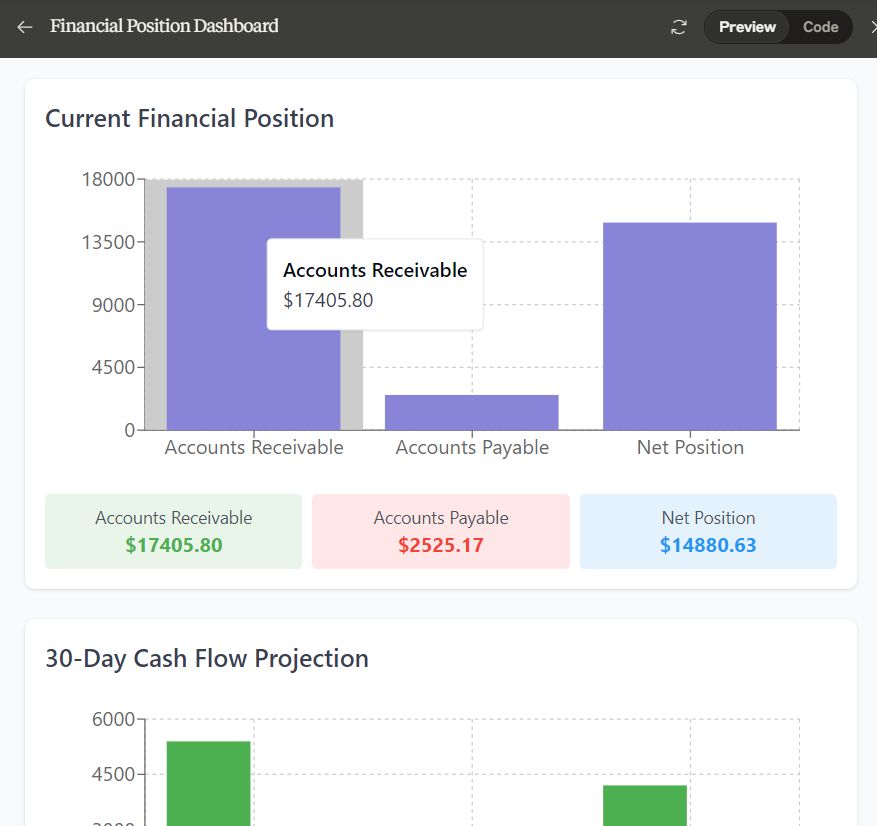
- "Visualize my financial position over the last month"
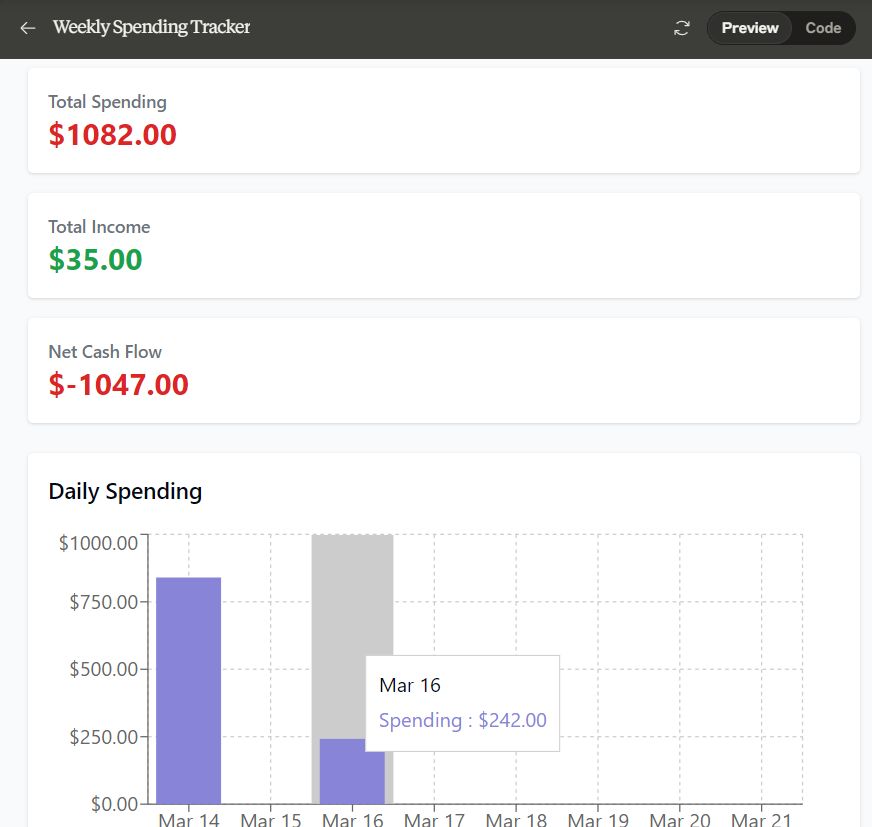
- "Track my spendings over last week"
- "Add all transactions from the monthly statement into my revenue account (account code 201) as receive money"
License
MIT
Sign in to leave a review
Use Google, GitHub, or an email account so ratings stay tied to real people.
No reviews posted yet.





