
Rhino 8
About
Enables direct control of Rhino 8's 3D modeling environment through a C# SDK-based server that exposes modeling operations for design workflow automation and conversational interfaces.
Details
- Author
- jingcheng-chen
- Repository
- jingcheng-chen/rhinomcp
- GitHub stars
- 34
- Downloads
- 852
- License
- MIT License
- Categories
- Productivity, Design, AI, Frontend, Infrastructure, Other
Jump to
- Natural-language control of Rhino geometry and Grasshopper graphs.
- Viewport capture gives the AI visual feedback of the model.
- Build and wire entire Grasshopper definitions in a single batched operation.
- Execute native Rhino commands, RhinoScript-Python, or RhinoCommon C#.
- Single plugin and config entry cover both Rhino and Grasshopper.
- Two-way interaction: create and read geometry, select and modify objects.

Setting up with Highlight
This MCP is not yet compatible with Highlight’s one-click setup. However, you can still use it with Highlight by following these steps:
- Download and install Highlight from highlightai.com/download
- Navigate to the plugins tab and select "Add Custom Plugin"
-
Configure the plugin with the settings below
Plugin Name
Rhino 8Command (node, npx, python, etc.)uvxArguments-
Argument 1
rhinomcp
Environment-
RHINO_MCP_HOST
127.0.0.1
Please refer to the README for specific instructions on how to obtain API keys or other required environment variables.
-
Argument 1
- Enable "Start Automatically" if you want the plugin to start when Highlight launches





From the repository
With the bridge running and your client connected, you'll see the RhinoMCP tools. From there, just
In Rhino, open Tools → Package Manager, search for rhinomcp, and click Install. Restart Rhino.
If you use an agentic assistant (Codex, Claude Code, Cursor, Cline, and the like), paste this prompt:
Please install https://github.com/jingcheng-chen/rhinomcp as a local MCP server named rhino.
Codex, in one command:
codex mcp add rhino --env RHINO_MCP_HOST=127.0.0.1 -- uvx rhinomcp
Claude Code, in one command:
claude mcp add rhino -- uvx rhinomcp
ChatGPT: use Codex for the local setup above. ChatGPT apps/MCP connectors currently connect
to remote MCP servers, not local stdio commands like uvx rhinomcp. If you want to build a
ChatGPT app around RhinoMCP, use ChatGPT developer mode with a remote or tunneled MCP endpoint.
You can also manually edit the config yourself:
{
"mcpServers": {
"rhino": {
"command": "uvx",
"args": ["rhinomcp"],
"env": {
"RHINO_MCP_HOST": "127.0.0.1"
}
}
}
}
> [!IMPORTANT]
> The launcher uvx comes from uv. If you don't have it yet:
> macOS brew install uv · Windows powershell -c "irm https://astral.sh/uv/install.ps1 | iex"
>
> Run only one RhinoMCP server at a time (Codex, Claude, Cursor, etc. — not several at once).
<details>
<summary>Auto-restart the server with your AI client (optional)</summary>
To clean up a stale rhinomcp process each time your client launches:
macOS / Linux
{
"mcpServers": {
"rhino": {
"command": "sh",
"args": ["-c", "killall rhinomcp 2>/dev/null; uvx rhinomcp"]
}
}
}
Windows
{
"mcpServers": {
"rhino": {
"command": "cmd",
"args": ["/c", "taskkill /F /IM rhinomcp.exe 2>nul & uvx rhinomcp"]
}
}
}
</details>
create_object
Create one or many objects in Rhino.
modify_object
Transform or edit one or many objects in Rhino.
delete_object
Delete an object in Rhino.
boolean_union
Perform a boolean union operation on objects in Rhino.
boolean_difference
Perform a boolean difference operation on objects in Rhino.
boolean_intersection
Perform a boolean intersection operation on objects in Rhino.
loft
Create a loft surface between curves in Rhino.
extrude_curve
Extrude a curve to create a surface in Rhino.
sweep1
Create a surface by sweeping a curve along a path in Rhino.
offset_curve
Create a curve offset from an existing curve in Rhino.
pipe
Create a pipe from a curve in Rhino.
project_curve
Project a curve onto a surface in Rhino.
intersect_curves
Find intersection points between curves in Rhino.
split_curve
Split a curve at specified parameters in Rhino.
analyze_objects
Measure length, area, volume, bounding boxes, and more for objects in Rhino.
select_objects
Select objects by filters such as name, color, or category in Rhino.
get_objects
Query objects in the document.
get_object_info
Retrieve information about a specific object in Rhino.
get_selected_objects_info
Get information about the currently selected objects in Rhino.
get_object_attributes
Read attributes of an object in Rhino.
update_object_attributes
Update attributes of an object in Rhino.
create_layer
Create a new layer in Rhino.
delete_layer
Delete a layer in Rhino.
get_or_set_current_layer
Get or set the current layer in Rhino.
get_document_summary
Get an overview of the current document in Rhino.
capture_viewport
Take a screenshot of the current viewport for visual feedback in Rhino.
run_command
Run any native Rhino command.
execute_rhinoscript_python_code
Execute RhinoScript-Python code in Rhino.
execute_rhinocommon_csharp_code
Execute RhinoCommon C# code in Rhino.
search_rhinoscript_functions
Search for RhinoScript functions.
get_rhinoscript_docs
Retrieve documentation for RhinoScript.
list_rhinoscript_modules
List available RhinoScript modules.
get_module_functions
Get functions available in a specified RhinoScript module.
get_commands
List available commands in Rhino.
undo
Undo the last action in Rhino.
redo
Redo the last undone action in Rhino.
gh_create_document
Create a new Grasshopper document.
gh_get_document_info
Retrieve information about a Grasshopper document.
gh_get_canvas_state
Get the current state of the Grasshopper canvas.
gh_search_components
Search for components in the Grasshopper component library.
gh_batch_search_components
Search for multiple components in the Grasshopper component library.
gh_list_component_categories
List categories of components in the Grasshopper component library.
gh_get_available_components
Get a list of available components installed in Grasshopper.
gh_get_component_type_info
Get information about a specific component type in Grasshopper.
gh_get_component_info
Retrieve information about a specific component instance in Grasshopper.
gh_list_components
List the components present on the Grasshopper canvas.
gh_add_component
Add a new component to the Grasshopper canvas.
gh_update_component
Update an existing component on the Grasshopper canvas.
gh_delete_component
Delete a component from the Grasshopper canvas.
gh_layout_components
Auto-layout the components on the Grasshopper canvas.
gh_clear_canvas
Clear all components from the Grasshopper canvas.
gh_connect_components
Connect parameters between components in Grasshopper.
gh_disconnect_components
Disconnect parameters between components in Grasshopper.
gh_set_parameter_value
Set the value of an input parameter in Grasshopper.
gh_get_parameter_value
Get the value of an output parameter from a component in Grasshopper.
gh_run_solution
Run the solution for the Grasshopper document.
gh_expire_solution
Expire the current solution in Grasshopper.
gh_build_graph
Build a complete Grasshopper graph in one batched operation.
gh_mutate_graph
Mutate an existing Grasshopper graph in one batched operation.
gh_get_graph
Inspect objects in Grasshopper by graph ID.
gh_clear_graph
Clear objects in Grasshopper by graph ID.
Claude Desktop / Cursor
Paste into your MCP client config file to install this server.
{
    "mcpServers": {
        "rhino 8": {
            "env": {
                "RHINO_MCP_HOST": "127.0.0.1"
            },
            "args": [
                "rhinomcp"
            ],
            "command": "uvx"
        }
    }
}Linux
{
"env": {
"RHINO_MCP_HOST": "127.0.0.1"
},
"args": [
"-c",
"killall rhinomcp 2>/dev/null; uvx rhinomcp"
],
"command": "sh"
}Macos
{
"env": {
"RHINO_MCP_HOST": "127.0.0.1"
},
"args": [
"rhinomcp"
],
"command": "uvx"
}Windows
{
"env": {
"RHINO_MCP_HOST": "127.0.0.1"
},
"args": [
"/c",
"taskkill /F /IM rhinomcp.exe 2>nul & uvx rhinomcp"
],
"command": "cmd"
}<div align="center">

RhinoMCP
Control Rhino 3D and Grasshopper with AI, in plain language.
RhinoMCP connects Rhino to AI agents through the Model Context Protocol,
so assistants like Claude and Cursor can model geometry, read your document, and build
Grasshopper definitions for you, just by chatting.




Quick start · What it can do · Usage · Examples · Tool reference
English · 简体中文
</div>
---
Highlights
- Describe what you want and the assistant builds it in Rhino.
- It reads your document and can capture the viewport, so it works from what is actually on screen.
- It scripts Grasshopper for you: finding components, wiring them, setting sliders, and solving.
- A single plugin and a single config entry cover both Rhino and Grasshopper.
- When you need more control, it can run native Rhino commands, RhinoScript-Python, or RhinoCommon C#.
> [!NOTE]
> RhinoMCP targets Rhino 8 on Windows and macOS.
Demos
<table>
<tr>
<td width="50%" align="center">
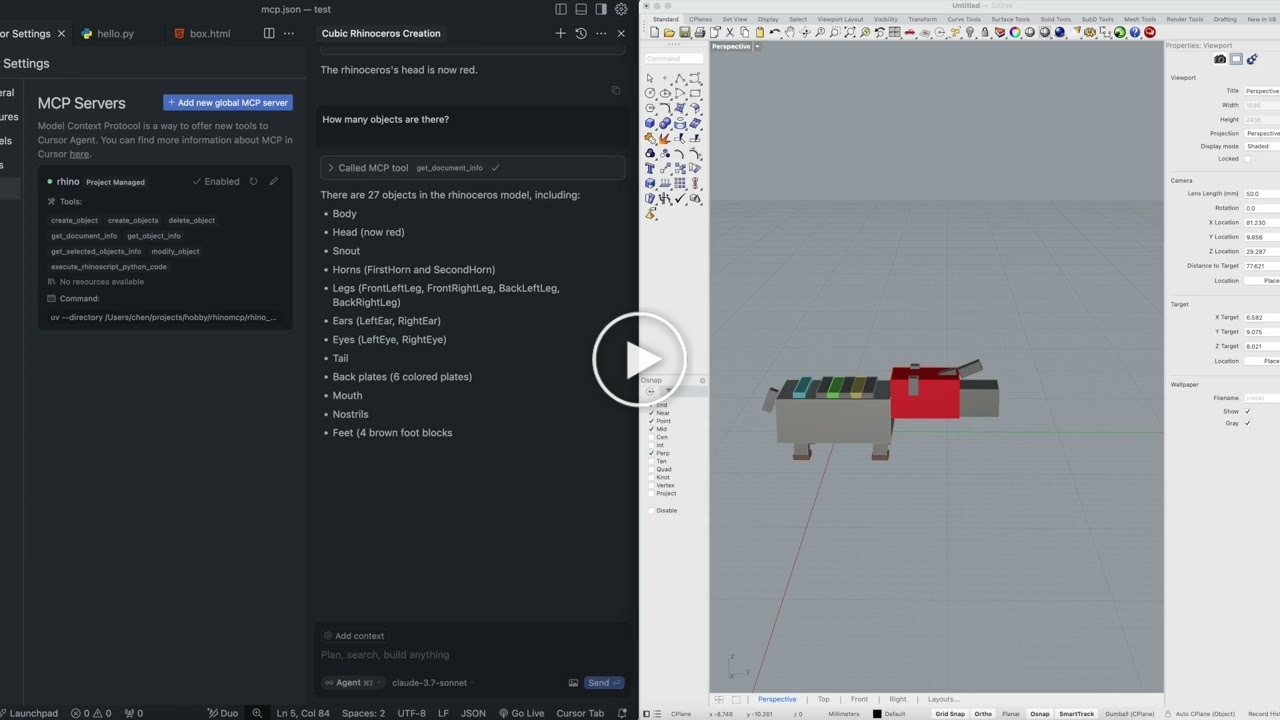
Two-way interaction: the AI both creates and reads geometry.
</td>
<td width="50%" align="center">
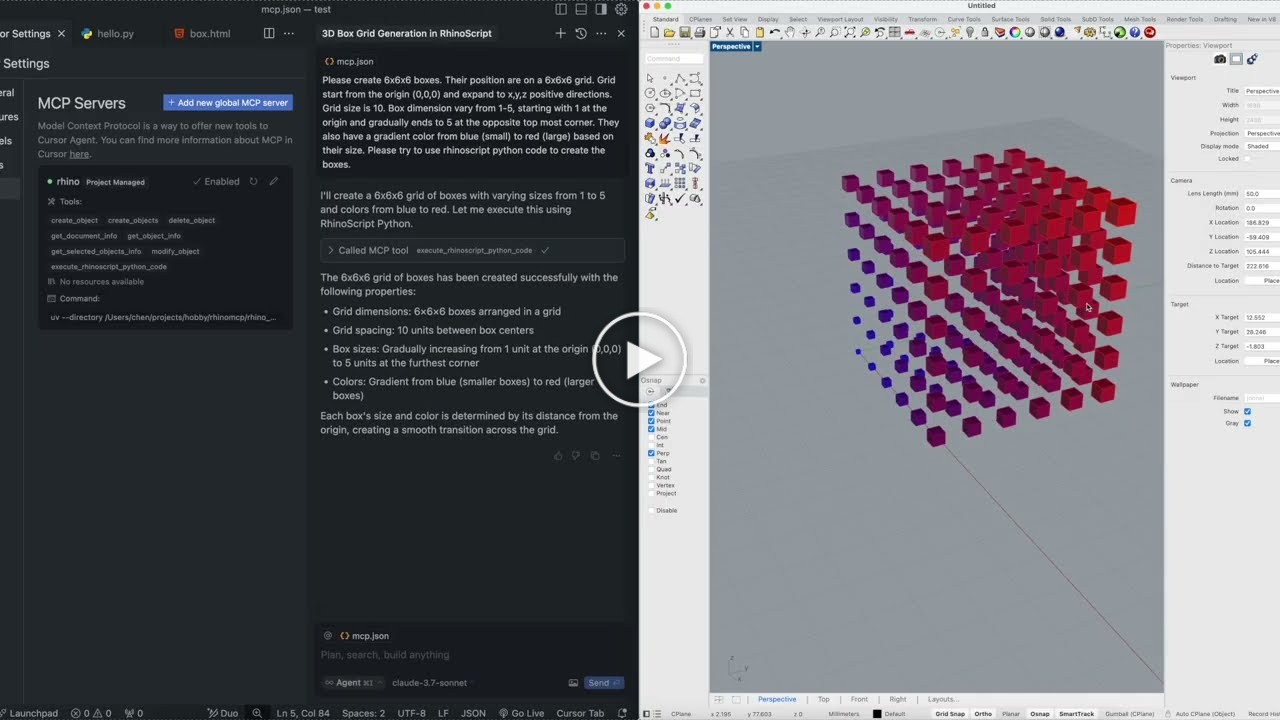
Custom scripts: the AI writes and runs scripts inside Rhino.
</td>
</tr>
</table>
Prefer a walkthrough? Nate made a showcase and install tutorial on YouTube.
What it can do
 Rhino
Rhino
| Area | What the AI can do |
| ------------------- | -------------------------------------------------------------------------------------------------------------------------------------- |
| Create geometry | Points, lines, polylines, circles, arcs, ellipses, curves, boxes, spheres, cones, cylinders, and surfaces, one at a time or in batches |
| Transform & edit | Move, rotate, scale, recolor, rename, and delete objects |
| Advanced modeling | Loft, extrude, sweep, offset, pipe; boolean union, difference, and intersection |
| Curve operations | Project, intersect, and split curves |
| Layers & attributes | Create, delete, and switch layers; read and write object attributes |
| Inspect & select | Document summaries, object info, and filtered selection (by name, color, or category, with AND / OR logic) |
| See the model | Capture the viewport so the AI gets visual feedback |
| Analyze | Measure length, area, volume, bounding boxes, and more |
| Go deeper | Run any Rhino command, execute RhinoScript-Python, or run RhinoCommon C#, with built-in RhinoScript docs lookup |
 Grasshopper
| Area | What the AI can do |
| ----------------- | ----------------------------------------------------------------------------------------------------- |
| Find components | Search the installed component library and inspect a component's inputs and outputs before placing it |
| Build canvases | Add, position, lay out, update, and delete components |
| Wire it up | Connect and disconnect parameters between components |
| Set & read values | Drive sliders, toggles, panels, and value lists; read structured data back out of outputs |
| Solve | Run the solution and surface runtime warnings and errors |
| Build in one shot | Construct and wire a whole graph, or mutate an existing one, in a single batched operation |
Quick start
Three steps: install the Rhino plugin, connect your AI client, then start the bridge in Rhino.
1. Install the Rhino plugin
In Rhino, open Tools → Package Manager, search for rhinomcp, and click Install. Restart Rhino.
2. Connect your AI client
Option A: ask your AI assistant to install it (recommended)
If you use an agentic assistant (Codex, Claude Code, Cursor, Cline, and the like), paste this prompt:
Please install https://github.com/jingcheng-chen/rhinomcp as a local MCP server named rhino.
Option B: Install the mcp server or manually edit the config yourself
Codex, in one command:
codex mcp add rhino --env RHINO_MCP_HOST=127.0.0.1 -- uvx rhinomcp
Claude Code, in one command:
claude mcp add rhino -- uvx rhinomcp
ChatGPT: use Codex for the local setup above. ChatGPT apps/MCP connectors currently connect
to remote MCP servers, not local stdio commands like uvx rhinomcp. If you want to build a
ChatGPT app around RhinoMCP, use ChatGPT developer mode with a remote or tunneled MCP endpoint.
You can also manually edit the config yourself:
{
  "mcpServers": {
    "rhino": {
      "command": "uvx",
      "args": ["rhinomcp"],
      "env": {
        "RHINO_MCP_HOST": "127.0.0.1"
      }
    }
  }
}
> [!IMPORTANT]
> The launcher uvx comes from uv. If you don't have it yet:
> macOS brew install uv · Windows powershell -c "irm https://astral.sh/uv/install.ps1 | iex"
>
> Run only one RhinoMCP server at a time (Codex, Claude, Cursor, etc. — not several at once).
<details>
<summary>Auto-restart the server with your AI client (optional)</summary>
To clean up a stale rhinomcp process each time your client launches:
macOS / Linux
{
  "mcpServers": {
    "rhino": {
      "command": "sh",
      "args": ["-c", "killall rhinomcp 2>/dev/null; uvx rhinomcp"]
    }
  }
}
Windows
{
  "mcpServers": {
    "rhino": {
      "command": "cmd",
      "args": ["/c", "taskkill /F /IM rhinomcp.exe 2>nul & uvx rhinomcp"]
    }
  }
}
</details>
3. Start the Rhino bridge
With Rhino open, type mcpstart in the command line. This starts the TCP bridge the server
connects to (mcpstop ends it). Run it once per Rhino session.
Usage
With the bridge running and your client connected, you'll see the RhinoMCP tools. From there, just
Sign in to leave a review
Use Google, GitHub, or an email account so ratings stay tied to real people.
No reviews posted yet.




