
API2MCPTools
About
Converts JSON API definitions into executable tools, enabling seamless integration of external APIs without modifying core server code.
Details
- Author
- jayli52
- Repository
- JayLi52/api2mcptools
- GitHub stars
- 4
- Downloads
- 588
- Categories
- AI, Design, Developer Tools, File Management, Infrastructure, Frontend
- Tags
- #integration
Jump to
- Convert JSON APIs to MCP tools
- Easy integration with MCP ecosystem
- Support for various API types
- Command-line interface (CLI) support

Setting up with Highlight
This MCP is not yet compatible with Highlight’s one-click setup. However, you can still use it with Highlight by following these steps:
- Download and install Highlight from highlightai.com/download
- Navigate to the plugins tab and select "Add Custom Plugin"
-
Configure the plugin with the settings below
Plugin Name
API2MCPToolsCommand (node, npx, python, etc.)npxArguments-
Argument 1
-y -
Argument 2
@highlight/mcp-server
Please refer to the README for specific instructions on how to obtain API keys or other required environment variables.
-
Argument 1
- Enable "Start Automatically" if you want the plugin to start when Highlight launches





From the repository
set CONFIG_JSON_PATH=example.json
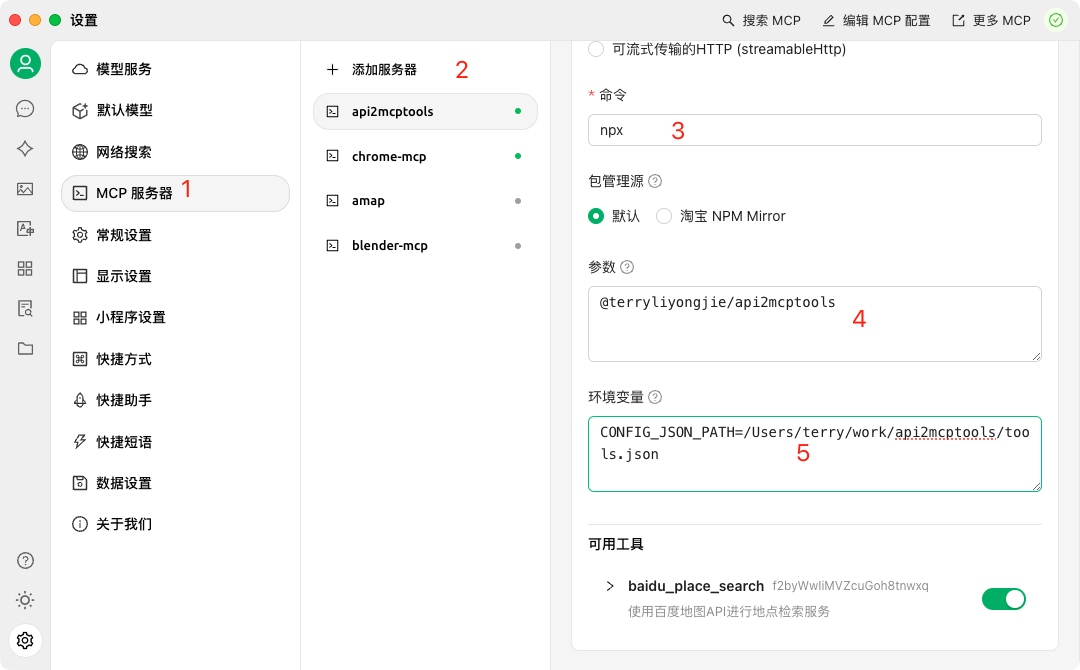
npx @terryliyongjie/api2mcptools
npm install @terryliyongjie/mcp-tools
npm install -g @terryliyongjie/mcp-tools
CONFIG_JSON_PATH=example.json
Example configuration file (example.json):
// Single tool configuration
{
"name": "tool_name",
"description": "Tool description",
"inputSchema": {
"type": "object",
"properties": {
"param1": {
"type": "string",
"description": "Parameter description"
}
},
"required": ["param1"]
},
"axiosConfig": {
"url": "https://api.example.com/endpoint",
"method": "get",
"params": {
"key": "your_api_key"
}
}
}
// Or multiple tools configuration
[
{
"name": "baidu_place_search",
"description": "使用百度地图API进行地点检索服务",
"inputSchema": {
"type": "object",
"properties": {
"query": {
"type": "string",
"description": "检索关键字"
},
"region": {
"type": "string",
"description": "检索行政区划区域"
}
},
"required": ["query", "region"]
},
"axiosConfig": {
"url": "https://api.map.baidu.com/place/v2/search",
"method": "get",
"params": {
"ak": "your_baidu_map_key"
}
}
},
// More tools...
]
npm install
Claude Desktop / Cursor
Paste into your MCP client config file to install this server.
{
    "mcpServers": {
        "api2mcptools": {
            "env": {},
            "args": [
                "-y",
                "@highlight/mcp-server"
            ],
            "command": "npx"
        }
    }
}Linux
{
"env": [],
"args": [
"-y",
"@highlight/mcp-server"
],
"command": "npx"
}Macos
{
"env": [],
"args": [
"-y",
"@highlight/mcp-server"
],
"command": "npx"
}Windows
{
"env": [],
"args": [
"/c",
"npx",
"-y",
"@highlight/mcp-server"
],
"command": "cmd"
}@terryliyongjie/api2mcptools

A Node.js package that converts APIs to MCP (Model Context Protocol) tools.
- CherryStudio Example CherryStudio
Installation
Option 1: Quick Start with npx (Recommended)
set CONFIG_JSON_PATH=example.json
npx @terryliyongjie/api2mcptools
Option 2: Traditional Installation
```bashSign in to leave a review
Use Google, GitHub, or an email account so ratings stay tied to real people.
No reviews posted yet.





