
Japanese Vocab Anki MCP Server
About
A Model Context Protocol server that enables Language Models to interact with Anki decks programmatically, with dedicated support for Japanese language learning. It allows listing, viewing, adding, and reviewing cards, importing Japanese vocabulary, and adding sample sentences.
Details
- Author
- vionwinnie
- Downloads
- 306
- Categories
- Other
Jump to
- List and view available Anki decks
- Add new cards to any deck
- Review cards with spaced repetition ease
- Import Japanese vocabulary from CSV
- Add sample sentences to vocabulary notes
- Track review history and learning progress

Setting up with Highlight
This MCP is not yet compatible with Highlight’s one-click setup. However, you can still use it with Highlight by following these steps:
- Download and install Highlight from highlightai.com/download
- Navigate to the plugins tab and select "Add Custom Plugin"
-
Configure the plugin with the settings below
Plugin Name
Japanese Vocab Anki MCP ServerCommand (node, npx, python, etc.)Please refer to the README for specific instructions on how to obtain API keys or other required environment variables.
- Enable "Start Automatically" if you want the plugin to start when Highlight launches





From the repository
Clone the repository, optionally set the ANKI_COLLECTION_PATH environment variable to your collection.anki2 file, and run python -m anki_mcp.server. Ensure Anki is not running to avoid database locks.
Claude Desktop / Cursor
Paste into your MCP client config file to install this server.
{
    "mcpServers": {
        "japanese vocab anki mcp server": {
            "jap-vocab-anki-mcp-server": {
                "command": "python",
                "args": [
                    "-m",
                    "anki_mcp.server"
                ]
            }
        }
    }
}McpServers
{
    "jap-vocab-anki-mcp-server": {
        "command": "python",
        "args": [
            "-m",
            "anki_mcp.server"
        ]
    }
}
Japanese Vocab Anki MCP Server
A Model Context Protocol server implementation for interacting with Anki decks programmatically. This server allows Language Models to interact with Anki through a standardized interface, with special support for Japanese language learning.
This is vibe-coded with Cursor with Claude 3.5 Sonnet.
Features
- List available decks
- View cards in decks
- Add new cards
- Review cards with spaced repetition
- Import Japanese vocabulary with readings and meanings
- Add sample sentences to Japanese vocabulary cards
- Track review history and learning progress
End-to-End Example: Japanese Vocabulary Study with Claude
Here's a complete workflow showing how to use Claude to enhance your Japanese vocabulary cards with sample sentences.
Step 1: Generate Fill-in-the-Blank Exercises
First, ask Claude to create practice exercises using the study_japanese_vocab_prompt:
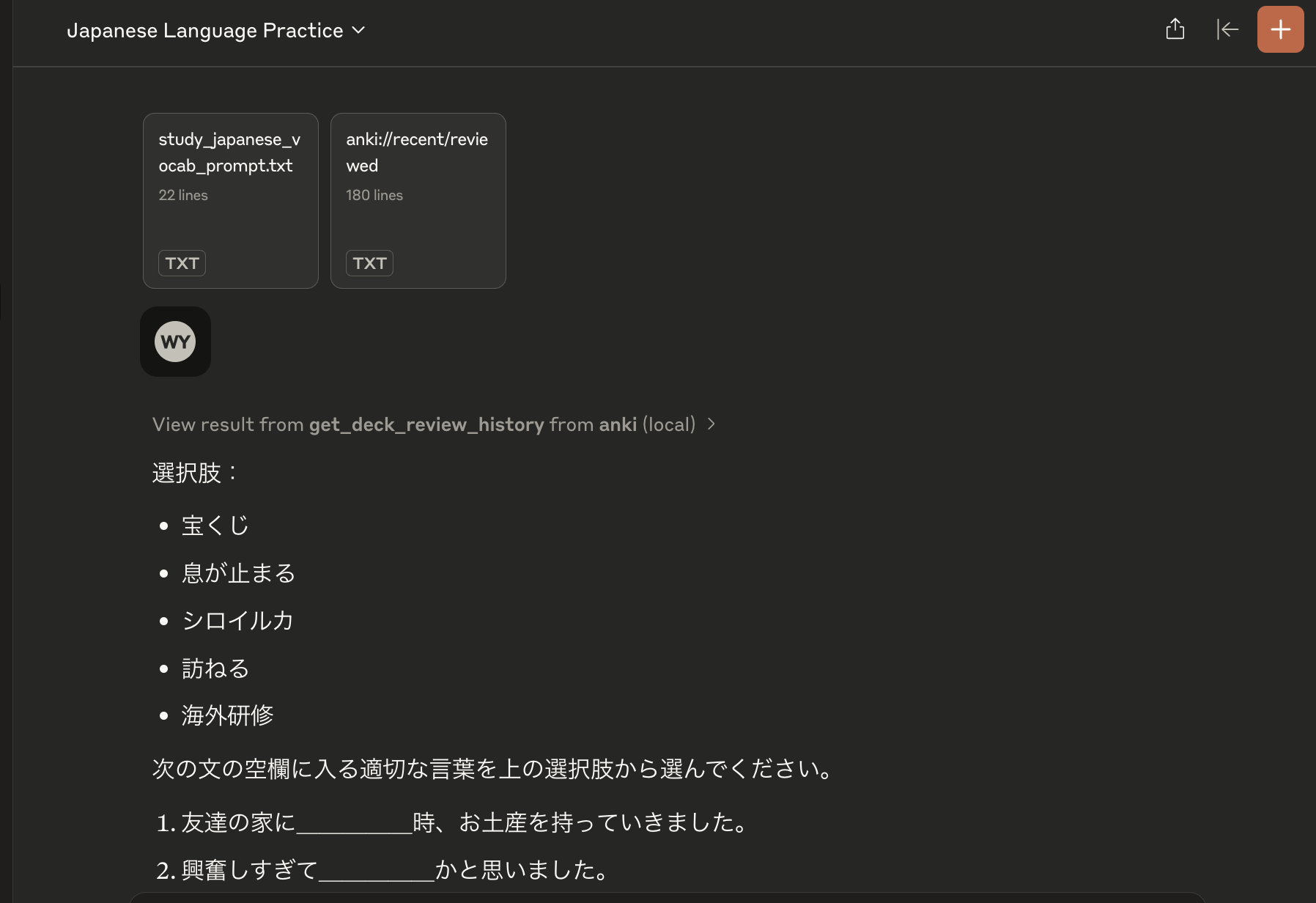
Claude will look through your recently reviewed vocabulary and create contextual sentences with blanks to test your understanding.
Step 2: Convert to Sample Sentences
Next, use the vocab_sentences_json_prompt to convert these sentences into a structured format:
Claude will transform the sentences into a JSON dictionary mapping each vocabulary word to its sample sentences.
Step 3: Update Anki Cards
Finally, use the update_notes_with_sentences tool to add these sentences to your Anki cards:
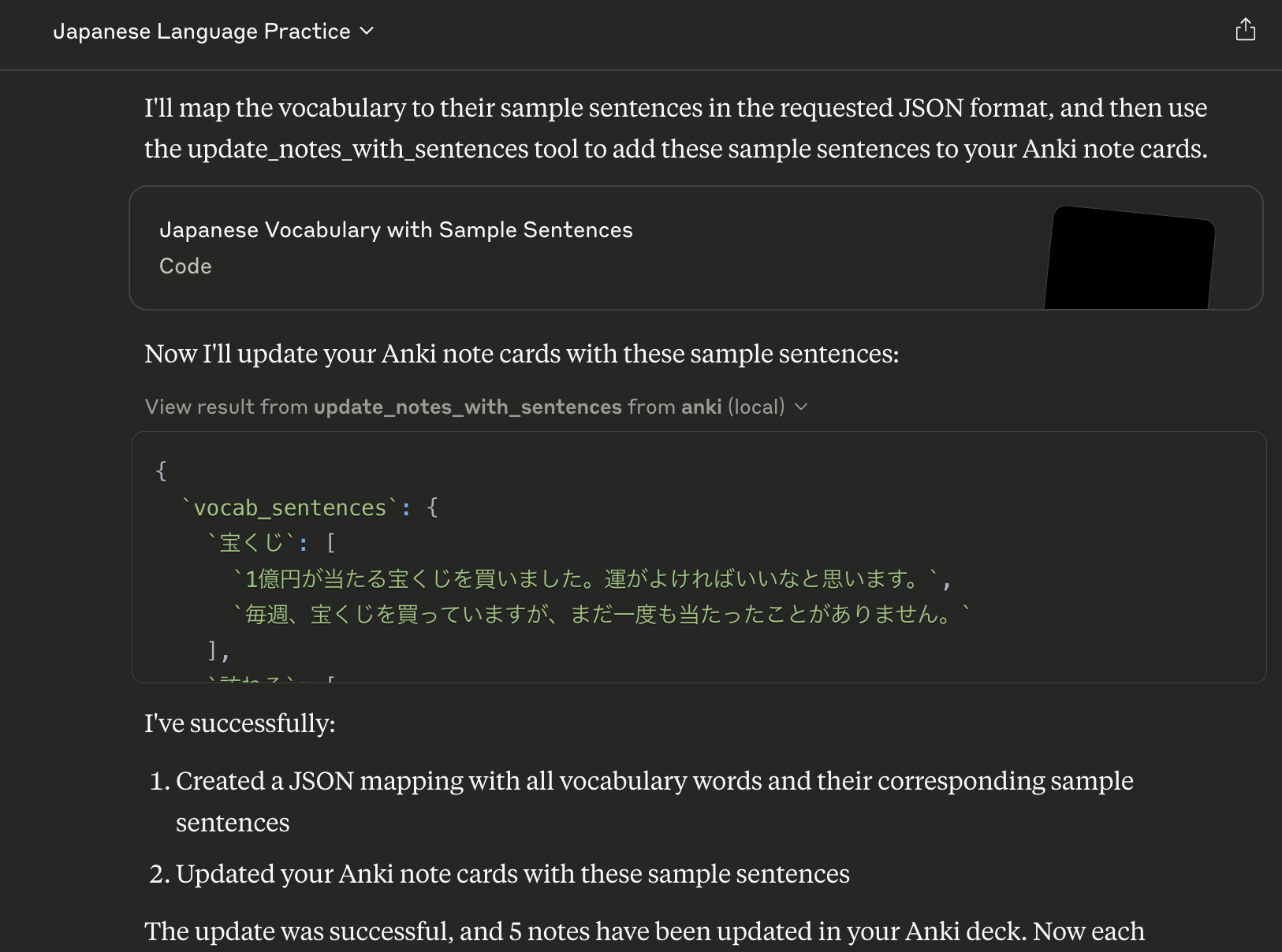
The sentences will be added to the reading field of each vocabulary card, providing more context for your studies.
Results in Anki
After the update, your cards will include the new sample sentences:
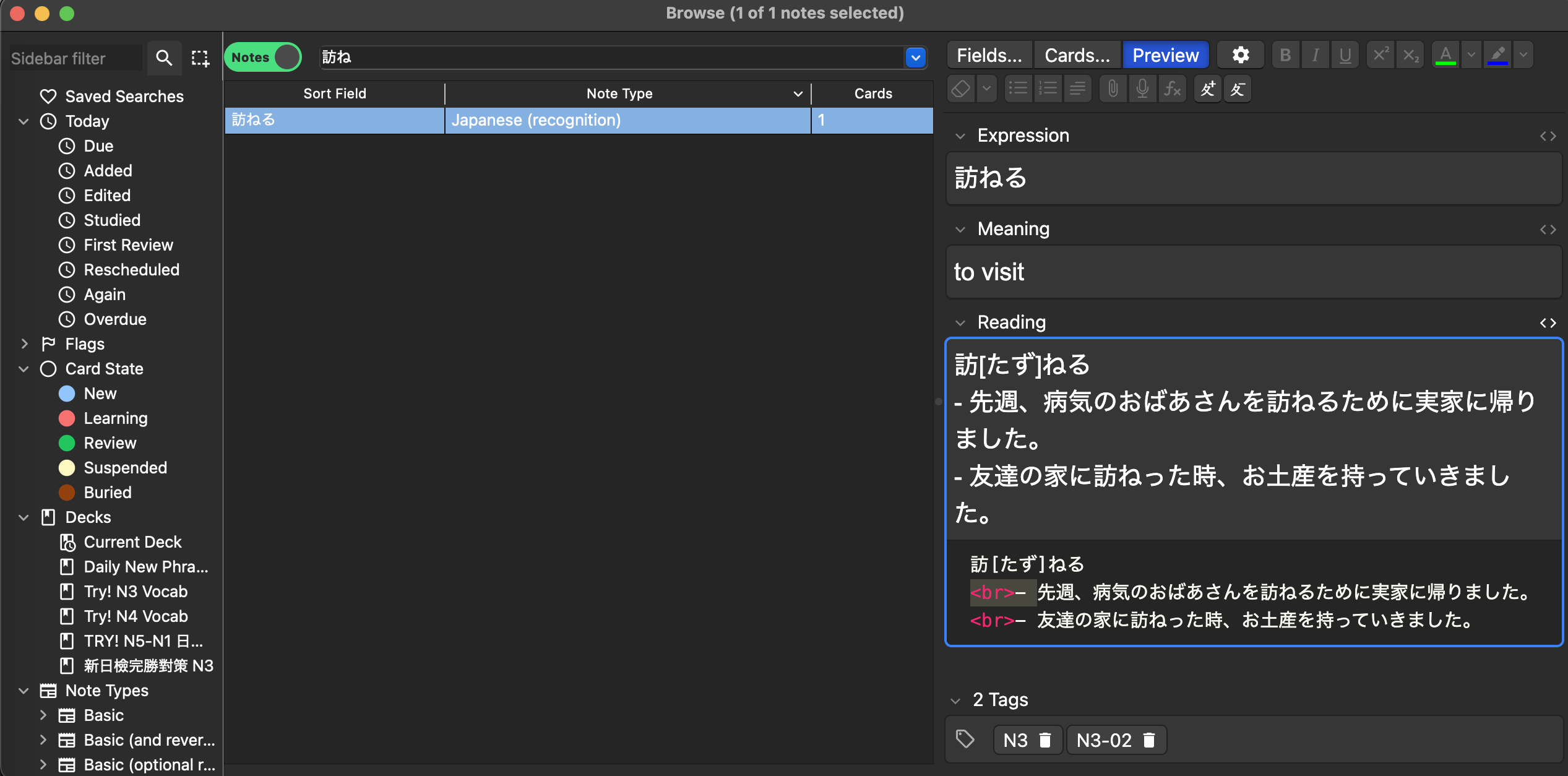
This workflow helps you:
1. Practice vocabulary in context through fill-in-the-blank exercises
2. Add natural example sentences to your cards
3. Build a more comprehensive understanding of each word's usage
Installation
1. Clone this repository:
git clone https://github.com/vionwinnie/jap-vocab-anki-mcp-server.git

cd jap-vocab-anki-mcp-server
Usage
1. Make sure Anki is not running (to avoid database locks)
2. Set the path to your Anki collection (optional):
export ANKI_COLLECTION_PATH="/path/to/your/collection.anki2"
3. Run the server:
python -m anki_mcp.server
Available Resources
- anki://decks - List all available Anki decks
- anki://deck/{deck_name}/cards - List all cards in a specific deck
- anki://recent/reviewed - View cards reviewed in the last 24 hours
- anki://recent/learned - View cards learned (graduated from new) in the last 24 hours
Available Tools
Basic Card Management
-add_card(deck_name: str, front: str, back: str) - Add a new card to a deck
- review_card(card_id: int, ease: int) - Review a card with a specific ease (1-4)
- get_card_history(card_id: int) - Get detailed review history for a specific card
Japanese Vocabulary Features
-import_japanese_vocab(csv_path: str, deck_name: str, tags: str = None) - Import Japanese vocabulary from CSV
- update_notes_with_sentences(vocab_sentences: Dict[str, List[str]], deck_name: str = "Try! N3 Vocab") - Add sample sentences to vocabulary notes
Review History
-get_deck_review_history(deck_name: str) - Get review history for all cards in a deck within the past 24 hours
Available Prompts
- create_deck_prompt(deck_name: str) - Get help creating a new deck
- review_history_prompt() - Get help analyzing review history
- study_japanese_vocab_prompt() - Get help with Japanese vocabulary study
- vocab_sentences_json_prompt() - Generate JSON dictionary mapping vocab to sample sentences
Japanese Note Type Requirements
The server expects a note type called "Japanese (recognition)" with the following fields:
1. Expression (Japanese word)
2. Meaning (English meaning)
3. Reading (with furigana and sample sentences)
License
MIT License
Sign in to leave a review
Use Google, GitHub, or an email account so ratings stay tied to real people.
No reviews posted yet.





