
iRacing 🐎
About
iRacing 🐎 is a Node.js Model Context Protocol (MCP) server that provides seamless access to iRacing's racing simulation data API. It serves as both a standalone CLI tool and an MCP server for AI assistant integration.
Details
- Author
- emilioSp
- GitHub stars
- 3
- Downloads
- 321
- Categories
- Search
Jump to
- AI Assistant Ready: Integrate with Claude, ChatGPT
- Real-time iRacing data access
- Automatic login and session management
- Type-safe operations with TypeScript and Zod
- Dual interface: MCP server and CLI
Install via npm (npx iracing-data-mcp-server@latest) and configure environment variables for credentials (EMAIL, PASSWORD or API_KEY) and cookie storage (COOKIE_JAR). Use as an MCP server with AI assistants like Claude Desktop, or as a CLI tool with npm run login followed by npm run api commands (e.g., npm run api member 123456).
iRacing Data MCP Server 🏎️
A Node.js Model Context Protocol (MCP) server that provides seamless access to iRacing's racing simulation data API. This project serves as both a standalone CLI tool and an MCP server for AI assistant integration.


🌟 Features
🤖 MCP Server Integration
- AI Assistant Ready: Seamlessly integrate with Claude, ChatGPT, and other AI assistants - Real-time Data Access: Live access to iRacing's comprehensive racing data - Automatic Authentication: Handles login and session management automatically - Type-safe Operations: Full TypeScript support with Zod schema validation📊 Data Access
- Member Profiles: Detailed driver information including licenses and ratings - Team Information: Comprehensive team data and statistics - Career Statistics: Complete racing career history and achievements - Season Recaps: Detailed season performance and progression - Driver Lookup: Search and find drivers by name - API Documentation: Built-in access to iRacing's API documentation🛠️ Dual Interface
- MCP Server: For AI assistant integration - CLI Tool: For direct command-line access and automation📖 Usage
As MCP Server
Configuration for LLM Clients
To use this MCP server with AI assistants like Claude Desktop, add the following configuration to your MCP settings file: For Claude Desktop (~/Library/Application Support/Claude/claude_desktop_config.json on macOS):
{
  "mcpServers": {
    "iracing-data-mcp-server": {
      "command": "npx",
      "args": [
        "iracing-data-mcp-server@latest",
        "@modelcontextprotocol/server-filesystem",
        "/path/to/your/cookie-jar-file"
      ]
      "env": {
        "COOKIE_JAR": "/path/to/your/cookie-jar-file",
        "EMAIL": "your.email@example.com",
        "API_KEY": "your_api_key_here"
      }
    }
  }
}
Available MCP Tools
The server will run and provide the following tools to AI assistants:| Tool | Description | Parameters |
|------|-------------|------------|
| login | Authenticate with iRacing | None |
| get_members_profile | Get member profile data | member_ids: number[] |
| get_team | Retrieve team information | team_id: string |
| get_member_recap | Get season recap data | member_id: number, year?: number, season?: number |
| get_member_career | Get career statistics | member_id: number |
| driver_lookup | Search for drivers | driver_name: string |
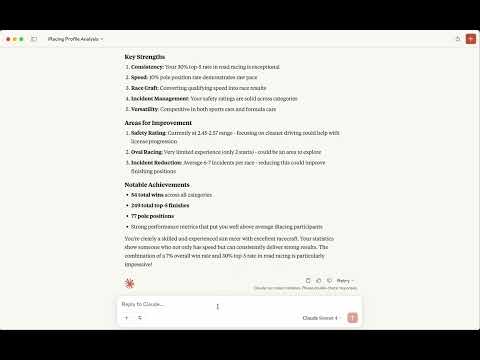
📹 Watch the video
As CLI Tool
Environment Setup
Create a .env file in your project directory:
```env
Sign in to leave a review
Use Google, GitHub, or an email account so ratings stay tied to real people.
No reviews posted yet.





