
Infra Lens
About
TypeScript MCP server for infrastructure visibility, health checks, inventory inspection, and operations-focused automation across developer environments.
Details
- Author
- oaslananka
- GitHub stars
- 1
- Downloads
- 224
Jump to
- Node.js 24 LTS for CI, Docker, and release workflows
- Node.js 22 or newer for package runtime compatibility
- pnpm 11.3.0 through Corepack for development installs
- Linux SSH targets with /proc, free, df, ps, and uname
- Strict SSH host verification through known_hosts or pinned SHA256 host keys

Setting up with Highlight
This MCP is not yet compatible with Highlight’s one-click setup. However, you can still use it with Highlight by following these steps:
- Download and install Highlight from highlightai.com/download
- Navigate to the plugins tab and select "Add Custom Plugin"
-
Configure the plugin with the settings below
Plugin Name
Infra LensCommand (node, npx, python, etc.)Please refer to the README for specific instructions on how to obtain API keys or other required environment variables.
- Enable "Start Automatically" if you want the plugin to start when Highlight launches





From the repository
The README includes setup instructions such as npx -y infra-lens-mcp.
Claude Desktop / Cursor
Paste into your MCP client config file to install this server.
{
    "mcpServers": {
        "infra lens": {
            "infra-lens-mcp": {
                "command": "npx",
                "args": [
                    "-y",
                    "infra-lens-mcp"
                ]
            }
        }
    }
}McpServers
{
    "infra-lens-mcp": {
        "command": "npx",
        "args": [
            "-y",
            "infra-lens-mcp"
        ]
    }
}
infra-lens-mcp
<p align="center">
<a href="https://www.buymeacoffee.com/oaslananka">
</a>
</p>

Explain Linux incidents over SSH with baseline-aware MCP tooling.





infra-lens-mcp is a TypeScript MCP server that connects to Linux hosts over SSH, captures live metrics, stores local SQLite history, compares snapshots to baselines, and returns plain-English infrastructure explanations.
Demo
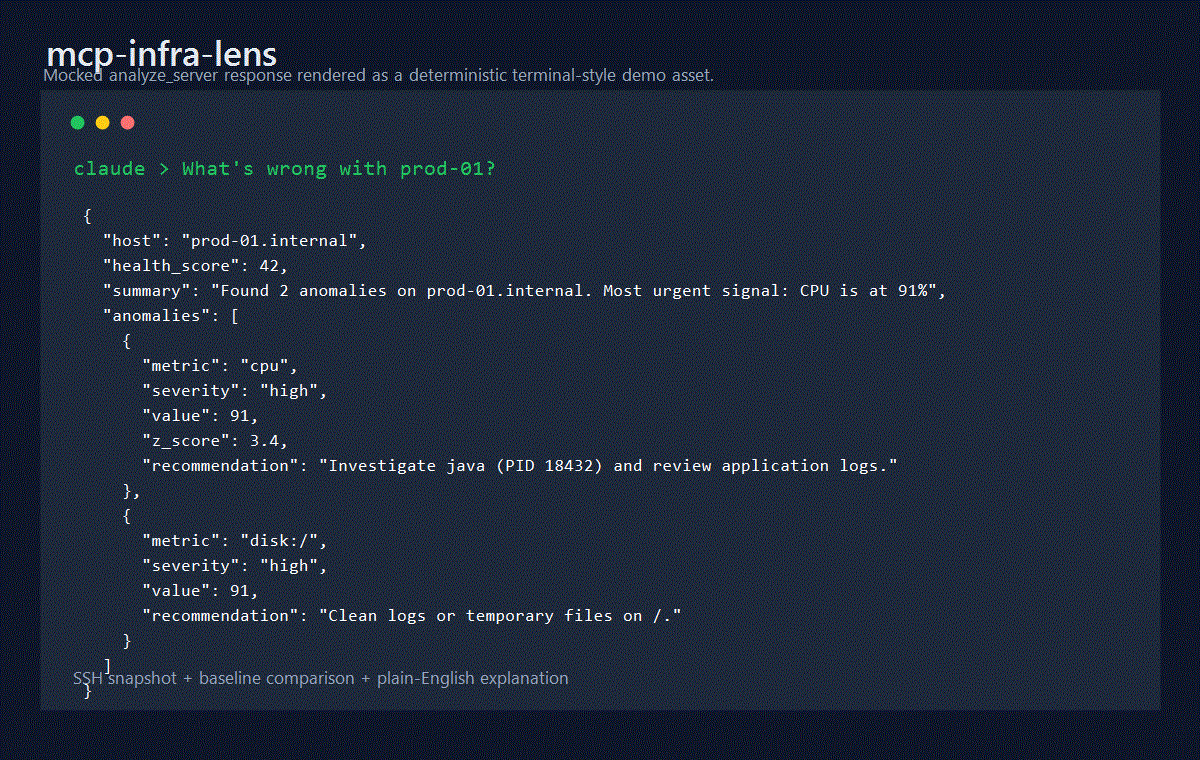
See the MCP 2025-11-25 compliance matrix for the current protocol support, delegated behavior, and open follow-up issues.
Tools
| Tool | Purpose |
| --- | --- |
| analyze_server | Collect a sampled snapshot, store it, and explain anomalies |
| snapshot | Store a point-in-time snapshot without anomaly analysis |
| record_baseline | Save a labeled healthy-state sample |
| compare_to_baseline | Compare current state with a named baseline |
| get_history | Return CPU, memory, or load history from SQLite |
| inspect_host_capabilities | Check required Linux commands and proc files before collection |
All tools return both readable JSON text and MCP structuredContent validated by declared outputSchema definitions, so clients and agents can consume responses without parsing the text block. Collection tools include a warnings array when optional sections cannot be collected but a partial snapshot is still usable.
Requirements
- Node.js 24 LTS for CI, Docker, and release workflows
- Node.js 22 or newer for package runtime compatibility
- pnpm 11.3.0 through Corepack for development installs
- Linux SSH targets with /proc, free, df, ps, and uname
- Strict SSH host verification through known_hosts or pinned SHA256 host keys
Quick Start
Run the stdio MCP server from npm:
npx -y infra-lens-mcp
Desktop MCP client style configuration:
{
  "mcpServers": {
    "infra-lens": {
      "command": "npx",
      "args": ["-y", "infra-lens-mcp"],
      "env": {
        "INFRA_LENS_DB": "/Users/you/.infra-lens-mcp/metrics.db"
      }
    }
  }
}
Local development:
corepack enable
corepack prepare pnpm@11.3.0 --activate
pnpm install --frozen-lockfile
pnpm run build
node dist/mcp.js
Configuration
| Variable | Default | Description |
| --- | --- | --- |
| MCP_TRANSPORT | stdio | Intended transport mode: stdio or http |
| INFRA_LENS_DB | ~/.infra-lens-mcp/metrics.db | SQLite database path |
| MCP_HTTP_HOST | 127.0.0.1 | HTTP bind host. HOST remains a deprecated alias |
| MCP_HTTP_PORT | 3000 | HTTP bind port. PORT remains a deprecated alias |
| MCP_HTTP_ENDPOINT_PATH | /mcp | Canonical Streamable HTTP MCP endpoint path |
| MCP_HTTP_ALLOWED_ORIGINS | unset | Comma-separated allowed Origin values |
| MCP_HTTP_ALLOWED_HOSTS | unset | Comma-separated allowed Host values |
| MCP_HTTP_AUTH_MODE | none | none, bearer, or oauth-gateway; oauth is accepted as a compatibility alias |
| MCP_HTTP_BEARER_TOKEN | unset | Local/dev bearer fallback token |
| MCP_HTTP_OAUTH_GATEWAY_HEADER | x-infra-lens-gateway-auth | Header injected by a trusted OAuth gateway |
| MCP_HTTP_OAUTH_GATEWAY_SECRET | unset | Shared backend secret required for oauth-gateway mode |
| MCP_HTTP_BODY_LIMIT_BYTES | 1048576 | Maximum JSON request body size |
| MCP_HTTP_REQUEST_TIMEOUT_MS | 30000 | Maximum time to receive and handle an HTTP request before the socket is closed |
| MCP_HTTP_MAX_CONCURRENT_REQUESTS | 100 | Maximum concurrent HTTP requests accepted by the Node process |
| MCP_HTTP_RATE_LIMIT_PER_MINUTE | 0 | Optional per-client in-memory rate limit; 0 disables it |
| MCP_HTTP_AUTHORIZATION_SERVERS | unset | OAuth authorization server metadata URLs |
| MCP_PROFILE | full | full, remote-safe, chatgpt, or claude |
| MCP_SSH_STRICT_HOST_CHECKING | true | Strict host key verification toggle |
| MCP_SSH_KNOWN_HOSTS | ~/.ssh/known_hosts | Known hosts file |
| MCP_SSH_ALLOWED_HOSTS | unset | Exact host/IP or IPv4 CIDR allowlist; required for remote-safe profiles and enforced in full profile when set |
| MCP_SSH_ALLOWED_USERS | unset | Optional comma-separated SSH username allowlist |
| MCP_SSH_ALLOWED_PORTS | unset | Optional comma-separated SSH port allowlist |
| MCP_SSH_MAX_SESSIONS_PER_HOST | 0 | Optional active SSH session cap per host:port; 0 disables it |
| MCP_SSH_MAX_CONNECTION_ATTEMPTS_PER_MINUTE | 0 | Optional SSH connection-attempt cap per host:port per minute; 0 disables it |
MCP_DB_PATH from older examples is not used; use INFRA_LENS_DB.
SSH Security
Strict host key checking is enabled by default. Provide either:
- a hostKeySha256 value in the connection input, such as SHA256:...
- a knownHostsPath in the connection input
- MCP_SSH_KNOWN_HOSTS pointing at an OpenSSH known_hosts file
Raw passwords, private keys, and passphrases are accepted only in the default full profile for trusted local MCP contexts. remote-safe, chatgpt, and claude profiles reject raw SSH credentials in tool input and require MCP_SSH_ALLOWED_HOSTS. Production SSH policy can also restrict exact hosts or IPv4 CIDR ranges, users, ports, per-host active sessions, and per-host connection attempts.
Process command arguments are not collected by the default process command. Secret-like values in process data, SSH errors, and logs are redacted before storage or output.
HTTP Transport
Run the Streamable HTTP transport locally. The canonical MCP endpoint is http://127.0.0.1:3000/mcp unless MCP_HTTP_ENDPOINT_PATH is changed. HTTP mode is stateless today: the server does not issue or accept MCP-Session-Id, and only POST JSON-RPC calls are supported on the MCP endpoint.
MCP_TRANSPORT=http MCP_HTTP_HOST=127.0.0.1 MCP_HTTP_PORT=3000 node dist/server-http.js
Loopback HTTP can run without auth for local development. Any non-loopback bind, such as 0.0.0.0, fails fast unless all of these are configured:
- MCP_PROFILE=remote-safe, chatgpt, or claude
- MCP_HTTP_AUTH_MODE=bearer or oauth-gateway
- MCP_HTTP_ALLOWED_ORIGINS
- MCP_HTTP_ALLOWED_HOSTS
Native OAuth/JWT validation is not implemented inside this package. Public deployments should use MCP_HTTP_AUTH_MODE=oauth-gateway behind a production OAuth-aware gateway or reverse proxy, configure HTTPS MCP_HTTP_RESOURCE_URL, and block direct access to the Node process. Keep origin/host allowlists, body limits, request timeout, concurrency limit, and optional rate limit enabled at the Node process even when an upstream proxy also enforces them. See ADR 0006. Connector publication readiness remains false until a full connector deployment is verified.
Docker
The Docker image defaults to stdio mode:
docker build -t infra-lens-mcp .
docker run --rm -it \
  -v "$HOME/.infra-lens-mcp:/home/appuser/.infra-lens-mcp" \
  infra-lens-mcp
For local HTTP testing, override the command and keep the bind host on loopback unless a remote-safe profile and auth controls are configured:
docker run --rm -p 127.0.0.1:3000:3000 \
  -e MCP_TRANSPORT=http \
  -e MCP_HTTP_HOST=0.0.0.0 \
  -e MCP_HTTP_ALLOWED_ORIGINS=http://localhost:3000 \
  -e MCP_HTTP_ALLOWED_HOSTS=localhost:3000 \
  -e MCP_HTTP_AUTH_MODE=bearer \
  -e MCP_HTTP_BEARER_TOKEN=local-dev-token \
  infra-lens-mcp node dist/server-http.js
Development
pnpm run format:check
pnpm run lint
pnpm test
pnpm run test:coverage
pnpm run build
pnpm run check:metadata
pnpm run package:dry-run
Docker-backed SSH e2e validation uses a self-contained fixture lifecycle:
pnpm run test:e2e
If a fixture is already running and you intentionally want to skip lifecycle management, use:
INFRA_LENS_E2E_SKIP_FIXTURE=1 pnpm run test:e2e:raw
Generated API docs live in docs/api. Client setup recipes live in docs/integrations/client-setup.md.
See docs/testing.md, docs/security.md, docs/operations.md, and docs/release.md for the full operational workflow.
Community
Use SUPPORT.md for support channels and response expectations. Project conduct is defined in CODE_OF_CONDUCT.md, and maintainer triage policy lives in docs/governance.md.
Release
Releases are managed through release-please manifest mode and the guarded GitHub Actions release workflow. Implementation PRs must not publish packages, containers, MCP Registry entries, marketplace artifacts, or production GitHub Releases.
See docs/release.md and docs/release-state-machine.md.
License
Agent plugin and runtime configuration
This repository owns the product-level agent plugin, MCP runtime configuration, and product-specific skills for infra-lens-mcp. The central agent-tools repository should catalog this plugin, but the manifest and workflow instructions live here so they stay synchronized with the actual MCP server package.
| File | Purpose |
| --- | --- |
| .claude-plugin/plugin.json | Claude Code-valid product plugin manifest. |
| .mcp.json | Claude Code project-local MCP server configuration. |
| .codex/config.example.toml | Codex CLI MCP configuration example. |
| .vscode/mcp.example.json | VS Code / GitHub Copilot workspace MCP configuration example. |
| opencode.example.jsonc | OpenCode project MCP configuration example. |
| .opencode/skills/ | OpenCode-native mirrored skill definitions. |
| docs/agent-runtime-config.md | Agent runtime setup and validation notes. |
Validate plugin packaging locally:
claude plugin validate .
Sign in to leave a review
Use Google, GitHub, or an email account so ratings stay tied to real people.
No reviews posted yet.




