
ImgMCP
About
ImgMCP is a multimedia AI model aggregation platform that provides a unified API and MCP protocol to access various AI models for image generation and processing. It simplifies integration for applications and LLMs, enabling creation and manipulation of visual content.
Details
- Author
- imgmcp
- Downloads
- 261
- Categories
- Other
Jump to
- Unified API and MCP protocol for model access
- Models include GPT-Image-1, Midjourney, Flux Kontext
- Basic image processing: upscaling and background removal
- Curated style library with predefined visual presets
- Authentication via API key in Authorization header
- Simplified invocation via natural language in MCP hosts

Setting up with Highlight
This MCP is not yet compatible with Highlight’s one-click setup. However, you can still use it with Highlight by following these steps:
- Download and install Highlight from highlightai.com/download
- Navigate to the plugins tab and select "Add Custom Plugin"
-
Configure the plugin with the settings below
Plugin Name
ImgMCPCommand (node, npx, python, etc.)Please refer to the README for specific instructions on how to obtain API keys or other required environment variables.
- Enable "Start Automatically" if you want the plugin to start when Highlight launches





From the repository
Register on the ImgMCP dashboard, obtain an API key, then configure an MCP-compatible host (e.g., Cherry Studio) with the Streamable HTTP endpoint https://api.imgmcp.com/mcp and your API key in the Authorization header. No additional client libraries are required for supported hosts.
Claude Desktop / Cursor
Paste into your MCP client config file to install this server.
{
    "mcpServers": {
        "imgmcp": {
            "ImgMCP": {
                "command": "npx",
                "args": [
                    "-y",
                    "mcp-remote",
                    "https://api.imgmcp.com/mcp",
                    "--header",
                    "Authorization:${AUTH_HEADER}"
                ],
                "env": {
                    "AUTH_HEADER": "Bearer <Your API Key>"
                }
            }
        }
    }
}McpServers
{
    "ImgMCP": {
        "command": "npx",
        "args": [
            "-y",
            "mcp-remote",
            "https://api.imgmcp.com/mcp",
            "--header",
            "Authorization:${AUTH_HEADER}"
        ],
        "env": {
            "AUTH_HEADER": "Bearer <Your API Key>"
        }
    }
}
Introduction
ImgMCP is a multimedia AI model aggregation platform. It aims to provide you with a concise and efficient way to access and utilize various effective multimedia AI models.
We offer a unified API and the MCP (Multimedia Control Protocol) to simplify the model integration process—whether you are integrating them directly into your applications or invoking them via a Large Language Model (LLM).
Our goal is to connect the capabilities of these AI models with your creativity, striving to enhance the experience, reduce costs, and increase efficiency for every creator.
Please consult the relevant documentation here (or in this repository/website) to learn how to leverage ImgMCP's capabilities.
Prerequisites
Before you start using the ImgMCP platform, please ensure you have the following ready:
- An ImgMCP Account: You need to register on the platform. If you don't have an account yet, please go to the Dashboard to register.
- An API Key: An API key is required to authenticate your requests. After registering and logging in, you can find your default API key on the API Keys page in the management console.
Important: Please keep your API key secure and confidential.
Quick Start: Connecting via Streamable HTTP MCP
This section guides you on how to configure an MCP Host (like Cherry Studio) to interact with the ImgMCP platform using our Streamable HTTP MCP Service. This method typically doesn't require installing additional client libraries; you only need to set up the service endpoint and API key.
Supported MCP Hosts:
Native Support: Tools like Cherry Studio and ChatWise offer a good integration experience with Streamable HTTP MCP.
Via mcp-remote: For Hosts that do not yet support the Streamable HTTP protocol (like Claude Desktop or Cursor), you can use the mcp-remote tool as a proxy.
(For detailed configuration guides for different tools, please refer to our dedicated documentation. The following steps use Cherry Studio as an example.)
1. Service Endpoint & Authentication:
MCP Endpoint URL:
https://api.imgmcp.com/mcp
Authentication Method: ImgMCP uses API keys for authentication. Provide the key in the Authorization header of your HTTP requests:
Authorization: Bearer <Your API Key>
Tip: If your MCP Host makes configuring the Bearer <Your API Key> format difficult, you might try using just <Your API Key> as the value for the Authorization header. However, the standard Bearer format is recommended.
2. Example Configuration in Cherry Studio:
Open Cherry Studio and navigate to Settings -> MCP Servers.
Click Add Server, then select Import from JSON.
Paste the following JSON content:
    {

      "name": "ImgMCP",

      "type": "streamableHttp",

      "description": "Connecting Models to Your Creativity.",

      "provider": "ImgMCP",

      "providerUrl": "https://imgmcp.com",

      "logoUrl": "https://cdn.imgmcp.com/imgmcp-favicon.png",

      "baseUrl": "https://api.imgmcp.com/mcp"

    }
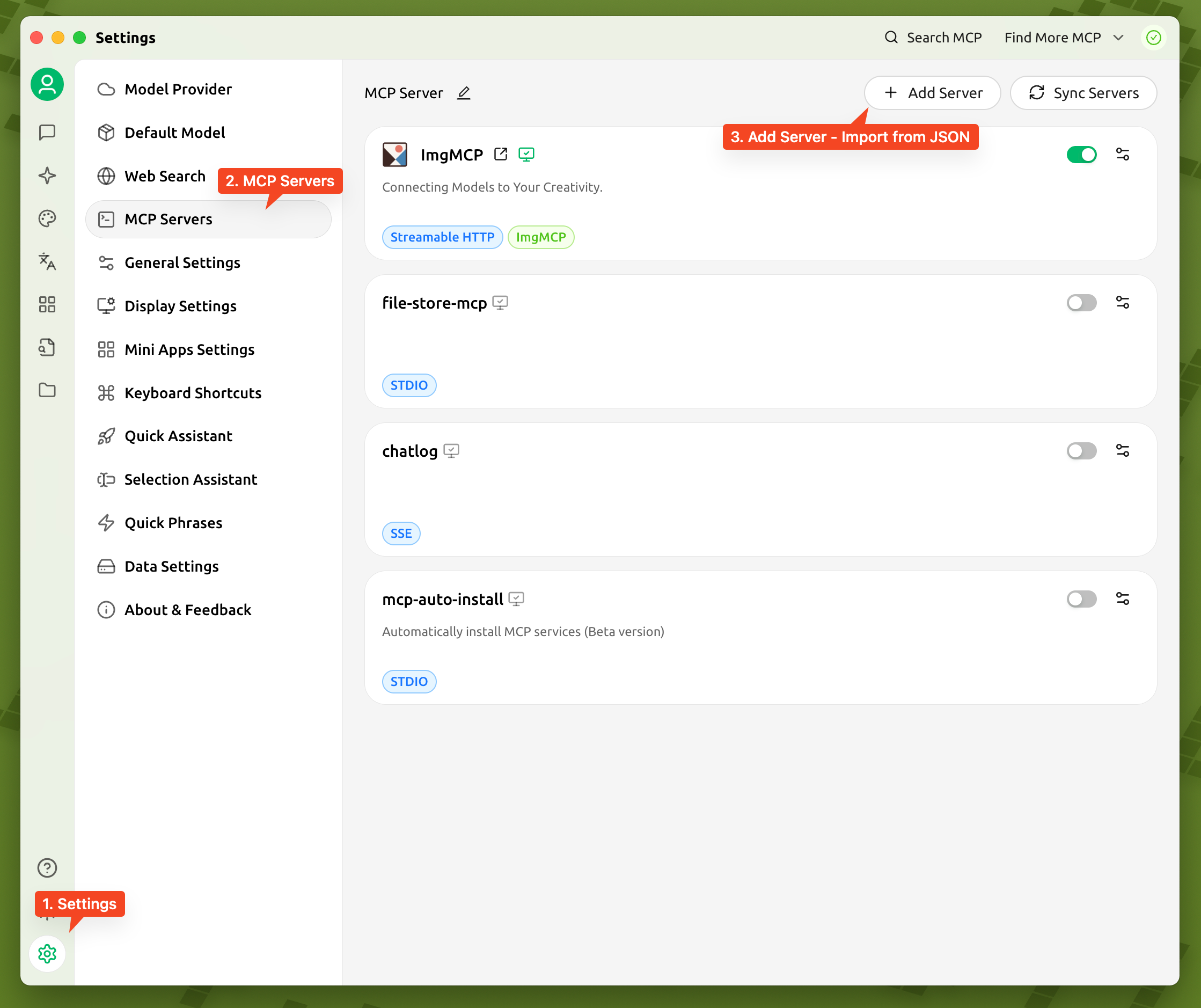
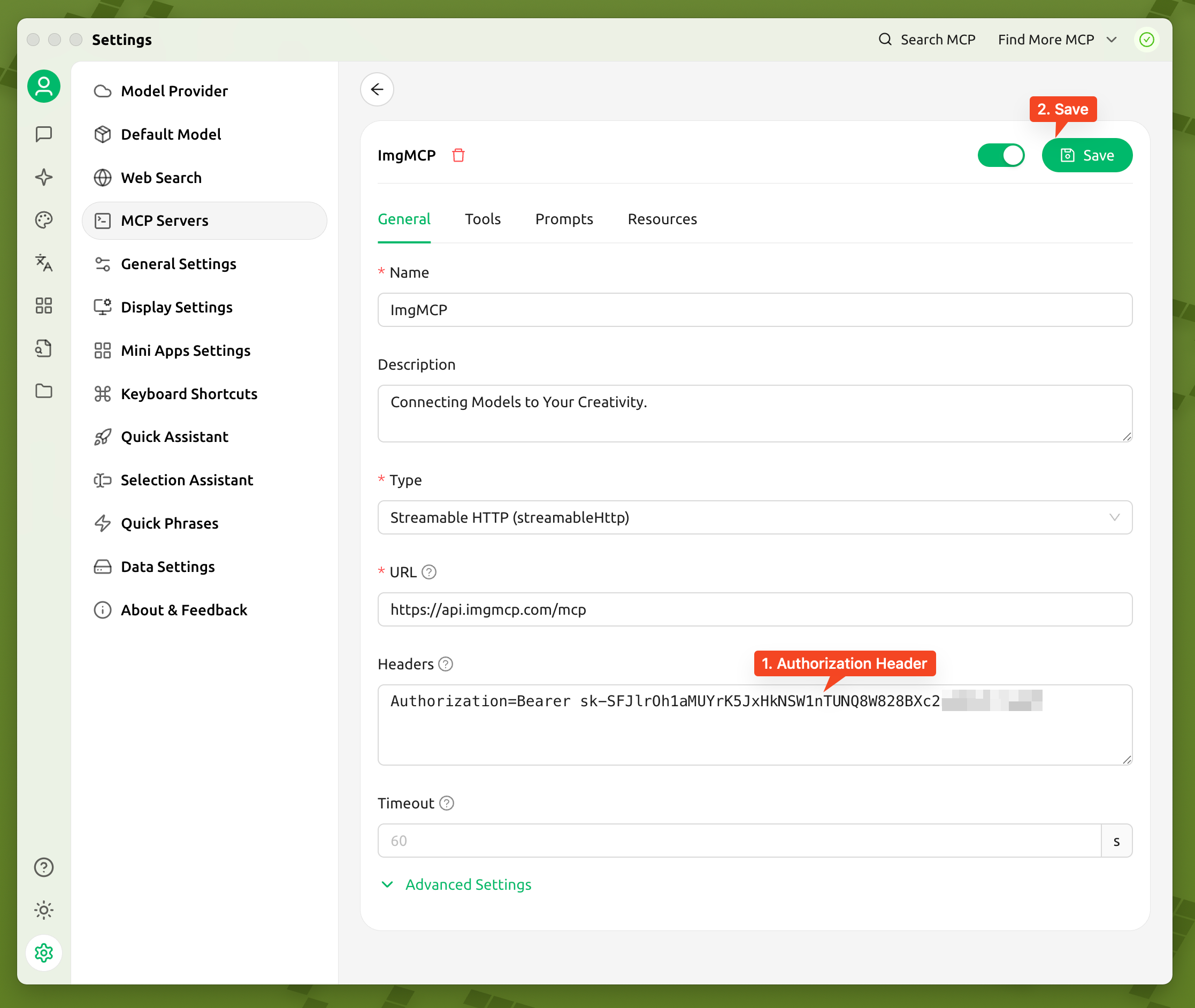
After importing, select the newly created "ImgMCP" service.
In the Request Headers section, add your API key:
Authorization=Bearer <Your API Key>
(Replace
<Your API Key> with your actual key)Click Save.
3. Verify Connection:
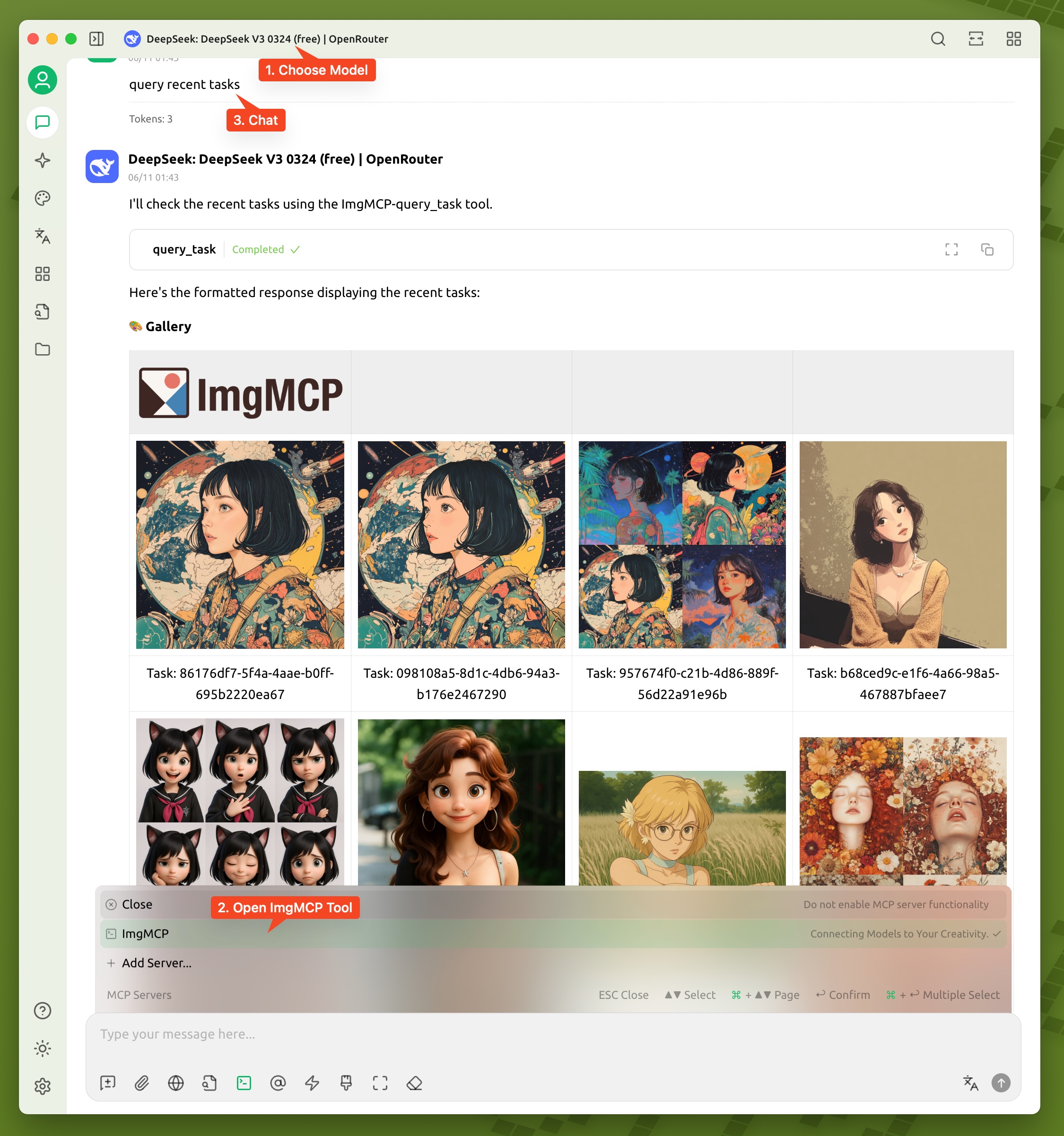
After configuration, verify that your MCP Host can communicate with ImgMCP:
Basic Check: Check the MCP tool list in your Host (e.g., Cherry Studio). If tools from ImgMCP appear, the basic connection is working.Functional Verification:
1. Select an LLM in your Host and enable the ImgMCP toolset.
2. Try a simple request, like "Query historical tasks" or ask for the list of available models.
3. If the LLM responds with information from ImgMCP (e.g., task history, model list), your setup is successful!
Next Steps:
You've successfully connected your MCP Host! Explore the AI model capabilities offered by ImgMCP.
Available Models
ImgMCP provides access to various AI models via the MCP protocol. Understanding their strengths helps you choose the right tool:
Main Model Types:
1. Understanding & General Purpose: Models like GPT-Image-1 excel at interpreting complex descriptions and context, suitable for general image creation from detailed prompts.
2. Artistic Expression: Models like Midjourney are known for strong artistic styles and unique visual effects, ideal for creative exploration.
3. Professionalism & Stability: Models like Flux Kontext offer consistent output for specific applications like product renderings or commercial materials, ensuring predictable results.
Basic Image Processing:
We also integrate fundamental image processing tools:
Upscaling: Increase image resolution.- Background Removal: Isolate subjects.
Simplified Invocation via MCP:
Using an MCP-compatible client (like Cherry Studio) with a configured LLM abstracts the complexity. You state your needs in natural language, the LLM parses it, and invokes the appropriate ImgMCP model via MCP. This lets you focus on creativity, not technical details.
Using Styles
Styles in ImgMCP help define or adjust the visual characteristics of generated images quickly.
What are Styles?
A "style" is a set of predefined prompt fragments or parameter combinations designed to influence visual appearance. They often represent common artistic genres (e.g., "watercolor," "cyberpunk"), textures ("claymation," "embroidery"), or lighting ("cinematic lighting," "golden hour").
Benefits of Styles:
1. Efficiency: Faster than crafting descriptive prompts from scratch for common effects.
2. Consistency: Easily maintain a unified look across multiple creations.
3. Inspiration: Browsing the style library can spark new ideas.
Style Library:
We provide a curated library of tested style presets. Use them as a starting point or combine/modify them. You can always define your prompts entirely from scratch as well.
Sign in to leave a review
Use Google, GitHub, or an email account so ratings stay tied to real people.
No reviews posted yet.





