
Command Proxy
About
Proxy server for CLI commands that captures terminal output in a circular buffer, enabling remote execution, log retrieval, and process management for command-line applications like Expo development tools.
Details
- Author
- hormold
- Repository
- Hormold/mcp-command-proxy
- GitHub stars
- 6
- Downloads
- 3,038
- License
- MIT License
- Categories
- Design, Developer Tools, AI, Infrastructure, Frontend
Jump to
- Command Proxying: Run any CLI command through the MCP server
- Log Collection: Capture and store logs from running processes (configurable buffer size)
- Key Press Forwarding: Forward key presses from client to the running process
- Transparent Experience: The end user sees the command output exactly as if they ran it directly
- Interactive Commands: Works with interactive CLI tools like Expo
- MCP Integration: Built using the MCP SDK for easy integration with Claude and other MCP-enabled AI assistants

Setting up with Highlight
This MCP is not yet compatible with Highlight’s one-click setup. However, you can still use it with Highlight by following these steps:
- Download and install Highlight from highlightai.com/download
- Navigate to the plugins tab and select "Add Custom Plugin"
-
Configure the plugin with the settings below
Plugin Name
Command ProxyCommand (node, npx, python, etc.)mcp-command-proxyArguments-
Argument 1
--prefix -
Argument 2
ExpoServer -
Argument 3
--command -
Argument 4
expo start
Please refer to the README for specific instructions on how to obtain API keys or other required environment variables.
-
Argument 1
- Enable "Start Automatically" if you want the plugin to start when Highlight launches





From the repository
pnpm install
pnpm install -g
mcp-command-proxy --prefix "MyServer" --command "expo start"
mcp-command-proxy -p "ExpoServer" -c "expo start" -b 500
getRecentLogs
Returns the most recent logs from the buffer. Parameters: limit (optional): Number of logs to return (default: 100), types (optional): Types of logs to include (stdout, stderr, system) (default: all)
sendKeyPress
Sends a key press to the running process. Parameters: key: Key to send (e.g. 'enter', 'a', '1', 'space')
getProcessStatus
Returns the current status of the process. Parameters: None
Claude Desktop / Cursor
Paste into your MCP client config file to install this server.
{
    "mcpServers": {
        "command proxy": {
            "cwd": "",
            "env": {},
            "args": [
                "--prefix",
                "ExpoServer",
                "--command",
                "expo start"
            ],
            "shell": false,
            "command": "mcp-command-proxy"
        }
    }
}Linux
{
    "cwd": "",
    "env": [],
    "args": [
        "--prefix",
        "ExpoServer",
        "--command",
        "expo start"
    ],
    "shell": false,
    "command": "mcp-command-proxy"
}
Macos
{
    "cwd": "",
    "env": [],
    "args": [
        "--prefix",
        "ExpoServer",
        "--command",
        "expo start"
    ],
    "shell": false,
    "command": "mcp-command-proxy"
}
Windows
{
    "cwd": "",
    "env": [],
    "args": [
        "/c",
        "mcp-command-proxy",
        "--prefix",
        "ExpoServer",
        "--command",
        "expo start"
    ],
    "shell": false,
    "command": "cmd"
}
MCP Command Proxy
An MCP (Model Context Protocol) server that acts as a proxy for CLI commands, specifically designed for Expo development but adaptable for any command-line application.
How to use in Cursor (Expo example)
1. Go to the directory of your Expo project
2. Run npx mcp-command-proxy --prefix "ExpoServer" --command "expo start" --port 8383
3. Go to Cursor settings -> MCP -> +Add new MCP server, like this:
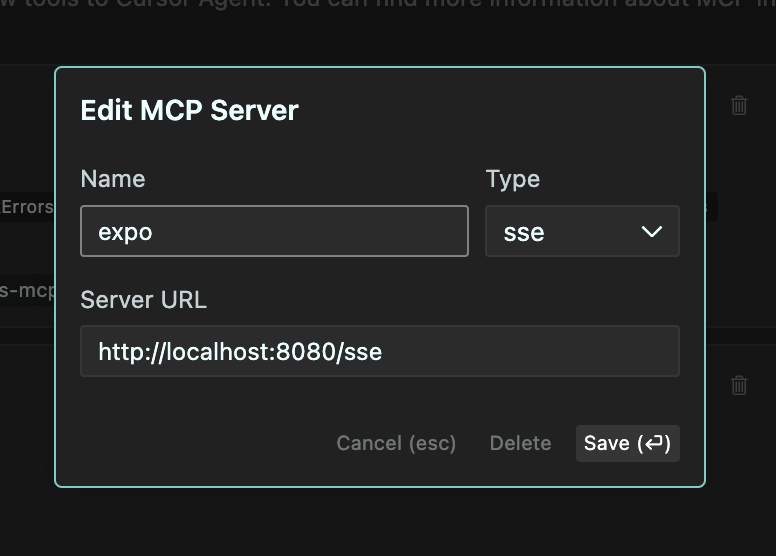
4. Set the name to "ExpoServer", Type to "SSE", URL to http://localhost:8383/sse
5. Click "Save" and you should now be able to use the MCP server in Cursor. Like this:
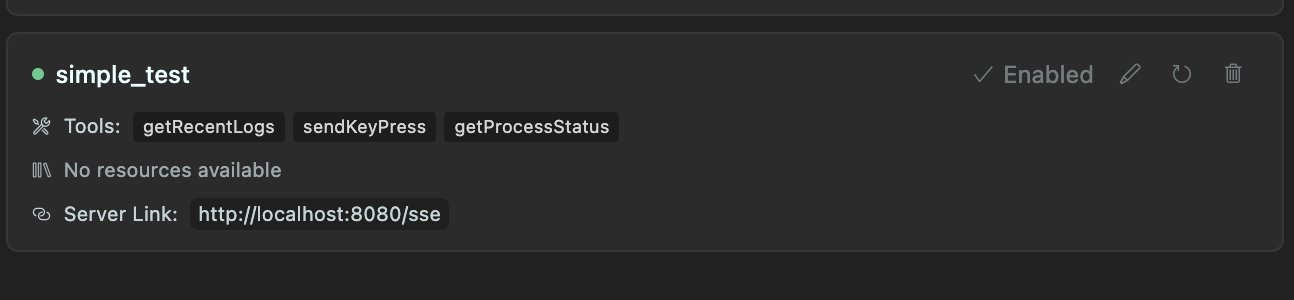
Recommended to use the --port 8383 flag to avoid conflicts with other servers.
Also, you can add following instruction to .cursorrules file:
You can use MCP getRecentLogs tool to get the most recent logs from Expo server. And if needed, you can send key presses to the running process using sendKeyPress tool.
Features
- Command Proxying: Run any CLI command through the MCP server
- Log Collection: Capture and store logs from running processes (configurable buffer size)
- Key Press Forwarding: Forward key presses from client to the running process
- Transparent Experience: The end user sees the command output exactly as if they ran it directly
- Interactive Commands: Works with interactive CLI tools like Expo
- MCP Integration: Built using the MCP SDK for easy integration with Claude and other MCP-enabled AI assistants
How It Works
1. The server starts a specified command in a pseudo-terminal (PTY)
2. All stdout/stderr output is:
- Streamed to the client in real-time
- Stored in a circular buffer (configurable size, default 300 lines)
3. Key presses from the client are forwarded to the running process
4. The server provides tools to:
- View collected logs
- Send key presses to the process
- Get the current state of the process
Use Cases
- Expo Development: Run expo start and interact with it while collecting logs
- Build Processes: Monitor build processes and analyze logs
- Long-running Services: Monitor services and keep recent log history
- Remote Command Execution: Execute and monitor commands from remote clients
Requirements
- Node.js 18+
- TypeScript
- pnpm (recommended) or npm
Installation
```bash
Sign in to leave a review
Use Google, GitHub, or an email account so ratings stay tied to real people.
No reviews posted yet.





