
Graphpilot
About
GraphPilot gives coding agents persistent structural knowledge of a codebase. It parses TypeScript/JavaScript with tree-sitter into a graph of symbols and call edges, then exposes that graph over MCP so the agent can recall definitions, find callers, and trace change impact witho
Details
- Author
- graphpilot-oss
- Downloads
- 468
- Categories
- Other, Developer Tools
Jump to
- Evidence anchors with file:line@sha on every result
- Differential impact scoped to branch changes via since
- Worktree‑aware indexing without manual configuration
- Local‑first, zero telemetry, deterministic graph
- Sub‑second incremental watch mode updates
- Four MCP tools: gp_recall, gp_callers, gp_impact, gp_index

Setting up with Highlight
This MCP is not yet compatible with Highlight’s one-click setup. However, you can still use it with Highlight by following these steps:
- Download and install Highlight from highlightai.com/download
- Navigate to the plugins tab and select "Add Custom Plugin"
-
Configure the plugin with the settings below
Plugin Name
GraphpilotCommand (node, npx, python, etc.)Please refer to the README for specific instructions on how to obtain API keys or other required environment variables.
- Enable "Start Automatically" if you want the plugin to start when Highlight launches





From the repository
Install the package globally (npm install -g @graphpilot-oss/graphpilot), then run graphpilot index <path> once to build the graph. For agent integration, add a two-line MCP server entry to your agent's configuration pointing to graphpilot mcp. Optionally run graphpilot watch <path> for sub-second incremental updates and graphpilot init to write editor rules that teach the agent to use the gp_* tools.
gp_index
Re-index the repo after batch edits so subsequent gp_* calls see your changes. Call after any non-trivial edit session. Do NOT call before every query — indexing is slow; only needed when source files changed.
gp_recall
Find a symbol definition by name — returns kind, file:line, and signature. ALWAYS use instead of `grep -rn "function X"` or reading files to locate a definition: pre-indexed, no false positives from comments or strings, sub-millisecond. Pass substring:true for partial-name searches. Do NOT use for "who calls X?" — use gp_callers for that.
gp_callers
List every caller of a symbol (direction=callers) or everything it calls (direction=callees). ALWAYS use instead of `grep -rn "X("` for "who calls X?" — pre-indexed reverse map, sub-millisecond, no false positives from comments or strings. Use direction=callers to find dependents before a rename; direction=callees to understand what a function depends on. Do NOT use for full blast-radius analysis across multiple hops — use gp_impact instead.
gp_impact
Compute the blast radius of a rename or signature change: direct callers, transitive callers up to depth 3, affected tests, and whether the symbol is exported (breaking-change risk). ALWAYS call before proposing a rename, signature change, or behavior change — replaces `git diff | xargs grep` with a single structured answer. Pass `since: <commit|branch>` to scope callers to files changed since that ref (ideal for PR review or refactor scoping). Do NOT use just to see direct callers; use gp_callers for that.
Claude Desktop / Cursor
Paste into your MCP client config file to install this server.
{
    "mcpServers": {
        "graphpilot": {
            "graphpilot": {
                "command": "npx",
                "args": [
                    "-y",
                    "@graphpilot-oss/graphpilot",
                    "mcp"
                ]
            }
        }
    }
}McpServers
{
    "graphpilot": {
        "command": "npx",
        "args": [
            "-y",
            "@graphpilot-oss/graphpilot",
            "mcp"
        ]
    }
}
<p align="center">

</p>
<h1 align="center">GraphPilot</h1>
<p align="center">
<strong>Structural memory for coding agents.</strong><br />
A refactor-safe, branch-aware, evidence-backed code graph that runs entirely on your machine.
</p>
<p align="center">
<a href="LICENSE"> </a>
</a>
<a href="https://nodejs.org"> </a>
</a>



</p>
<p align="center">
<a href="#quickstart">Quickstart</a> ·
<a href="#the-four-tools">Tools</a> ·
<a href="#how-it-works">How it works</a> ·
<a href="#editor-setup">Editor setup</a> ·
<a href="docs/limitations.md">Limitations</a> ·
<a href="bench/README.md">Benchmarks</a>
</p>
<p align="center">

</p>
---
What it is
GraphPilot is a local CLI + MCP server that indexes your TypeScript/JavaScript repo into a structural graph (symbols, callers, callees, blast radius) and exposes it to coding agents — Claude Code, Cursor, Cline, Windsurf, Continue — so they stop re-
grepping the same files every conversation.The problem it solves: agents burn tokens, hallucinate function names, and miss structural relationships ("what calls this?", "what breaks if I rename it?") because each session starts from zero. GraphPilot is the persistent structural memory in between.
Token cost drops. Hallucinations drop. Refactors get safer.
Put a real coding agent (claude-sonnet-4-5) on 40 structural questions about fastify — a ~300-file Node.js framework — and give it nothing but file reads. Then hand it GraphPilot's four tools and ask the same 40. The agent with GraphPilot uses 61 % fewer tokens, costs $3.68 instead of $8.88 — $5.20 saved per session — and gets more of them right, not fewer (37 correct vs 33). Same model, same questions, same repo; the only change is whether the structural index is there. Reproduce it →
A separate correctness benchmark backs the savings with precision: on 10 standardized structural queries GraphPilot scores F1 0.89 vs grep's 0.42 while reading 99.9 % fewer bytes (721 B vs 528 KB), and the byte-cost win holds at scale — indexing microsoft/TypeScript (601 files, 17 k symbols, 70 k call edges in 10 s) gives sub-millisecond queries and a 99.99 % bytes-read reduction. Full methodology →
One binary, two modes
GraphPilot ships as a single npm package (
@graphpilot-oss/graphpilot) with two runtime modes — most users run both.| Mode | Command | What it does |
| -------------- | -------------------------- | ---------------------------------------------------------------------------- |
| CLI |
graphpilot index <path> | Walks your repo, builds the structural graph, writes it to ~/.graphpilot/ || |
graphpilot watch <path> | Keeps the graph fresh (~10 ms per file save) || |
graphpilot status <path> | Health probe — when the graph was last refreshed, file/symbol/edge counts || MCP server |
graphpilot mcp | Speaks MCP over stdio — your coding agent calls into this to query the graph |The flow: the CLI builds the index once (and
watch keeps it warm). The MCP server is what your coding agent talks to — you never invoke it yourself, you just point your agent's MCP config at graphpilot mcp once and the agent spawns it on every session.<p align="center">
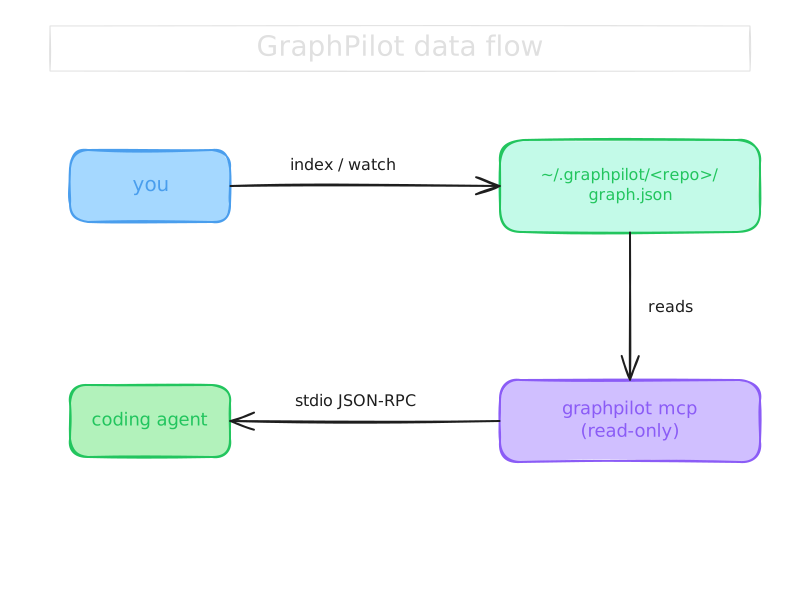 /graph.json; the read-only graphpilot mcp server reads it and serves your coding agent over stdio JSON-RPC" width="720" />
</p>
If you only want CLI access to your code graph (no agent), run
graphpilot index and then graphpilot stats / inspect graph.json directly. If you only want the agent integration, you still need to run graphpilot index once — the MCP server is read-only against the on-disk graph.What makes it different
Other code-graph tools treat your repo as a static blob: index once, query forever, no branch awareness, no proof of where an answer came from. GraphPilot is built around three properties none of them ship:
- 🔍 Evidence anchors. Every tool response carries
file:line @ sha on every symbol and call site. The agent can quote the anchor verbatim and you can verify it instantly — hallucinations get exposed the moment you jump to the line.- 🌿 Differential impact. Pass
since: <commit|branch> to gp_impact and the result is filtered to files your branch actually touches. PR-scoped refactor analysis in one call instead of git diff | xargs grep.- 🪵 Worktree-aware by default. Two
git worktree add-ed branches naturally produce two separate indexes — no manual config. Run graphpilot index ./src/feature from a subdir and it transparently re-roots to the worktree top. Opt out with --no-worktree.Add to that: local-first (no telemetry, no remote calls, enforced by an ESLint policy on
src/ itself), deterministic (same repo → same graph), sub-second incremental updates via watch mode.Quickstart
Prerequisites
- Node.js ≥ 20 (
node --version to check)- An MCP-capable coding agent (Claude Code, Cursor, Cline, Windsurf, or Continue)
- A TypeScript or JavaScript repo to index
End-to-end time: ~3 minutes.
1. Install the CLI
``
bash

npm install -g @graphpilot-oss/graphpilot

or: pnpm add -g @graphpilot-oss/graphpilot


or one-shot, no install: npx @graphpilot-oss/graphpilot <command>
`
Verify it landed on your :
`bash
graphpilot --version
→ 0.1.0
`
If you see , your global npm bin is not on PATH. Run npm config get prefix and add <prefix>/bin to your shell's PATH, or use the npx form above.
2. Build the structural index for your repo
Run this once per project. It walks your source tree, parses each TS/JS file with tree-sitter, extracts symbols + call edges, and writes the graph to ~/.graphpilot/<repo-id>/graph.json.
`bash
graphpilot index ~/code/my-app
`
Expect a one-line summary like .
3. Wire it into your coding agent
GraphPilot speaks MCP over stdio. Add this server entry to your agent's MCP config — every supported client uses the same two-line shape:
`json
{
"mcpServers": {
"graphpilot": {
"command": "graphpilot",
"args": ["mcp"]
}
}
}
`
Where this file lives depends on the client (, ~/.claude.json, Cline's settings panel, etc.). Pre-made configs with the exact file path for each agent are in examples/ — copy the one for your client.
Restart the agent. It now has four new tools: gp_recall, gp_callers, gp_impact, gp_index — see The four tools below for what each one does and when the agent should reach for it.
4. Try it
Ask your agent a structural question instead of letting it grep:
> _"Use gp_impact to show me everything that breaks if I rename parseToken."_
You should see a response with file:line @ sha anchors you can click straight to. If the agent doesn't reach for the tool, prompt explicitly: "use the gp_ MCP tools." If it can't see them at all, the MCP config wasn't picked up — restart the agent and re-check the config path for your client in examples/.
5. Keep the index fresh as you edit (optional but recommended)
`bash
graphpilot watch ~/code/my-app
`
Sub-10 ms incremental updates on each file save. Leave it running in a terminal tab.


6. Drop per-editor routing rules into your repo (optional)
bash

graphpilot init
`
Auto-detects which editors you have installed (Cursor, Claude Code, Cline, Windsurf, Continue) and writes the matching rules file (, CLAUDE.md, etc.) to the current directory. The rules teach the agent to reach for gp_ tools before grep.
`bash
graphpilot init --all # write rules for every supported editor
graphpilot init --client cursor # one editor only
graphpilot init --dry-run # preview without writing
`
Full 5-minute walkthrough with screenshots: .
The four tools
GraphPilot exposes four MCP tools. Each one answers a structural question your agent would otherwise solve by grepping and reading files.
gp_recall — find a symbol by name
Use this when the agent asks "where is X defined?" or needs to locate a function before reasoning about it.
- Input: { query, limit?, substring?, path? }
- Returns: symbols matching the name (exact case-insensitive by default; for partial matches), each with file:line @ sha.
- Replaces: grep -rn "function X" plus reading each hit to find the real definition.
`text
Agent: gp_recall({ query: "parseToken" })
→ parseToken (function) — src/auth.ts:42 @ a1b2c3d
export function parseToken(raw: string): Token | null
`
 — list callers (or callees)


Use this when the agent needs to know "who calls X?" or "what does X call?" — the two fundamental questions of refactoring.


- Input:
{ symbol, direction?: 'callers' | 'callees', limit?, includeUnresolved?, path? }
- Returns: every call edge where the symbol is target (callers) or source (callees), with anchors.

- Replaces: followed by manual filtering of comments, strings, and renamed shadows.
`text
Agent: gp_callers({ symbol: "authenticate", direction: "callers" })
→ login → authenticate — src/routes/login.ts:18 @ a1b2c3d
→ refreshSession → authenticate — src/session.ts:64 @ a1b2c3d
`
 — blast radius in one call


Use this when the agent asks "what breaks if I rename X?" or "what depends on this?" — the single most expensive question an agent normally solves.


- Input:
{ symbol, depth? (1–5, default 3), since?, path? }
- Returns: direct callers, transitive callers grouped by BFS depth, tests likely affected, public-API flag, summary stats.

- Killer feature: pass and the result is scoped to files your branch actually touches — PR-scoped refactor review without git diff gymnastics.
`text
Agent: gp_impact({ symbol: "extractSymbols", depth: 2, since: "main" })
→ Direct callers (2): indexDirectory, applyUpdate
→ Depth-2 callers (1): cmdIndex
→ Tests affected (3): tests/indexer.test.ts, tests/symbols.test.ts, tests/cli.test.ts
→ Public API: no
`
 — refresh from inside the agent


Use this after the agent (or the user) has made a batch of structural edits and wants the graph to reflect them without dropping to a shell.


- Input:
{ path? }
- Returns: re-indexes the repo and invalidates the per-path query cache.

- Pairs with: for sub-10 ms incremental updates between explicit re-indexes.
How it works
<p align="center">
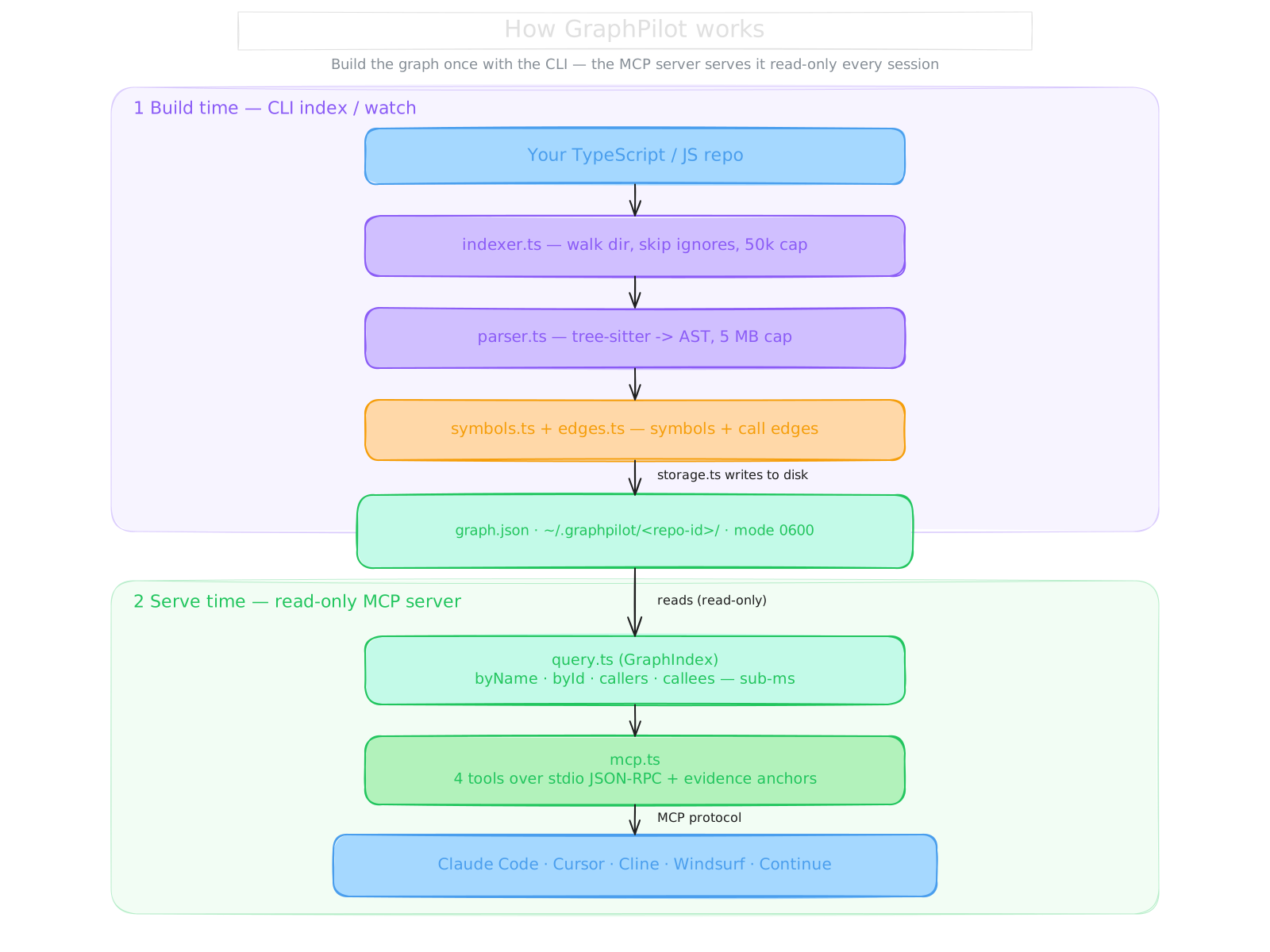 / (mode 0600). Serve time (read-only MCP server): query.ts reads graph.json, mcp.ts exposes 4 tools over stdio JSON-RPC with evidence anchors, served to Claude Code, Cursor, Cline, Windsurf, and Continue." width="760" />
</p>
Data flow is one-way: source → tree → symbols + edges → JSON → query → agent. GraphPilot never modifies your code.
Full pipeline writeup with file references: docs/architecture.md.
When to use which tool
| If the agent is about to… | Reach for… | Why |
| --------------------------------------- | ------------------------------ | ----------------------------------------------------- |
| grep for a function by name | gp_recall | One call, no false positives from comments or strings |
| Read 20 files looking for "who calls X" | gp_callers | Pre-computed reverse index, sub-millisecond |
| Plan a rename or signature change | gp_impact | Direct + transitive + tests + public-API in one call |
| Review a PR's structural blast radius | gp_impact({ since: 'main' }) | Differential — only callers your branch touches |
| Re-grep after editing several files | gp_index | Incremental: lets the next call see your edits |
For string literals, error messages, config values, or anything in a language other than TS/JS: stay with grep. GraphPilot indexes code structure, not text.
Editor setup
GraphPilot speaks MCP over stdio, so it works with any MCP-capable client. Ready-to-paste configs live in examples/:
| Client | Folder |
| ----------------------------- | ------------------------------------------------ |
| Claude Code (Anthropic) | examples/claude-code/ |
| Cursor | examples/cursor/ |
| Cline (VS Code extension) | examples/cline/ |
| Windsurf (Codeium) | examples/windsurf/ |
| Continue.dev | examples/continue/ |
| Any other MCP client | See docs/mcp-setup.md |
Each folder contains: a README.md walkthrough, a sample config file with the exact JSON to paste, and (where the client supports it) a routing template so the agent automatically reaches for GraphPilot on structural questions.
Privacy & security
GraphPilot is local-first by promise and by build gate.
- No telemetry, no remote calls, ever. Verifiable: src/ has zero http, fetch, axios, or analytics imports — enforced by an ESLint rule plus a meta-test that proves the rule fires on every banned import.
- No child_process, no exec, no spawn. Git facts are read directly from .git/ via pure-JS helpers.
- Source code never leaves your machine. Only structural metadata (names, locations, signatures, call relationships) lives in ~/.graphpilot/.
- Signatures are redacted for common secret patterns (OpenAI/Anthropic sk-, GitHub ghp_/ghs_, AWS AKIA, JWTs, PEM headers, Slack/Stripe tokens) before they're written to disk.
- Strict file permissions: dir 0o700, files 0o600.
- Schema validation on load: tampered or corrupt graph.json falls back to "no index" rather than poisoning the agent.
- Hand-rolled input validators on every MCP tool — unknown fields are rejected, every field type-checked, numbers range-checked, strings length-capped.
Threat model and per-defence test references live in docs/architecture.md. Report security issues per SECURITY.md.
Limitations
GraphPilot v0.1 makes deliberate trade-offs to ship small and sharp:
- TS/JS only. Python, Rust, Go, Java are out of scope for v1. Python is demand-gated for v0.2 / v0.3.
- Name-based resolver (no import-path tracking, no type-based method dispatch). Expected resolution rate: ~25–35 % of edges resolve to in-repo symbols; the rest are stdlib / third-party. That's enough because the questions agents actually ask (_"who calls X in my repo?"_) are the ones the dumb resolver answers correctly.
- No semantic search. gp_recall is name-only. "Find code similar to this snippet" is deferred until 30+ users ask for it.
- No .graphpilotignore yet (defaults skip node_modules, dist, build, .git, coverage, .next, .nuxt, .cache, out, .d.ts).
- Single repo per query. Workspace abstraction is on the v1.x roadmap.
Full list with mitigations: docs/limitations.md.
FAQ
Does it send my code anywhere?
No. There is no network code in src/, no telemetry, no update check. An ESLint rule blocks adding any of those at the build gate.
Will it slow down my editor?
The MCP server is idle until your agent calls a tool. Tool calls are sub-millisecond after the first lazy load. Watch mode adds ~3–10 ms per file save.
What happens to the graph when I switch branches?
If you use git worktree, you automatically get a separate graph per worktree. On a single working copy that you switch with git checkout, the graph reflects the last gp_index (or watch-mode updates). Run gp_index after a branch switch to refresh.
Do I need to re-index every session?
No. The graph persists at ~/.graphpilot/<repo-id>/graph.json. Re-index after sweeping changes; otherwise, watch mode keeps it fresh incrementally.
Why TypeScript/JavaScript first?
That's where the maintainer's pain was, and tree-sitter-typescript covers TS, TSX, JSX, and JS in a single grammar. Python is the next likely addition; vote with a GitHub Discussion.
How does this compare to LSP?
LSPs are scoped to one editor and one buffer at a time, and they re-compute on each query. GraphPilot is editor-agnostic, persists across sessions, and answers structural questions (who-calls, blast-radius) that LSPs don't expose uniformly.
Documentation
- docs/quickstart.md — 5-minute walkthrough
- docs/mcp-setup.md — per-client config reference
- docs/architecture.md — pipeline writeup with file refs
- docs/limitations.md — v1 caveats (read this)
- bench/README.md — benchmark methodology + results
- examples/ — ready-to-paste configs for every supported client
Contributing
GraphPilot is small, opinionated, and accepting contributions. Start with CONTRIBUTING.md — especially the _"What we are NOT doing in v1"_ section before you propose a feature.
Found a security issue? Please follow SECURITY.md` instead of opening a public issue.License
Apache-2.0. Copyright 2026 Akshay Sharma — codewithakki@gmail.com
Sign in to leave a review
Use Google, GitHub, or an email account so ratings stay tied to real people.
No reviews posted yet.





