
Grantex
About
grantex is the identity, authorization, and audit infrastructure for AI agents — the "OAuth moment" for the agentic internet. We provide a universal SDK and cloud service that lets any AI agent act on behalf of a human with scoped, revocable permissions, cryptographic identity, a
Details
- Author
- mishrasanjeev
- GitHub stars
- 29
- Downloads
- 183
- Categories
- Developer Tools, Other, AI, Security
Jump to
- Offline token verification using published JWKS (no network call needed)
- Per-agent identity and scoped consent for end users
- Granular revocation of individual agent access
- Spending limits on agent actions (e.g., payments:initiate:max_500)
- Audit logging for every agent action
- MCP Auth Server with OAuth 2.1 + PKCE support
- Public trust registry and anomaly detection with integrations

Setting up with Highlight
This MCP is not yet compatible with Highlight’s one-click setup. However, you can still use it with Highlight by following these steps:
- Download and install Highlight from highlightai.com/download
- Navigate to the plugins tab and select "Add Custom Plugin"
-
Configure the plugin with the settings below
Plugin Name
GrantexCommand (node, npx, python, etc.)Please refer to the README for specific instructions on how to obtain API keys or other required environment variables.
- Enable "Start Automatically" if you want the plugin to start when Highlight launches





From the repository
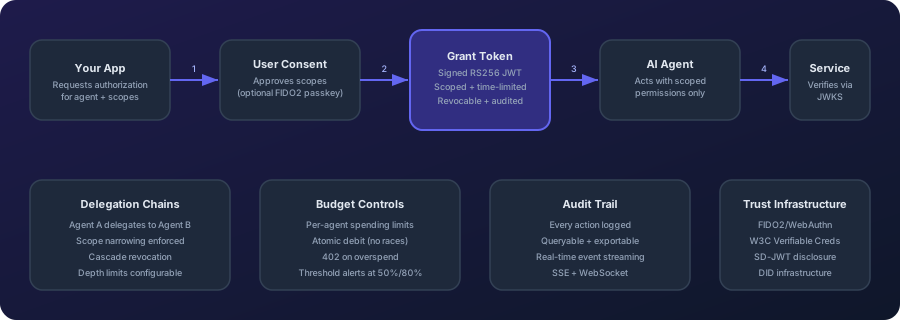
Install the Grantex SDK (npm install @grantex/sdk, pip install grantex, or go get github.com/mishrasanjeev/grantex-go) and configure with an API key. Register an agent, request authorization from a user (via Grantex consent UI), exchange the authorization code for a signed RS256 JWT grant token, then verify the token offline using published JWKS. For MCP servers, use the MCP Auth Server in managed or self-hosted mode with OAuth 2.1 + PKCE.
grantex_agent_register
Register a new AI agent with Grantex
grantex_agent_list
List all registered agents
grantex_agent_get
Get details for a specific agent
grantex_agent_update
Update an existing agent
grantex_agent_delete
Delete an agent
grantex_authorize
Start an authorization flow — returns a consent URL for the user to approve
grantex_token_exchange
Exchange authorization code for grant token
grantex_token_verify
Verify a grant token and inspect its claims
grantex_token_revoke
Revoke a grant token by its JTI
grantex_token_refresh
Refresh a grant token using a refresh token (single-use rotation)
grantex_grant_list
List grants with optional filters
grantex_grant_get
Get details for a specific grant
grantex_grant_revoke
Revoke an active grant
grantex_grant_delegate
Delegate a grant to a sub-agent with narrowed scopes
grantex_audit_log
Log an audit entry for an agent action
grantex_audit_list
List audit entries with optional filters
grantex_principal_session_create
Create a principal session for end-user permission management
Claude Desktop / Cursor
Paste into your MCP client config file to install this server.
{
    "mcpServers": {
        "grantex": {
            "grantex": {
                "command": "npx",
                "args": [
                    "-y",
                    "@grantex/mcp"
                ],
                "env": {
                    "GRANTEX_API_KEY": "your-api-key"
                }
            }
        }
    }
}McpServers
{
    "grantex": {
        "command": "npx",
        "args": [
            "-y",
            "@grantex/mcp"
        ],
        "env": {
            "GRANTEX_API_KEY": "your-api-key"
        }
    }
}
Grantex
Delegated Authorization Protocol for AI Agents
What OAuth 2.0 is to humans, Grantex is to agents.
<br/>











<br/>
Docs | Playground | Spec | Dashboard | IETF Draft
<br/>
<br/>
</div>
OACP Authority For Agentic Commerce
Grantex is the OACP protocol, trust, policy, artifact, verification, and adapter authority for agentic commerce. AgenticOrg owns buyer and seller AI-agent runtime, merchant self-service onboarding, Shopify connector runtime, future merchant connector setup intent, buyer sessions, channel bridges, OACP cache, and provider-owned capability verification.
Merchant systems such as Shopify, future WooCommerce/ERP sources, POS systems, and provider systems remain the source of record. Provider, bank, POS, and payment rails own mandate, payment, and in-store execution. Grantex signs and verifies artifacts; it is not a merchant connector runtime or a toll booth for every buyer and seller message.
flowchart LR
  merchant[Shopify, future ERP/WooCommerce, POS, provider systems] --> agentic[AgenticOrg buyer and seller runtime]
  agentic -->|redacted authority request| grantex[Grantex OACP authority]
  grantex -->|OACP artifacts or blockers| agentic
  agentic --> buyer[Buyer surfaces]
  agentic -->|capability check or handoff| provider[Pine Labs Plural/P3P, bank/POS/provider rails]
| Area | Current posture |
| --- | --- |
| Grantex C6Z authority route | Implemented at POST /v1/commerce/oacp/c6z/authority-requests for allowlisted AgenticOrg tenants. |
| Artifact families | 11 internal OACP families are issued or refused with source lineage, TTL, freshness, revocation posture, blocked capabilities, non-sensitive evidence refs, and signature metadata. |
| Protocol adapters | Schema.org, UCP-style, ACP-style, AP2-style, A2A, MCP, and OpenAPI mappings are compatibility mappings derived from OACP artifacts. |
| AgenticOrg runtime | Merchant self-service config, Seller onboarding, Shopify sync, future connector/provider intent capture, cache, buyer Q&A, bridges, and provider capability verification live in AgenticOrg. |
| Payment/order/POS execution | Outside OACP artifact authority. Provider, POS, and merchant systems must execute and confirm; agents must not invent success. |
| Historical Commerce V1 docs | Retained for context, but superseded for the AgenticOrg OACP runtime split. |
Start with the OACP runtime launch closure PRD, OACP authority overview, merchant self-service config boundary, truth inventory, AgenticOrg integration guide, POS bridge boundary, and operator runbook. The older Commerce V1 overview remains historical/contextual and should not be used to imply that Grantex owns AgenticOrg merchant connector runtime.
Current Development Snapshot
The latest repository changelog currently tops out at v0.3.11. Package versions are being reconciled across SDKs and adapters; use COMPATIBILITY.md as the current source of truth for package-specific versions.
- @grantex/gemma: Offline consent bundles and on-device verification examples
- MCP Auth Server: OAuth 2.1 + PKCE for MCP servers, managed and self-hosted modes
- @grantex/dpdp: DPDP Act 2023 and EU AI Act control mappings
- Trust Registry: Public DID verification registry — grantex.dev/registry
- grantex verify: Token inspection CLI — no account needed
- Anomaly Detection: 10 built-in rules, Slack/PagerDuty/Datadog integration
---
Try in 30 seconds
npm install @grantex/sdk
import { Grantex, verifyGrantToken } from '@grantex/sdk';
const gx = new Grantex({ apiKey: process.env.GRANTEX_API_KEY });
// 1. Authorize an agent for a user

const auth = await gx.authorize({ agentId: 'agent-123', userId: 'user-456', scopes: ['calendar:read', 'email:send'] });
// 2. Exchange code for a scoped, signed JWT

const { grantToken } = await gx.tokens.exchange({ code: auth.code, agentId: 'agent-123' });
// 3. Verify anywhere — offline, no callback needed

const grant = await verifyGrantToken(grantToken, { jwksUri: 'https://api.grantex.dev/.well-known/jwks.json' });

console.log(grant.scopes); // ['calendar:read', 'email:send']
pip install grantex             # Python
go get github.com/mishrasanjeev/grantex-go  # Go
npm install -g @grantex/cli     # CLI
> 29 packages across TypeScript, Python, and Go. Integrations for Anthropic SDK, LangChain, OpenAI Agents SDK, Google ADK, Strands Agents SDK, CrewAI, Vercel AI, AutoGen, MCP, Express.js, FastAPI, and Terraform. The changelog and GitHub Actions are the source of truth for current pass/fail status. Fully self-hostable. Apache 2.0.
---
The Problem
AI agents are booking travel, sending emails, deploying code, and spending money — on behalf of real humans. But:
- No scoping — agents get the same access as the key owner
- No consent — users never approve what the agent can do
- No per-agent identity — you know the key was used, but not which agent or why
- No revocation granularity — one agent misbehaves, rotate the key, kill everything
- No delegation control — Agent A calls Agent B? Copy-paste credentials
- No spending limits — an agent with a cloud API key can provision unlimited resources
OAuth solved this for web apps. IAM solved it for cloud. AI agents have nothing. Until now.
---
How It Works
---
Quickstart
1. Register your agent
import { Grantex } from '@grantex/sdk';
const grantex = new Grantex({ apiKey: process.env.GRANTEX_API_KEY });
const agent = await grantex.agents.register({

  name: 'travel-booker',

  description: 'Books flights and hotels on behalf of users',

  scopes: ['calendar:read', 'payments:initiate:max_500', 'email:send'],

});
console.log(agent.did);

// → did:grantex:ag_01HXYZ123abc...
2. Request authorization from a user
const authRequest = await grantex.authorize({
  agentId: agent.id,
  userId: 'user_abc123',       // your app's user identifier
  scopes: ['calendar:read', 'payments:initiate:max_500'],
  expiresIn: '24h',
  redirectUri: 'https://yourapp.com/auth/callback',
});
// Redirect user to authRequest.consentUrl

// Grantex handles the consent UI — plain language, mobile-first

console.log(authRequest.consentUrl);

// → https://consent.grantex.dev/authorize?req=eyJ...
3. Exchange the authorization code for a grant token
// After user approves, your redirectUri receives a code.
// Exchange it for a signed grant token (RS256 JWT):
const token = await grantex.tokens.exchange({
  code,                  // from the redirect callback
  agentId: agent.id,
});
console.log(token.grantToken);  // RS256 JWT — pass this to your agent

console.log(token.scopes);      // ['calendar:read', 'payments:initiate:max_500']

console.log(token.grantId);     // 'grnt_01HXYZ...'
4. Verify the token and use it
// Verify offline — no network call needed (uses published JWKS)
import { verifyGrantToken } from '@grantex/sdk';
const grant = await verifyGrantToken(token.grantToken, {

  jwksUri: 'https://api.grantex.dev/.well-known/jwks.json',

  requiredScopes: ['calendar:read'],

});

console.log(grant.principalId); // 'user_abc123'

console.log(grant.scopes);     // ['calendar:read', 'payments:initiate:max_500']
// Pass to your agent — it's now authorized

await travelAgent.run({ grantToken: token.grantToken, task: 'Book cheapest flight to Delhi on March 1' });
5. Log every action
// Inside your agent — one line, zero overhead
await grantex.audit.log({
  agentId: agent.id,
  grantId: token.grantId,
  action: 'payment.initiated',
  status: 'success',
  metadata: { amount: 420, currency: 'USD', merchant: 'Air India' },
});
6. Verify a token (service-side)
// In any service that receives agent requests — no Grantex account needed
import { verifyGrantToken } from '@grantex/sdk';
const grant = await verifyGrantToken(token, {

  jwksUri: 'https://grantex.dev/.well-known/jwks.json',  // or cache locally

  requiredScopes: ['payments:initiate'],

});

// Throws if token is expired, revoked, tampered, or missing required scopes
7. Give users control over their permissions
// Generate a short-lived link for the end-user to view & revoke agent access
const session = await grantex.principalSessions.create({
  principalId: 'user_abc123',
  expiresIn: '2h',
});
// Send session.dashboardUrl to the user via email, in-app notification, etc.
// The short-lived session token is carried in the URL fragment, not the query string.
---
Python SDK
```python
from grantex import Grantex, ExchangeTokenParams
client = Grantex(api_key=os.environ["GRANTEX_API_KEY"])
Sign in to leave a review
Use Google, GitHub, or an email account so ratings stay tied to real people.
No reviews posted yet.





