A Playwright-based Node.js tool that bypasses search engine anti-scraping mechanisms to execute Google searches. Local alternative to SERP APIs with MCP server integration.
Details
Author
web-agent-master
GitHub stars
611
Downloads
1,293
Categories
Search, AI, Web Scraping
Jump to
Local SERP API alternative, no paid API needed Advanced anti-bot detection bypass techniques Raw HTML retrieval for search result page analysis Page screenshot capture when saving HTML content MCP server integration for AI assistants like Claude Completely open source and free
Setting up with Highlight
This MCP is not yet compatible with Highlight’s one-click setup. However, you can still use it with Highlight by following these steps:
Install from source, build with pnpm build, then run google-search "search keywords" with optional flags (e.g., --limit, --timeout, --get-html). For MCP integration, configure your Claude Desktop’s claude_desktop_config.json with the command npx google-search-mcp (or alternative Windows configurations).
Claude Desktop / Cursor
Paste into your MCP client config file to install this server.
# Google Search Tool
A Playwright-based Node.js tool that bypasses search engine anti-scraping mechanisms to execute Google searches and extract results. It can be used directly as a command-line tool or as a Model Context Protocol (MCP) server to provide real-time search capabilities to AI assistants like Claude.
[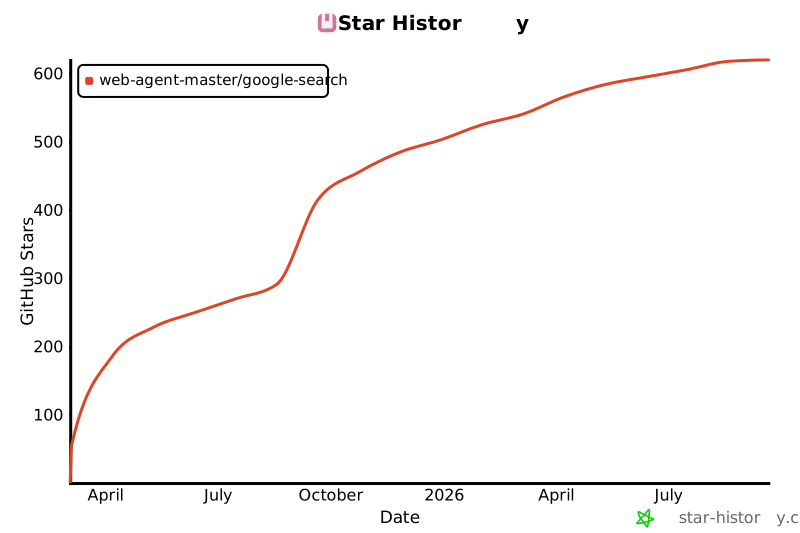](https://star-history.com/#web-agent-master/google-search&Date)
[中文文档](README.zh-CN.md)
## Key Features
- **Local SERP API Alternative**: No need to rely on paid search engine results API services, all searches are executed locally
- **Advanced Anti-Bot Detection Bypass Techniques**:
- Intelligent browser fingerprint management that simulates real user behavior
- Automatic saving and restoration of browser state to reduce verification frequency
- Smart headless/headed mode switching, automatically switching to headed mode when verification is needed
- Randomization of device and locale settings to reduce detection risk
- **Raw HTML Retrieval**: Ability to fetch the raw HTML of search result pages (with CSS and JavaScript removed) for analysis and debugging when Google's page structure changes
- **Page Screenshot**: Automatically captures and saves a full-page screenshot when saving HTML content
- **MCP Server Integration**: Provides real-time search capabilities to AI assistants like Claude without requiring additional API keys
- **Completely Open Source and Free**: All code is open source with no usage restrictions, freely customizable and extensible
## Technical Features
- Developed with TypeScript, providing type safety and better development experience
- Browser automation based on Playwright, supporting multiple browser engines
- Command-line parameter support for search keywords
- MCP server support for AI assistant integration
- Returns search results with title, link, and snippet
- Option to retrieve raw HTML of search result pages for analysis
- JSON format output
- Support for both headless and headed modes (for debugging)
- Detailed logging output
- Robust error handling
- Browser state saving and restoration to effectively avoid anti-bot detection
## Installation
```bash
# Install from source
git clone https://github.com/web-agent-master/google-search.git
cd google-search
# Install dependencies
npm install
# Or using yarn
yarn
# Or using pnpm
pnpm install
# Compile TypeScript code
npm run build
# Or using yarn
yarn build
# Or using pnpm
pnpm build
# Link package globally (required for MCP functionality)
npm link
# Or using yarn
yarn link
# Or using pnpm
pnpm link
```
### Windows Environment Notes
This tool has been specially adapted for Windows environments:
1. `.cmd` files are provided to ensure command-line tools work properly in Windows Command Prompt and PowerShell
2. Log files are stored in the system temporary directory instead of the Unix/Linux `/tmp` directory
3. Windows-specific process signal handling has been added to ensure proper server shutdown
4. Cross-platform file path handling is used to support Windows path separators
## Usage
### Command Line Tool
```bash
# Direct command line usage
google-search "search keywords"
# Using command line options
google-search --limit 5 --timeout 60000 --no-headless "search keywords"
# Or using npx
npx google-search-cli "search keywords"
# Run in development mode
pnpm dev "search keywords"
# Run in debug mode (showing browser interface)
pnpm debug "search keywords"
# Get raw HTML of search result page
google-search "search keywords" --get-html
# Get HTML and save to file
google-search "search keywords" --get-html --save-html
# Get HTML and save to specific file
google-search "search keywords" --get-html --save-html --html-output "./output.html"
```
#### Command Line Options
- `-l, --limit <number>`: Result count limit (default: 10)
- `-t, --timeout <number>`: Timeout in milliseconds (default: 60000)
- `--no-headless`: Show browser interface (for debugging)
- `--remote-debugging-port <number>`: Enable remote debugging port (default: 9222)
- `--state-file <path>`: Browser state file path (default: ./browser-state.json)
- `--no-save-state`: Don't save browser state
- `--get-html`: Retrieve raw HTML of search result page instead of parsing results
- `--save-html`: Save HTML to file (used with --get-html)
- `--html-output <path>`: Specify HTML output file path (used with --get-html and --save-html)
- `-V, --version`: Display version number
- `-h, --help`: Display help information
#### Output Example
```json
{
"query": "deepseek",
"results": [
{
"title": "DeepSeek",
"link": "https://www.deepseek.com/",
"snippet": "DeepSeek-R1 is now live and open source, rivaling OpenAI's Model o1. Available on web, app, and API. Click for details. Into ..."
},
{
"title": "DeepSeek",
"link": "https://www.deepseek.com/",
"snippet": "DeepSeek-R1 is now live and open source, rivaling OpenAI's Model o1. Available on web, app, and API. Click for details. Into ..."
},
{
"title": "deepseek-ai/DeepSeek-V3",
"link": "https://github.com/deepseek-ai/DeepSeek-V3",
"snippet": "We present DeepSeek-V3, a strong Mixture-of-Experts (MoE) language model with 671B total parameters with 37B activated for each token."
}
// More results...
]
}
```
#### HTML Output Example
When using the `--get-html` option, the output will include information about the HTML content:
```json
{
"query": "playwright automation",
"url": "https://www.google.com/",
"originalHtmlLength": 1291733,
"cleanedHtmlLength": 456789,
"htmlPreview": "<!DOCTYPE html><html itemscope=\"\" itemtype=\"http://schema.org/SearchResultsPage\" lang=\"zh-CN\"><head><meta charset=\"UTF-8\"><meta content=\"dark light\" name=\"color-scheme\"><meta content=\"origin\" name=\"referrer\">..."
}
```
If you also use the `--save-html` option, the output will include the path where the HTML was saved:
```json
{
"query": "playwright automation",
"url": "https://www.google.com/",
"originalHtmlLength": 1292241,
"cleanedHtmlLength": 458976,
"savedPath": "./google-search-html/playwright_automation-2025-04-06T03-30-06-852Z.html",
"screenshotPath": "./google-search-html/playwright_automation-2025-04-06T03-30-06-852Z.png",
"htmlPreview": "<!DOCTYPE html><html itemscope=\"\" itemtype=\"http://schema.org/SearchResultsPage\" lang=\"zh-CN\">..."
}
```
### MCP Server
This project provides Model Context Protocol (MCP) server functionality, allowing AI assistants like Claude to directly use Google search capabilities. MCP is an open protocol that enables AI assistants to safely access external tools and data.
```bash
# Build the project
pnpm build
```
#### Integration with Claude Desktop
1. Edit the Claude Desktop configuration file:
- Mac: `~/Library/Application Support/Claude/claude_desktop_config.json`
- Windows: `%APPDATA%\Claude\claude_desktop_config.json`
- Usually located at `C:\Users\username\AppData\Roaming\Claude\claude_desktop_config.json`
- You can access it directly by entering `%APPDATA%\Claude` in Windows Explorer address bar
2. Add server configuration and restart Claude
```json
{
"mcpServers": {
"google-search": {
"command": "npx",
"args": ["google-search-mcp"]
}
}
}
```
For Windows environments, you can also use the following configurations:
1. Using cmd.exe with npx:
```json
{
"mcpServers": {
"google-search": {
"command": "cmd.exe",
"args": ["/c", "npx", "google-search-mcp"]
}
}
}
```
2. Using node with full path (recommended if you encounter issues with the above method):
```json
{
"mcpServers": {
"google-search": {
"command": "node",
"args": ["C:/path/to/your/google-search/dist/src/mcp-server.js"]
}
}
}
```
Note: For the second method, you must replace `C:/path/to/your/google-search` with the actual full path to where you installed the google-search package.
After integration, you can directly use search functionality in Claude, such as "search for the latest AI research".
## Project Structure
```
google-search/
├── package.json # Project configuration and dependencies
├── tsconfig.json # TypeScript configuration
├── src/
│ ├── index.ts # Entry file (command line parsing and main logic)
│ ├── search.ts # Search functionality implementation (Playwright browser automation)
│ ├── mcp-server.ts # MCP server implementation
│ └── types.ts # Type definitions (interfaces and type declarations)
├── dist/ # Compiled JavaScript files
├── bin/ # Executable files
│ └── google-search # Command line entry script
├── README.md # Project documentation
└── .gitignore # Git ignore file
```
## Technology Stack
- **TypeScript**: Development language, providing type safety and better development experience
- **Node.js**: Runtime environment for executing JavaScript/TypeScript code
- **Playwright**: For browser automation, supporting multiple browsers
- **Commander**: For parsing command line arguments and generating help information
- **Model Context Protocol (MCP)**: Open protocol for AI assistant integration
- **MCP SDK**: Development toolkit for implementing MCP servers
- **Zod**: Schema definition library for validation and type safety
- **pnpm**: Efficient package management tool, saving disk space and installation time
## Development Guide
All commands can be run in the project root directory:
```bash
# Install dependencies
pnpm install
# Install Playwright browsers
pnpm run postinstall
# Compile TypeScript code
pnpm build
# Clean compiled output
pnpm clean
```
### CLI Development
```bash
# Run in development mode
pnpm dev "search keywords"
# Run in debug mode (showing browser interface)
pnpm debug "search keywords"
# Run compiled code
pnpm start "search keywords"
# Test search functionality
pnpm test
```
### MCP Server Development
```bash
# Run MCP server in development mode
pnpm mcp
# Run compiled MCP server
pnpm mcp:build
```
## Error Handling
The tool has built-in robust error handling mechanisms:
- Friendly error messages when browser startup fails
- Automatic error status return for network connection issues
- Detailed logs for search result parsing failures
- Graceful exit and useful information return in timeout situations
## Notes
### General Notes
- This tool is for learning and research purposes only
- Please comply with Google's terms of service and policies
- Do not send requests too frequently to avoid being blocked by Google
- Some regions may require a proxy to access Google
- Playwright needs to install browsers, which will be automatically downloaded on first use
### State Files
- State files contain browser cookies and storage data, please keep them secure
- Using state files can effectively avoid Google's anti-bot detection and improve search success rate
### MCP Server
- MCP server requires Node.js v16 or higher
- When using the MCP server, please ensure Claude Desktop is updated to the latest version
- When configuring Claude Desktop, use absolute paths to the MCP server file
### Windows-Specific Notes
- In Windows environments, you may need administrator privileges to install Playwright browsers for the first time
- If you encounter permission issues, try running Command Prompt or PowerShell as administrator
- Windows Firewall may block Playwright browser network connections; allow access when prompted
- Browser state files are saved by default in the user's home directory as `.google-search-browser-state.json`
- Log files are stored in the system temporary directory under the `google-search-logs` folder
## Comparison with Commercial SERP APIs
Compared to paid search engine results API services (such as SerpAPI), this project offers the following advantages:
- **Completely Free**: No API call fees
- **Local Execution**: All searches are executed locally, no dependency on third-party services
- **Privacy Protection**: Search queries are not recorded by third parties
- **Customizability**: Fully open source, can be modified and extended as needed
- **No Usage Limits**: Not subject to API call count or frequency limitations
- **MCP Integration**: Native support for integration with AI assistants like Claude
No reviews yet — be the first
Sign in to leave a review
Use Google, GitHub, or an email account so ratings stay tied to real people.
Social sign-in isn’t configured yet. You can still create an account with email below, or ask an admin to add Google/GitHub/Discord OAuth credentials.
A collection of reference implementations for the Model Context Protocol (MCP), demonstrating secure and controlled access to tools and data sources for Large…
🔥 1Panel is a modern, open-source VPS control panel — and the only one with native AI agent support. Run Ollama models, deploy OpenClaw agents, and manage your…












