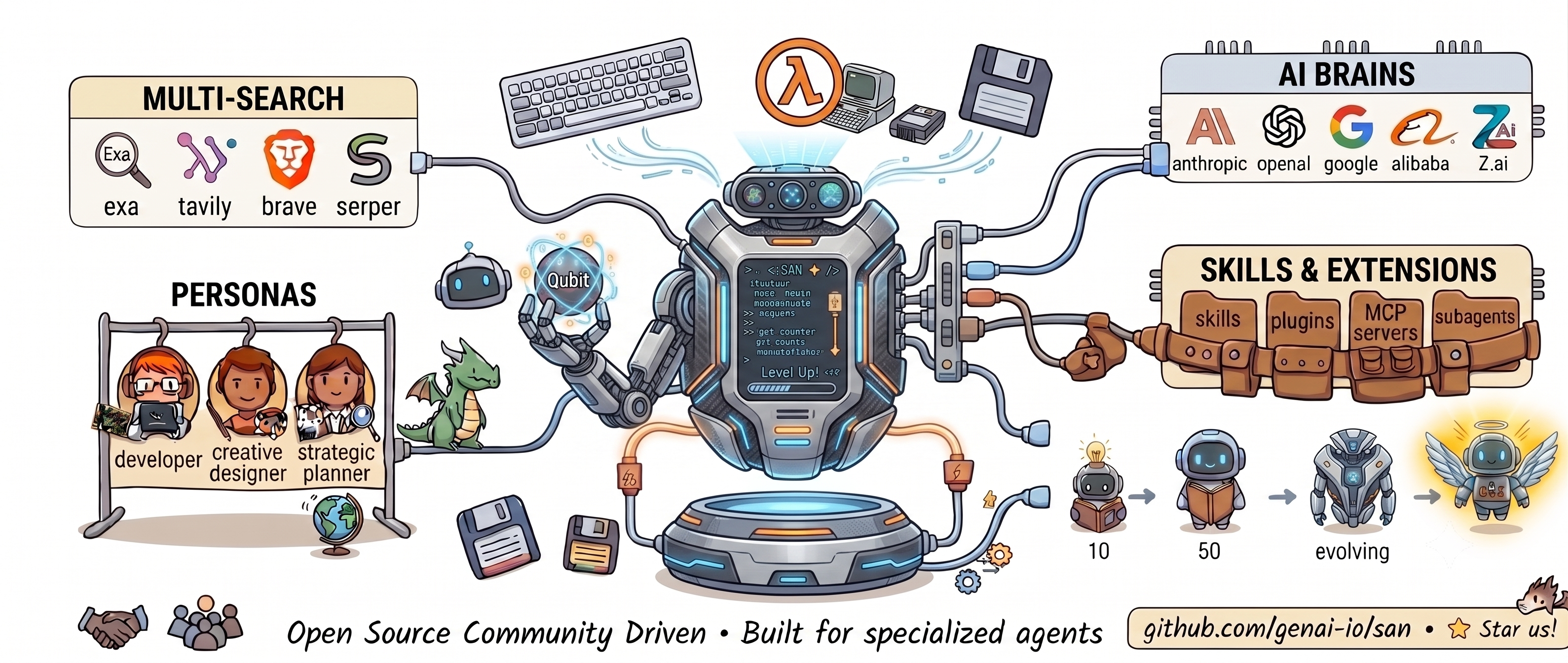

GenPilot
About
Fast, open agent harness for the terminal. One ~12 MB Go binary — bring any model and extensions into a single inspectable loop that learns as you work.
Details
- Author
- yanmxa
- GitHub stars
- 66
- Downloads
- 191
- Categories
- Other
Jump to
- ~12 MB single binary, ~0.01s cold start, zero runtime dependencies.
- Supports multiple models: Anthropic, OpenAI, Google, DeepSeek, and more.
- Pluggable search backends: Exa, Tavily, Brave, Serper.
- Personas, extensions, self-learning, and permission-gated loop.
- Sessions with auto-save, resume, fork, and per-message cost tracking.
- Inspector web UI for transcript replay and debugging.
Install GenPilot via a one-line script (curl on macOS/Linux, PowerShell on Windows). Use the san command for interactive sessions, one-shot queries, or print mode; switch models with /model, search with /search, and toggle permission modes with Shift+Tab.
<div align="center">
<h1>< SAN ✦ /></h1>
<p><strong>A fast, open agent harness for the terminal</strong></p>
<p>
<a href="https://github.com/genai-io/san/releases">
<a href="https://goreportcard.com/report/github.com/genai-io/san"></a>
<a href="https://genai-io.github.io/san/">
<a href="https://genai-io.github.io/san/getting-started.html">
<a href="docs/index.md">
<a href="https://www.producthunt.com/products/san?launch=san">
<a href="LICENSE">
</p>
<p>
<strong>English</strong> · <a href="README.zh.md">简体中文</a>
</p>
<p>
<a href="https://genai-io.github.io/san/intro.html">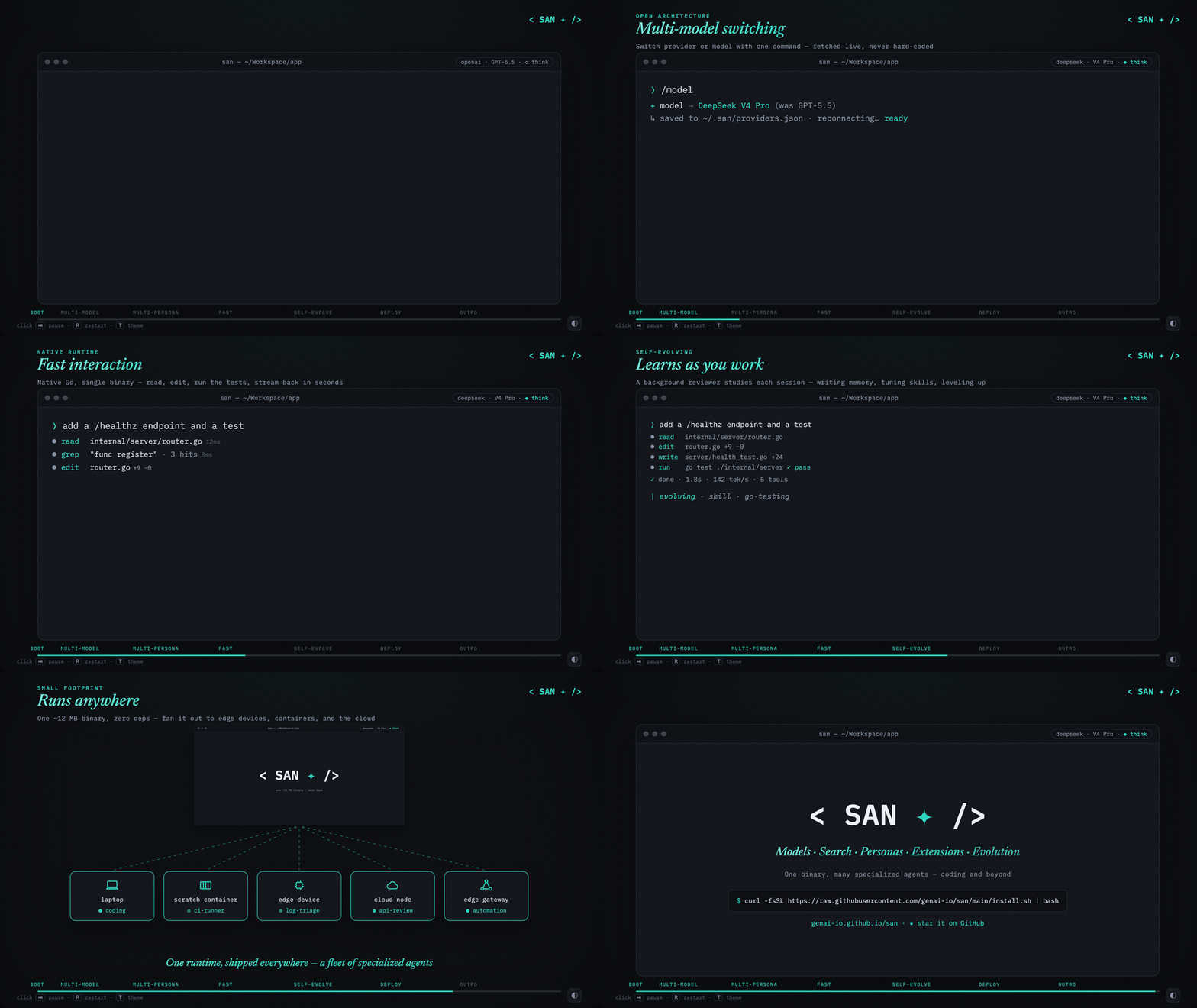 </a>
</a>
</p>
<sub><a href="https://genai-io.github.io/san/intro.html">Open the full-quality intro ↗</a></sub>
<p>
⚡ <strong>~0.01s</strong> cold start · 📦 <strong>~12 MB</strong> single binary · 🪶 <strong>zero</strong> runtime deps
</p>
</div>
San is an open-source agent harness for the terminal — one native Go binary
that wraps any model in a fast, inspectable, permission-gated loop. Bring your own
model and extensions; there's no Node.js or Python runtime to install.
Why San
- Fast — a ~12 MB single binary, ~0.01s cold start, no separate runtime.
- Open — swap the model, search, and tools at runtime; bring your own persona profiles and extensions.
- Harness — tune policies, not just parts: customize autopilot to cut human-in-the-loop, and self-learning — memory and skills it grows and refines — as you work.
<sub>The name — San, written 三 ("three") and drawn ☰. From the Dao De Jing, 三生万物 — "three begets the ten-thousand things": one runtime that becomes any agent, running a three-step loop (reason → act → observe). The command stays san.</sub>
Features
<details>
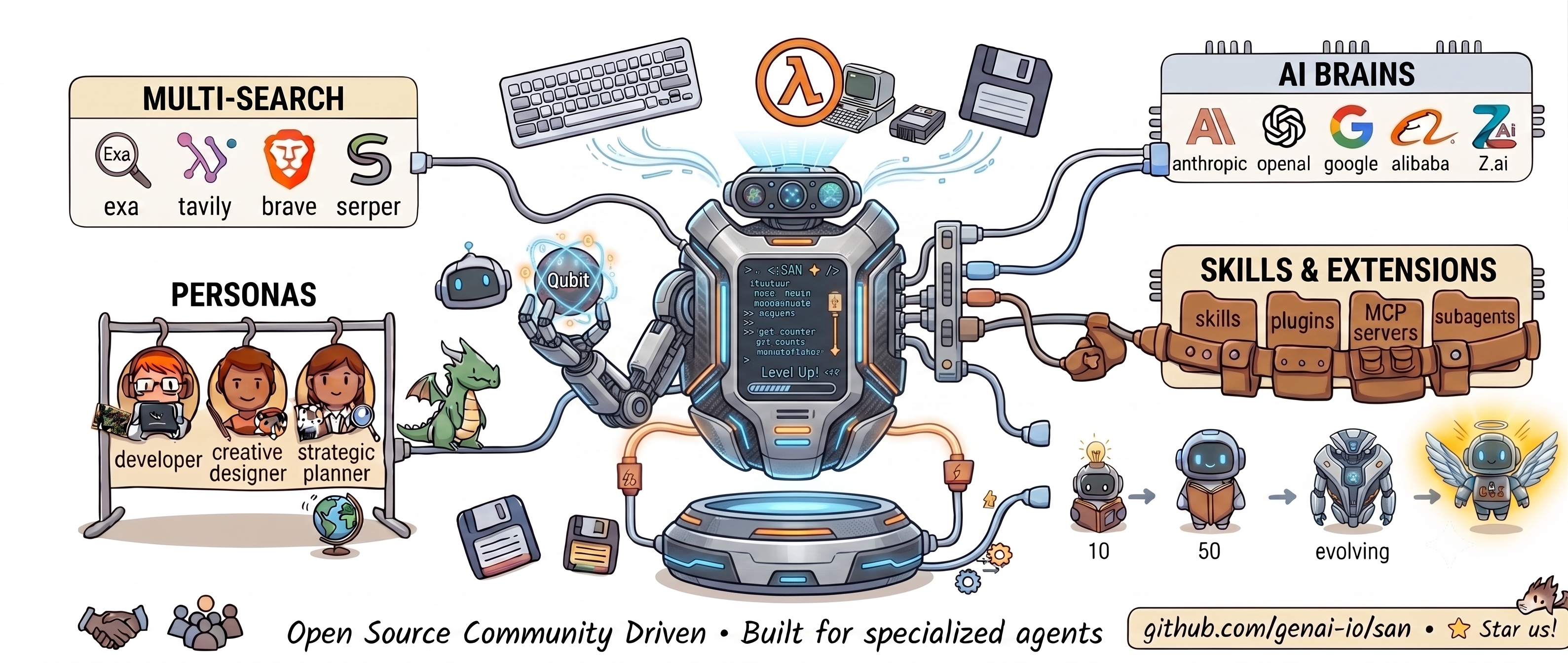
<summary><b>Open architecture</b> · overview diagram</summary>
<div align="center">
</div>
</details>
- Models — Anthropic, OpenAI, Google, DeepSeek, Moonshot, Alibaba, MiniMax, Z.ai (GLM), SenseNova, Mimo, Volcengine (Ark), Ollama (local), Agnes-AI. /model
- Search — Exa, Tavily, Brave, Serper. /search
- Personas & extensions — reusable profiles, plus Claude Code skills, plugins, MCP servers, hooks, and sandboxed subagents — all run unmodified. /persona
- Self-learning — opt-in; distills durable memory and reusable skills with configurable cadence and caps. (Level 1; deeper levels on the way.)
Engineering
- Runs anywhere — one static binary for Windows, macOS, and Linux; the same file runs on a laptop, an edge device, or a scratch container (footprint · benchmark).
- Permissions — three modes (ask · auto-accept · autopilot) toggled with Shift+Tab; subagents inherit the gates (details).
- Sessions — auto-save, resume (--continue / --resume), fork (/fork), auto-compaction (/compact), and per-message cost tracking.
- Inspector — replay transcripts and inspect system prompts in a local web UI (san inspector).
- Plus event-driven subagent coordination, TUI themes, and prompt prediction.
Installation
macOS / Linux
curl -fsSL https://raw.githubusercontent.com/genai-io/san/main/install.sh | bash
Windows (PowerShell)
irm https://raw.githubusercontent.com/genai-io/san/main/install.ps1 | iex
Re-run to upgrade.
<details>
<summary><b>Other methods</b></summary>
Uninstall
# macOS / Linux
curl -fsSL https://raw.githubusercontent.com/genai-io/san/main/install.sh | bash -s uninstall
# Windows (PowerShell)
& ([scriptblock]::Create((irm https://raw.githubusercontent.com/genai-io/san/main/install.ps1))) uninstall
Go Install
go install github.com/genai-io/san/cmd/san@latest
Build from Source
git clone https://github.com/genai-io/san.git
cd san
go build -o san ./cmd/san
mkdir -p ~/.local/bin && mv san ~/.local/bin/
</details>
Usage
san                              # interactive
san "explain this function"      # one-shot
san -p "do something"            # print mode (no TUI), pipe-friendly
san --continue                   # resume the latest session
san --resume                     # pick a past session to resume
Subcommands (run san <command> --help for the full list)
san inspector                    # session transcript viewer
san agent run --type Explore --prompt "..."   # run a headless agent
san plugin <list|install|enable|...>          # manage plugins
san mcp <add|list|remove|...>                 # manage MCP servers
| What | How |
|---|---|
| Pick / switch model | /model — saved to ~/.san/providers.json |
| Cycle thinking budget | Ctrl+T or /think (levels vary by provider) |
| Toggle permission mode | Shift+Tab (ask · auto-accept · autopilot) |
| Search / persona / memory | /search · /persona · /memory |
| Skills / agents / tools | /skills · /agents · /tools |
| Plugins / MCP / config | /plugin · /mcp · /config |
| Session / loop / misc | /fork · /compact · /loop · /glob · /init · /clear |
| All slash commands | /help |
| Send · newline · stop | Enter · Alt+Enter · Esc |
| Expand tool · cancel · exit | Ctrl+O · Ctrl+C · Ctrl+D |
For API keys, set the matching env var (see Credentials below) or paste when prompted on first launch. Full walkthrough: docs/guides/getting-started.md.
Configuration
Config lives in ~/.san/ (user) and <project>/.san/ (project, overrides user). A SAN.md or CLAUDE.md at the project root is auto-loaded into the system prompt.
<details>
<summary><b>Credentials</b></summary>
| Service | Variable |
|:--------|:---------|
| Anthropic (Claude) | ANTHROPIC_API_KEY or Vertex AI |
| OpenAI (GPT, o-series, Codex) | OPENAI_API_KEY, or a ChatGPT subscription (sign in via /model) |
| Google (Gemini) | GOOGLE_API_KEY |
| DeepSeek (DeepSeek V4) | DEEPSEEK_API_KEY |
| Moonshot (Kimi) | MOONSHOT_API_KEY |
| Alibaba (Qwen) | DASHSCOPE_API_KEY |
| MiniMax | MINIMAX_API_KEY |
| Z.ai (GLM / GLM Coding Plan) | BIGMODEL_API_KEY |
| SenseNova | SENSENOVA_API_KEY |
| Mimo | MIMO_API_KEY |
| Volcengine (Ark) | VOLCENGINE_API_KEY |
| Ollama (local) | OLLAMA_BASE_URL (default http://localhost:11434/v1) |
| Agnes-AI | AGNESAI_API_KEY |
| Exa search | _none_ (default) |
| Tavily search | TAVILY_API_KEY |
| Brave search | BRAVE_API_KEY |
| Serper search | SERPER_API_KEY |
</details>
<details>
<summary><b>Directory layout</b></summary>
User-level (~/.san/):
providers.json    # Provider connections and current model
settings.json     # Permissions, hooks, env, active persona
skills.json       # Skill states
personas/         # Persona bundles: system prompt parts, skills, settings
skills/           # Custom skill definitions
agents/           # Custom agent definitions
commands/         # Custom slash commands
plugins/          # Installed plugins
projects/         # Session transcripts + indexes
Project-level (.san/):
settings.json       # Permissions, hooks, disabled tools
mcp.json            # MCP server definitions (team shared)
mcp.local.json      # MCP server definitions (personal, git-ignored)
personas/           # Project-scoped persona bundles (override user-level)
agents/.md         # Subagent definitions
skills//SKILL.md   # Skills
commands/*.md       # Slash commands
plugins/            # Project-level plugins
plugins-local/      # Local plugins (git-ignored)
</details>
Benchmark: San vs Claude Code
Compared with Claude Code v2.1.112 on Apple Silicon, same model (claude-sonnet-4-6):
| Metric | San | Claude Code | Advantage |
|--------|---------|-------------|-----------|
| Download size | 12 MB | 63 MB (+ Node.js 112 MB) | 5x smaller |
| Disk footprint | 38 MB | 175 MB | 4.6x smaller |
| Startup time | ~0.01s | ~0.20s | 20x faster |
| Startup memory | ~32 MB | ~189 MB | 5.8x less |
| Simple task | ~2.4s / 39 MB | ~10.4s / 286 MB | 4.3x faster, 7.3x less memory |
| Tool-use task | ~3.3s / 39 MB | ~26.0s / 285 MB | 7.9x faster, 7.2x less memory |
Both tools have comparable features (hooks, skills, plugins, session, MCP, etc.). The performance gap comes from Go's native compilation, minimal architecture design, and lean prompt engineering — vs Node.js V8/JIT/GC runtime overhead.
See full details: docs/operations/benchmark.md
Documentation
- Documentation Index — map of architecture, features, operations, and references
- Architecture — architecture entrypoint and reading order
- Package Map — package ownership and dependency boundaries
- Personas — bundled system prompt, skills, agents, and settings
- System Prompt — Slot model, persona, skill/agent injection
- Subagents · Skills · Plugins · MCP
- Hooks · Permissions · Tasks
- Inspector — local web UI for transcript replay and debugging
- Per-package design under docs/packages/ — start at Package Index
Related Projects
- Claude Code — Anthropic's AI coding assistant
- Aider — AI pair programming in terminal
- Continue — Open-source AI code assistant
Community
Two ways in — WeChat for the Chinese community, Slack for everyone else:
<div align="center">
<table>
<tr>
<td align="center" width="50%">
 <br>
<br>
<sub>关注公众号「极客外传」· 回复 <code>san</code> 或 <code>三</code> 入群</sub>
</td>
<td align="center" width="50%">
 <br>
<br>
<sub>Scan or <a href="https://join.slack.com/t/sanaico/shared_invite/zt-3zvfr8v6f-dchFpvpufY7fKA7tG7lhIg">join our Slack</a></sub>
</td>
</tr>
</table>
</div>
Contributing
Contributions welcome! See CONTRIBUTING.md for guidelines.
License
Apache License 2.0 - see LICENSE for details.
Sign in to leave a review
Use Google, GitHub, or an email account so ratings stay tied to real people.
No reviews posted yet.





