
BigGo
About
Integrates with BigGo's price comparison APIs to search products across multiple e-commerce platforms, track price histories, and compare specifications for shopping assistance and product research.
Details
- Author
- funmula-corp
- Repository
- Funmula-Corp/BigGo-MCP-Server
- GitHub stars
- 18
- Downloads
- 344
- License
- MIT License
- Categories
- Productivity, Developer Tools, Design, AI, Search, API, Infrastructure, Other
- Tags
- #ecommerce, #data-analysis
Jump to
> Supports stdio and SSE transports
- Product Discovery: Search for products across multiple e-commerce platforms (Amazon, Aliexpress, Ebay, Taobao, Shopee ... etc.)
- Price History Tracking: Track product price history by supplying product url or related terms.
- Spec Comparison [Disabled on versions >= v0.1.28]: Compare and find products based on their specifications, from basic infos to more complex technical specs.

Setting up with Highlight
This MCP is not yet compatible with Highlight’s one-click setup. However, you can still use it with Highlight by following these steps:
- Download and install Highlight from highlightai.com/download
- Navigate to the plugins tab and select "Add Custom Plugin"
-
Configure the plugin with the settings below
Plugin Name
BigGoCommand (node, npx, python, etc.)uvxArguments-
Argument 1
BigGo-MCP-Server@latest
Environment-
BIGGO_MCP_SERVER_REGION
REGION -
BIGGO_MCP_SERVER_CLIENT_ID
CLIENT_ID -
BIGGO_MCP_SERVER_CLIENT_SECRET
CLIENT_SECRET
Please refer to the README for specific instructions on how to obtain API keys or other required environment variables.
-
Argument 1
- Enable "Start Automatically" if you want the plugin to start when Highlight launches





From the repository
{
"mcpServers": {
"biggo-mcp-server": {
"command": "uvx",
"args": [ "BigGo-MCP-Server@latest"],
"env": {
"BIGGO_MCP_SERVER_CLIENT_ID": "CLIENT_ID",
"BIGGO_MCP_SERVER_CLIENT_SECRET": "CLIENT_SECRET",
"BIGGO_MCP_SERVER_REGION": "REGION"
}
}
}
}
BigGo-MCP-Server@VERSION, ex: BigGo-MCP-Server@0.1.1
| Variable | Description | Default | Choices |
| -------------------------------- | ------------------------- | ------- | ------------------------------------------ |
| BIGGO_MCP_SERVER_CLIENT_ID | Client ID | None | Required for specification search |
| BIGGO_MCP_SERVER_CLIENT_SECRET | Client Secret | None | Required for specification search |
| BIGGO_MCP_SERVER_REGION | Region for product search | TW | US, TW, JP, HK, SG, MY, IN, PH, TH, VN, ID |
| BIGGO_MCP_SERVER_SSE_PORT | Port for SSE server | 9876 | Any available port number |
| BIGGO_MCP_SERVER_SERVER_TYPE | Server transport type | stdio | stdio, sse |
> Default SSE URL: http://localhost:9876/sse
For Product Discovery related:
Look for Nike running shoes
For Price History Tracking related:
Show me the price history of this product: https://some-product-url
For Spec Comparison related:
Find me phones with 16GB RAM and 1TB storage
Please show me diving watches that can withstand the most water pressure
product_search
Product search with BigGo search api.
price_history_graph
Link that visualizes product price history.
price_history_with_history_id
Uses history IDs from product search results to track price history.
price_history_with_url
Tracks price history using product URLs.
spec_indexes
Lists available Elasticsearch indexes for product specifications.
spec_mapping
Shows Elasticsearch index mapping with example documents.
spec_search
Query product specifications from Elasticsearch.
get_current_region
Get the current region.
- product_search: Product search with BigGo search api
- price_history_graph: Link that visualizes product price history
- price_history_with_history_id: Uses history IDs from product search results
- price_history_with_url: Tracks price history using product URLs
- spec_indexes: Lists available Elasticsearch indexes for product specifications
- spec_mapping: Shows Elasticsearch index mapping with example documents
- spec_search: Query product specifications from Elasticsearch
- get_current_region: Get the current region
Claude Desktop / Cursor
Paste into your MCP client config file to install this server.
{
    "mcpServers": {
        "biggo": {
            "env": {
                "BIGGO_MCP_SERVER_REGION": "REGION",
                "BIGGO_MCP_SERVER_CLIENT_ID": "CLIENT_ID",
                "BIGGO_MCP_SERVER_CLIENT_SECRET": "CLIENT_SECRET"
            },
            "args": [
                "BigGo-MCP-Server@latest"
            ],
            "command": "uvx"
        }
    }
}Linux
{
"env": {
"BIGGO_MCP_SERVER_REGION": "REGION",
"BIGGO_MCP_SERVER_CLIENT_ID": "CLIENT_ID",
"BIGGO_MCP_SERVER_CLIENT_SECRET": "CLIENT_SECRET"
},
"args": [
"BigGo-MCP-Server@latest"
],
"command": "uvx"
}Macos
{
"env": {
"BIGGO_MCP_SERVER_REGION": "REGION",
"BIGGO_MCP_SERVER_CLIENT_ID": "CLIENT_ID",
"BIGGO_MCP_SERVER_CLIENT_SECRET": "CLIENT_SECRET"
},
"args": [
"BigGo-MCP-Server@latest"
],
"command": "uvx"
}Windows
{
"env": {
"BIGGO_MCP_SERVER_REGION": "REGION",
"BIGGO_MCP_SERVER_CLIENT_ID": "CLIENT_ID",
"BIGGO_MCP_SERVER_CLIENT_SECRET": "CLIENT_SECRET"
},
"args": [
"BigGo-MCP-Server@latest"
],
"command": "uvx"
}BigGo MCP Server



Introduction
BigGo MCP Server utilizes APIs from BigGo, a professional price comparison website.Features
> Supportsstdio and SSE transports
- Product Discovery: Search for products across multiple e-commerce platforms (Amazon, Aliexpress, Ebay, Taobao, Shopee ... etc.)
- Price History Tracking: Track product price history by supplying product url or related terms.
- Spec Comparison [Disabled on versions >= v0.1.28]: Compare and find products based on their specifications, from basic infos to more complex technical specs.
Installation
Prerequisites
1. Python >= 3.10 2. uvx package manager ( Included with uv ) 3. BigGo Certification (client_id and client_secret) for specification search.
How to obtain BigGo certification?
- Register a BigGo account if you don't have one. - Go to BigGo Certification Page - Click "Generate certification" button -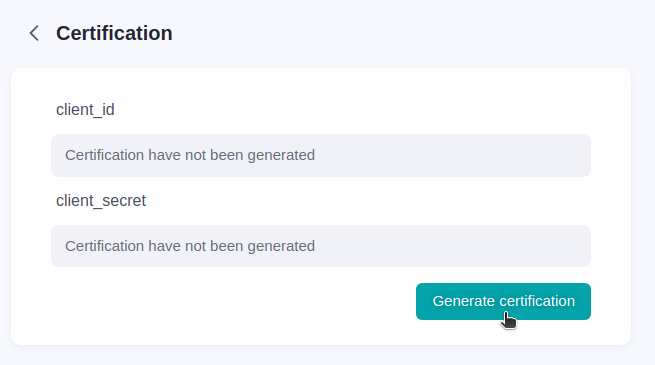 - Copy the
 client_id and client_secret
- Use them in the MCP Server configuration (BIGGO_MCP_SERVER_CLIENT_ID and BIGGO_MCP_SERVER_CLIENT_SECRET)
Installation Config
{
  "mcpServers": {
    "biggo-mcp-server": {
      "command": "uvx",
      "args": [ "BigGo-MCP-Server@latest"],
      "env": {
        "BIGGO_MCP_SERVER_CLIENT_ID": "CLIENT_ID",
        "BIGGO_MCP_SERVER_CLIENT_SECRET": "CLIENT_SECRET",
        "BIGGO_MCP_SERVER_REGION": "REGION"
      }
    }
  }
}
BigGo-MCP-Server@VERSION, ex: BigGo-MCP-Server@0.1.1
Environment Variables
| Variable | Description | Default | Choices | | -------------------------------- | ------------------------- | ------- | ------------------------------------------ | |BIGGO_MCP_SERVER_CLIENT_ID | Client ID | None | Required for specification search |
| BIGGO_MCP_SERVER_CLIENT_SECRET | Client Secret | None | Required for specification search |
| BIGGO_MCP_SERVER_REGION | Region for product search | TW | US, TW, JP, HK, SG, MY, IN, PH, TH, VN, ID |
| BIGGO_MCP_SERVER_SSE_PORT | Port for SSE server | 9876 | Any available port number |
| BIGGO_MCP_SERVER_SERVER_TYPE | Server transport type | stdio | stdio, sse |
> Default SSE URL: http://localhost:9876/sse
Available Tools
-product_search: Product search with BigGo search api
- price_history_graph: Link that visualizes product price history
- price_history_with_history_id: Uses history IDs from product search results
- price_history_with_url: Tracks price history using product URLs
- spec_indexes: Lists available Elasticsearch indexes for product specifications
- spec_mapping: Shows Elasticsearch index mapping with example documents
- spec_search: Query product specifications from Elasticsearch
- get_current_region: Get the current region
FAQ
How to trigger tool usage?
For Product Discovery related:Look for Nike running shoes
Show me the price history of this product: https://some-product-url
Find me phones with 16GB RAM and 1TB storage
Please show me diving watches that can withstand the most water pressure
Build
See build.md for more details.License
This project is licensed under the MIT License. See the LICENSE file for details.Sign in to leave a review
Use Google, GitHub, or an email account so ratings stay tied to real people.
No reviews posted yet.





