
FOCUS DATA MCP Server
About
Enables AI assistants to query data from DataFocus using natural language.
Details
- Author
- focussearch
- Repository
- FocusSearch/focus_mcp_data
- GitHub stars
- 3
- Downloads
- 341
- License
- Apache License 2.0
- Categories
- Database, Other, AI, Design, Search, Infrastructure
- Tags
- #sql-agent, #data-analysis, #analytics
Jump to
- Register on DataFocus to open an application space, and import (directly connect to) the data tables to be analyzed.
- Select Datafocus data table initialization dialogue
- Natural language data acquisition results

Setting up with Highlight
This MCP is not yet compatible with Highlight’s one-click setup. However, you can still use it with Highlight by following these steps:
- Download and install Highlight from highlightai.com/download
- Navigate to the plugins tab and select "Add Custom Plugin"
-
Configure the plugin with the settings below
Plugin Name
FOCUS DATA MCP ServerCommand (node, npx, python, etc.)javaArguments-
Argument 1
-jar -
Argument 2
path/to/focus_mcp_data/focus_mcp_data.jar
Please refer to the README for specific instructions on how to obtain API keys or other required environment variables.
-
Argument 1
- Enable "Start Automatically" if you want the plugin to start when Highlight launches





From the repository
1. Clone this repository:
git clone https://github.com/FocusSearch/focus_mcp_data.git
cd focus_mcp_data
2. Build the server:
gradle clean
gradle bootJar
The jar path: build/libs/focus_mcp_data.jar
Add the server to your MCP settings file (usually located
at ~/AppData/Roaming/Code/User/globalStorage/saoudrizwan.claude-dev/settings/cline_mcp_settings.json):
{
"mcpServers": {
"focus_mcp_data": {
"command": "java",
"args": [
"-jar",
"path/to/focus_mcp_data/focus_mcp_data.jar"
],
"autoApprove": [
"tableList",
"gptText2DataInit",
"gptText2DataData"
]
}
}
}
tableList
Get table list in DataFocus. Parameters: name (optional string), bearer (required string)
gptText2DataInit
Initialize dialogue. Parameters: names (required array of strings), bearer (required string), language (optional string ['english','chinese'])
gptText2DataData
Query data results. Parameters: chatId (required string), input (required string), bearer (required string)
Claude Desktop / Cursor
Paste into your MCP client config file to install this server.
{
    "mcpServers": {
        "focus data mcp server": {
            "cwd": "string (optional)",
            "env": {},
            "args": [
                "-jar",
                "path/to/focus_mcp_data/focus_mcp_data.jar"
            ],
            "shell": false,
            "command": "java"
        }
    }
}Linux
{
"cwd": "string (optional)",
"env": [],
"args": [
"-jar",
"path/to/focus_mcp_data/focus_mcp_data.jar"
],
"shell": false,
"command": "java"
}Macos
{
"cwd": "string (optional)",
"env": [],
"args": [
"-jar",
"path/to/focus_mcp_data/focus_mcp_data.jar"
],
"shell": false,
"command": "java"
}Windows
{
"cwd": "string (optional)",
"env": [],
"args": [
"-jar",
"path/to/focus_mcp_data/focus_mcp_data.jar"
],
"shell": false,
"command": "java"
}FOCUS DATA MCP Server [中文]
A Model Context Protocol (MCP) server enables artificial intelligence assistants to directly query data results. Users can obtain data results from DataFocus using natural language.
Features
- Register on DataFocus to open an application space, and import (directly connect to) the data tables to be analyzed.
- Select Datafocus data table initialization dialogue
- Natural language data acquisition results
Prerequisites
- jdk 23 or higher. Download jdk
- gradle 8.12 or higher. Download gradle
- register Datafocus to obtain bearer token:
1. Register an account in Datafocus
2. Create an application
3. Enter the application
4. Admin -> Interface authentication -> Bearer Token -> New Bearer Token

Installation
1. Clone this repository:
git clone https://github.com/FocusSearch/focus_mcp_data.git
cd focus_mcp_data
2. Build the server:
gradle clean
gradle bootJar
The jar path: build/libs/focus_mcp_data.jar
MCP Configuration
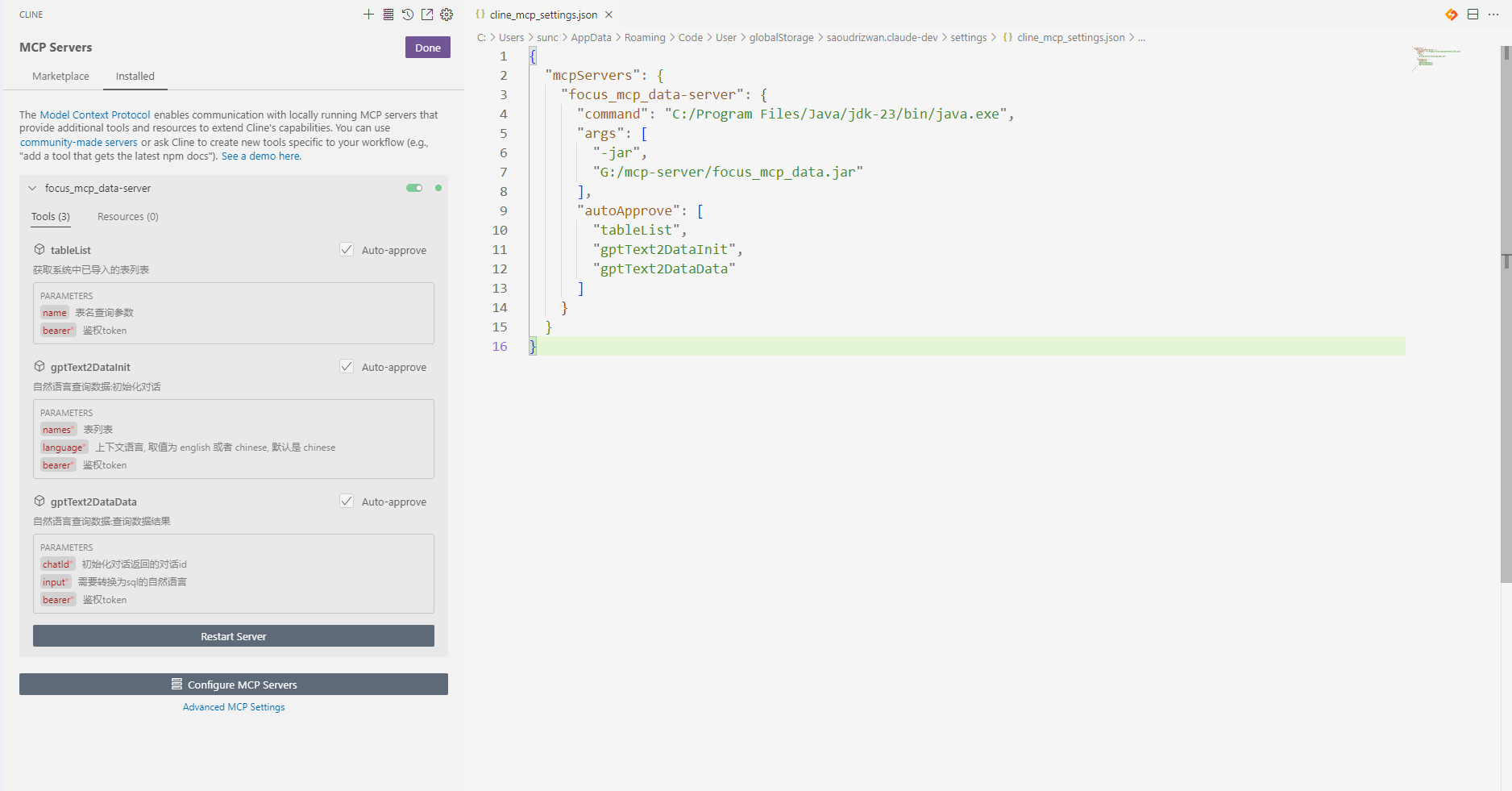
Add the server to your MCP settings file (usually located
at ~/AppData/Roaming/Code/User/globalStorage/saoudrizwan.claude-dev/settings/cline_mcp_settings.json):
{
  "mcpServers": {
    "focus_mcp_data": {
      "command": "java",
      "args": [
        "-jar",
        "path/to/focus_mcp_data/focus_mcp_data.jar"
      ],
      "autoApprove": [
        "tableList",
        "gptText2DataInit",
        "gptText2DataData"
      ]
    }
  }
}
Available Tools
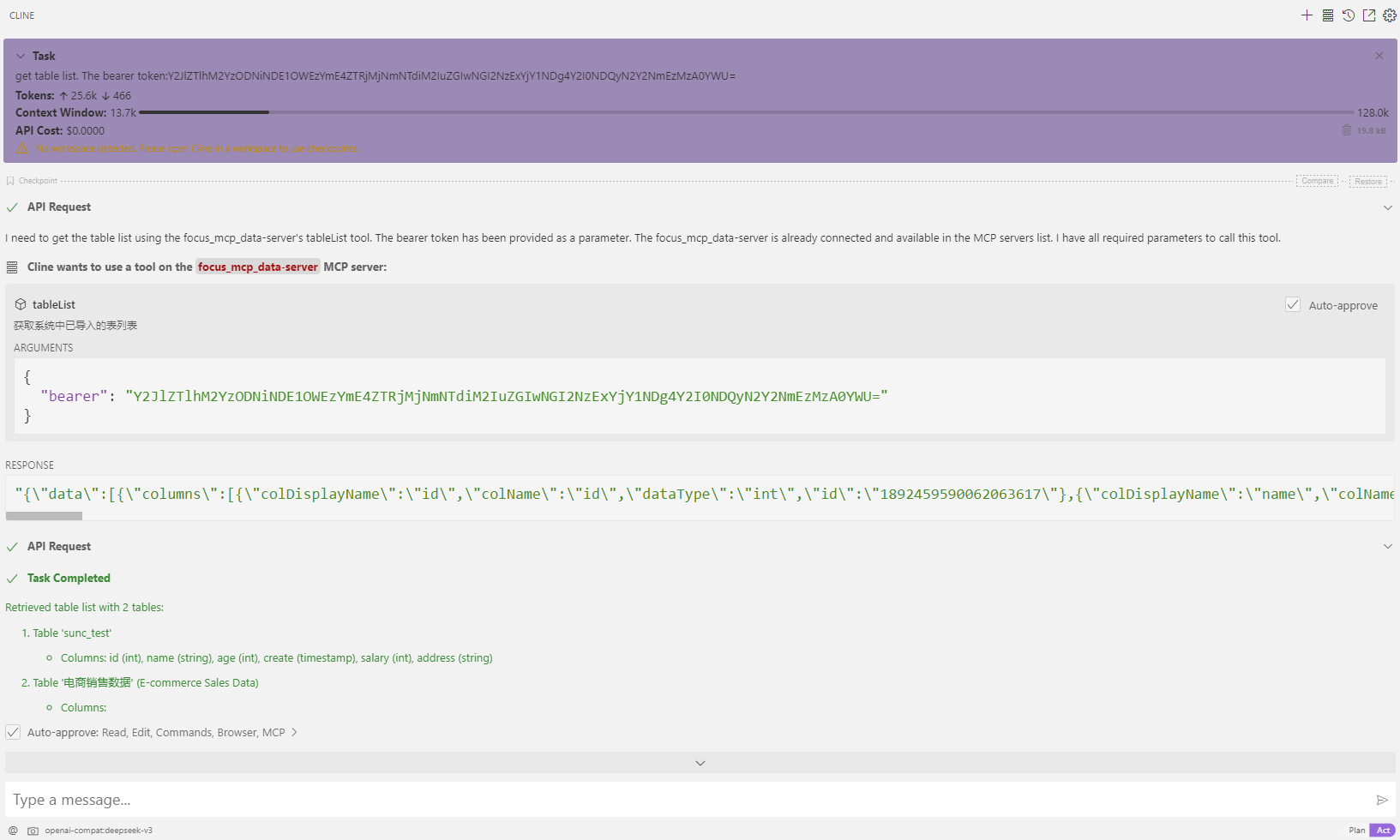
1. tableList
Get table list in datafocus.
Parameters:
- name (optional): table name to filter
- bearer (required): bearer token
Example:
{
  "name": "test",
  "bearer": "ZTllYzAzZjM2YzA3NDA0ZGE3ZjguNDJhNDjNGU4NzkyYjY1OTY0YzUxYWU5NmU="
}
2. gptText2DataInit
Initialize dialogue.
Parameters:
- names (required): selected table names
- bearer (required): bearer token
- language (optional): language ['english','chinese']
Example:
{
  "names": [
    "test1",
    "test2"
  ],
  "bearer": "ZTllYzAzZjM2YzA3NDA0ZGE3ZjguNDJhNDjNGU4NzkyYjY1OTY0YzUxYWU5NmU="
}
3. gptText2DataData
Query data results.
Parameters:
- chatId (required): chat id
- input (required): Natural language
- bearer (required): bearer token
Example:
{
  "chatId": "03975af5de4b4562938a985403f206d4",
  "input": "max(age)",
  "bearer": "ZTllYzAzZjM2YzA3NDA0ZGE3ZjguNDJhNDjNGU4NzkyYjY1OTY0YzUxYWU5NmU="
}
Response Format
All tools return responses in the following format:
{
  "errCode": 0,
  "exception": "",
  "msgParams": null,
  "promptMsg": null,
  "success": true,
  "data": {
  }
}
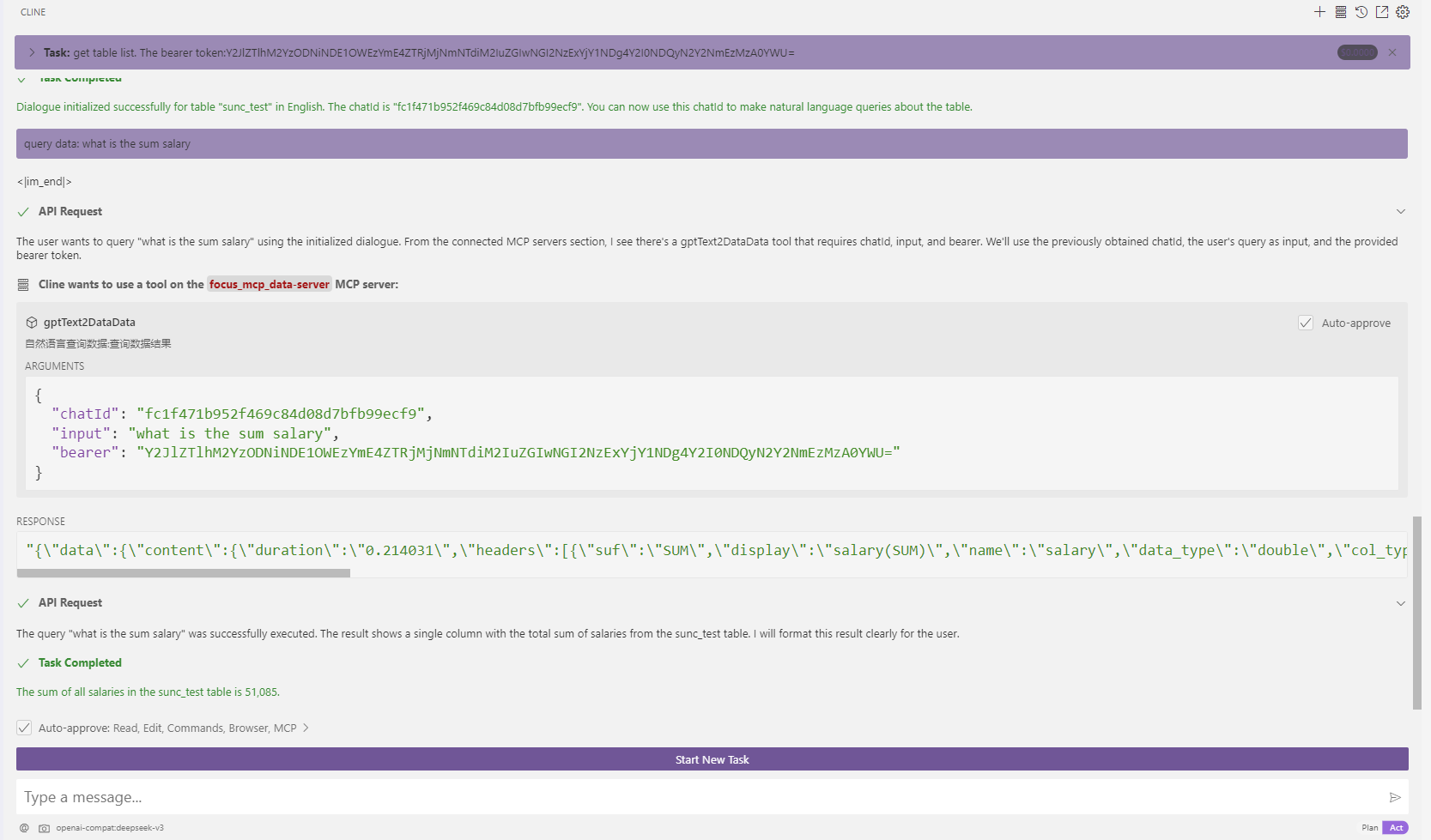
Visual Studio Code Cline Sample
1. vsCode install cline plugin
2. mcp server config
3. use
1. get table list
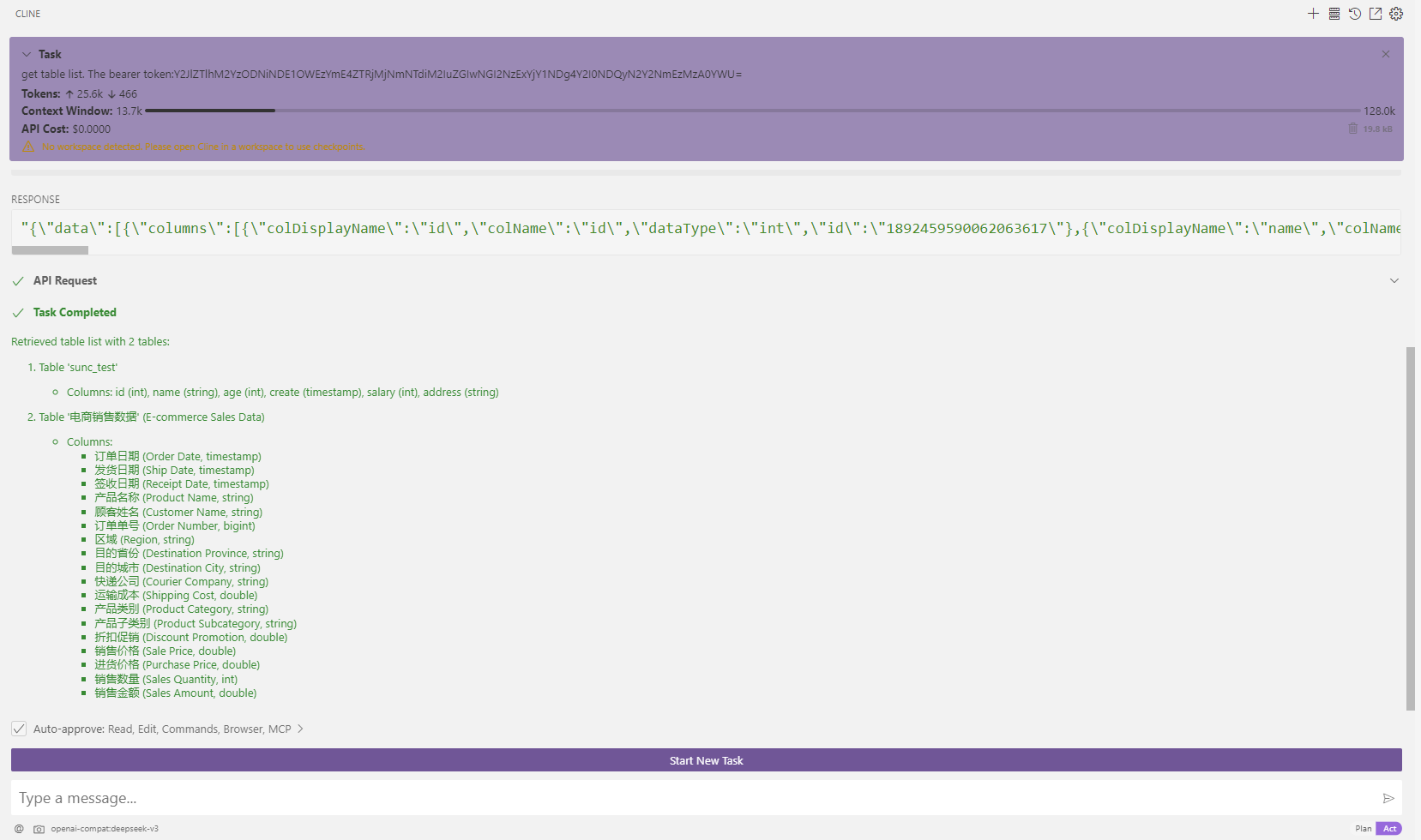
2. Initialize dialogue
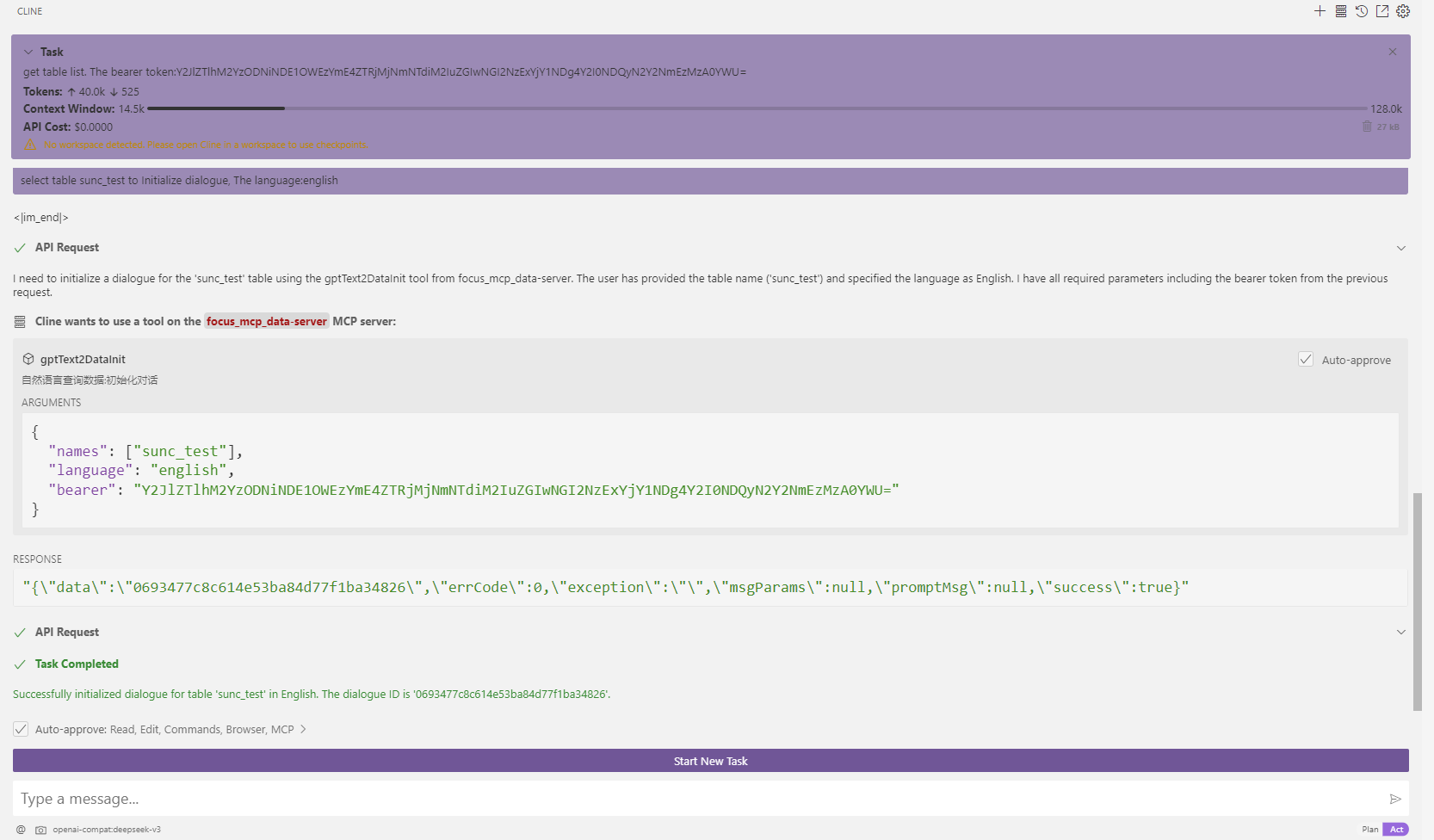
3. query: what is the sum salary
Contact:
https://discord.gg/mFa3yeq9
Sign in to leave a review
Use Google, GitHub, or an email account so ratings stay tied to real people.
No reviews posted yet.





