
MCP Server for FHIR
About
An MCP server built in C# for querying and managing FHIR healthcare data.
Details
- Author
- quiquemz
- GitHub stars
- 3
- Downloads
- 196
- Categories
- Other
Jump to
- Full CRUD operations (Create, Read, Update, Delete) on FHIR resources.
- Search resources with criteria and count matching results.
- Execute FHIR transactions and retrieve resource history.
- Query FHIR server capabilities (version, formats, resource types).
- Supports R4 FHIR implementations.

Setting up with Highlight
This MCP is not yet compatible with Highlight’s one-click setup. However, you can still use it with Highlight by following these steps:
- Download and install Highlight from highlightai.com/download
- Navigate to the plugins tab and select "Add Custom Plugin"
-
Configure the plugin with the settings below
Plugin Name
MCP Server for FHIRCommand (node, npx, python, etc.)Please refer to the README for specific instructions on how to obtain API keys or other required environment variables.
- Enable "Start Automatically" if you want the plugin to start when Highlight launches





From the repository
Set up a local FHIR server environment by running docker compose up -d --wait to start HAPI FHIR and Azure FHIR servers. Configure the server in VS Code by updating the .vscode/mcp.json file with your local path to the .csproj. Invoke the tools (e.g., CreateResource, SearchResources) through an MCP client like Claude.
Claude Desktop / Cursor
Paste into your MCP client config file to install this server.
{
    "mcpServers": {
        "mcp server for fhir": {
            "fhir-mcp-server": {
                "command": "docker",
                "args": [
                    "compose",
                    "up",
                    "-d",
                    "--wait"
                ]
            }
        }
    }
}McpServers
{
    "fhir-mcp-server": {
        "command": "docker",
        "args": [
            "compose",
            "up",
            "-d",
            "--wait"
        ]
    }
}
MCP Server for FHIR
A C#-based Model Context Protocol (MCP) server that enables interaction with FHIR servers. This server is primarily
designed for developers working with FHIR R4 implementations.
Demo
This demo highlights some of the MCP server's when combined with Claude client:
1. Generating synthetic data
2. Searching for patients and related resources
3. Visualizing the results through a graphical representation.
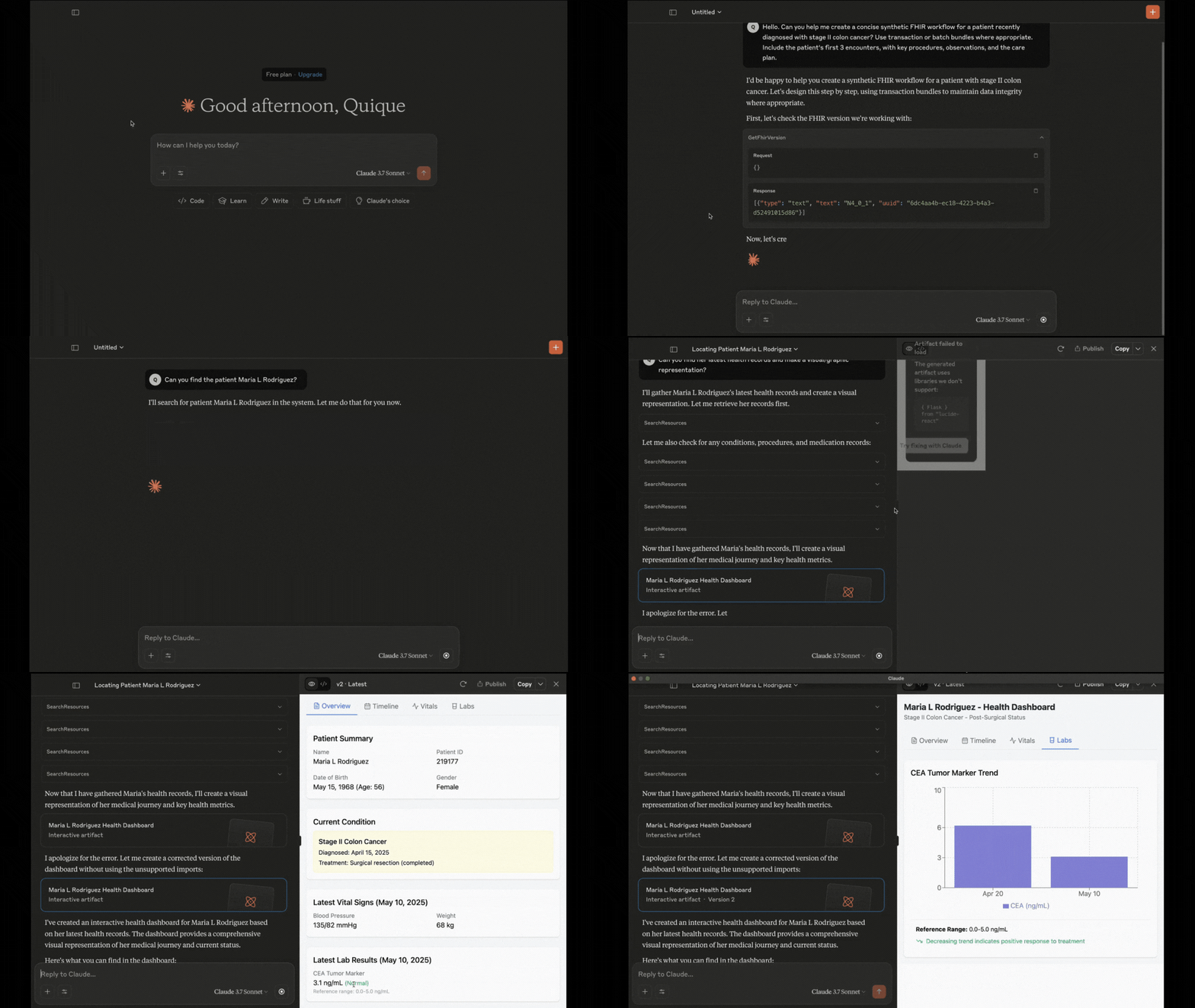
Here is a link of the full demo: MCP Server Demo
Tools
CRUD, Search and Other Helpful Operations
- CreateResource: Create a new resource on the server.
- ReadResource: Retrieve a resource by its ID.
- UpdateResource: Update an existing resource.
- DeleteResource: Delete a resource from the server.
- SearchResources: Search for resources based on specific criteria.
- FindNumberOfResources: Count the number of resources that match a search criteria.
- GetResourceHistory: Retrieve the history of a resource.
- ExecuteTransaction: Execute a FHIR transaction.
FHIR Server Capability Statements
- GetFhirVersion: Get the FHIR version of the server.
- ListSupportedFormats: List the formats supported by the server.
- ListResourceTypes: List the resource types supported by the server.
- ListResourceCapabilities: List the capabilities of a specific resource type.
Getting Started
Use MCP Server in VS Code
For detailed setup information
follow the official documentation.
You can use the configuration file located under .vscode/mcp.json. You need to update your path to
point to the .csproj in you local machine.
Setting Up Infrastructure
To set up a local FHIR server environment, run:
docker compose up -d --wait
This will start two FHIR servers using Docker Compose:
1. HAPI FHIR Server - Comes pre-loaded with sample data
2. Azure FHIR Server - Starts with an empty database
Sign in to leave a review
Use Google, GitHub, or an email account so ratings stay tied to real people.
No reviews posted yet.





