
IDA Pro
About
Provides a bridge to IDA Pro for reverse engineering and binary analysis tasks through a remote control plugin that enables script execution, string/function analysis, and disassembly via HTTP endpoints
Details
- Author
- fdrechsler
- Repository
- fdrechsler/mcp-server-idapro
- GitHub stars
- 46
- Downloads
- 943
- License
- MIT License
- Categories
- Developer Tools, Security, Productivity, AI, Search, Infrastructure, Project Management, Other
- Tags
- #integration
Jump to
- Execute Python scripts in IDA Pro from AI assistants
- Retrieve information about binaries:
- Strings
- Imports
- Exports
- Functions
- Advanced binary analysis capabilities:
- Search for immediate values in instructions
- Search for text strings in the binary
- Search for specific byte sequences
- Get disassembly for address ranges
- Automate IDA Pro operations through a standardized interface
- Secure communication between components

Setting up with Highlight
This MCP is not yet compatible with Highlight’s one-click setup. However, you can still use it with Highlight by following these steps:
- Download and install Highlight from highlightai.com/download
- Navigate to the plugins tab and select "Add Custom Plugin"
-
Configure the plugin with the settings below
Plugin Name
IDA ProCommand (node, npx, python, etc.)nodeArguments-
Argument 1
path/to/ida-server/dist/index.js
Please refer to the README for specific instructions on how to obtain API keys or other required environment variables.
-
Argument 1
- Enable "Start Automatically" if you want the plugin to start when Highlight launches





From the repository
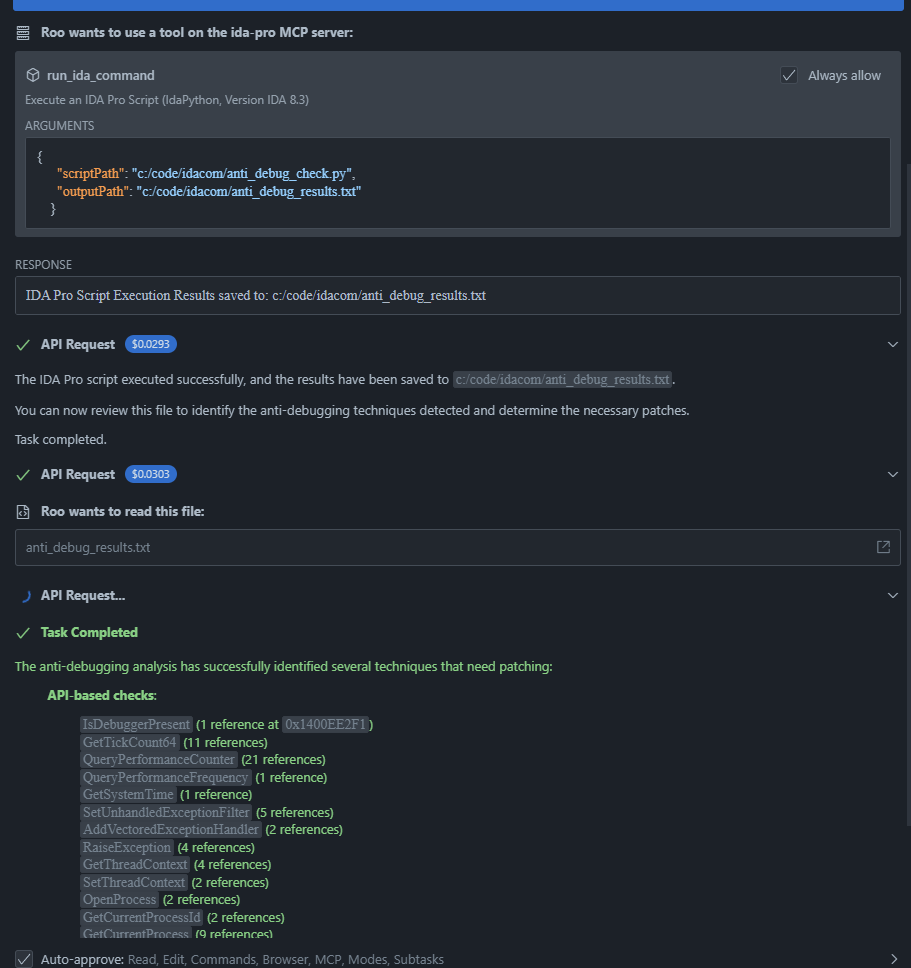
Once installed and configured, the MCP server provides the following tool to AI assistants:
curl -X POST -H "Content-Type: application/json" -d '{"script":"print(\"Script initialization...\")"}' http://127.0.0.1:9045/api/execute
{"success": true, "output": "Script initialization...\n"}
1. Copy ida_remote_server.py to your IDA Pro plugins directory:
- Windows: %PROGRAMFILES%\IDA Pro\plugins
- macOS: /Applications/IDA Pro.app/Contents/MacOS/plugins
- Linux: /opt/idapro/plugins
2. Start IDA Pro and open a binary file.
3. The plugin will automatically start an HTTP server on 127.0.0.1:9045.
1. Clone this repository:
git clone <repository-url>
cd ida-server
2. Install dependencies:
npm install
3. Build the project:
npm run build
4. Configure the MCP server in your AI assistant's MCP settings file:
{
"mcpServers": {
"ida-pro": {
"command": "node",
"args": ["path/to/ida-server/dist/index.js"],
"env": {}
}
}
}
npm test
run_ida_command
Executes an IDA Pro Python script. Parameters: scriptPath (required): Absolute path to the script file to execute, outputPath (optional): Absolute path to save the script's output to.
search_immediate_value
Searches for immediate values in the binary's instructions. Parameters: value (required): Value to search for (number or string), radix (optional): Radix for number conversion (default: 16), startAddress (optional): Start address for search, endAddress (optional): End address for search.
search_text
Searches for text strings in the binary. Parameters: text (required): Text to search for, caseSensitive (optional): Whether the search is case sensitive (default: false), startAddress (optional): Start address for search, endAddress (optional): End address for search.
search_byte_sequence
Searches for a specific byte sequence in the binary. Parameters: bytes (required): Byte sequence to search for (e.g., '90 90 90' for three NOPs), startAddress (optional): Start address for search, endAddress (optional): End address for search.
get_disassembly
Gets disassembly for an address range. Parameters: startAddress (required): Start address for disassembly, endAddress (optional): End address for disassembly, count (optional): Number of instructions to disassemble.
get_functions
Gets the list of functions from the binary. Parameters: None required.
get_exports
Gets the list of exports from the binary. Parameters: None required.
get_strings
Gets the list of strings from the binary. Parameters: None required.
Claude Desktop / Cursor
Paste into your MCP client config file to install this server.
{
    "mcpServers": {
        "ida pro": {
            "env": {},
            "args": [
                "path/to/ida-server/dist/index.js"
            ],
            "command": "node"
        }
    }
}Linux
{
"env": [],
"args": [
"path/to/ida-server/dist/index.js"
],
"command": "node"
}Macos
{
"env": [],
"args": [
"path/to/ida-server/dist/index.js"
],
"command": "node"
}Windows
{
"env": [],
"args": [
"path/to/ida-server/dist/index.js"
],
"command": "node"
}IDA Pro MCP Server
A Model Context Protocol (MCP) server that enables AI assistants to interact with IDA Pro for reverse engineering and binary analysis tasks.
<a href="https://glama.ai/mcp/servers/@fdrechsler/mcp-server-idapro">
</a>
Overview
This project provides a bridge between AI assistants and IDA Pro, a popular disassembler and debugger used for reverse engineering software. It consists of three main components:
1. IDA Pro Remote Control Plugin (ida_remote_server.py): An IDA Pro plugin that creates an HTTP server to remotely control IDA Pro functions.
2. IDA Remote Client (idaremoteclient.ts): A TypeScript client for interacting with the IDA Pro Remote Control Server.
3. MCP Server (index.ts): A Model Context Protocol server that exposes IDA Pro functionality to AI assistants.
Features
- Execute Python scripts in IDA Pro from AI assistants
- Retrieve information about binaries:
- Strings
- Imports
- Exports
- Functions
- Advanced binary analysis capabilities:
- Search for immediate values in instructions
- Search for text strings in the binary
- Search for specific byte sequences
- Get disassembly for address ranges
- Automate IDA Pro operations through a standardized interface
- Secure communication between components
Prerequisites
- IDA Pro 8.3 or later
- Node.js 18 or later
- TypeScript
Example usage ida_remote_server.py
curl -X POST -H "Content-Type: application/json" -d '{"script":"print(\"Script initialization...\")"}' http://127.0.0.1:9045/api/execute
{"success": true, "output": "Script initialization...\n"}
Example usage MCP Server
Installation
1. Install the IDA Pro Remote Control Plugin
1. Copy ida_remote_server.py to your IDA Pro plugins directory:
- Windows: %PROGRAMFILES%\IDA Pro\plugins
- macOS: /Applications/IDA Pro.app/Contents/MacOS/plugins
- Linux: /opt/idapro/plugins
2. Start IDA Pro and open a binary file.
3. The plugin will automatically start an HTTP server on 127.0.0.1:9045.
2. Install the MCP Server
1. Clone this repository:
   git clone <repository-url>

   cd ida-server
2. Install dependencies:
npm install
3. Build the project:
npm run build
4. Configure the MCP server in your AI assistant's MCP settings file:
   {

     "mcpServers": {

       "ida-pro": {

         "command": "node",

         "args": ["path/to/ida-server/dist/index.js"],

         "env": {}

       }

     }

   }
Usage
Once installed and configured, the MCP server provides the following tool to AI assistants:
run_ida_command
Executes an IDA Pro Python script.
Parameters:
- scriptPath (required): Absolute path to the script file to execute
- outputPath (optional): Absolute path to save the script's output to
Example:
```python
Sign in to leave a review
Use Google, GitHub, or an email account so ratings stay tied to real people.
No reviews posted yet.





