
F2C MCP Server
About
A Model Context Protocol server that converts Figma designs to code using the F2C engine. It enables AI-powered coding tools (like Cursor) to access Figma design context, fetch node data, download images, and generate pixel-perfect HTML/CSS, React, or Tailwind CSS code.
Details
- Author
- f2c-ai
- GitHub stars
- 408
- Downloads
- 711
- Categories
- Other
Jump to
- Pixel-perfect HTML/CSS generation from Figma designs
- Multi‑framework support (React, CSS Modules, Tailwind CSS)
- Integrates Figma design context for AI tool compatibility
- Converts design nodes via Figma file URLs
- Automates downloading Figma images to local assets

Setting up with Highlight
This MCP is not yet compatible with Highlight’s one-click setup. However, you can still use it with Highlight by following these steps:
- Download and install Highlight from highlightai.com/download
- Navigate to the plugins tab and select "Add Custom Plugin"
-
Configure the plugin with the settings below
Plugin Name
F2C MCP ServerCommand (node, npx, python, etc.)Please refer to the README for specific instructions on how to obtain API keys or other required environment variables.
- Enable "Start Automatically" if you want the plugin to start when Highlight launches





From the repository
Configure the server in an MCP-supported IDE (e.g., Cursor, Trae, or Comate AI IDE). In the IDE chat, paste a Figma node link (copied from Figma’s layer panel) and enter your requirements such as fetching node data, downloading images, or converting to code.
get_code
Generate UI code for a given node or the currently selected node in the Figma desktop app. Use the nodeId parameter to specify a node id. If no node id is provided, the currently selected node will be used. If a URL is provided, extract the node id from the URL, for example, if given the URL https://figma.com/design/:fileKey/:fileName?node-id=1-2, the extracted nodeId would be 1:2.
get_image
Generate an image for a given node or the currently selected node in the Figma desktop app. Use the nodeId parameter to specify a node id. If no node id is provided, the currently selected node will be used. If a URL is provided, extract the node id from the URL, for example, if given the URL https://figma.com/design/:fileKey/:fileName?node-id=1-2, the extracted nodeId would be 1:2. Also export Figma design images for visual verification and design fidelity validation. Essential for comparing generated code output against original designs, ensuring pixel-perfect implementation and catching visual discrepancies during the design-to-code process.
Claude Desktop / Cursor
Paste into your MCP client config file to install this server.
{
    "mcpServers": {
        "f2c mcp server": {
            "f2c-mcp": {
                "command": "npx",
                "args": [
                    "-y",
                    "@f2c/mcp"
                ],
                "env": {
                    "personalToken": ""
                }
            }
        }
    }
}McpServers
{
    "f2c-mcp": {
        "command": "npx",
        "args": [
            "-y",
            "@f2c/mcp"
        ],
        "env": {
            "personalToken": ""
        }
    }
}
F2C MCP Server
!MCP Server[npm-version-src]: https://img.shields.io/npm/v/@f2c/mcp?style=flat&colorA=18181B&colorB=F0DB4F
[npm-version-href]: https://npmjs.com/package/@f2c/mcp
[npm-downloads-src]: https://img.shields.io/npm/dm/@f2c/mcp?style=flat&colorA=18181B&colorB=F0DB4F
[npm-downloads-href]: https://npmjs.com/package/@f2c/mcp
[github-src]: https://img.shields.io/badge/github-@f2c/mcp-blue?style=flat&colorA=18181B&colorB=F0DB4F
[github-href]: https://github.com/f2c-ai/f2c-mcp
[node-src]: https://img.shields.io/node/v/@f2c/mcp?style=flat&colorA=18181B&colorB=F0DB4F
[node-href]: https://nodejs.org/en/about/previous-releases
> Due to Figma REST API rate limits, if you are affected, please switch to @f2c/mcp-plugin for normal operation.
English | 简体中文
A Model Context Protocol server for Figma Design to Code using F2C.
<a href="https://glama.ai/mcp/servers/@f2c-ai/f2c-mcp">
</a>
Features
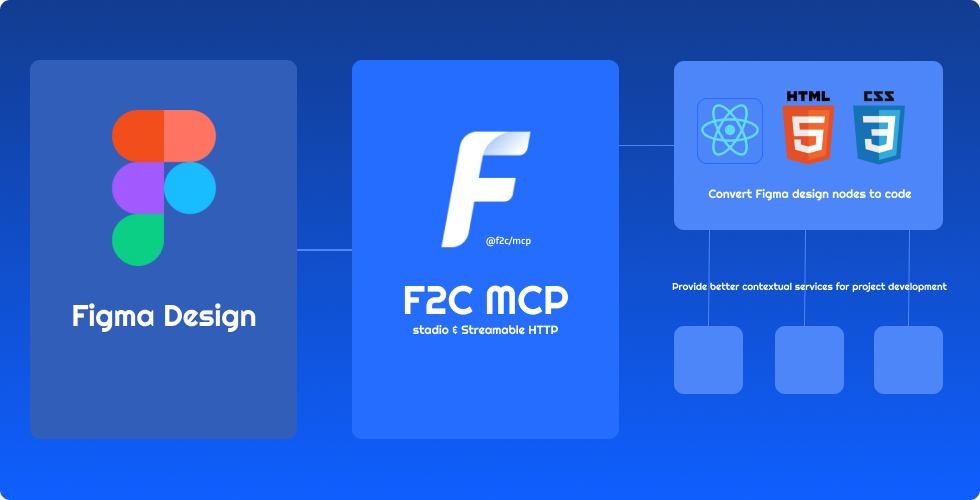
- 🎨 Pixel-Perfect HTML/CSS:F2C converts Figma designs to pixel-perfect HTML/CSS with precision.
- ⚛️ Multi-Framework Support:F2C generates React, CSS Modules, and Tailwind CSS code for fast development.
- 🧠 Figma Design Context:F2C integrates design context, ensuring compatibility with AI tools like Cursor.
- 🔗 Figma File URL Parsing:F2C converts design nodes via Figma URLs, streamlining workflows.
- 🖼️ Remote Image Localization:F2C automates downloading Figma images to local assets for efficiency.
How it works
1. Configure the Server in an MCP-supported IDE (e.g., Cursor, Trae). > recommended to use Comate AI IDE 2. Open your chat in IDE (e.g. agent mode in Cursor). 3. Paste a link to a Figma Node (Right-click any node in the Figma Layer panel to copy it). 4. Enter your requirements in the chat, such as fetching node data, downloading images, converting to code, etc.Configuration and Development
See Configuration and Development
Data Privacy Notice
The logging tools integrated in this project are used solely for basic usage statistics and error log reporting. No sensitive information or user data is collected. All reported data is used exclusively to improve product quality and user experience.FAQ
See FAQCredits
Thanks to:
+ Framelink Figma MCP Server Give Cursor and other AI-powered coding tools access to your Figma files with this Model Context Protocol server.
+ Cursor Talk to Figma MCP Allowing Cursor to communicate with Figma for reading designs and modifying them programmatically.
+ Figma MCP Server This server provides tools for viewing, commenting, and analyzing Figma designs directly through the ModelContextProtocol.
Sign in to leave a review
Use Google, GitHub, or an email account so ratings stay tied to real people.
No reviews posted yet.





