
Easy Code Reader
About
一个强大的 MCP (Model Context Protocol) 服务器,用于智能读取 Java 源代码。支持从 Maven 依赖和本地项目中提取源码,配备双反编译器(CFR/Fernflower)自动选择机制,智能处理 SNAPSHOT 版本,完美支持多模块项目,让 AI 助手能够深入理解你的 Java 代码库。
Details
- Author
- FangYuan33
- Downloads
- 300
- Categories
- Developer Tools
Jump to
- Reads Java source from Maven dependencies and local projects.
- Dual decompiler support (CFR/Fernflower) with automatic selection.
- Intelligent SNAPSHOT version handling with timestamp resolution.
- Smart caching mechanism for decompiled class files.
- Lists projects and project files with fuzzy matching.
- Filters out test, build, and IDE files automatically.
- Focuses on specific subdirectories for targeted code exploration.
- Provides AI-friendly smart error hints to reduce hallucinations.

Setting up with Highlight
This MCP is not yet compatible with Highlight’s one-click setup. However, you can still use it with Highlight by following these steps:
- Download and install Highlight from highlightai.com/download
- Navigate to the plugins tab and select "Add Custom Plugin"
-
Configure the plugin with the settings below
Plugin Name
Easy Code ReaderCommand (node, npx, python, etc.)Please refer to the README for specific instructions on how to obtain API keys or other required environment variables.
- Enable "Start Automatically" if you want the plugin to start when Highlight launches





From the repository
Install uv and configure your MCP client with the command uvx easy-code-reader along with the --maven-repo (local Maven repository path) and --project-dir (projects root directory) arguments. Alternatively, install it locally with uv tool install easy-code-reader and point the MCP client to the installed binary.
read_jar_source
从 Maven 依赖中读取 Java 类的源代码。工作流程:1) 首先尝试从 -sources.jar 中提取原始源代码;2) 如果 sources jar 不存在,自动使用反编译器(CFR 或 Fernflower)反编译 class 文件。支持 SNAPSHOT 版本的智能处理,会自动查找带时间戳的最新版本。适用场景:阅读第三方库源码(如 Spring、MyBatis)、理解依赖实现细节、排查依赖相关问题。注意:需要提供完整的 Maven 坐标(group_id、artifact_id、version)和完全限定的类名(如 org.springframework.core.SpringVersion)。
read_project_code
从本地项目目录中读取指定文件的源代码。支持两种输入格式:1) 完全限定的类名(如 com.example.service.UserService);2) 相对路径(如 src/main/java/com/example/MyClass.java 或 core/src/main/java/com/example/MyClass.java)。自动支持多模块 Maven/Gradle 项目,会递归搜索子模块中的文件。搜索策略:优先在项目根目录查找,如果未找到则自动在所有子模块(包含 pom.xml 或 build.gradle 的目录)中搜索。适用场景:阅读本地项目源码、分析项目结构、理解业务逻辑实现。推荐流程:先使用 list_all_project 确认项目存在 → 使用 list_project_files 查看文件列表 → 使用本工具读取具体文件。
list_all_project
列举项目目录下所有的项目文件夹名称。返回项目目录中所有子目录的名称列表(自动过滤隐藏目录如 .git)。适用场景:1) 探索未知的项目目录,了解有哪些项目可用;2) 验证项目名称是否正确,避免拼写错误;3) 当用户提供不完整的项目名时,帮助推断完整名称。推荐使用:这是探索本地项目的第一步,先用此工具获取所有项目列表,再使用 list_project_files 查看具体项目的文件结构。返回格式:包含项目目录路径、项目总数和项目名称列表的 JSON 对象。
list_project_files
列出 Java 项目中的源代码文件和配置文件路径。支持两种模式:1) 列出整个项目的所有文件;2) 指定子目录(如 'core' 或 'address/src/main/java')仅列出该目录下的文件。返回相对路径列表,已自动过滤测试目录(src/test)、编译产物(target/build)和 IDE 配置等无关文件。适合在阅读代码前先了解项目结构,或当项目文件过多时聚焦特定模块。
Claude Desktop / Cursor
Paste into your MCP client config file to install this server.
{
    "mcpServers": {
        "easy code reader": {
            "easy-code-reader": {
                "command": "uvx",
                "args": [
                    "easy-code-reader",
                    "--maven-repo",
                    "/custom/path/to/maven/repository",
                    "--project-dir",
                    "/path/to/projects"
                ],
                "env": []
            }
        }
    }
}McpServers
{
    "easy-code-reader": {
        "command": "uvx",
        "args": [
            "easy-code-reader",
            "--maven-repo",
            "/custom/path/to/maven/repository",
            "--project-dir",
            "/path/to/projects"
        ],
        "env": []
    }
}
Easy Code Reader
<div align="center">
</div>
<div align="center">
一个强大的 MCP (Model Context Protocol) 服务器,用于智能读取 Java 源代码。支持从 Maven 依赖和本地项目中提取源码,配备双反编译器(CFR/Fernflower)自动选择机制,智能处理 SNAPSHOT 版本,完美支持多模块项目,让 AI 助手能够深入理解你的 Java 代码库。
A powerful MCP (Model Context Protocol) server for intelligently reading Java source code. Supports extracting source code from Maven dependencies and local projects, equipped with dual decompiler (CFR/Fernflower) auto-selection mechanism, intelligent SNAPSHOT version handling, and perfect multi-module project support. Empowers AI assistants to deeply understand your Java codebase.
</div>
---
---
功能特性
- 📁 本地项目代码读取:支持从本地项目目录读取源代码,支持多模块 Maven/Gradle 项目 - 📋 项目列举功能:列出项目目录下所有项目,便于快速查找和定位,支持项目名称模糊匹配 - 🗂️ 智能文件过滤:自动过滤测试目录、编译产物和 IDE 配置,只显示源代码和配置文件,支持文件名模糊匹配 - 🎯 模块聚焦模式:支持只列出项目中特定子目录的文件,精准定位目标代码 - 🤖 AI 友好的智能提示:所有工具都具备智能错误提示机制,当查询失败时主动引导 AI 助手调整策略,有效减少幻觉和重复尝试 - 📦 从 Maven 仓库读取源代码:自动从本地 Maven 仓库(默认获取 MAVEN_HOME 目录或~/.m2/repository,支持配置)中查找和读取 JAR 包源代码
- 🔍 智能源码提取:优先从 sources jar 提取源码,如果不存在则自动反编译 class 文件
- 🛠️ 双反编译器支持:支持 CFR 和 Fernflower 反编译器,根据 Java 版本自动选择最佳反编译器
- ⚡ 智能缓存机制:反编译结果缓存在 JAR 包同目录的 easy-code-reader/ 下,避免重复反编译
- 🔄 SNAPSHOT 版本支持:智能处理 SNAPSHOT 版本,自动查找带时间戳的最新版本并管理缓存
最佳实践
Easy Code Reader 特别适合与 Claude、ChatGPT 等大模型配合使用,接下来以 VSCode 结合 Copilot 为例,介绍一些最佳实践:1. 跨项目调用,根据调用链路分析源码
在比较复杂的项目中一般会拆分多个微服务,某些功能的实现可能会跨多个项目调用,如果靠人梳理相关逻辑会比较耗时,所以可以将涉及的代码 clone 到本地后使用 Easy Code Reader MCP 并结合 Code Agent 进行分析。接下来我们以 Nacos 项目为例,假设我们想了解 Nacos 的服务注册功能是如何实现的,可以按照以下步骤操作。 首先,比如我们创建了一个 Nacos Client 客户端,在这段逻辑中执行服务注册: ``java
public class Main {
private static final Logger logger = LoggerFactory.getLogger(Main.class);
public static void main(String[] args) throws NacosException, InterruptedException {
logger.info("开始初始化 Nacos 客户端...");
Properties properties = new Properties();
properties.put(PropertyKeyConst.SERVER_ADDR, "127.0.0.1:8848");
properties.put(PropertyKeyConst.NAMESPACE, "7430d8fe-99ce-4b20-866e-ed021a0652c9");
NamingService namingService = NacosFactory.createNamingService(properties);
System.out.println("=== 注册服务实例 ===");
try {
// 注册一个服务实例
namingService.registerInstance("test-service0", "127.0.0.1", 8080);
// 添加事件监听器
namingService.subscribe("test-service", event -> {
System.out.println("服务实例变化: " + event);
});
} catch (Exception e) {
System.out.println("服务注册失败(预期,因为服务器可能未启动): " + e.getMessage());
}
TimeUnit.HOURS.sleep(3);
}
}
`
因为我们创建 Nacos Client 执行服务注册时是由 Nacos 提供的 SDK 直接调用 NamingService#registerInstance 方法实现的,我们并不清楚底层是如何实现的,如果我们想要了解实现细节,那么就需要将 Nacos 的源码 Clone 下来,并使用 Easy Code Reader 读取相关源码,下面是一个示例 Prompt:
`text
你是一位 Java 专家,请你帮我分析 #file:Main.java 中 namingService.registerInstance 方法的逻辑,这段逻辑的实现在本地项目的 nacos 中,所以你需要在 nacos 读取一系列相关的源码才能了解它的核心逻辑,读取 nacos 项目的代码你可以借助 easy-code-reader MCP,其中包含你可以获取项目信息、项目中所有的文件信息和某个文件的工具
`
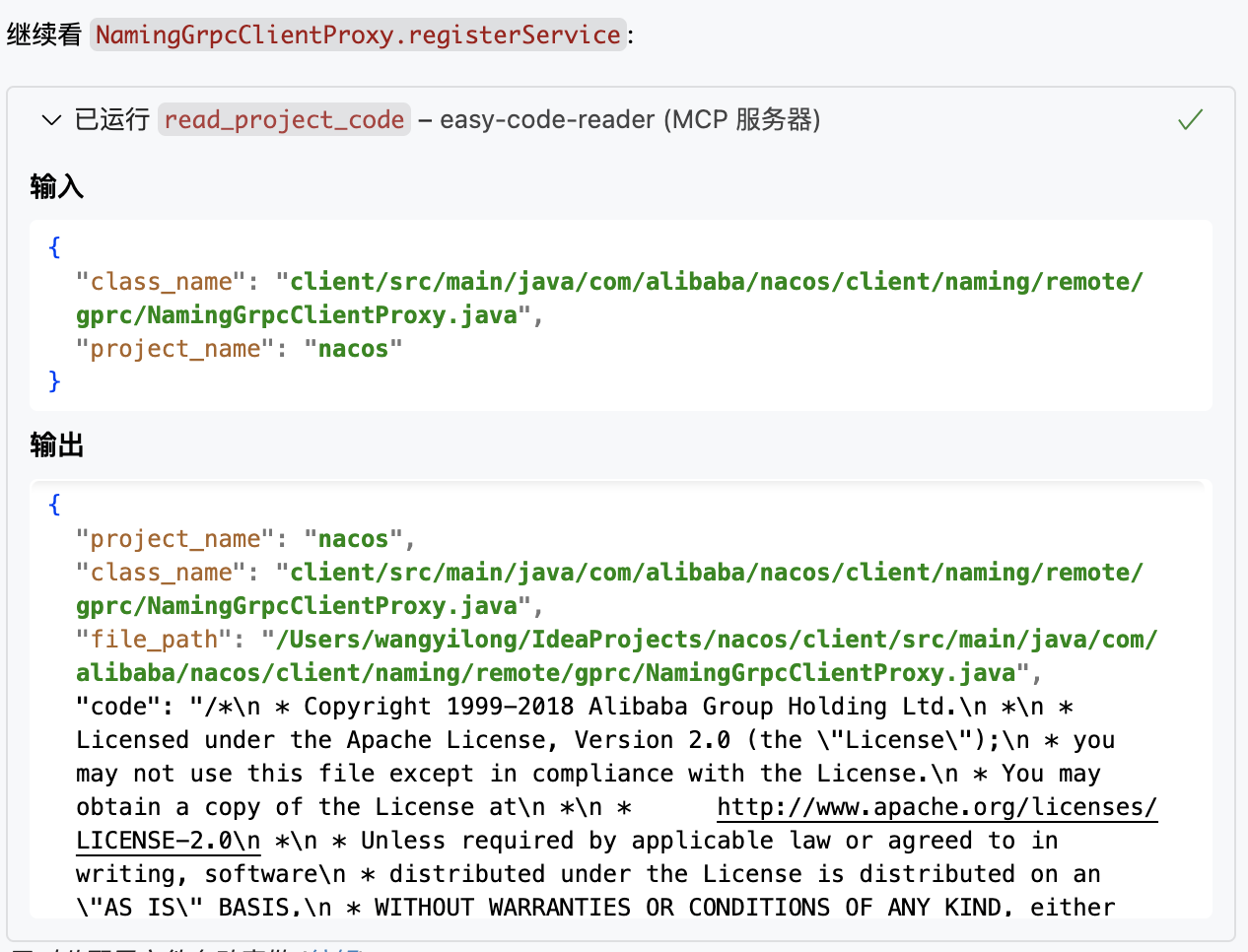
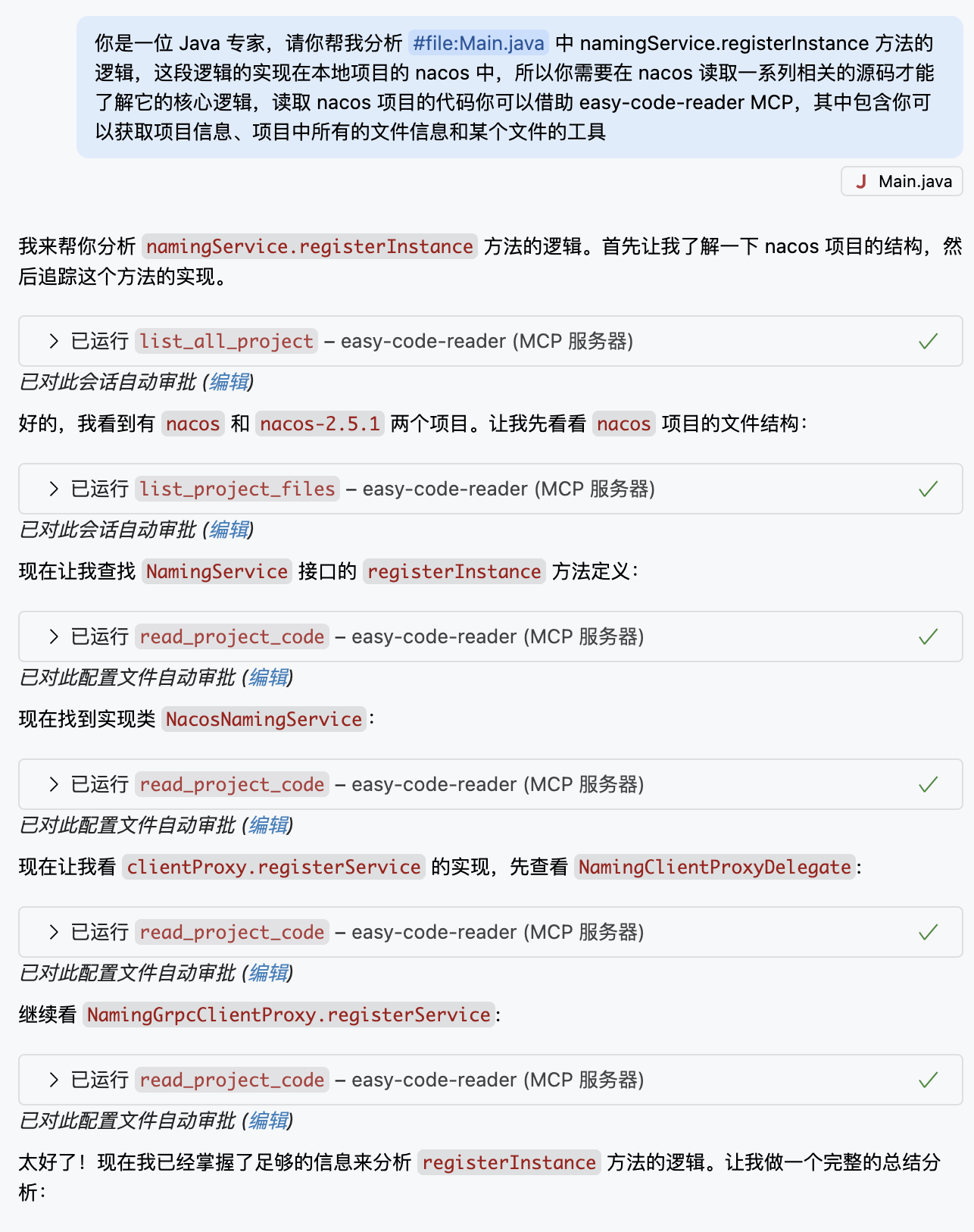 如图所示,它会不断地根据源码调用链路,读取相关源码并进行分析,最终我们就能了解服务注册的实现细节,会使用到 MCP Easy Code Reader 提供的多个工具
 list_all_project、list_project_files 和 read_project_code, 具体调用细节图示如下:
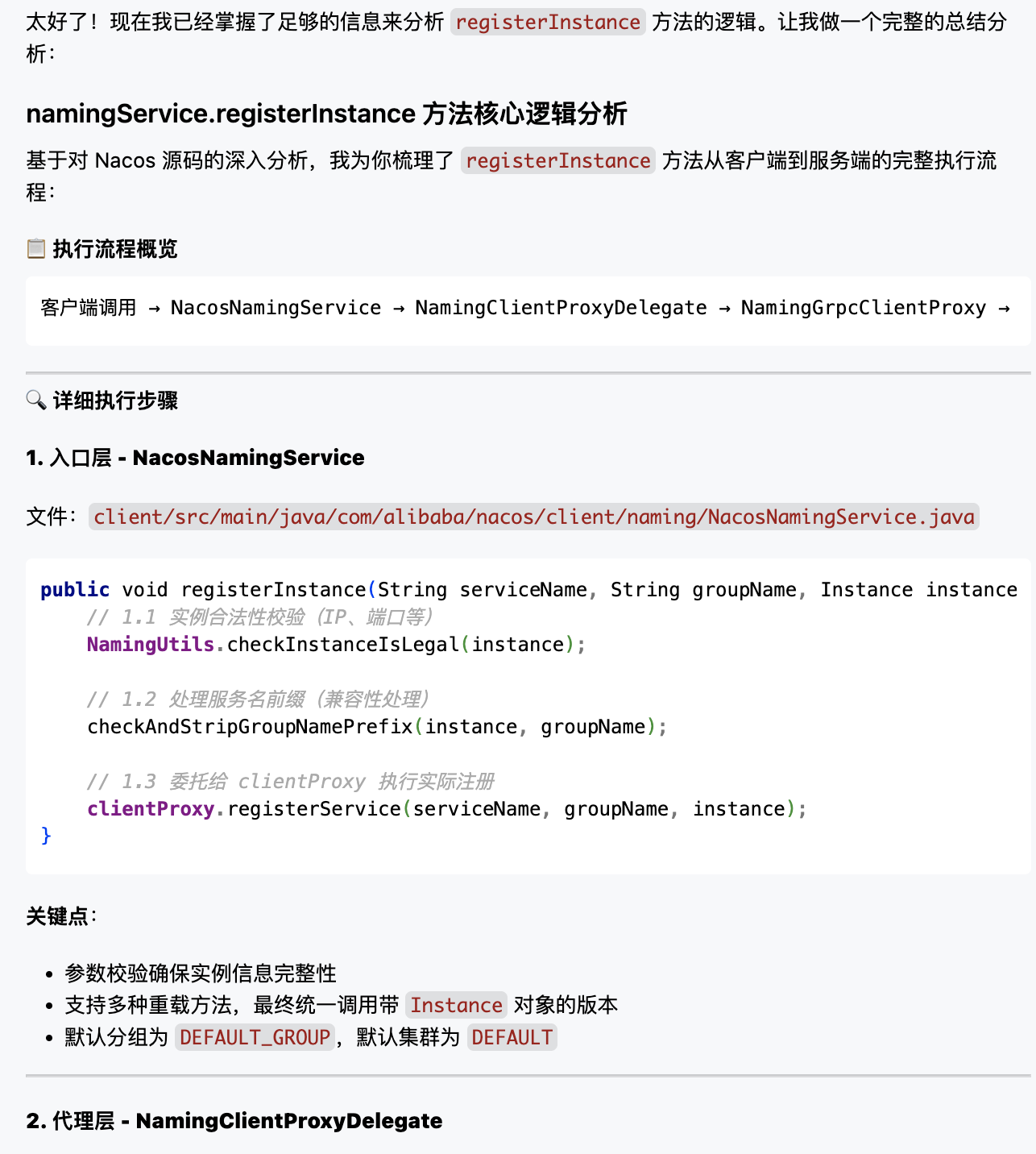
 最终得到分析结果,节省很多时间:
2. 阅读 jar 包源码,根据源码完成代码编写
在使用第三方或其他外部依赖时,Copilot 或其他 Code Agent 并不能直接读取 jar 包中的源码,往往需要我们将源码内容手动复制到提示词中才能完成,费时费力。在 Easy Code Reader 中提供了 read_jar_source 工具来读取 jar 包中的源码,帮我们完成开发实现。我们还是以如下代码为例,现在我想实现多个服务实例的注册,但是我又不了解 NamingService 的实现,便可以借助 read_jar_source 来完成:
`java
public class Main {
private static final Logger logger = LoggerFactory.getLogger(Main.class);
public static void main(String[] args) throws NacosException, InterruptedException {
logger.info("开始初始化 Nacos 客户端...");
Properties properties = new Properties();
properties.put(PropertyKeyConst.SERVER_ADDR, "127.0.0.1:8848");
properties.put(PropertyKeyConst.NAMESPACE, "7430d8fe-99ce-4b20-866e-ed021a0652c9");
NamingService namingService = NacosFactory.createNamingService(properties);
System.out.println("=== 注册服务实例 ===");
try {
// 注册一个服务实例
namingService.registerInstance("test-service0", "127.0.0.1", 8080);
// 添加事件监听器
namingService.subscribe("test-service", event -> {
System.out.println("服务实例变化: " + event);
});
// 注册多个服务实例
} catch (Exception e) {
System.out.println("服务注册失败(预期,因为服务器可能未启动): " + e.getMessage());
}
TimeUnit.HOURS.sleep(3);
}
}
`
`text
你是一位 Java 技术专家,精通 Nacos 框架,请你帮我在 #file:Main.java 中完成注册多个服务实例的逻辑,在编写代码前,你需要先试用 easy-code-reader 的 read_jar_source 工具读取 com.alibaba.nacos.api.naming.NamingService 的源码信息来了解注册多个服务实例的方法
`
处理过程如下所示:
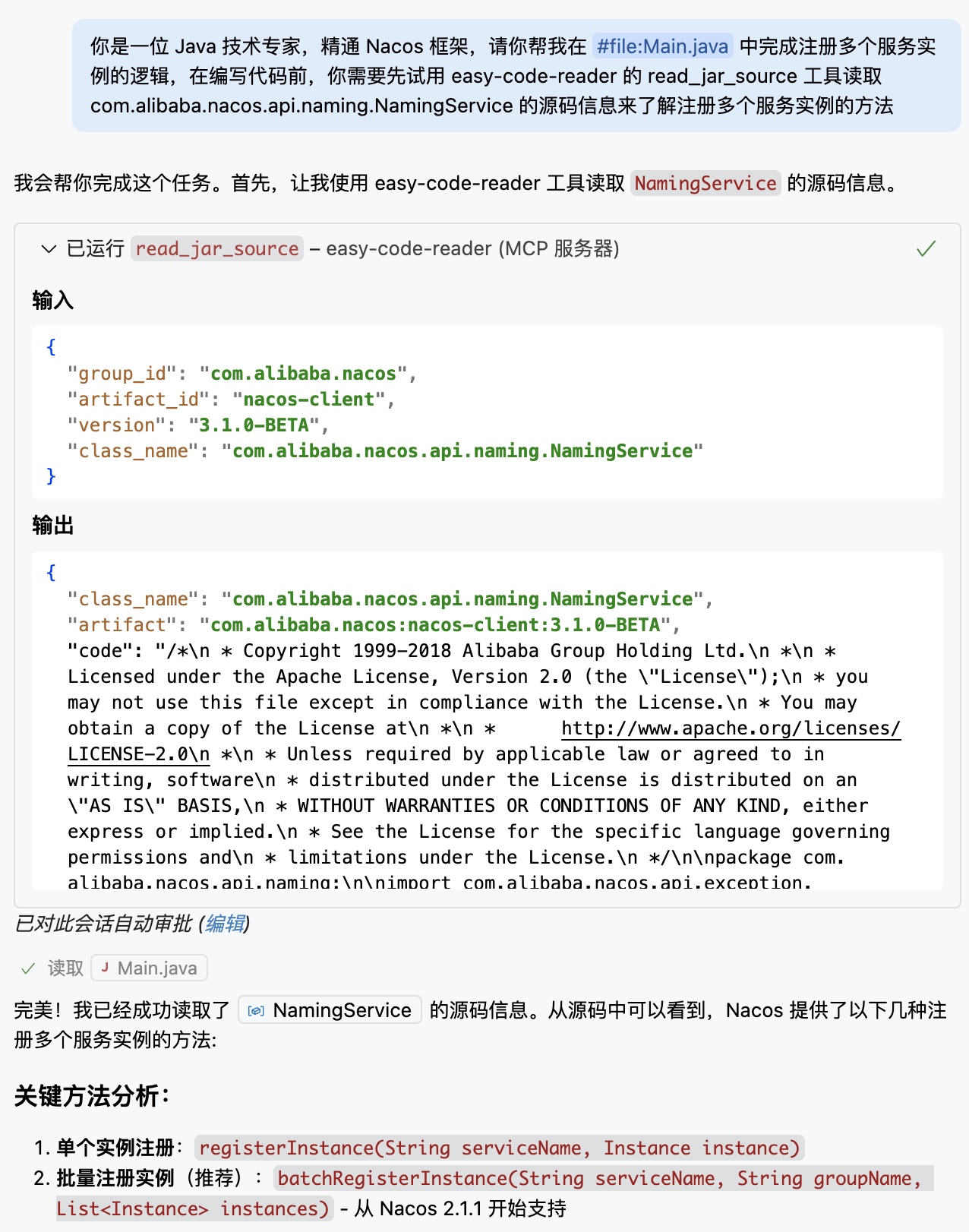 这样我们便能够快速地了解
 NamingService 的实现细节,从而完成代码编写工作,节省了大量时间。
3. 跨项目阅读源码,根据源码完成本项目实现
在大型项目中,某些功能的实现可能会跨多个模块或微服务,如果部分逻辑已经实现并且后续其他应用的逻辑需要依赖这部分逻辑时,可以借助 Easy Code Reader 读取相关模块的源码,帮助我们更好地理解和实现当前项目的功能,示例 Prompt 如下:
`text
你是一位 Java 技术专家,现在我要实现 XXX 的业务逻辑,这部分逻辑的实现需要调用本地项目 A 中 XXX 的接口及其实现,请你借助 MCP easy-code-reader 来帮我读取 A 项目中的源码,并帮我实现 XXX 的业务逻辑
`
当然除了这三种应用场景以外,还可以使用 Easy Code Reader 完成以下事项:

- 异常问题快速溯源:如果有异常信息是外部 jar 包依赖中抛出来的,可以使用
read_jar_source 工具根据异常堆栈日志快速定位异常点
- 依赖升级影响评估(旧/新版本差异核对):同样是使用 read_jar_source 工具来完成新旧版本的实现差异,评估升级影响
- 业务代码逻辑评审:如果业务逻辑开发实现在多个项目中,可以借助读取本地项目代码的工具 list_all_project、list_project_files 和 read_project_code,来分析新增的逻辑是否满足业务要求
- 新人快速上手多个微服务:借助读取本地项目代码的工具,可以根据接口调用链路快速理清微服务项目代码之间的关系,提高上手速度
---
环境要求
- uv - Python 包和项目管理工具
- Python 3.10 或更高版本
- Java Development Kit (JDK) - 用于运行反编译器,要求至少 Java 8
<a id="quick-start-uvx"></a>
快速接入(方法一):使用 uvx(推荐 - 开箱即用)
如果您还没有安装 uv,可以通过以下方式快速安装:
``bashSign in to leave a review
Use Google, GitHub, or an email account so ratings stay tied to real people.
No reviews posted yet.





