A Model Context Protocol (MCP) server that provides web search capabilities through DuckDuckGo, with additional features for content fetching and parsing.
Details
Author
nickclyde
GitHub stars
1,313
Downloads
1,663
Categories
Search, Other
Jump to
- Web search via DuckDuckGo with advanced rate limiting
- Content fetching and parsing with intelligent text extraction
- LLM-friendly output formatting
- Built-in rate limiting: 30 search requests/minute, 20 fetch requests/minute
- Backend options (httpx, curl, auto) to bypass TLS fingerprint blocking
- SafeSearch filtering and region localization
Setting up with Highlight
This MCP is not yet compatible with Highlight’s one-click setup. However, you can still use it with Highlight by following these steps:
Install via uvx duckduckgo-mcp-server or uv pip install duckduckgo-mcp-server. Configure for Claude Desktop or Claude Code by adding the server to the MCP configuration. Supports stdio (default), sse, and streamable-http transports. Optional environment variables DDG_SAFE_SEARCH and DDG_REGION set SafeSearch and default region.
duckduckgo_web_search
Performs a web search using the DuckDuckGo, ideal for general queries, news, articles, and online content. Use this for broad information gathering, recent events, or when you need diverse web sources. Supports content filtering and region-specific searches. Maximum 20 results per request.
Claude Desktop / Cursor
Paste into your MCP client config file to install this server.
# DuckDuckGo Search MCP Server
[](https://pypi.org/project/duckduckgo-mcp-server/)
[](https://pypi.org/project/duckduckgo-mcp-server/)
[](https://pypi.org/project/duckduckgo-mcp-server/)
A Model Context Protocol (MCP) server that provides web search capabilities through DuckDuckGo, with additional features for content fetching and parsing.
## Quick Start
```bash
uvx duckduckgo-mcp-server
```
## Features
- **Web Search**: Search DuckDuckGo with advanced rate limiting and result formatting
- **Content Fetching**: Retrieve and parse webpage content with intelligent text extraction
- **Rate Limiting**: Built-in protection against rate limits for both search and content fetching
- **Error Handling**: Comprehensive error handling and logging
- **LLM-Friendly Output**: Results formatted specifically for large language model consumption
## Installation
Install from PyPI using `uv`:
```bash
uv pip install duckduckgo-mcp-server
```
## Usage
### Running with Claude Desktop
1. Download [Claude Desktop](https://claude.ai/download)
2. Create or edit your Claude Desktop configuration:
- On macOS: `~/Library/Application Support/Claude/claude_desktop_config.json`
- On Windows: `%APPDATA%\Claude\claude_desktop_config.json`
Add the following configuration:
**Basic Configuration (No SafeSearch, No Default Region):**
```json
{
"mcpServers": {
"ddg-search": {
"command": "uvx",
"args": ["duckduckgo-mcp-server"]
}
}
}
```
**With SafeSearch and Region Configuration:**
```json
{
"mcpServers": {
"ddg-search": {
"command": "uvx",
"args": ["duckduckgo-mcp-server"],
"env": {
"DDG_SAFE_SEARCH": "STRICT",
"DDG_REGION": "cn-zh"
}
}
}
}
```
**Configuration Options:**
- `DDG_SAFE_SEARCH`: SafeSearch filtering level (optional)
- `STRICT`: Maximum content filtering (kp=1)
- `MODERATE`: Balanced filtering (kp=-1, default if not specified)
- `OFF`: No content filtering (kp=-2)
- `DDG_REGION`: Default region/language code (optional, examples below)
- `us-en`: United States (English)
- `cn-zh`: China (Chinese)
- `jp-ja`: Japan (Japanese)
- `wt-wt`: No specific region
- Leave empty for DuckDuckGo's default behavior
3. Restart Claude Desktop
### Running with Claude Code
1. Download [Claude Code](https://github.com/anthropics/claude-code)
2. Ensure [`uvenv`](https://github.com/robinvandernoord/uvenv) is installed and the `uvx` command is available
3. Add the MCP server: `claude mcp add ddg-search uvx duckduckgo-mcp-server`
### Running with SSE or Streamable HTTP
The server supports alternative transports for use with other MCP clients:
```bash
# SSE transport
uvx duckduckgo-mcp-server --transport sse
# Streamable HTTP transport
uvx duckduckgo-mcp-server --transport streamable-http
```
The default transport is `stdio`, which is used by Claude Desktop and Claude Code.
When running with `sse` or `streamable-http`, override the default bind address (`127.0.0.1:8000`) with the `--host` and `--port` flags:
```bash
uvx duckduckgo-mcp-server --transport streamable-http --host 0.0.0.0 --port 7070
```
### Backends (bypassing bot detection)
Some sites — and, as of recently, DuckDuckGo's own search endpoint (`html.duckduckgo.com`) — block the default `httpx` client because of its distinctive TLS fingerprint, regardless of User-Agent. Cloudflare Bot Management and similar filters key on the JA3/TLS handshake, not on headers, so `html.duckduckgo.com` may answer `httpx` with an empty **HTTP 202** page (silently yielding "no results"). An opt-in backend, `curl` (implemented via `curl_cffi`), impersonates a real Chrome browser's TLS handshake and passes through those checks.
Both the `search` tool and the `fetch_content` tool support these backends.
**Installation:**
```bash
# Default install (httpx only)
uv pip install duckduckgo-mcp-server
# With the optional browser backend
uv pip install "duckduckgo-mcp-server[browser]"
```
**Backend options:**
| Value | Behavior | Needs `[browser]` |
| ------ | ----------------------------------------------------------------------------------------- | ----------------- |
| `httpx` | Lightweight async HTTP. Default. Works on most sites. | no |
| `curl` | Uses `curl_cffi` with Chrome 131 TLS impersonation. Passes TLS-fingerprint-based filters. | yes |
| `auto` | Tries `httpx` first; on 403 or a Cloudflare challenge response, retries with `curl`. | yes |
**Two ways to configure the backend:**
1. **Server-wide default** via the `--fetch-backend` CLI flag (applies to every `fetch_content` call):
```bash
# Default behavior — uses httpx
uvx duckduckgo-mcp-server
# Force curl for every fetch (requires the [browser] extra)
uvx --with "duckduckgo-mcp-server[browser]" duckduckgo-mcp-server --fetch-backend curl
# Try httpx first, fall back to curl on 403 / Cloudflare challenge
uvx --with "duckduckgo-mcp-server[browser]" duckduckgo-mcp-server --fetch-backend auto
```
2. **Per-call override** via the `backend` argument on the `fetch_content` tool (overrides the CLI default for that single call). The tool exposes `backend` in its input schema, so an MCP client can choose `"httpx"`, `"curl"`, or `"auto"` on a fetch-by-fetch basis.
For `fetch_content`, the default stays `httpx` so users who don't need the impersonation don't pay for the extra dependency.
#### Search backend
Because DuckDuckGo's search endpoint now fingerprint-blocks plain `httpx`, the `search` tool defaults to **`auto`**: it tries `httpx` first and falls back to `curl` when it detects a block (HTTP 202/403). The fallback only works if the `[browser]` extra is installed; otherwise search returns a message telling you to install it.
Configure the search backend with the `--search-backend` CLI flag or the `DDG_SEARCH_BACKEND` environment variable (`auto` (default) / `httpx` / `curl`):
```bash
# Recommended: install the browser extra so the auto fallback can impersonate Chrome
uvx --with "duckduckgo-mcp-server[browser]" duckduckgo-mcp-server
# Force curl for every search
uvx --with "duckduckgo-mcp-server[browser]" duckduckgo-mcp-server --search-backend curl
# Opt out of the fallback (legacy behavior — may return no results while blocked)
uvx duckduckgo-mcp-server --search-backend httpx
```
### Development
For local development:
```bash
# Install dependencies
uv sync
# Run with the MCP Inspector
mcp dev src/duckduckgo_mcp_server/server.py
# Install locally for testing with Claude Desktop
mcp install src/duckduckgo_mcp_server/server.py
# Run all tests
uv run python -m pytest src/duckduckgo_mcp_server/ -v
# Run only unit tests
uv run python -m pytest src/duckduckgo_mcp_server/test_server.py -v
# Run only e2e tests
uv run python -m pytest src/duckduckgo_mcp_server/test_e2e.py -v
```
## Available Tools
### 1. Search Tool
```python
async def search(query: str, max_results: int = 10, region: str = "") -> str
```
Performs a web search on DuckDuckGo and returns formatted results.
**Parameters:**
- `query`: Search query string
- `max_results`: Maximum number of results to return (default: 10)
- `region`: (Optional) Region/language code to override the default. Leave empty to use the configured default region.
**Region Code Examples:**
- `us-en`: United States (English)
- `cn-zh`: China (Chinese)
- `jp-ja`: Japan (Japanese)
- `de-de`: Germany (German)
- `fr-fr`: France (French)
- `wt-wt`: No specific region
**Returns:**
Formatted string containing search results with titles, URLs, and snippets.
**Example Usage:**
- Search with default settings: `search("python tutorial")`
- Search with specific region: `search("latest news", region="jp-ja")` for Japanese news
### 2. Content Fetching Tool
```python
async def fetch_content(
url: str,
start_index: int = 0,
max_length: int = 8000,
backend: Optional[str] = None,
) -> str
```
Fetches and parses content from a webpage.
**Parameters:**
- `url`: The webpage URL to fetch content from
- `start_index`: Character offset to start reading from (for pagination)
- `max_length`: Maximum number of characters to return
- `backend`: Optional per-call override of the default fetch backend (`"httpx"`, `"curl"`, or `"auto"`). When omitted, uses whatever was set via `--fetch-backend` at server startup.
**Returns:**
Cleaned and formatted text content from the webpage.
> **SSRF protection:** By default `fetch_content` refuses URLs that resolve to
> loopback, private (RFC1918), link-local (including the `169.254.169.254` cloud
> metadata endpoint), reserved, multicast, or unspecified addresses, and it
> re-validates every redirect hop. Only `http`/`https` URLs are allowed. For
> trusted local deployments that need to fetch internal hosts, disable the guard
> with `DDG_ALLOW_PRIVATE_URLS=1` or `--allow-private-urls`. See
> [SECURITY.md](SECURITY.md) for details.
## Features in Detail
### Rate Limiting
- Search: Limited to 30 requests per minute
- Content Fetching: Limited to 20 requests per minute
- Automatic queue management and wait times
### Result Processing
- Removes ads and irrelevant content
- Cleans up DuckDuckGo redirect URLs
- Formats results for optimal LLM consumption
- Truncates long content appropriately
### Content Safety
- **SafeSearch Filtering**: Configured at server startup via `DDG_SAFE_SEARCH` environment variable
- Controlled by administrators, not modifiable by AI assistants
- Filters inappropriate content based on the selected level
- Uses DuckDuckGo's official `kp` parameter
- **Region Localization**:
- Default region set via `DDG_REGION` environment variable
- Can be overridden per search request by AI assistants
- Improves result relevance for specific geographic regions
### Error Handling
- Comprehensive error catching and reporting
- Detailed logging through MCP context
- Graceful degradation on rate limits or timeouts
## Contributing
Issues and pull requests are welcome! Some areas for potential improvement:
- Enhanced content parsing options
- Caching layer for frequently accessed content
- Additional rate limiting strategies
## License
This project is licensed under the MIT License.
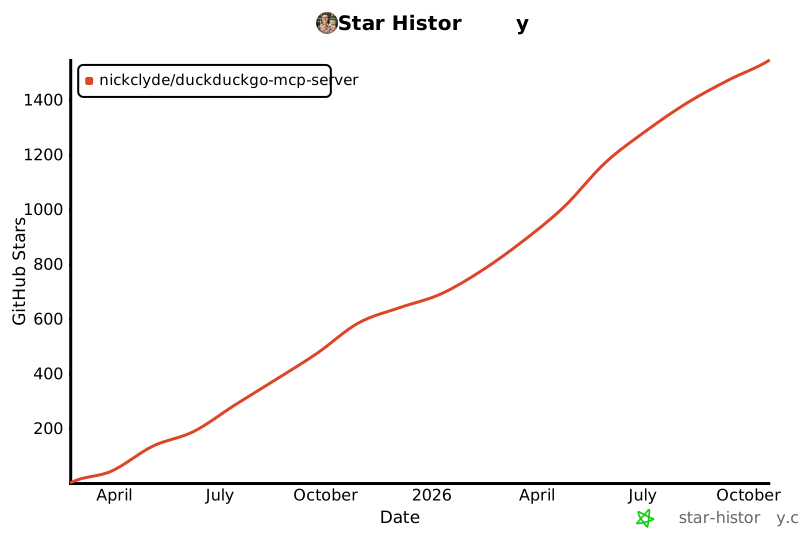
## Star History
[](https://star-history.com/#nickclyde/duckduckgo-mcp-server&Date)
No reviews yet — be the first
Sign in to leave a review
Use Google, GitHub, or an email account so ratings stay tied to real people.
Social sign-in isn’t configured yet. You can still create an account with email below, or ask an admin to add Google/GitHub/Discord OAuth credentials.
Sequential Thinking is an MCP server that provides a tool for dynamic and reflective problem-solving through a structured, step-by-step thinking process. It is…
Filesystem is a Node.js server that implements the Model Context Protocol (MCP) for filesystem operations. It enables AI assistants to read, write, and manage…
A one-of-a-kind resume builder that keeps your privacy in mind. Completely secure, customizable, portable, open-source and free forever. Try it out today!












