
ArcKnowledge (Custom RAG)
About
Bridges AI systems to custom knowledge base APIs for retrieval-augmented generation across multiple text and image sources with configurable authentication and processing capabilities.
Details
- Author
- dragonjump
- Repository
- dragonjump/mcp-ARCknowledge
- Downloads
- 343
- License
- MIT License
- Categories
- Developer Tools, Design, Workplace, File Management, AI, Media, Search, Infrastructure, Frontend, Security, Other, Knowledge Base, Database
- Tags
- #web
Jump to
1. Define new models in main.py
2. Add new tools using the @mcp.tool() decorator
3. Update documentation as needed

Setting up with Highlight
This MCP is not yet compatible with Highlight’s one-click setup. However, you can still use it with Highlight by following these steps:
- Download and install Highlight from highlightai.com/download
- Navigate to the plugins tab and select "Add Custom Plugin"
-
Configure the plugin with the settings below
Plugin Name
ArcKnowledge (Custom RAG)Command (node, npx, python, etc.)cmdArguments-
Argument 1
/c -
Argument 2
uv -
Argument 3
--directory -
Argument 4
C:/Users/Acer/OneDrive/GitHub/YourDrive -
Argument 5
run -
Argument 6
main.py
Environment-
DOCUMENT_SOURCES_PATH
C:/Users/Acer/OneDrive/GitHub/YourDrive/testcustomother.json
Please refer to the README for specific instructions on how to obtain API keys or other required environment variables.
-
Argument 1
- Enable "Start Automatically" if you want the plugin to start when Highlight launches





From the repository
To install ArcKnowledge for Claude Desktop automatically via Smithery:
npx -y @smithery/cli install @dragonjump/mcp-ARCknowledge --client claude
1.Clone repo
git clone https://github.com/dragonjump/mcp-arcknowledge
cd mcp-arcknowledge
2. Configure endpoints
Make a copy or changeknowledge_document_sources.json.
See sample_endpoint folder for references on current knowledge endpoints api schema supported. You may change the code as you wish to fit your need.
3. Connect to the MCP server
Copy the below json with the appropriate {{PATH}} values:
{
"mcpServers": {
"mcp-arcknowledge": {
"command": "cmd /c uv",
"args": [
"--directory",
"C:/Users/Acer/OneDrive/GitHub/YourDrive",
"run",
"main.py"
],
"env": {
"DOCUMENT_SOURCES_PATH": "C:/Users/Acer/OneDrive/GitHub/YourDrive/testcustomother.json"
}
}
}
}
claude_desktop_config.json in your Claude Desktop configuration directory at:
~/Library/Application Support/Claude/claude_desktop_config.json
For Cursor, save this as mcp.json in your Cursor configuration directory at:
~/.cursor/mcp.json
For cline, save this as cline_mcp_settings.json in your configuration
4. Restart Client: Claude Desktop / Cursor / Cline / Windsurf
Open and restart your client ide for mcp. eg Claude/Cursor/Cline/etc
1. Create an mcp.json file in your project root:
{
"name": "mcp-webhook-ai-agent",
"version": "1.0.0",
"description": "Webhook AI agent with RAG capabilities",
"main": "main.py",
"tools": [
{
"name": "set_document_source",
"description": "Register a new document source URL for RAG operations"
},
{
"name": "list_document_sources",
"description": "List all registered document sources"
},
{
"name": "query_rag",
"description": "Query the specified document sources using RAG"
},
{
"name": "process_post_query",
"description": "Process a POST request with a query payload"
}
],
"dependencies": {
"fastmcp": ">=0.4.0",
"requests": ">=2.31.0",
"pydantic": ">=2.0.0"
}
}
2. Configure Cursor AI:
- Open Cursor AI settings
- Navigate to the MCP section
- Add the path to your mcp.json file
- Restart Cursor AI to apply changes
3. Verify Configuration:
```bash
fastmcp check mcp.json
add_new_knowledge_document_source
Registers a new document source URL, optionally with a description and API key. Returns a confirmation message with the new source ID.
list_knowledge_document_sources
Lists all registered document sources. Returns a dictionary mapping source IDs to their details (URL, description, API key).
query_knowledge_base
Queries specified document sources (or all if none specified) with a text query and optional image data. Returns aggregated results from the queried sources.
1. Default Loads knowledge list from knowledge_document_sources.json
Default loads knowledge sources from config ``
knowledge_document_sources.json
You may Load custom knowledge from mcp.json environment config
"env": {
"DOCUMENT_SOURCES_PATH": "C:/Users/Acer/OneDrive/Somewhere/YourDrive/your-custom.json"
}
#### 2. List all currently registered knowledge sources
Shows and explains the list of all registered knowledge sources.
eg. Show me my arcknowledge list
#### 3. Add New Knowledge Document Source
Add new arcknowledge endpoint url document sources.
Provide url, description purpose and apikey(if any)
eg. Add new arcknowledge data source. Endpoint is http://something.com/api/123.
Purpose is to handle questions on 123 topic. Api key is 'sk-2123123'
4. Querying Specific Knowledge Doc Source
Query the arcknowledge base built from these sources using query_knowledge_base.
eg. Query for me my knowledge base for product. Question is : Which is most expensive product?
eg. Query for me my arcknowledge base for business. Question is :When is the business established?
eg. Query for me all my arcknowledge base . Question is :When is the business established? Which is most expensive product?
`
Tool Functions
1.
Registers a new document source URL, optionally with a description and API key.
Returns: Confirmation message with the new source ID.
2.
Lists all registered document sources.
Returns: Dictionary mapping source IDs to their details (URL, description, API key).
3.
Queries specified document sources (or all if none specified) with a text query and optional image data.
Returns: Aggregated results from the queried sources.
Claude Desktop / Cursor
Paste into your MCP client config file to install this server.
{
    "mcpServers": {
        "arcknowledge (custom rag)": {
            "env": {
                "DOCUMENT_SOURCES_PATH": "C:/Users/Acer/OneDrive/GitHub/YourDrive/testcustomother.json"
            },
            "args": [
                "/c",
                "uv",
                "--directory",
                "C:/Users/Acer/OneDrive/GitHub/YourDrive",
                "run",
                "main.py"
            ],
            "command": "cmd"
        }
    }
}Linux
{
"env": {
"DOCUMENT_SOURCES_PATH": "C:/Users/Acer/OneDrive/GitHub/YourDrive/testcustomother.json"
},
"args": [
"/c",
"uv",
"--directory",
"C:/Users/Acer/OneDrive/GitHub/YourDrive",
"run",
"main.py"
],
"command": "cmd"
}Macos
{
"env": {
"DOCUMENT_SOURCES_PATH": "C:/Users/Acer/OneDrive/GitHub/YourDrive/testcustomother.json"
},
"args": [
"/c",
"uv",
"--directory",
"C:/Users/Acer/OneDrive/GitHub/YourDrive",
"run",
"main.py"
],
"command": "cmd"
}Windows
{
"env": {
"DOCUMENT_SOURCES_PATH": "C:/Users/Acer/OneDrive/GitHub/YourDrive/testcustomother.json"
},
"args": [
"/c",
"uv",
"--directory",
"C:/Users/Acer/OneDrive/GitHub/YourDrive",
"run",
"main.py"
],
"command": "cmd"
}MCP ArcKnowledge

How it works?
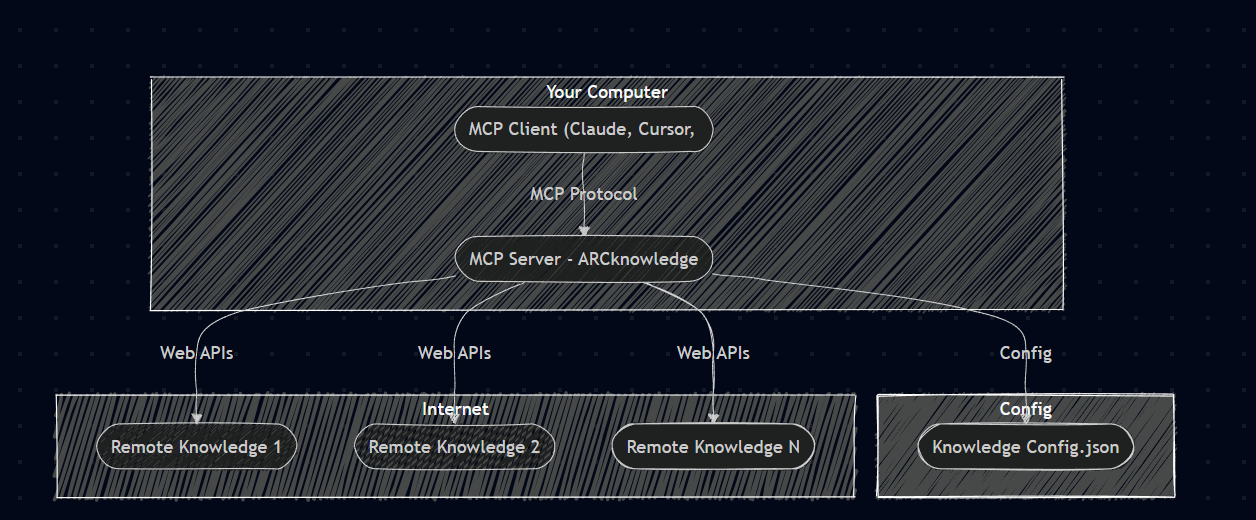
This is a Model Context Protocol (MCP) server for your custom webhook endpoints (knowledgebase).
With this you can you can easily manage and query your list of knowledge base(webhook endpoints).
You can add new document sources by registering their URLs, and optionally provide a description and API key.
You can also list all the registered document sources and view their details.
When you're ready to ask/search, you can query the knowledge base with a text question , specifying which sources to search or leaving it blank to search all of them.
The tool will then aggregate the results from the queried sources and provide them to you.
Prerequisites
- Go
- Python 3.6+
- Anthropic Claude Desktop app (or Cursor or Cline)
- UV (Python package manager), install with curl -LsSf https://astral.sh/uv/install.sh | sh
Concept
Imagine being able to bridge 1 unified setup where you can connect all your custom knowledge base endpoints webhook in one configuration, eliminating the need for multiple MCP servers.Demo
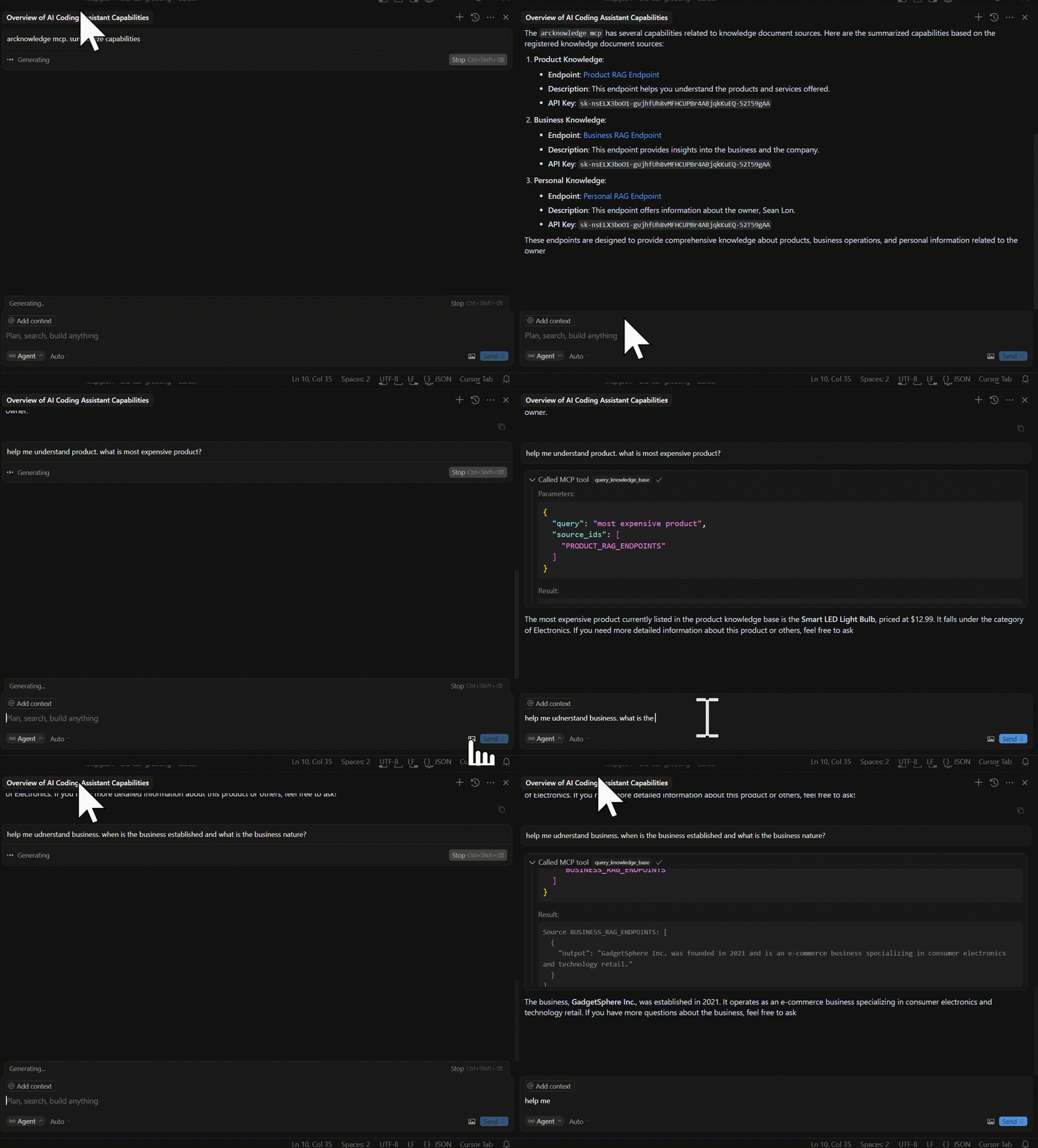
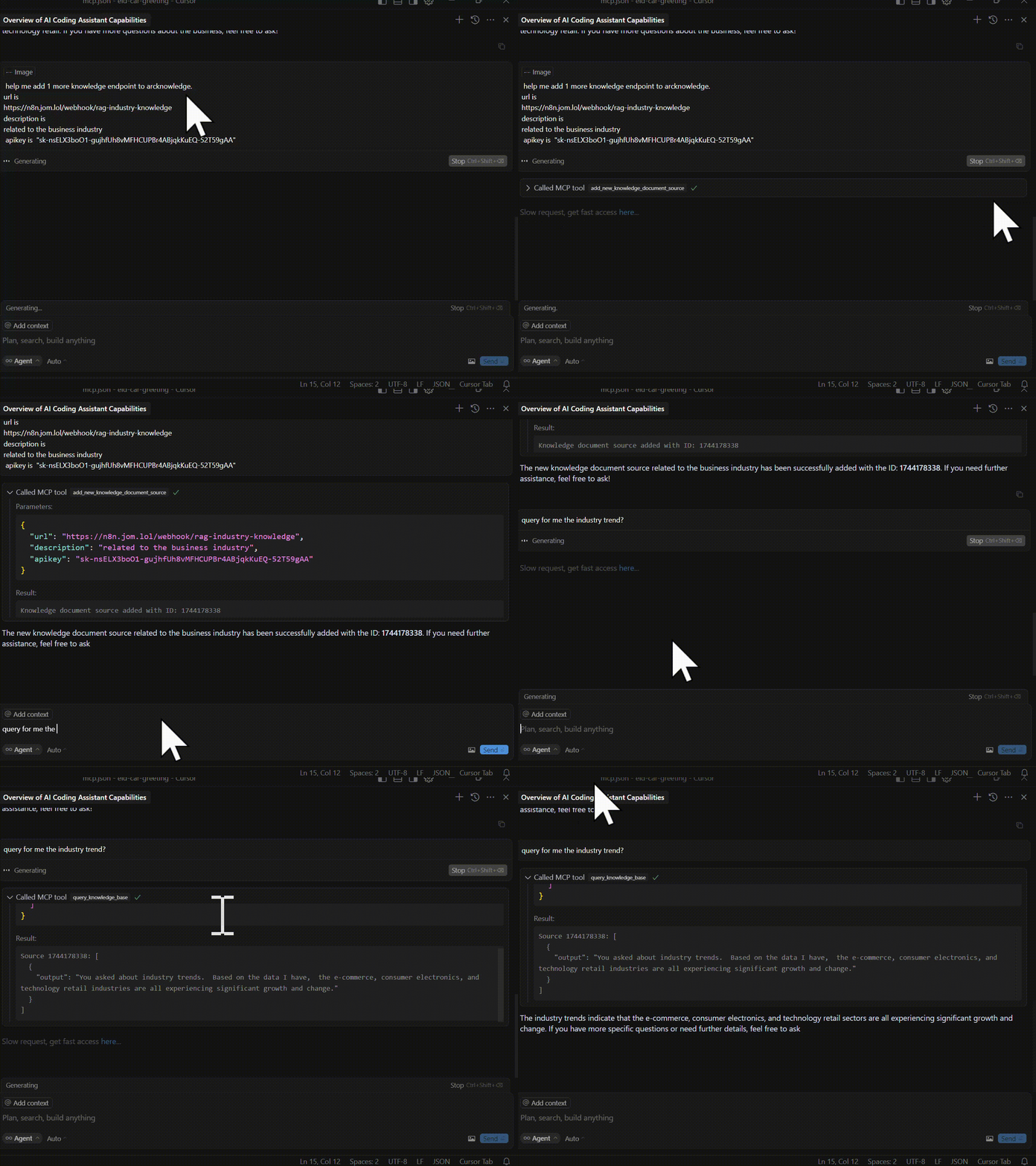
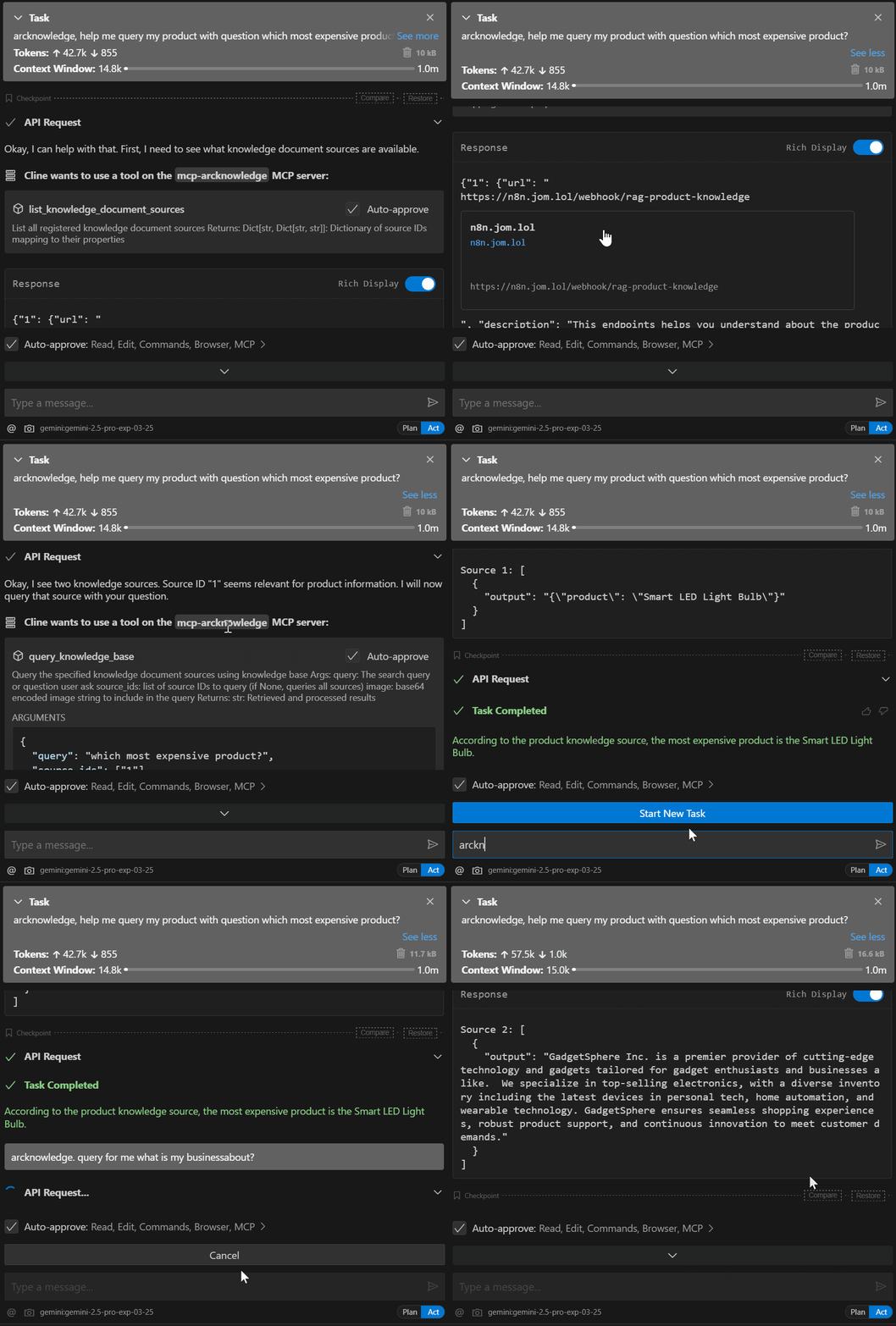 See mcp cursor video
Setup Installation
Installing via Smithery
To install ArcKnowledge for Claude Desktop automatically via Smithery:
npx -y @smithery/cli install @dragonjump/mcp-ARCknowledge --client claude
1.Clone repo
git clone https://github.com/dragonjump/mcp-arcknowledge

cd mcp-arcknowledge
2. Configure endpoints
Make a copy or changeknowledge_document_sources.json.
See sample_endpoint folder for references on current knowledge endpoints api schema supported. You may change the code as you wish to fit your need.
3. Connect to the MCP server
Copy the below json with the appropriate {{PATH}} values:
    {
        "mcpServers": {
            "mcp-arcknowledge": {
                "command": "cmd /c uv",
                "args": [
                    "--directory",
                    "C:/Users/Acer/OneDrive/GitHub/YourDrive",
                    "run",
                    "main.py"
                ],
                "env": {
                    "DOCUMENT_SOURCES_PATH": "C:/Users/Acer/OneDrive/GitHub/YourDrive/testcustomother.json"
                }
            }
        }
    }
claude_desktop_config.json in your Claude Desktop configuration directory at:
~/Library/Application Support/Claude/claude_desktop_config.json
For Cursor, save this as mcp.json in your Cursor configuration directory at:
~/.cursor/mcp.json
For cline, save this as cline_mcp_settings.json in your configuration
4. Restart Client: Claude Desktop / Cursor / Cline / Windsurf
Open and restart your client ide for mcp. eg Claude/Cursor/Cline/etc
Windows Compatibility
If you're running this project on Windows, be aware that go-sqlite3 requires CGO to be enabled in order to compile and work properly. By default, CGO is disabled on Windows, so you need to explicitly enable it and have a C compiler installed.
Steps to get it working:
1. Install a C compiler
We recommend using MSYS2 to install a C compiler for Windows. After installing MSYS2, make sure to add the ucrt64\bin folder to your PATH.
→ A step-by-step guide is available here.
Architecture Overview
This application consists of simple main component:
Python MCP Server (main.py): A Python server implementing the Model Context Protocol (MCP), which provides standardized tools client to interact with data and invoke api call.
Data Storage
- All storage is runtime local main python server.
Technical Details
1. Client sends requests to the Python MCP server
2. The MCP server lookup its runtime config knowledge base.
3. Then based on your queries, it calls your knowledge base endpoint api,
Troubleshooting
- If you encounter permission issues when running uv, you may need to add it to your PATH or use the full path to the executable.
- Make sure both the Go application and the Python server are running for the integration to work properly.
Starting the Server
1. Config Run the server in development mode:fastmcp dev main.py
Or install it for use with Claude:
fastmcp install main.py
Available Tools
1. Default Loads knowledge list from knowledge_document_sources.json
Default loads knowledge sources from config ``
knowledge_document_sources.json
You may Load custom knowledge from mcp.json environment config
"env": {
"DOCUMENT_SOURCES_PATH": "C:/Users/Acer/OneDrive/Somewhere/YourDrive/your-custom.json"
}
#### 2. List all currently registered knowledge sources
Shows and explains the list of all registered knowledge sources.
eg. Show me my arcknowledge list
#### 3. Add New Knowledge Document Source
Add new arcknowledge endpoint url document sources.
Provide url, description purpose and apikey(if any)
eg. Add new arcknowledge data source. Endpoint is http://something.com/api/123.
Purpose is to handle questions on 123 topic. Api key is 'sk-2123123'
4. Querying Specific Knowledge Doc Source
Query the arcknowledge base built from these sources using query_knowledge_base.
eg. Query for me my knowledge base for product. Question is : Which is most expensive product?
eg. Query for me my arcknowledge base for business. Question is :When is the business established?
eg. Query for me all my arcknowledge base . Question is :When is the business established? Which is most expensive product?
Tool Functions
1.
add_new_knowledge_document_source(url: str, description:str = None, apikey:str = None) -> str
Registers a new document source URL, optionally with a description and API key.
Returns: Confirmation message with the new source ID.
2.
Lists all registered document sources.
Returns: Dictionary mapping source IDs to their details (URL, description, API key).
3.
Queries specified document sources (or all if none specified) with a text query and optional image data.
Returns: Aggregated results from the queried sources.
Development
Crucial filesProject Structure
mcp-arcknowledge/
├── main.py # Main server implementation
├── README.md # Documentation
├── requirements.txt # Project dependencies
Cursor AI MCP Configuration
1. Create an
file in your project root:
json
{

    "name": "mcp-webhook-ai-agent",

    "version": "1.0.0",

    "description": "Webhook AI agent with RAG capabilities",

    "main": "main.py",

    "tools": [

        {

            "name": "set_document_source",

            "description": "Register a new document source URL for RAG operations"

        },

        {

            "name": "list_document_sources",

            "description": "List all registered document sources"

        },

        {

            "name": "query_rag",

            "description": "Query the specified document sources using RAG"

        },

        {

            "name": "process_post_query",

            "description": "Process a POST request with a query payload"

        }

    ],

    "dependencies": {

        "fastmcp": ">=0.4.0",

        "requests": ">=2.31.0",

        "pydantic": ">=2.0.0"

    }

}
2. Configure Cursor AI:
- Open Cursor AI settings
- Navigate to the MCP section
- Add the path to your file
- Restart Cursor AI to apply changes
3. Verify Configuration:
bash
Check if MCP is properly configured
fastmcp check mcp.json
List available tools
fastmcp list
`
Adding New Features
1. Define new models in
main.py
2. Add new tools using the 3. Update documentation as needed
License
MITContributing
1. Fork the repository
2. Create your feature branch
3. Commit your changes
4. Push to the branch
5. Create a new Pull Request
Sign in to leave a review
Use Google, GitHub, or an email account so ratings stay tied to real people.
No reviews posted yet.





