
Python MCP Server - Documentation Search
About
MCP (Model Context Protocol) server that allows users to search for documentation from popular libraries such as LangChain, LlamaIndex, and OpenAI using the Serper API. The server fetches search results and extracts the relevant documentation from the web using HTTP requests and
Details
- Author
- sawantudayan
- Downloads
- 292
- Categories
- Search
Jump to
- Supports documentation search for LangChain, LlamaIndex, and OpenAI.
- Uses Serper API for web searches.
- Extracts and returns text from relevant documentation pages.
- Can be used interactively through the MCP protocol.
- Includes a dummy_tool to confirm the server is running.

Setting up with Highlight
This MCP is not yet compatible with Highlight’s one-click setup. However, you can still use it with Highlight by following these steps:
- Download and install Highlight from highlightai.com/download
- Navigate to the plugins tab and select "Add Custom Plugin"
-
Configure the plugin with the settings below
Plugin Name
Python MCP Server - Documentation SearchCommand (node, npx, python, etc.)Please refer to the README for specific instructions on how to obtain API keys or other required environment variables.
- Enable "Start Automatically" if you want the plugin to start when Highlight launches





From the repository
Install Python dependencies, set up a .env file with your Serper API key, and run uv run main.py. Then, from an interactive MCP client, invoke the get_docs tool with a query and library name (e.g., get_docs("Chroma DB", "langchain")).
Claude Desktop / Cursor
Paste into your MCP client config file to install this server.
{
    "mcpServers": {
        "python mcp server - documentation search": {
            "document-search-mcp-server": {
                "command": "uv",
                "args": [
                    "run",
                    "main.py"
                ]
            }
        }
    }
}McpServers
{
    "document-search-mcp-server": {
        "command": "uv",
        "args": [
            "run",
            "main.py"
        ]
    }
}
Python MCP Server - Documentation Search
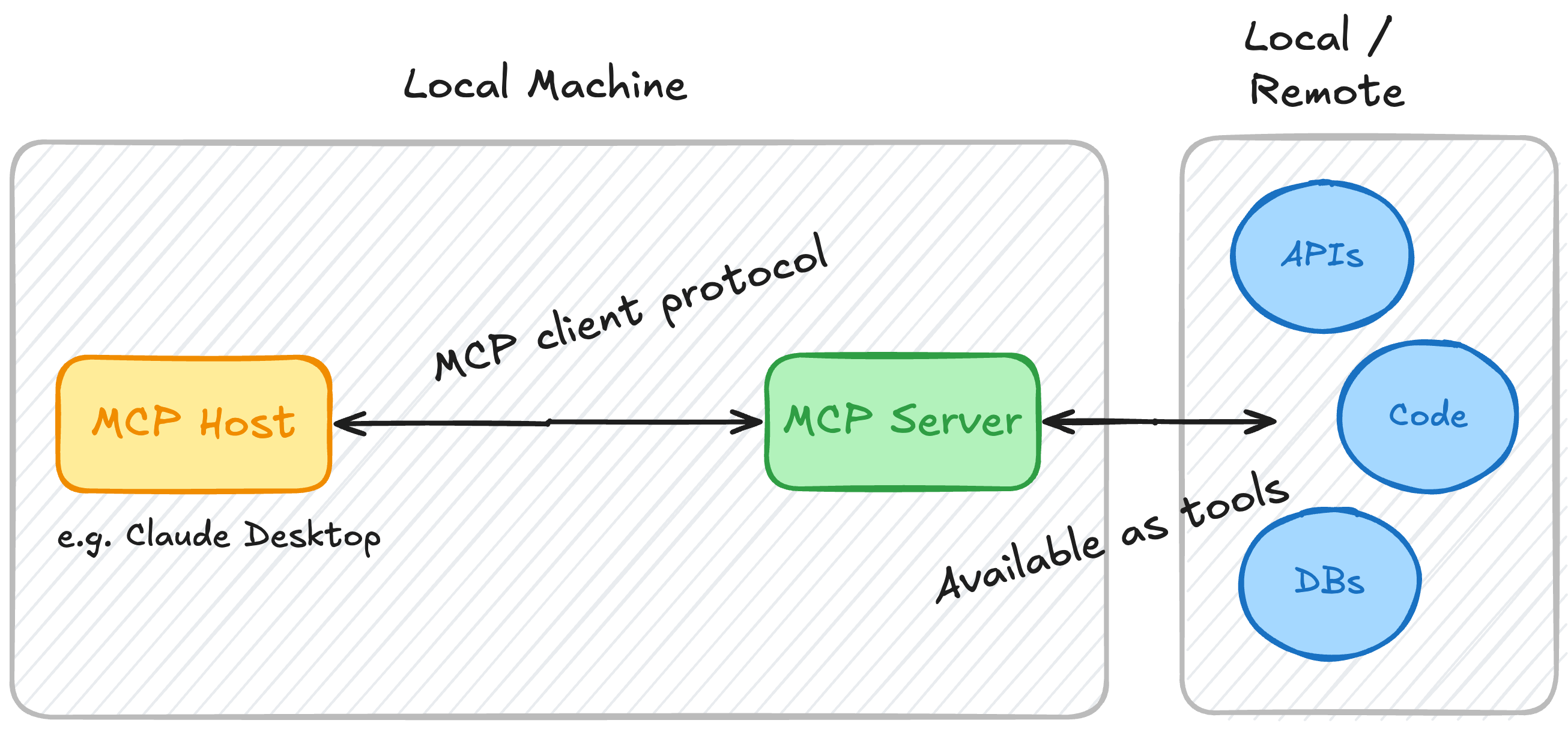
This is a simple MCP (Minimal Command Protocol) server that allows users to search for documentation from popular
libraries such as LangChain, LlamaIndex, and OpenAI using the Serper API. The server fetches search
results and extracts the relevant documentation from the web using HTTP requests and BeautifulSoup.
Features
- Supports searching documentation for LangChain, LlamaIndex, and OpenAI.
- Uses Serper API to perform web searches.
- Extracts and returns the text from the relevant documentation pages.
- Can be used interactively through MCP protocol.
Requirements
- Python 3.12 or higher.
- Serper API Key for performing web searches.
- MCP library for the server and tool execution.
- BeautifulSoup4 and httpx for HTTP requests and HTML parsing.
Installation
Step 1: Install Python Dependencies
To set up the project, clone this repository and install the required dependencies.
git clone <repository-url>
cd <repository-directory>
pip install -r requirements.txt
Or, if you're not using a requirements.txt file:
pip install httpx beautifulsoup4 mcp python-dotenv
Step 2: Set Up Environment Variables
Create a .env file in the root directory of the project with your Serper API Key.
SERPER_API_KEY=your-serper-api-key-here
Make sure the .env file is loaded using the dotenv package.
Step 3: Run the Server
Once the environment is set up, run the server using the following command:
uv run main.py
The server will start and wait for input.
Usage
Once the server is running, you can use it to query the latest documentation for specific libraries. Here’s an example
of how to query the tool:
Example Query
Start your server with ``uv run main.py`.
In another terminal or from within an interactive MCP client, invoke the get_docs tool to search for documentation:
get_docs("Chroma DB", "langchain")
This will search for "Chroma DB" in the LangChain documentation and return the relevant content.
Available Libraries
- LangChain: Documentation at langchain.com
- LlamaIndex: Documentation at llamaindex.ai
- OpenAI: Documentation at platform.openai.com
Code Overview
`main.py
- FastMCP: Initializes the MCP server.
- Tools: The server has two tools:
- dummy_tool: A simple tool that confirms the server is up and running.
- get_docs: Fetches the latest documentation for a given query and library (LangChain, LlamaIndex, OpenAI).
- search_web(): Handles searching using the Serper API.
- fetch_url(): Fetches a URL and extracts the text content using BeautifulSoup.
dotenv` and `logging`
.env
- Loads the Serper API Key from the file.
- Provides debug-level logging for better visibility into server actions and potential issues.
Troubleshooting
- Missing API Key: Make sure the Serper API Key is set correctly in the .env`` file. You’ll get an error if it's
missing.
- Timeout Issues: If a search or URL fetch times out, try increasing the timeout values or checking the network
connectivity.
- Package Installation Issues: Ensure all dependencies are installed and the correct Python environment is activated.
Contributor
Udayan Sawant
Sign in to leave a review
Use Google, GitHub, or an email account so ratings stay tied to real people.
No reviews posted yet.





