
MCP Server
Description
# MCP Server A Model Context Protocol (MCP) server implementation using Node.js and TypeScript. ## What is MCP? The Model Context Protocol (MCP) is an open protocol that standardizes how applications provide context to LLMs (Large Language Models). It allows for seamless…
About
# MCP Server A Model Context Protocol (MCP) server implementation using Node.js and TypeScript. ## What is MCP? The Model Context Protocol (MCP) is an open protocol that standardizes how applications provide context to LLMs (Large Language Models). It allows for seamless communication between AI applications and…
Details
- Author
- semo94
- Downloads
- 103
- Categories
- Other
Jump to
- Cross-document search tool for retrieving relevant information
- Document management with listing and metadata resources
- Document Q&A prompt template
- Support for stdio and SSE transport methods
- Comprehensive logging system
- Readiness management and graceful shutdown
Clone the repository, install dependencies with npm install, and build the project with npm run build. Start the server using npm start for stdio transport or npm start -- --transport=sse for SSE transport. Configuration is done via environment variables such as PORT and DOCUMENT_DIRECTORIES.
MCP Server
A Model Context Protocol (MCP) server implementation using Node.js and TypeScript.
What is MCP?
The Model Context Protocol (MCP) is an open protocol that standardizes how applications provide context to LLMs (Large Language Models). It allows for seamless communication between AI applications and various data sources and tools.
Features
This server implementation provides:
- Cross-document search tool for retrieving relevant information
- Document management with document listing and metadata resources
- Document Q&A prompt template for answering questions about documents
- Support for both stdio and SSE transport methods
- Comprehensive logging system
- Configuration via environment variables
- Readiness management to ensure all services are initialized before accepting requests
- Graceful shutdown handling for server termination
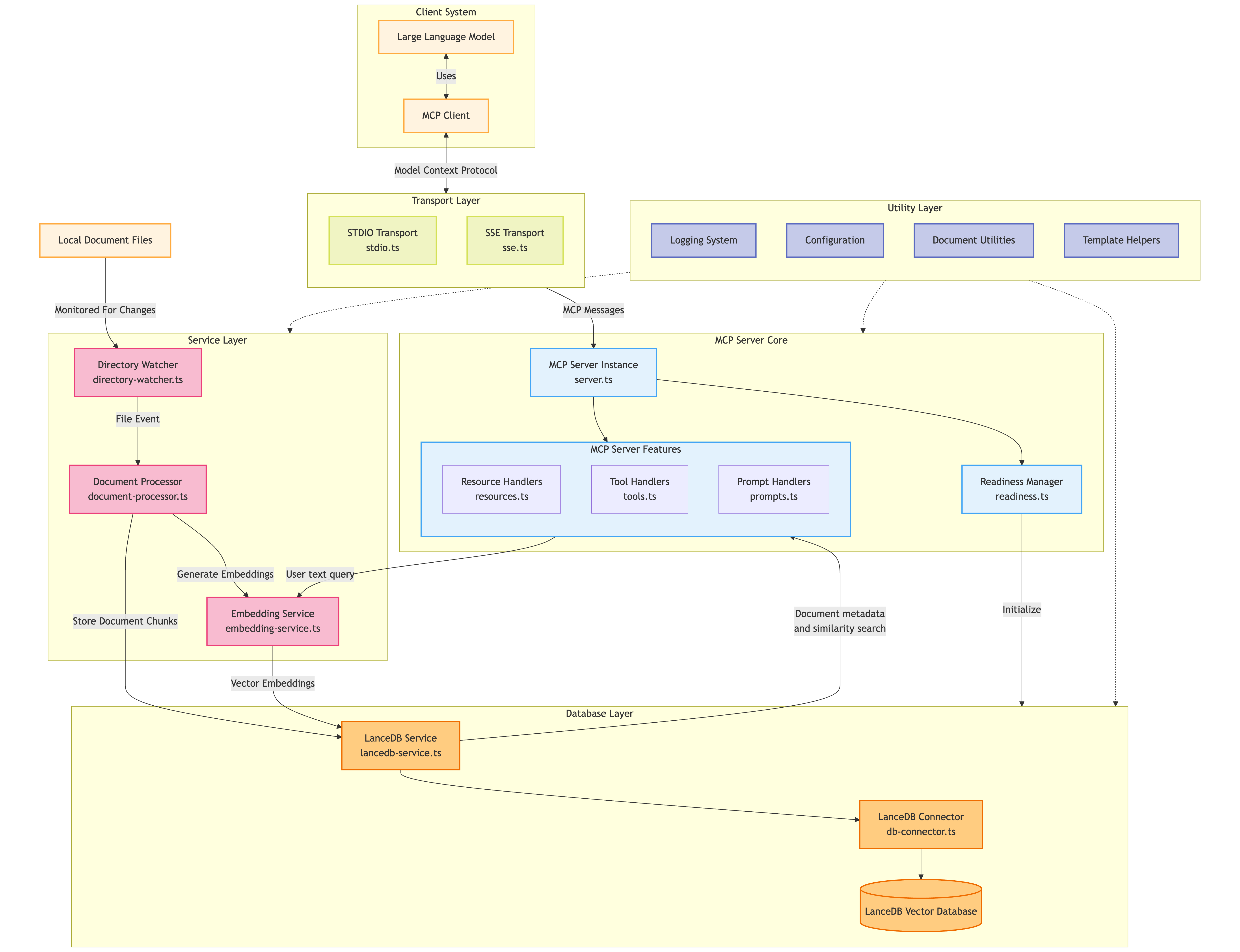
System Architecture
<picture>
<source media="(prefers-color-scheme: dark)" srcset="docs/system-arch-dark.png" />
<source media="(prefers-color-scheme: light)" srcset="docs/system-arch-light.png" />
</picture>
Getting Started
Prerequisites
- Node.js 22+ and npm
Installation
1. Clone the repository
2. Install dependencies:
npm install
3. Build the project:
npm run build
Running the Server
Using stdio (for integration with MCP clients)
npm start
Using SSE (for web-based usage)
npm start -- --transport=sse
The server will start on port 3000 by default. You can change this by setting the PORT environment variable or using the port argument:
npm start -- --transport=sse --port=8080
Or:
PORT=8080 npm start -- --transport=sse
API
Tools
- getDocumentsMetadata: Retrieves metadata of available documents
- Parameters:
- query (string): The user's original query or question
- checkQueryRelevance: Assesses relevant documents and returns instructions for intent analysis
- Parameters:
- query (string): The user's original query or question
- relevantDocIds (string): Comma-separated list of document IDs that appear relevant to the query
- analyzeIntent: Takes intent classification and returns instructions for context retrieval
- Parameters:
- query (string): The user's original query or question
- intentType (string): The classified intent type of the query
- retrieveContext: Retrieves relevant passages from selected documents
- Parameters:
- query (string): The user's original query or question
- intentType (string): The classified intent type of the query
- relevantDocIds (string): Comma-separated list of document IDs to retrieve context from
Resources
- documents://metadata: Returns a list of all document metadata
- documents://metadata/{id}: Returns metadata for a specific document by ID
Prompts
- document_qa: Q&A about document content
- Parameters:
- question (string): The user's question about the documents
- relevantDocIds (string): Comma-separated list of relevant document IDs (from the archive)
- intentType (string): The intent of the question (select from dropdown)
Configuration
The server can be configured through environment variables:
- SERVER_NAME: Name of the server (default: "document-archive-mcp-server")
- SERVER_VERSION: Server version (default: "1.0.0")
- ENABLE_RESOURCES: Enable/disable resources (default: true)
- ENABLE_TOOLS: Enable/disable tools (default: true)
- ENABLE_PROMPTS: Enable/disable prompts (default: true)
- PORT: Default port for SSE transport (default: 3000)
- TRANSPORT_TYPE: Default transport type (default: "stdio")
- LOG_LEVEL: Log level (default: "info")
- LOG_DIR: Directory for log files (default: "logs")
- LOG_FILE: Main log file name (default: "combined.log")
- ERROR_LOG_FILE: Error log file name (default: "error.log")
- ENABLE_FILE_LOGGING: Enable file logging (default: true in production, false in development)
- DOCUMENT_DIRECTORIES: Comma-separated list of directories to watch for documents
- DOCUMENT_CHUNK_SIZE: Size of document chunks for processing (default: 1000)
- DOCUMENT_CHUNK_OVERLAP: Overlap size for document chunks (default: 200)
- EMBEDDING_MODEL: Embedding model to use (default: 'sentence-transformers/all-MiniLM-L6-v2')
- LANCEDB_PATH: Path to LanceDB database (default: './vectordb')
Development
To run the server in development mode with auto-reloading:
npm run dev
For SSE transport in development mode:
npm run dev -- --transport=sse
License
MIT
Sign in to leave a review
Use Google, GitHub, or an email account so ratings stay tied to real people.
No reviews posted yet.





