Comfy Cloud MCP
About
Official MCP server for Comfy Cloud - generate images, video, audio, and 3D, run ComfyUI workflows, and search models directly from Claude and other AI agents
Details
- Author
- Unknown
- Categories
- Other, AI, Media, Automation
Jump to
Connect any AI agent to ComfyUI on Comfy Cloud GPUs or on your own machine. Generate images, video, audio and 3D, search models, nodes and templates, and run real workflows.
Public beta.Comfy MCP is in public beta. APIs, tools, and behavior may change while we iterate. SeeFeedbackto report issues or share suggestions.
Comfy MCPconnects AI agents to ComfyUI over theModel Context Protocol. Once connected, you can generate images, video, audio and 3D, search models, nodes and templates, and run real ComfyUI workflows from a chat with your agent.
It comes with two connections: aComfy Cloudconnection and alocal ComfyUIconnection, with the local one fully open source.
Stuck on anything below? The best way is to hand this page to your agent and ask for help.
For new users, we recommend starting with the cloud connection— it is the simplest setup. If you use claude.ai, ChatGPT, or the Claude Desktop chat app, the cloud connection is also the more compatible choice.
If you already run ComfyUI locally or in your own deployed environment, or you work mostly in a coding agentlike Claude Code, Cursor, or Codex, start with thelocalconnection.
For Mac users, if you plan to run open-source models, we recommend the cloud connection.Today's open-weight models — the local versions of MiniMax H3, LTX-2.3, and similar — are large, and will not run at a workable speed on the Apple GPU.
The hosted connection, linking your agent to yourComfy Cloudaccount. Nothing to install, and workflows run on Comfy Cloud GPUs. To learn more about Comfy Cloud, seeComfy Cloud.
You need aComfy Cloudaccount before connecting.Sign upif you do not have one yet; new users get5 free runsto try it out. OAuth sign-in during setup uses your Comfy account.
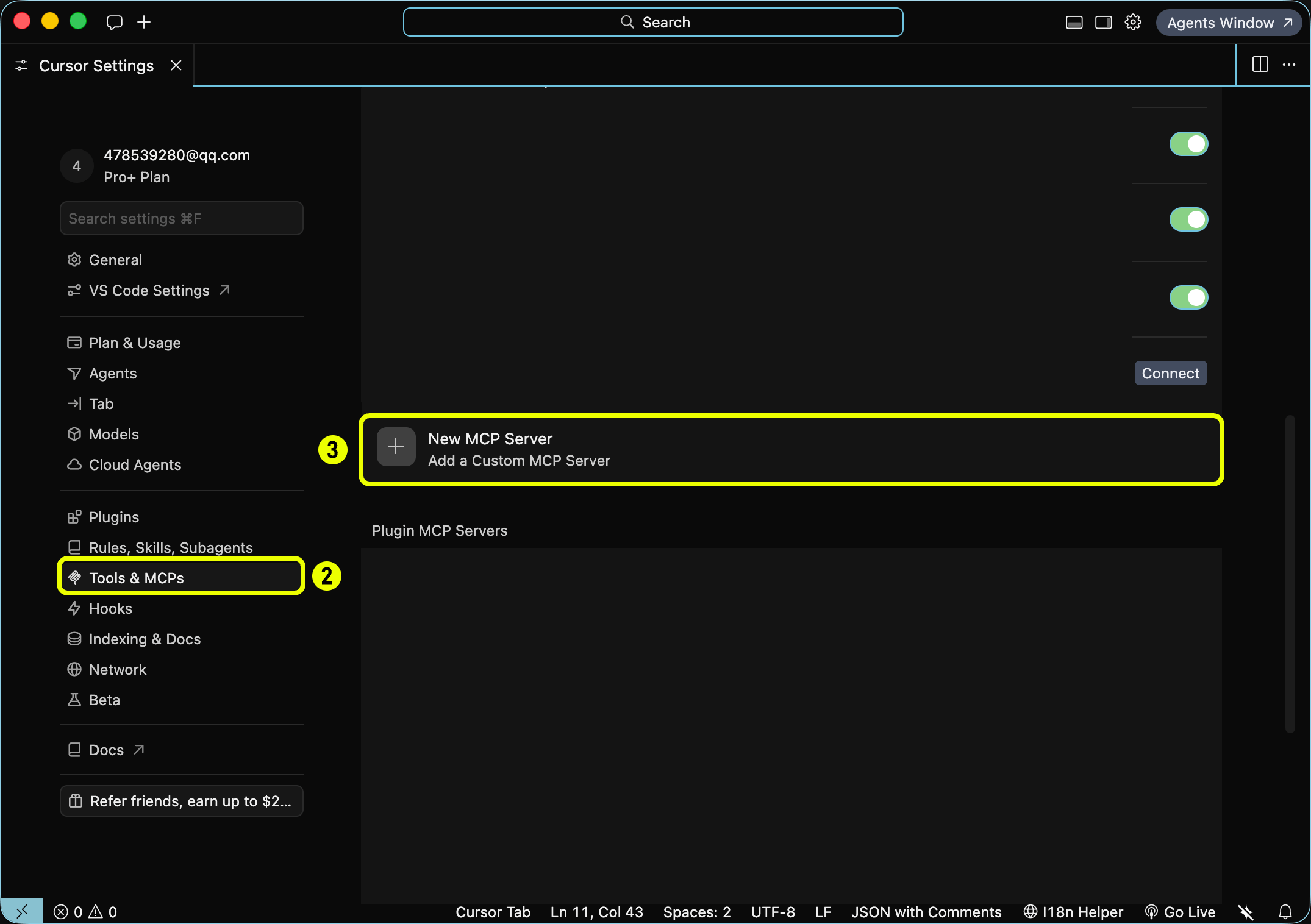
<Steps> <Step title="Open Cursor Settings"> Click the Settings gear in the top-right corner (labeled 1). 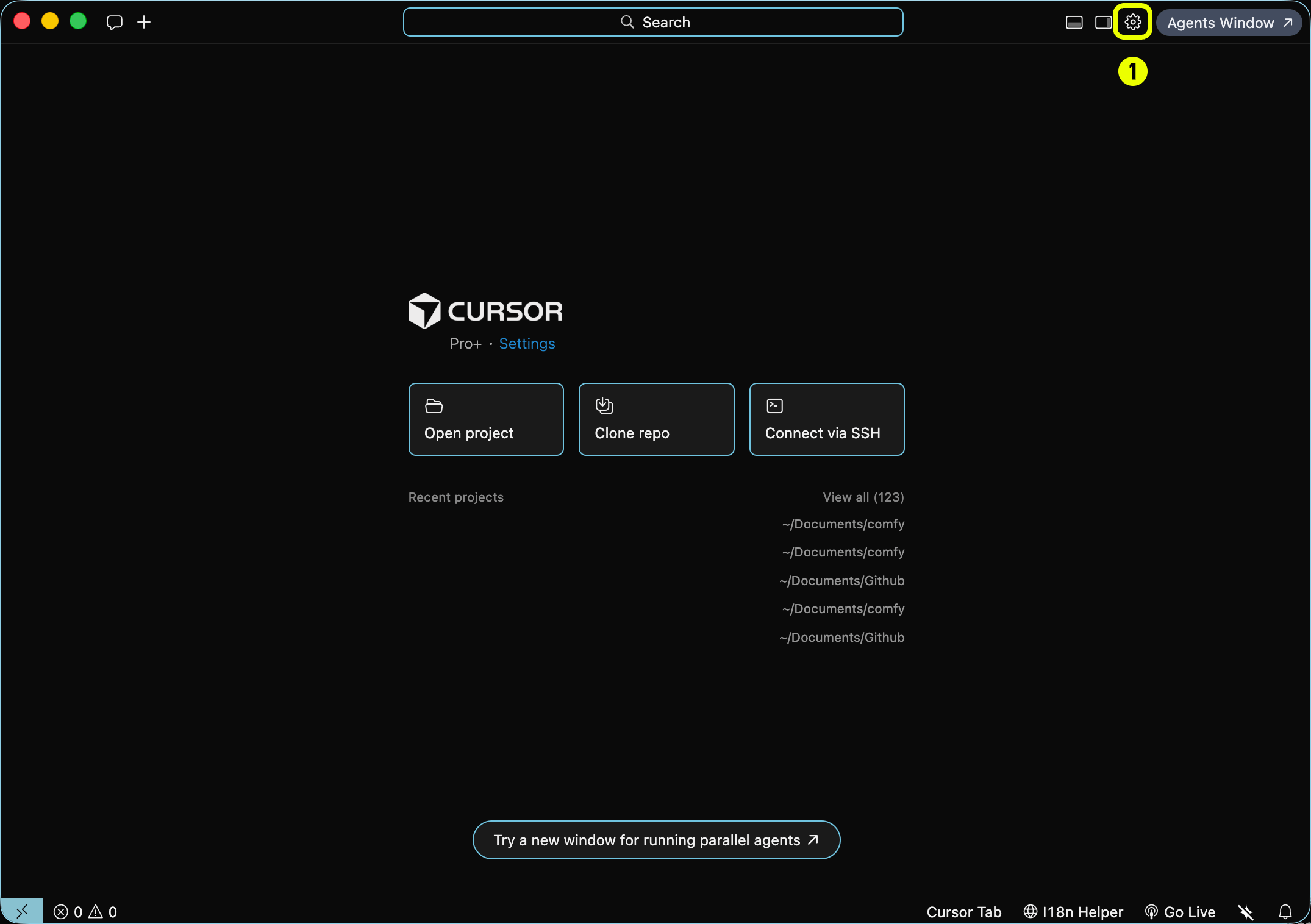 </Step> <Step title="Open Tools & MCP"> 1. In the sidebar, click Tools & MCPs (labeled 2). 2. Click + New MCP Server (labeled 3) → Add a Custom MCP Server.
  </Step> <Step title="Add your API key"> Edit
 ~/.cursor/mcp.json (global) or .cursor/mcp.json (project). Set the server URL and pass your Comfy Cloud API key in the X-API-Key header. Create a key at platform.comfy.org/profile/api-keys (starts with comfyui-): Set COMFY_API_KEY in your shell or system environment. Prefer ${env:COMFY_API_KEY} over hardcoding the key in a file you might commit to Git. 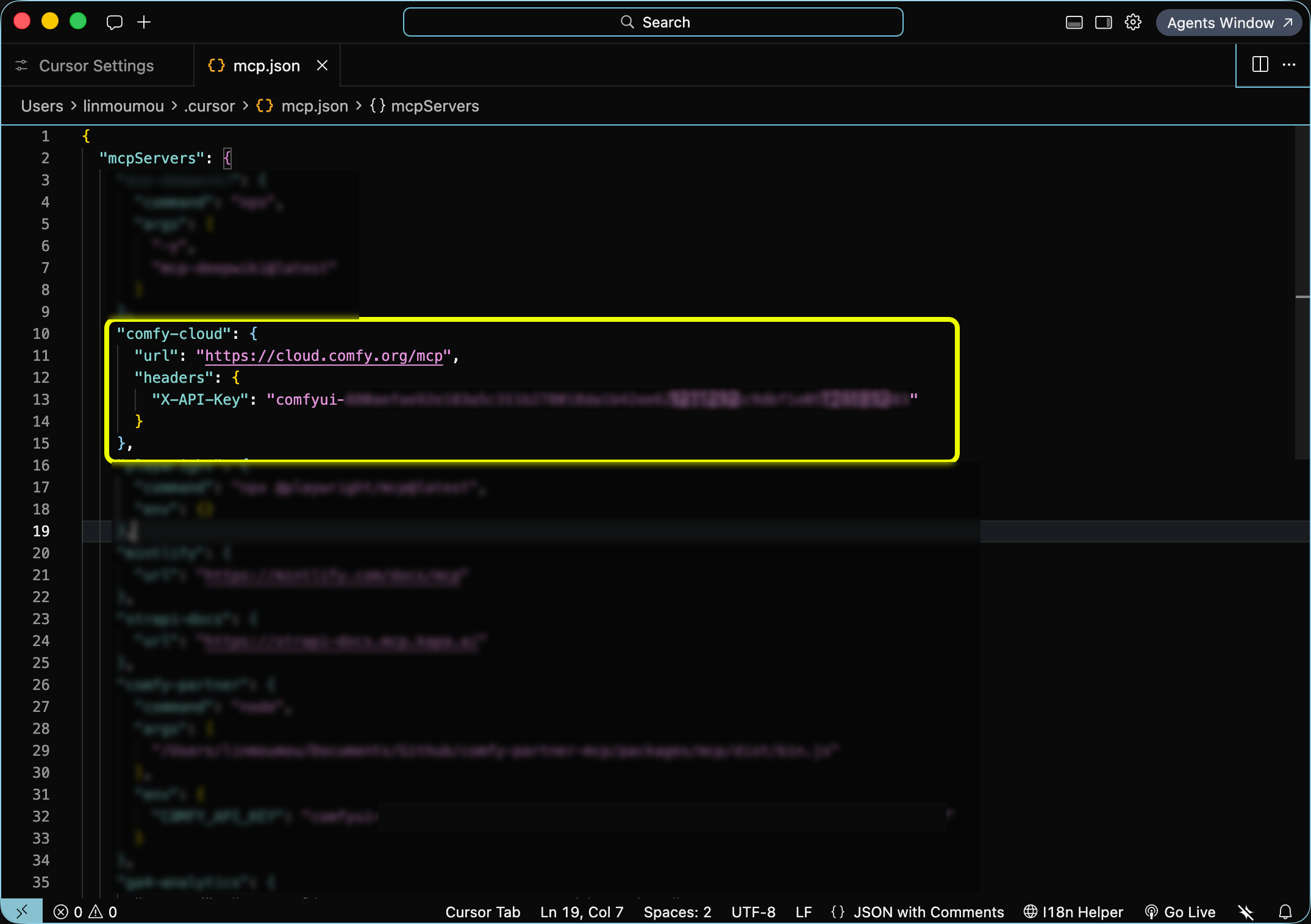 </Step> <Step title="Start generating"> Ask in plain language ("generate an image of a cat astronaut", "find a Wan 2.2 video template"). Cursor invokes the MCP tools on your behalf. </Step> </Steps>
Whenauth: "oauth"is set, OpenClaw ignores staticheaderson that server entry. Do not combine OAuth with a hardcoded API key header.
<Step title="Start generating"> Ask in plain language ("generate an image of a cat astronaut", "find a Wan 2.2 video template"). OpenClaw invokes the MCP tools on your behalf. </Step> </Steps> <Accordion title="API key instead of OAuth (headless or CI)"> Create a key at platform.comfy.org/profile/api-keys (starts with comfyui-), export it, then register the server: `bash theme={null} export COMFY_API_KEY="comfyui-..." openclaw mcp set comfy '{"url":"https://cloud.comfy.org/mcp","transport":"streamable-http","headers":{"Authorization":"Bearer ${COMFY_API_KEY}"}}' openclaw gateway restart ` Prefer Authorization: Bearer over a custom X-API-Key header for OpenClaw. Some OpenClaw builds drop custom headers on streamable-http transports; Bearer survives proxies more reliably. Put COMFY_API_KEY in your shell profile or OpenClaw env. Do not commit the key. </Accordion>
You do not call MCP tools yourself. Your agent picks the right tool based on what you ask for. Slash commands and prompts (below) are shortcuts that steer the agent toward common tasks, but plain language works too ("generate an image of a cat astronaut", "upscale this photo", "find a Wan 2.2 video template").
- Discoverwhat is available (search_templates,search_models,search_nodes, orcqlfor graph-style questions).
- Runa generation:run_templatefor a matching pre-built template,submit_workflowfor a custom workflow (withupload_filewhen an input image is needed), orpartner_generatefor partner models like Flux, Grok, Gemini, OpenAI, Ideogram, and Seedance.
- Wait and retrieveoutputs (wait_for_job, thenget_outputreturns a download command your agent runs in your shell).
The server prefers matchingpre-built templatesbefore building a workflow from scratch, which tends to produce better results faster.
These are the tools your agent has access to once connected. Names match what appears in MCP client logs and debugging output.
Hub URL share IDs:the trailing hyphen-delimited hex token in acomfy.org/workflows/<slug>-<hex>hub URL is the share ID. For example,comfy.org/workflows/topaz-starlight-upscale-1c77e82713b7has share ID1c77e82713b7. Pass that token toimport_shared_workflowasshare_id. Theshare_urlparameter only accepts?share=<id>query URLs likehttps://cloud.comfy.org/?share=..., not hub page URLs.
Claude Desktop does not support Claude Code slash commands. Instead, open theprompt pickerfor the same workflows:
You can also skip prompts and ask in plain language. The MCP tools work the same way.
Discovery is free:search_templates,search_models, andsearch_nodeswork with just aComfy account. Running generations requires an active Comfy Cloud subscription. A credit or top-up balance alone does not grant access: you need an active subscription to run generations, even if you have unused credits.
The MCP server runs in the cloud and the MCP itself doesn't write files to your machine. When a generation completes, your agent callsget_output, which returns:
- Atemporary signed download URL(valid for a short window).
- A ready-to-runshell command(curlon macOS and Linux,curl.exeon Windows).
Your agent should run that command in your shell. The command includes the destination path and filename.
Run the returned commandverbatim. Do not re-encode or edit the signed URL. The signature lives in the query string and breaks if the URL is modified.
If your MCP client cannot run shell commands (some GUI-only setups), copy the command and run it yourself in a terminal.
Asset upload and download depend on the client's file access. If Claude Desktop or another agent client has trouble handling asset uploads or downloads, it may be related to the agent's access to your local file directories. For Claude users we recommendClaude Code(desktop app or terminal), which has more capabilities. Similarly, for other agent families, the coding agent is usually better than the web chat version.
Comfy Cloud MCP is an early release. These limitations are known and being worked on:
- Assets generated viasubmit_workflowmay not embed workflow metadata.They might not reopen the originating workflow when opened in ComfyUI.
- Workflow building depends on agent accuracy.Complex multi-node workflows may need a retry or refinement.
- Outputs require a shell download step.SeeUploads and downloads.
- Upload size limitsmay apply depending on your MCP client. Some clients impose their own limits on file uploads.
- OAuth or API key.Claude Code and Claude Desktop use a one-time browser OAuth flow.Cursorrequires a Comfy Cloud API key in your MCP config (no OAuth). Other headless clients can pass a Comfy Cloud API key via theX-API-Keyheader instead. A device-code OAuth flow for clients that cannot open a browser is planned.
The open-source connection: your client launches the server on your machine and it drives the ComfyUI installed there.
Unlike the cloud and partner servers, it talks to the ComfyUI running onyour own machine— so it can run your workflows and inspect the nodes, custom nodes, and models your install actually has.
The fastest setup: hand it to your agent.Pastehttps://docs.comfy.org/agent-tools/mcp#installationinto your AI client and ask it to set up the local connection for you.
- Python 3.10+
- comfy-clion yourPATH(pip install "comfy-cli>=1.14.0") — the engine every tool wraps
- A ComfyUI workspace— create one withcomfy installif you don't have one (an existing checkout works viacomfy set-default <path>)
- A running ComfyUI for execution tools.Start it withcomfy launch, or calllaunch_comfyui. The server does not launch ComfyUI implicitly.
This puts acomfy-mcpconsole script on yourPATH— that command is the MCP server (it speaks MCP over stdio). Point your AI client at it below. (Hacking on the server itself?pip install -e .from a checkout of therepositoryinstead.)
COMFY_BIN(optional).MCP clients launch the server with their own environment, which often doesnotinclude your shell'sPATH. Ifcomfylives in a virtualenv or a non-standard location, setCOMFY_BINto its absolute path (for example/path/to/venv/bin/comfy). Every client example below shows where it goes; drop it ifcomfyis already on the environment your client launches the server with.
All clients speak the same MCP stdio contract: run thecomfy-mcpcommand as a server. Pick your client:
```
json theme={null} { "mcpServers": { "comfy-mcp": { "command": "comfy-mcp", "env": { "COMFY_BIN": "/path/to/venv/bin/comfy" } } } } bash theme={null} claude mcp add comfy-mcp -e COMFY_BIN=/path/to/venv/bin/comfy -- comfy-mcp ` Or check it into a project with a .mcp.json at the repo root: `json theme={null} { "mcpServers": { "comfy-mcp": { "command": "comfy-mcp", "env": { "COMFY_BIN": "/path/to/venv/bin/comfy" } } } } json theme={null} { "mcpServers": { "comfy-mcp": { "command": "comfy-mcp", "env": { "COMFY_BIN": "/path/to/venv/bin/comfy" } } } } > "Confirm my local ComfyUI is running, then run the workflow at ~/workflows/txt2img.json and show me the image." Under the hood the agent calls server_info to confirm ComfyUI is up, run_workflow to execute the workflow JSON, and fetch_outputs to collect the result.
Each tool maps onto acomfy-clicommand, run with--where local. Highlights:
Node introspection and model search read yourlive install— custom nodes included — which is the local differentiator from the cloud connection. See therepositoryfor the full tool list and reference.
Want the agent experienceinsideComfy Cloud (chat that builds and edits your graph), not an external MCP client?
Comfy MCP is in public beta. Please try it out and tell us what works and what doesn't:
- Feedback survey: report bugs, request features, or share general impressions.
- Discord:#comfy-mcp-and-clion the Comfy Discord for questions and discussion.
The cloud connection needs remote HTTP support. Claude Code, Claude Desktop, Cursor, Codex and OpenClaw have first-class setup above; Windsurf, Amp and others use the same URL with OAuth or an API key. The local connection needs a client that can launch a local stdio server as a subprocess. That rules out browser-based clients. claude.ai and ChatGPT accept remote connectors only.
The local connection has no URL. Your client launches the comfy-mcp command directly and talks to it over stdio.
The two sign-ins are separate, though. Signing in on one does not sign you in on the other, even though it is the same Comfy account.
On a Mac, use the cloud connection for generating: today's open-weight models are too large to run at a workable speed on the Apple GPU. On a PC with a dedicated graphics card, 24 GB or more of VRAM handles most things including video; 8–24 GB is fine for images but video will be slow or will not fit; under 8 GB, use cloud.
On the cloud connection, running generations requires an active Comfy Cloud subscription; new users get 5 free runs. On the local connection, runs are free because they happen on your hardware, with one exception: partner models execute on partner infrastructure and spend credits.
Cursor requires a Comfy Cloud API key in your MCP config; there is no MCP OAuth there yet. Headless and CI setups with no browser need one too. See the Cursor and Other clients tabs under Set up the cloud connection.
On the local connection, ComfyUI writes into your workspace's output/ directory, and fetch_outputs(prompt_id, out_dir) copies a finished job's files anywhere you name.
Going local → cloud (you need Cloud GPUs or partner models): ask your agent to sign you in, then add https://cloud.comfy.org/mcp to your client. Going cloud → local (you want your own models and custom nodes): install ComfyUI and the local server, then point your client at it. Your agent can do most of this for you.
If a workflow turns out to be too heavy for your machine, your agent can tell you and offer to run it on Comfy Cloud instead. And if only one connection is set up, ask it to add the other — see Set up the cloud connection or the Local Comfy MCP Connection.
On the local connection, ask your agent to handle it. Afterwards, restart your client or start a new session: MCP servers load when a session starts, so a running one keeps serving the old version until you do.
Plugin (recommended): /comfy-cloud:generate-image, /comfy-cloud:generate-video, … — type /comfy-cloud: to see them all. Direct connection (no plugin): /mcp__comfy-cloud__generate-image, … — type /mcp__ to see them. Either way you can just ask in plain language ("generate an image of …"). The MCP tools are model-invoked and do not require a slash command.
All-in-one AI creative studio — generate videos, images, audio in 11 Indian languages, and 3D models via MCP. Hosted at mcp.arcframe.ai.
AI podcast editing as a service. Upload raw audio or submit a URL, get back edited episodes with filler words removed, noise reduction, transcripts, show notes, and social clips. Includes webhooks for automation.
A server for creating fast and free lipsync videos for digital avatars, supporting both realistic and cartoon styles.
Automate end-to-end youtube production pipeline for face less channels
Licensed AI content access. 1,821 Dhar Mann Studios videos. $0.0025/pull, creator compensated automatically. 30ms delivery.
AI photo generation, editing, and video creation. 150+ themes, 19 edit operations, 3 video types.
Turn any language model into a multimodal powerhouse that can generate images, music, videos and more on the fly. Rostro's tools are designed to be used by language models from the ground up, expanding capabilities with minimal context bloat.
MCP-native AI media generation with x402 pay-per-call. Image, video, audio, and music from 6 providers — composable via resource IDs. USDC on Base.
Server for advanced AI-driven video editing, semantic search, multilingual transcription, generative media, voice cloning, and content moderation.
AVCLabs MCP integrates AI-powered video upscaling, quality enhancement, and SAM3 image segmentation into MCP workflows. It enhances low-resolution videos, cleans noisy footage, and extracts target objects through text prompts.
Sign in to leave a review
Use Google, GitHub, or an email account so ratings stay tied to real people.
No reviews posted yet.





