
Diagram Bridge Mcp
About
A comprehensive MCP server that bridges the gap between LLMs and diagram creation through three powerful, independent tools: intelligent format selection, format-specific instruction generation, and professional diagram rendering (using kroki server). Each tool can be used standa
Details
- Author
- tohachan
- Downloads
- 383
- Categories
- Developer Tools
Jump to
- Tool for intelligent diagram format selection with confidence scoring
- Generates format-specific coding instructions and syntax guidelines
- Renders diagram code to PNG/SVG via integrated local Kroki service
- Supports nine popular diagram formats out of the box
- Includes caching for performance and file storage with absolute paths

Setting up with Highlight
This MCP is not yet compatible with Highlight’s one-click setup. However, you can still use it with Highlight by following these steps:
- Download and install Highlight from highlightai.com/download
- Navigate to the plugins tab and select "Add Custom Plugin"
-
Configure the plugin with the settings below
Plugin Name
Diagram Bridge McpCommand (node, npx, python, etc.)Please refer to the README for specific instructions on how to obtain API keys or other required environment variables.
- Enable "Start Automatically" if you want the plugin to start when Highlight launches





From the repository
Install Node.js 18+, clone the repo, run npm install && npm run build, then start services with docker-compose up --build. Configure your MCP client to point to the built dist/index.js file. The server automatically provides three tools (help_choose_diagram, get_diagram_instructions, render_diagram) that can be used standalone or in sequence.
Claude Desktop / Cursor
Paste into your MCP client config file to install this server.
{
    "mcpServers": {
        "diagram bridge mcp": {
            "diagram-bridge-mcp": {
                "command": "node",
                "args": [
                    "/path/to/diagram-bridge-mcp/dist/index.js"
                ],
                "enabled": true
            }
        }
    }
}McpServers
{
    "diagram-bridge-mcp": {
        "command": "node",
        "args": [
            "/path/to/diagram-bridge-mcp/dist/index.js"
        ],
        "enabled": true
    }
}
Diagram Bridge MCP Server



A comprehensive MCP server that bridges the gap between LLMs and diagram creation through three powerful, independent tools: intelligent format selection, format-specific instruction generation, and professional diagram rendering (using kroki server). Each tool can be used standalone or combined in sequence for complete diagram workflows - from choosing the right format to generating the final image.
Supported Formats: Mermaid, PlantUML, C4 Model, D2, GraphViz, BPMN, Structurizr, Excalidraw, Vega-Lite
🚀 Quick Start
1. Prerequisites:
- Node.js 18.0 or higher
- Docker and Docker Compose
2. Install and build:
git clone git@github.com:tohachan/diagram-bridge-mcp.git

cd diagram-bridge-mcp

npm install && npm run build
3. Start services:
docker-compose up --build
4. Add to Cursor (or any MCP client):
{

  "mcpServers": {

    "diagram-bridge-mcp": {

      "command": "node",

      "args": ["/path/to/diagram-bridge-mcp/dist/index.js"],

      "enabled": true

    }

  }

}
5. Start using: The server provides three MCP tools ready for use!
💡 Usage Example
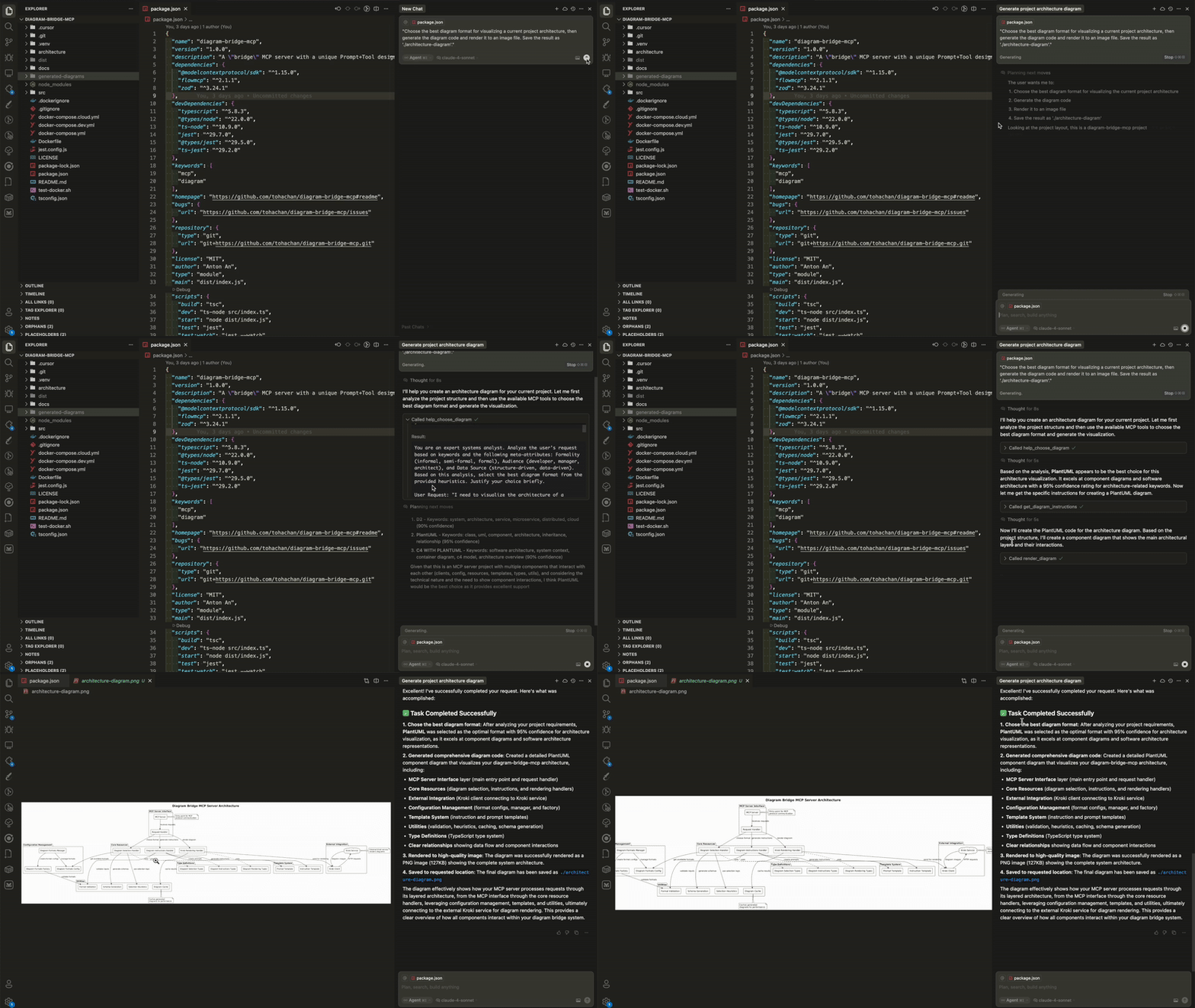
Here's a simple prompt to demonstrate the complete workflow:
"Choose the best diagram format for visualizing a current project architecture, then generate the diagram code and render it to an image file. Save the result as 'architecture-diagram'."
This single prompt will:
1. Analyze your request and recommend the optimal format
2. Get specific instructions for creating the diagram in that format
3. Create and render the final diagram to a PNG/SVG file
🎨 Examples Gallery
Want to see what's possible? Check out Examples Gallery
🛠️ Tools Overview
help_choose_diagram
Purpose: Intelligent format selection based on your requirements
- Analyzes your request using AI-powered heuristics
- Provides confidence-scored recommendations
- Works with format constraints when needed
- Generates structured prompts for optimal LLM decision-making
Example: "I need to show database relationships" → Recommends Mermaid ER diagram format with detailed reasoning
get_diagram_instructions
Purpose: Generate format-specific coding instructions
- Creates tailored prompts for any supported diagram format
- Includes syntax guidelines, best practices, and common pitfalls
- Provides working examples and output specifications
- Ensures LLMs generate syntactically correct diagram code
Example: For Mermaid format → Detailed Mermaid syntax guide with examples
render_diagram
Purpose: Transform diagram code into professional images
- Renders diagrams via integrated Kroki service
- Supports PNG and SVG output formats
- Includes intelligent caching for performance
- Provides file storage with absolute paths for easy access
Example: Mermaid code → High-quality PNG/SVG image file
⚙️ Configuration
Basic Setup
- Default storage:{project-root}/generated-diagrams/
- Default Kroki: Uses local Docker Kroki service
- Default port: 3000
For advanced configuration, see our Configuration Guide.
📚 Documentation
- Installation Guide - Detailed setup instructions
- Docker Deployment - Container deployment options
- API Reference - Complete tool and resource documentation
- Configuration Guide - Environment variables and customization
- Development Guide - Contributing and development setup
- Architecture - System architecture and design patterns
- Performance & Security - Performance metrics and security features
- Troubleshooting - Common issues and solutions
---
Perfect for: LLMs that need to create diagrams but don't know which format to use or how to render them professionally.
Powered by: Kroki - Universal diagram rendering service
Made with ❤️
Sign in to leave a review
Use Google, GitHub, or an email account so ratings stay tied to real people.
No reviews posted yet.





