
Dev.to MCP Server
About
It is a Model Context Protocol server that gives AI assistants read and write access to Dev.to content. Developers can use it to fetch articles, search by tags or users, and create or update posts directly from an AI chat interface.
Details
- Author
- Arindam200
- GitHub stars
- 61
- Downloads
- 188
- Categories
- Other
Jump to
- Fetch latest and trending articles from Dev.to
- Search articles by title or description keywords
- Get full details and metadata for a specific article
- Load articles by tag or by a specific username
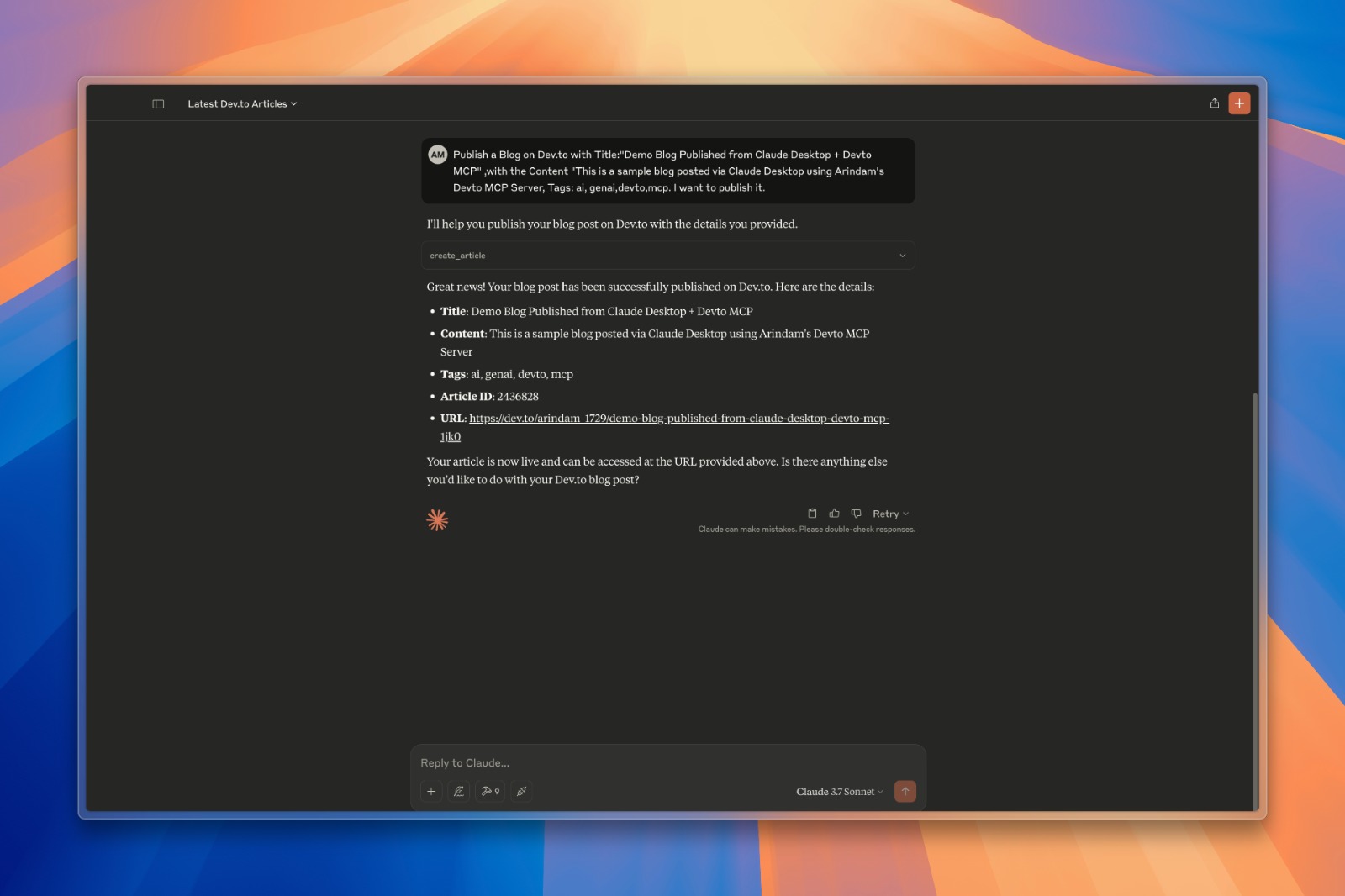
- Create and publish new articles to Dev.to
- Update existing articles with new content
Clone the repository, then add a JSON snippet to your Claude Desktop (claude_desktop_config.json) or Cursor (mcp.json) configuration, providing the path to uv, the path to the server.py file, and your Dev.to API key as an environment variable. After restarting the app, tools like get_latest_articles(), search_articles(query), and create_article(...) become available.
Dev.to MCP Server
This repository contains a Model Context Protocol server implementation for Dev.to that allows AI assistants to access and interact with Dev.to content.
<a href="https://glama.ai/mcp/servers/@Arindam200/devto-mcp">
</a>
What is MCP?
The Model Context Protocol (MCP) is a standard for enabling AI assistants to interface with external services, tools, and data sources. This server implements the MCP specification to provide access to Dev.to content. To know more about MCP, Check this video
Features
- Fetch latest and trending articles from Dev.to
- Search for articles by various criteria
- Get detailed information about specific articles
- Get Detailed information about a User.
- Access articles by tag or username
- Create and publish new articles to Dev.to
- Update existing articles
- Caching mechanism to improve performance and reduce API calls
Installation
1. Clone this repository
git clone https://github.com/Arindam200/devto-mcp.git

cd devto-mcp
2. Connect to the MCP server
Copy the below json with the appropriate {{PATH}} values:
   {
    "mcpServers": {
      "devto": {
        "command": "{{PATH_TO_UV}}", // Run which uv and place the output here
        "args": [
                  "--directory",
                  "{{PATH_TO_SRC}}",// cd into the repo, run pwd and enter the output here
                  "run",
                  "server.py"
        ],
        "env": {
          "DEV_TO_API_KEY":"Your Dev.to API Key" // Get it from https://dev.to/settings/extensions.
        }
      }
    }
   }
For Claude, save this as claude_desktop_config.json in your Claude Desktop configuration directory at:
~/Library/Application Support/Claude/claude_desktop_config.json
For Cursor, save this as mcp.json in your Cursor configuration directory at:
~/.cursor/mcp.json
3. Restart Claude Desktop / Cursor
Open Claude Desktop and you should now see Devto as an available integration.
Or restart Cursor.
Available Tools
The server provides the following tools:
- get_latest_articles() - Get the latest articles from Dev.to
- get_top_articles() - Get the most popular articles from Dev.to
- get_articles_by_tag(tag) - Get articles by tag
- get_article_by_id(id) - Get a specific article by ID
- search_articles(query, page=1) - Search for articles by keywords in title/description
- get_article_details(article_id) - Get full content and metadata for a specific article
- get_articles_by_username(username) - Get articles written by a specific author
- create_article(title, body_markdown, tags, published) - Create and publish a new article
- update_article(article_id, title, body_markdown, tags, published) - Update an existing article
Example Queries
Here are some examples of what you can ask an AI assistant connected to this server:
- "Find articles about Python on Dev.to"
- "Show me the latest Dev.to articles"
- "Get details for article 1234"
- "What articles has user 'ben' written?"
- "Search for articles about machine learning"
- "Create a new article titled 'Getting Started with Python'"
- "Update my article with ID 5678 to fix a typo in the content"
Authentication
The server requires a Dev.to API key for certain operations, particularly for creating and updating articles. The API key should be set as an environment variable DEV_TO_API_KEY.
Contributing
Contributions are welcome! Please feel free to submit a Pull Request.
License
This project is licensed under the MIT License - see the LICENSE file for details.
Sign in to leave a review
Use Google, GitHub, or an email account so ratings stay tied to real people.
No reviews posted yet.





