
Deep Search Lighting
About
A lightweight, pure web search solution for large language models, supporting multi-engine aggregated search, deep reflection and result evaluation. A balanced approach between web search and deep research, providing a framework-free implementation and mcp server for easy develo
Details
- Author
- positive666
- GitHub stars
- 2
- Downloads
- 230
- Categories
- Search
Jump to
- Multi-engine aggregated search (Baidu, DuckDuckGo, Bocha, Tavily)
- Reflection strategies for self-evaluation by the LLM
- Customizable pipelines for any LLM model
- OpenAI-style API compatibility out of the box
- Pure model source code for easy integration
- Built-in MCP server support

Setting up with Highlight
This MCP is not yet compatible with Highlight’s one-click setup. However, you can still use it with Highlight by following these steps:
- Download and install Highlight from highlightai.com/download
- Navigate to the plugins tab and select "Add Custom Plugin"
-
Configure the plugin with the settings below
Plugin Name
Deep Search LightingCommand (node, npx, python, etc.)Please refer to the README for specific instructions on how to obtain API keys or other required environment variables.
- Enable "Start Automatically" if you want the plugin to start when Highlight launches





From the repository
Install dependencies via pip install -r requirements.txt, rename .env.examples to .env, and fill in your model API information (OpenAI‑style APIs). Run the test case with python test_demo.py, launch the Streamlit demo with streamlit run streamlit_app.py, or start the built‑in MCP server with python mcp_server.py and connect the client via python langgraph_mcp_client.py.
Claude Desktop / Cursor
Paste into your MCP client config file to install this server.
{
    "mcpServers": {
        "deep search lighting": {
            "deep_search_lightning": {
                "command": "python",
                "args": [
                    "test_demo.py"
                ]
            }
        }
    }
}McpServers
{
    "deep_search_lightning": {
        "command": "python",
        "args": [
            "test_demo.py"
        ]
    }
}
Deep Search Lightning

A lightweight, pure web search solution for large language models, supporting multi-engine aggregated search, deep reflection and result evaluation. A balanced approach between web search and deep research, providing a framework-free implementation for easy developer integration.
✨ Why deepsearch_lightning?
Web search is a common feature for large language models, but traditional solutions have limitations:
- Limited search result quality and reflection effectiveness
- Requires powerful models and paid search engines
- Small models often struggle with tool calling patterns
- Contextual understanding can be unstable across different model sizes
Deep Search Lighting provides:
- Framework-free implementation with no restrictions
- Works with free APIs while maintaining good query quality
- Adjustable depth parameters to balance speed and results
- Reflection mechanism for model self-evaluation
- Supports models of any size, including smaller ones
[Experimental Planning]:
- Simplified design without web parsing or text chunking
- Considering adding RL-trained small recall models
✨ Features
- Multi-engine aggregated search:
- ✅ Baidu (free)
- ✅ DuckDuckGo (free but requires VPN)
- ✅ Bocha (requires API key)
- ✅ Tavily (requires registration key)
- Reflection strategies and controllable evaluation
- Custom pipelines for all LLM models
- OpenAI-style API compatibility
- Pure model source code for easy integration
- Built-in MCP server support
📺 DEMO

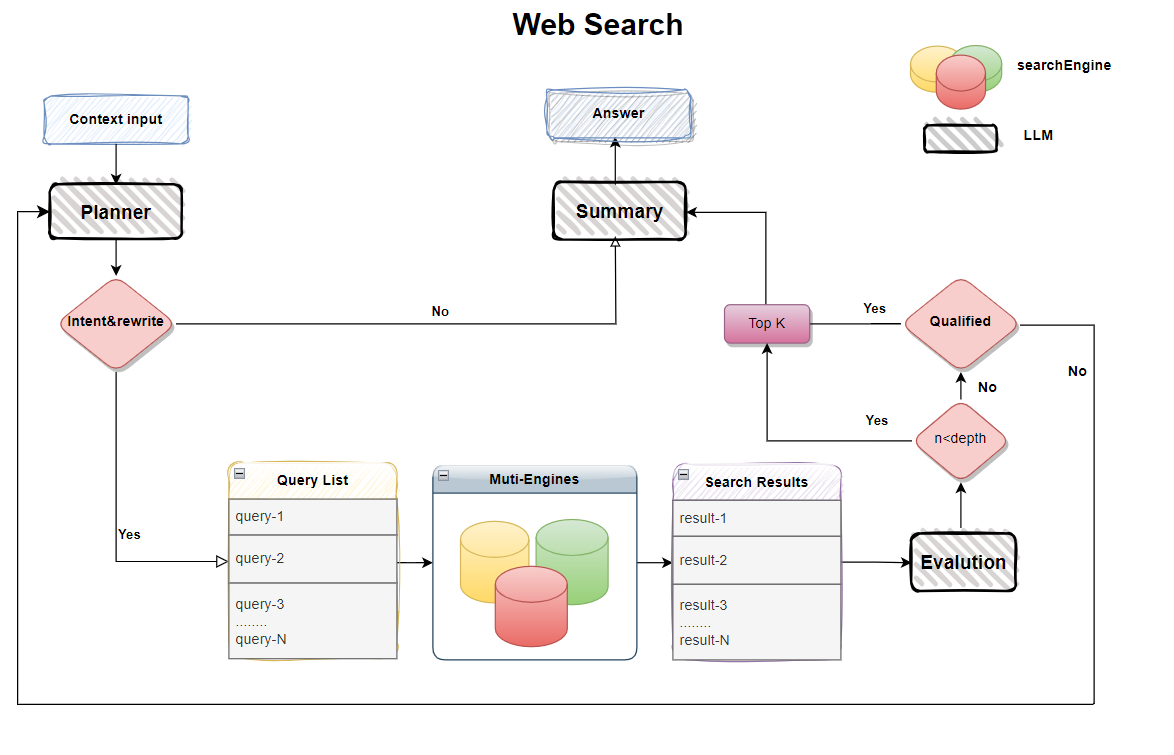
🔄 Piepline
🚀 Quick Start
1. Installation
``
bash

    conda create -n deepsearch_lightning python==3.11

    conda activate deepsearch_lightning

    pip install -r requirements.txt

    # Optional: For langchain support

    pip install -r requirements_langchain.txt
`
🔧Configuration


1. Rename .env.examples to .env

2. Fill in your model information (currently supports OpenAI-style APIs)

3. Baidu search is enabled by default - configure other engines as needed

🚀 RUN
bash

        1. test case

                python test_demo.py

        2. streamlit demo

                streamlit run streamlit_app.py

        3. run mcp server

                python mcp_server.py

                python langgraph_mcp_client.py
`` Planning
🧪 RL-trained small recall QA model validation
🧪 Strategy improvements
🧪 Multi-agent framework implementation
🙌 Welcome to contribute your ideas! Participate in the project via [Issues] or [Pull Requests].
License
This repository is licensed under the Apache-2.0 License.
Sign in to leave a review
Use Google, GitHub, or an email account so ratings stay tied to real people.
No reviews posted yet.





