
Astra DB
About
Integrates with Astra DB, enabling cloud-native database operations for scalable data storage and retrieval in AI applications.
Details
- Author
- datastax
- Repository
- datastax/astra-db-mcp
- GitHub stars
- 17
- Downloads
- 2,409
- License
- Apache License 2.0
- Categories
- Database, Other, Infrastructure, Knowledge Base, Developer Tools, Design, File Management, AI, Search, Cloud Service, Frontend
Jump to
The Astra DB MCP server now includes powerful vector search capabilities for AI applications:

Setting up with Highlight
This MCP is not yet compatible with Highlight’s one-click setup. However, you can still use it with Highlight by following these steps:
- Download and install Highlight from highlightai.com/download
- Navigate to the plugins tab and select "Add Custom Plugin"
-
Configure the plugin with the settings below
Plugin Name
Astra DBCommand (node, npx, python, etc.)npxArguments-
Argument 1
-y -
Argument 2
@datastax/astra-db-mcp
Environment-
ASTRA_DB_API_ENDPOINT
your_astra_db_endpoint -
ASTRA_DB_APPLICATION_TOKEN
your_astra_db_token
Please refer to the README for specific instructions on how to obtain API keys or other required environment variables.
-
Argument 1
- Enable "Start Automatically" if you want the plugin to start when Highlight launches





From the repository
The evals package loads an mcp client that then runs the index.ts file, so there is no need to rebuild between tests. You can load environment variables by prefixing the npx command. Full documentation can be found here.
OPENAI_API_KEY=your-key npx mcp-eval evals.ts tools.ts
GetCollections
Get all collections in the database.
CreateCollection
Create a new collection in the database (with vector support).
UpdateCollection
Update an existing collection in the database.
DeleteCollection
Delete a collection from the database.
EstimateDocumentCount
Get estimate of the number of documents in a collection.
ListRecords
List records from a collection in the database.
GetRecord
Get a specific record from a collection by ID.
CreateRecord
Create a new record in a collection.
UpdateRecord
Update an existing record in a collection.
DeleteRecord
Delete a record from a collection.
FindRecord
Find records in a collection by field value.
FindDistinctValues
Find distinct values for a specific field in a collection.
BulkCreateRecords
Create multiple records in a collection at once.
BulkUpdateRecords
Update multiple records in a collection at once.
BulkDeleteRecords
Delete multiple records from a collection at once.
VectorSearch
Perform vector similarity search on vector embeddings.
HybridSearch
Combine vector similarity search with text search for more accurate results.
OpenBrowser
Open a web browser for authentication and setup.
HelpAddToClient
Get assistance with adding Astra DB client to your MCP client.
The server provides the following tools for interacting with Astra DB:
Claude Desktop / Cursor
Paste into your MCP client config file to install this server.
{
    "mcpServers": {
        "astra db": {
            "env": {
                "ASTRA_DB_API_ENDPOINT": "your_astra_db_endpoint",
                "ASTRA_DB_APPLICATION_TOKEN": "your_astra_db_token"
            },
            "args": [
                "-y",
                "@datastax/astra-db-mcp"
            ],
            "command": "npx"
        }
    }
}Linux
{
    "env": {
        "ASTRA_DB_API_ENDPOINT": "your_astra_db_endpoint",
        "ASTRA_DB_APPLICATION_TOKEN": "your_astra_db_token"
    },
    "args": [
        "-y",
        "@datastax/astra-db-mcp"
    ],
    "command": "npx"
}
Macos
{
    "env": {
        "ASTRA_DB_API_ENDPOINT": "your_astra_db_endpoint",
        "ASTRA_DB_APPLICATION_TOKEN": "your_astra_db_token"
    },
    "args": [
        "-y",
        "@datastax/astra-db-mcp"
    ],
    "command": "npx"
}
Windows
{
    "env": {
        "ASTRA_DB_API_ENDPOINT": "your_astra_db_endpoint",
        "ASTRA_DB_APPLICATION_TOKEN": "your_astra_db_token"
    },
    "args": [
        "/k",
        "npx",
        "-y",
        "@datastax/astra-db-mcp"
    ],
    "command": "cmd"
}
Astra DB MCP Server
A Model Context Protocol (MCP) server for interacting with Astra DB. MCP extends the capabilities of Large Language Models (LLMs) by allowing them to interact with external systems as agents.
Prerequisites
You need to have a running Astra DB database. If you don't have one, you can create a free database here. From there, you can get two things you need:
1. An Astra DB Application Token
2. The Astra DB API Endpoint
To learn how to get these, please read the getting started docs.
Adding to an MCP client
Here's how you can add this server to your MCP client.
Claude Desktop
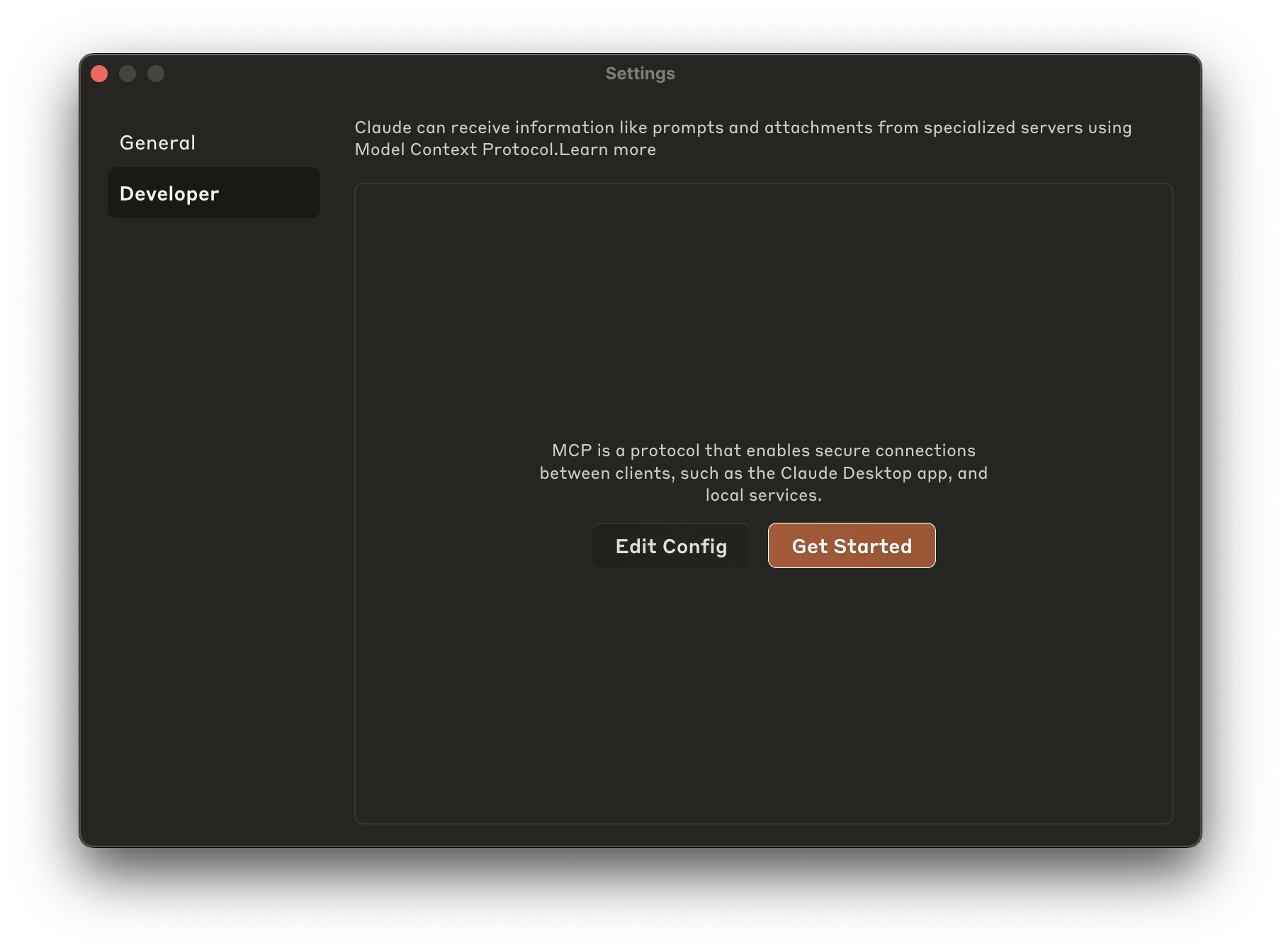
To add this to Claude Desktop, go to Preferences -> Developer -> Edit Config and add this JSON blob to claude_desktop_config.json:
{
  "mcpServers": {
    "astra-db-mcp": {
      "command": "npx",
      "args": ["-y", "@datastax/astra-db-mcp"],
      "env": {
        "ASTRA_DB_APPLICATION_TOKEN": "your_astra_db_token",
        "ASTRA_DB_API_ENDPOINT": "your_astra_db_endpoint"
      }
    }
  }
}
Optional Keyspace Configuration:
By default, this server uses the keyspace configured in the underlying Astra DB library (typically default_keyspace). If you need to connect to a specific keyspace, you can add the ASTRA_DB_KEYSPACE variable to the env object above, like so:
"env": {
  "ASTRA_DB_APPLICATION_TOKEN": "your_astra_db_token",
  "ASTRA_DB_API_ENDPOINT": "your_astra_db_endpoint",
  "ASTRA_DB_KEYSPACE": "your_desired_keyspace"
}
Windows PowerShell Users:
npx is a batch command so modify the JSON as follows:
  "command": "cmd",
  "args": ["/k", "npx", "-y", "@datastax/astra-db-mcp"],
Cursor
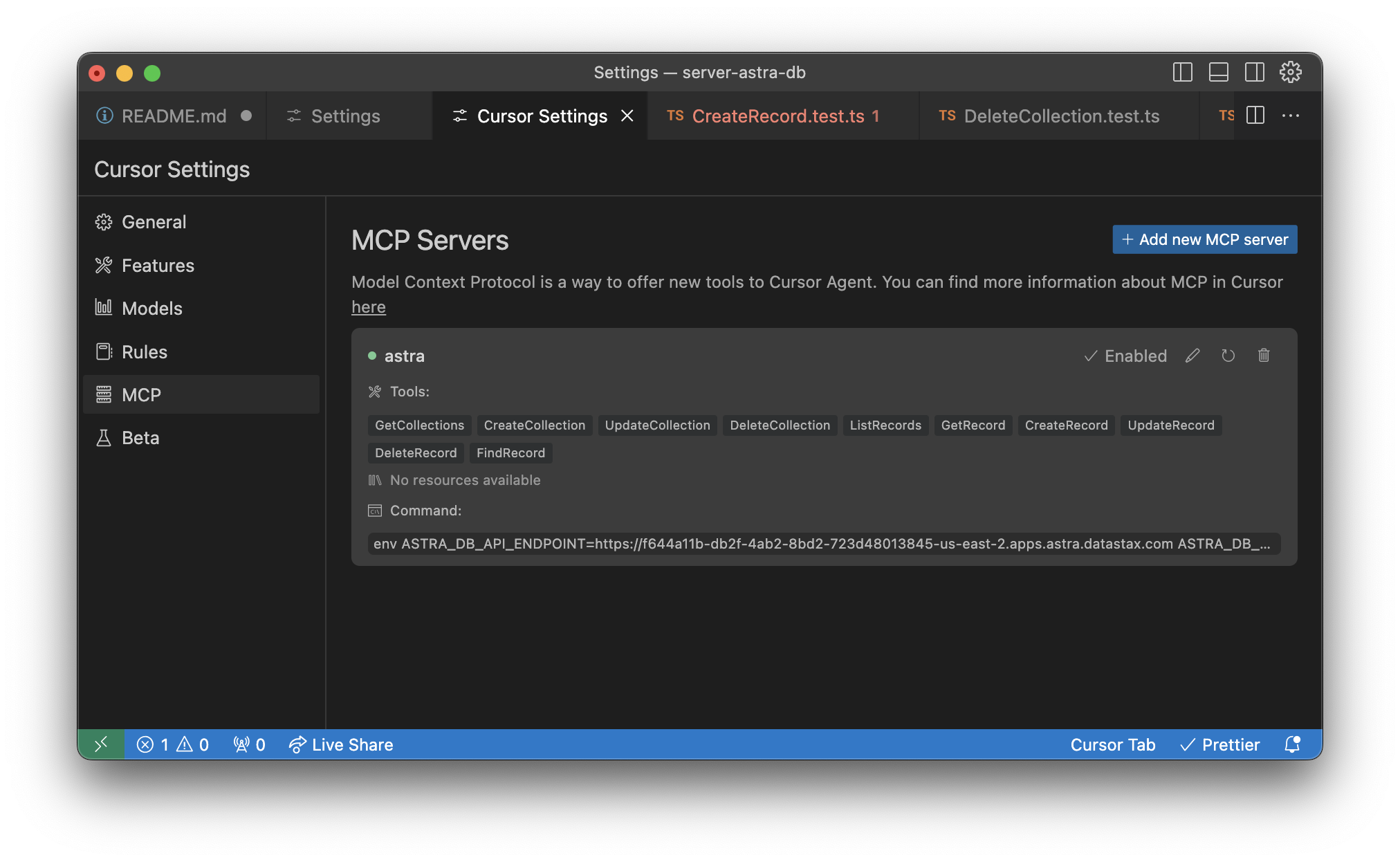
To add this to Cursor, go to Settings -> Cursor Settings -> MCP
From there, you can add the server by clicking the "+ Add New MCP Server" button, where you should be brought to an mcp.json file.
> Tip: there is a ~/.cursor/mcp.json that represents your Global MCP settings, and a project-specific .cursor/mcp.json file
> that is specific to the project. You probably want to install this MCP server into the project-specific file.
Add the same JSON as indiciated in the Claude Desktop instructions.
Alternatively you may be presented with a wizard, where you can enter the following values (for Unix-based systems):
- Name: Whatever you want
- Type: Command
- Command:
env ASTRA_DB_APPLICATION_TOKEN=your_astra_db_token ASTRA_DB_API_ENDPOINT=your_astra_db_endpoint npx -y @datastax/astra-db-mcp
Note: ASTRA_DB_KEYSPACE is optional. If omitted, the default keyspace configured in the Astra DB library will be used.
Once added, your editor will be fully connected to your Astra DB database.
Available Tools
The server provides the following tools for interacting with Astra DB:
Collection Management
-GetCollections: Get all collections in the database
- CreateCollection: Create a new collection in the database (with vector support)
- UpdateCollection: Update an existing collection in the database
- DeleteCollection: Delete a collection from the database
- EstimateDocumentCount: Get estimate of the number of documents in a collection
Record Operations
-ListRecords: List records from a collection in the database
- GetRecord: Get a specific record from a collection by ID
- CreateRecord: Create a new record in a collection
- UpdateRecord: Update an existing record in a collection
- DeleteRecord: Delete a record from a collection
- FindRecord: Find records in a collection by field value
- FindDistinctValues: Find distinct values for a specific field in a collection
Bulk Operations
-BulkCreateRecords: Create multiple records in a collection at once
- BulkUpdateRecords: Update multiple records in a collection at once
- BulkDeleteRecords: Delete multiple records from a collection at once
Vector Search
-VectorSearch: Perform vector similarity search on vector embeddings
- HybridSearch: Combine vector similarity search with text search
Utility
-OpenBrowser: Open a web browser for authentication and setup
- HelpAddToClient: Get assistance with adding Astra DB client to your MCP client
New Features and Capabilities
Vector Search Capabilities
The Astra DB MCP server now includes powerful vector search capabilities for AI applications:
VectorSearch
Perform similarity search on vector embeddings:
// Example usage
const results = await VectorSearch({
  collectionName: "my_vector_collection",
  queryVector: [0.1, 0.2, 0.3, ...], // Your embedding vector
  limit: 5,                          // Optional: Number of results to return (default: 10)
  minScore: 0.7,                     // Optional: Minimum similarity score threshold
  filter: { category: "article" }    // Optional: Additional filter criteria
});
HybridSearch
Combine vector similarity search with text search for more accurate results:
// Example usage
const results = await HybridSearch({
  collectionName: "my_vector_collection",
  queryVector: [0.1, 0.2, 0.3, ...], // Your embedding vector
  textQuery: "climate change",        // Text query to search for
  weights: {                          // Optional: Weights for hybrid search
    vector: 0.7,                      // Weight for vector similarity (0.0-1.0)
    text: 0.3                         // Weight for text relevance (0.0-1.0)
  },
  limit: 5,                           // Optional: Number of results to return
  fields: ["title", "content"]        // Optional: Fields to search in for text query
});
Enhanced Collection Creation
The CreateCollection tool now supports more vector configuration options:
// Example usage
const result = await CreateCollection({
  collectionName: "my_vector_collection",
  vector: true,                       // Enable vector search
  dimension: 1536,                    // Vector dimension (e.g., 1536 for OpenAI embeddings)
  metric: "cosine"                    // Similarity metric: "cosine", "euclidean", or "dot_product"
});
Finding Distinct Values
The new FindDistinctValues tool allows you to find unique values for a field:
// Example usage
const distinctValues = await FindDistinctValues({
  collectionName: "my_collection",
  field: "category",                  // Field to find distinct values for
  filter: { active: true }            // Optional: Filter to apply
});
Optimized Bulk Operations
Bulk operations now use native batch processing for better performance:
// Example: Bulk create records
const result = await BulkCreateRecords({
  collectionName: "my_collection",
  records: [
    { title: "Record 1", content: "Content 1" },
    { title: "Record 2", content: "Content 2" },
    // ... more records
  ]
});
// Example: Bulk update records

const updateResult = await BulkUpdateRecords({

  collectionName: "my_collection",

  records: [

    { id: "record1", record: { title: "Updated Title 1" } },

    { id: "record2", record: { title: "Updated Title 2" } },

    // ... more records

  ]

});
// Example: Bulk delete records

const deleteResult = await BulkDeleteRecords({

  collectionName: "my_collection",

  recordIds: ["record1", "record2", "record3"]

});
Improved Error Handling
The server now provides more detailed error messages with error codes to help diagnose issues more easily.
Changelog
All notable changes to this project will be documented in this file. The format is based on Keep a Changelog, and this project adheres to Semantic Versioning.Running evals
The evals package loads an mcp client that then runs the index.ts file, so there is no need to rebuild between tests. You can load environment variables by prefixing the npx command. Full documentation can be found here.
OPENAI_API_KEY=your-key npx mcp-eval evals.ts tools.ts
❤️ Contributors
Badges

---29:[
Sign in to leave a review
Use Google, GitHub, or an email account so ratings stay tied to real people.
No reviews posted yet.





