
Curl MCP - Natural Language Curl Commander
About
MCP server that translates natural language instructions into curl commands, supporting both English and Spanish
Details
- Author
- MartinPSDev
- GitHub stars
- 5
- Downloads
- 225
- Categories
- Other
Jump to
- Supports both English and Spanish commands
- Handles GET, POST, and other common HTTP methods
- Manages headers, authentication, and data payloads
- Offers SSL verification toggling and timeout settings
- Allows proxy specification and custom user agents (e.g., Chrome, iPhone)
- Saves responses to files using download commands

Setting up with Highlight
This MCP is not yet compatible with Highlight’s one-click setup. However, you can still use it with Highlight by following these steps:
- Download and install Highlight from highlightai.com/download
- Navigate to the plugins tab and select "Add Custom Plugin"
-
Configure the plugin with the settings below
Plugin Name
Curl MCP - Natural Language Curl CommanderCommand (node, npx, python, etc.)Please refer to the README for specific instructions on how to obtain API keys or other required environment variables.
- Enable "Start Automatically" if you want the plugin to start when Highlight launches





From the repository
Clone the repository, create a Python virtual environment, install dependencies, and start the server with python3 main.py. Configure the server in your MCP client settings by adding the JSON entry provided in the README, then send natural language commands like "Get headers from https://example.com" or "POST to https://api.example.com/users with data name=John and age=25".
Claude Desktop / Cursor
Paste into your MCP client config file to install this server.
{
    "mcpServers": {
        "curl mcp - natural language curl commander": {
            "curl-mcp": {
                "command": "python3",
                "args": [
                    "-m",
                    "venv",
                    ".env"
                ]
            }
        }
    }
}McpServers
{
    "curl-mcp": {
        "command": "python3",
        "args": [
            "-m",
            "venv",
            ".env"
        ]
    }
}
Curl MCP - Natural Language Curl Commander
Execute curl commands using natural language in English and Spanish.
Prerequisites
- Python 3.13 or higher
- curl (usually pre-installed on Linux)
- Git
Installation
1. Clone the repository:
git clone https://github.com/MartinPSDev/curl-mcp.git

cd curl-mcp
2. Create and activate a virtual environment:
python3 -m venv .env

source .env/bin/activate
3. Install dependencies:
pip install -r requirements.txt
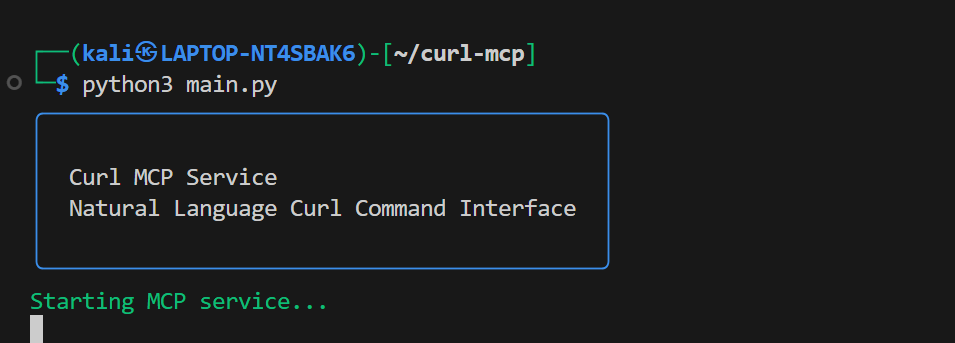
4. Start the MCP server:
python3 main.py
Configuration
Add this to your MCP settings:
{
    "mcpServers": {
        "curl-mcp": {
            "command": "/usr/bin/python3",
            "args": [
                "/path/to/your/curl-mcp/main.py"
            ],
            "env": {
                "PYTHONPATH": "/path/to/your/curl-mcp/.env/lib/python3.11/site-packages"
            }
        }
    }
}
Note: Replace /path/to/your/curl-mcp with the actual path where you cloned the repository.
Usage
1. Start the MCP server:
python3 main.py
2. The server can now receive natural language commands in English or Spanish. Here are some examples:
Basic Examples:
- "Get headers from https://example.com" - "Show raw response from https://api.example.com" - "Download https://example.com and save as page.html"Advanced Examples:
- Headers and Authentication: - "Make a request to https://api.example.com with header Authorization: Bearer mytoken" - "Get https://api.example.com using basic auth user:password"- Data Handling:
- "POST to https://api.example.com/users with data name=John and age=25"
- "Send form data to https://upload.example.com with file image.jpg"
- "POST urlencoded data user=test+name to https://api.example.com"
- Security and Options:
- "Get https://example.com ignoring SSL verification"
- "Request https://api.example.com with timeout 30 seconds"
- "Get https://example.com through proxy localhost:8080"
- User Agents:
- "Get https://example.com as Chrome"
- "Request https://mobile.example.com as iPhone"
Sign in to leave a review
Use Google, GitHub, or an email account so ratings stay tied to real people.
No reviews posted yet.





