
Context Lens
About
Semantic search knowledge base for MCP-enabled AI assistants. Index local files or GitHub repos, query with natural language. Built on LanceDB vector storage. Works with Claude Desktop, Cursor, and other MCP clients.
Details
- Author
- cornelcroi
- GitHub stars
- 24
- Downloads
- 371
- Categories
- Other, Knowledge Base, Search
Jump to
- Semantic search that understands meaning, not just keywords
- Zero setup: no installation, configuration, or API keys required
- Serverless vector storage with LanceDB (file-based, no cloud)
- 100% local and private: all data stays on your machine
- Index local files or public GitHub repositories
- Smart parsing: language-aware chunking for code and documents

Setting up with Highlight
This MCP is not yet compatible with Highlight’s one-click setup. However, you can still use it with Highlight by following these steps:
- Download and install Highlight from highlightai.com/download
- Navigate to the plugins tab and select "Add Custom Plugin"
-
Configure the plugin with the settings below
Plugin Name
Context LensCommand (node, npx, python, etc.)Please refer to the README for specific instructions on how to obtain API keys or other required environment variables.
- Enable "Start Automatically" if you want the plugin to start when Highlight launches





From the repository
Add Context Lens to your MCP client configuration (Kiro IDE, Cursor, Claude Desktop, Continue.dev) using uvx context-lens. For programmatic use, invoke the server with StdioServerParameters(command="uvx", args=["context-lens"]) and interact via the Python SDK. After setup, add content by asking the AI (e.g., "Add all Python files from ./src") and query naturally (e.g., "How does the authentication system work?").
Claude Desktop / Cursor
Paste into your MCP client config file to install this server.
{
    "mcpServers": {
        "context lens": {
            "context-lens": {
                "command": "uvx",
                "args": [
                    "context-lens"
                ]
            }
        }
    }
}McpServers
{
    "context-lens": {
        "command": "uvx",
        "args": [
            "context-lens"
        ]
    }
}
Context Lens
Give your AI the ability to understand meaning, not just match keywords.



What is Context Lens?
Context Lens transforms any content into a searchable knowledge base for your AI assistant. This self-contained Model Context Protocol (MCP) server with built-in serverless vector storage (LanceDB) brings semantic search to your conversations. Point it at any content - codebases, documentation, contracts, or text files - and your AI can instantly understand and answer questions about the content.
Traditional keyword search finds files containing specific words. Miss the exact term? Miss the content.
Context Lens understands meaning. Ask about "authentication" and find code about login, credentials, tokens, OAuth, and access control - even if those files never use the word "authentication."
See It In Action
Want to understand how Context-Lens works? Here's the fun part: you can use Context-Lens to learn about Context-Lens.
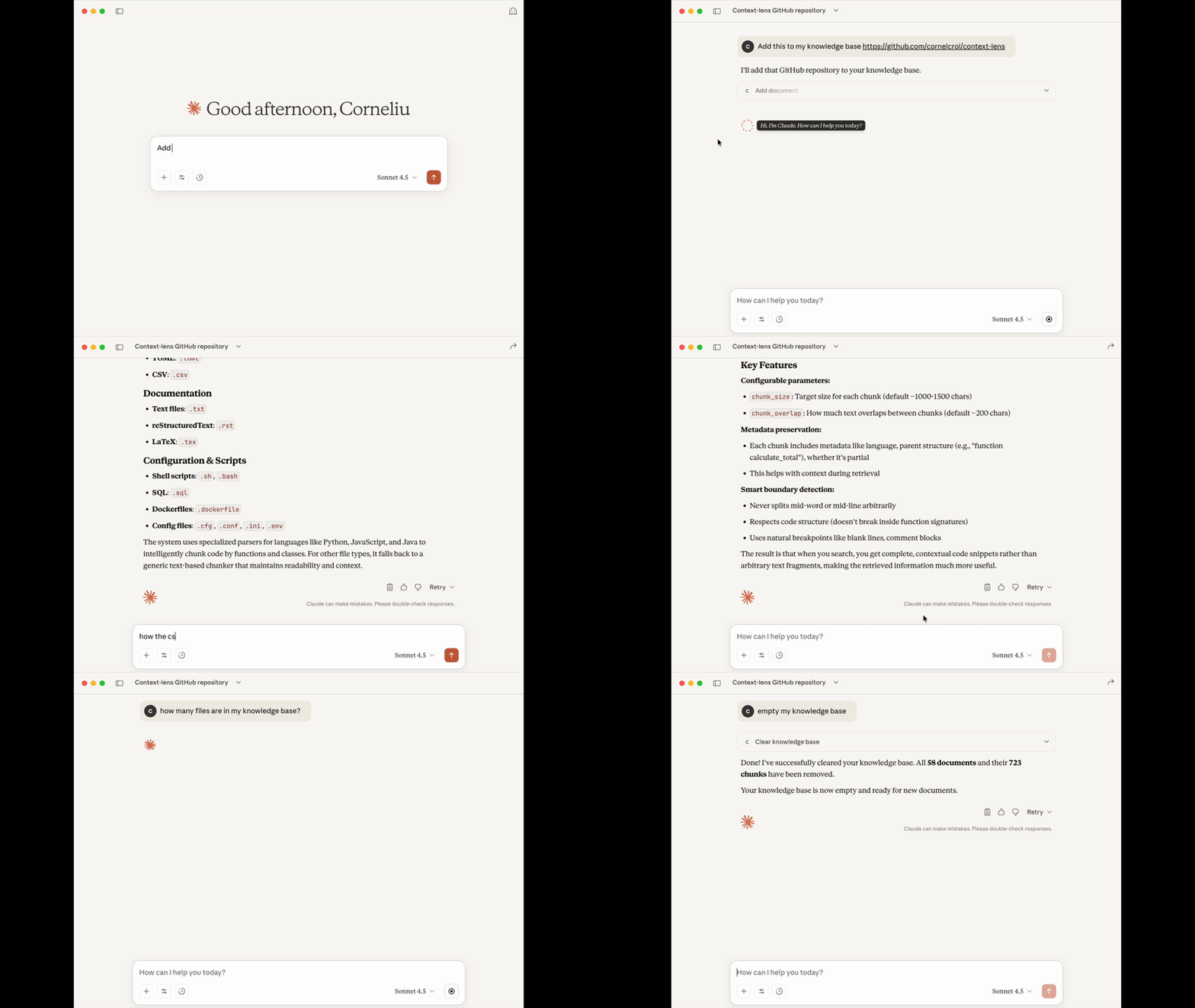
Demo: Using Claude Desktop with Context-Lens to index and query this repository itself. No git clone, no scrolling through code - just questions and answers.
Why LanceDB?
Context Lens uses LanceDB - a modern, serverless vector database:
- 🆓 Completely Free & Local - No cloud services, API keys, or subscriptions
- ⚡ Zero Infrastructure - Embedded database, just a file on disk
- 🚀 Fast & Efficient - Built on Apache Arrow, optimized for vector search
- 💾 Simple Storage - Single file database, easy to backup or move
Think of it as "SQLite for AI embeddings" - all the power of vector search without the complexity.
Features
- 🔍 Semantic Search - Understand meaning, not just keywords
- 🚀 Zero Setup - No installation, no configuration, no API keys
- 💾 Serverless Storage - Built-in LanceDB, no external database
- 🔒 100% Local & Private - All data stays on your machine
- 📁 Local & GitHub - Index local files or public GitHub repositories
- 🎯 Smart Parsing - Language-aware chunking for better results
Architecture
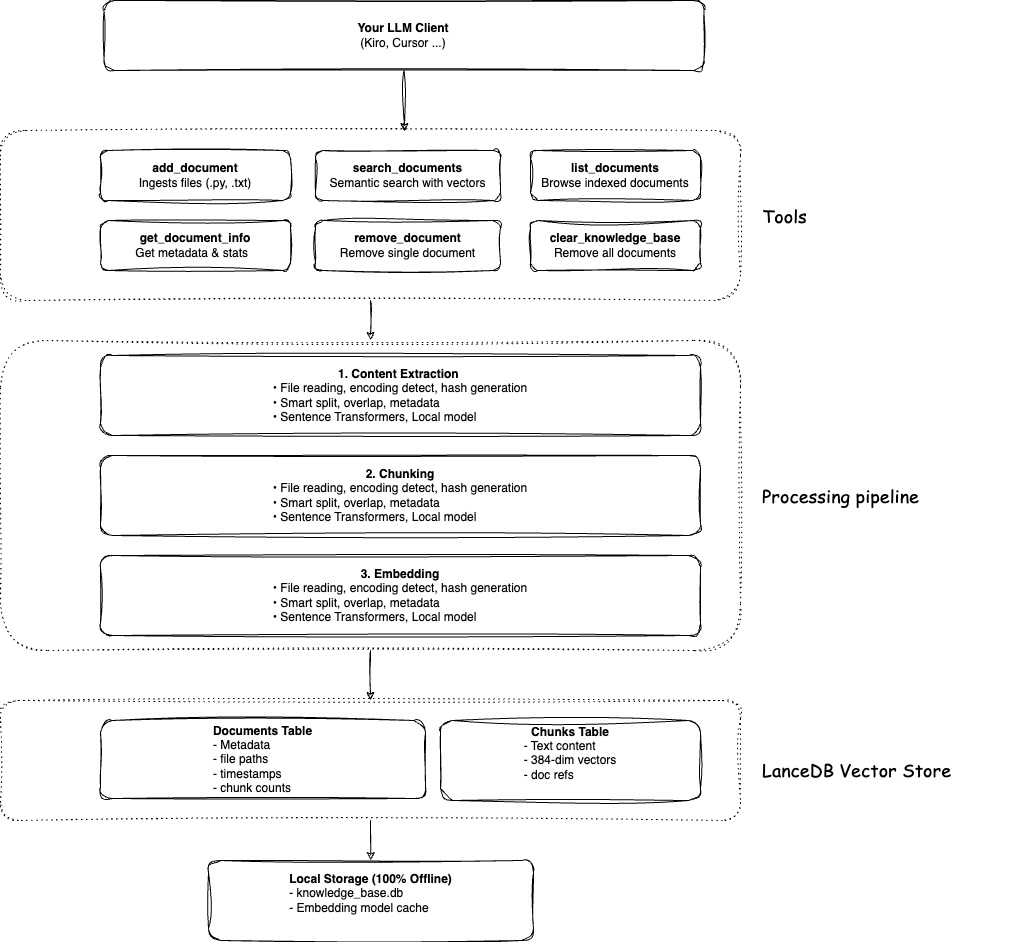
How It Works
When you add content to Context Lens, it doesn't just dump text into a database. Here's what actually happens:
Smart Reading: Context Lens detects your file type and uses specialized parsers. Python files are analyzed with AST parsing, JSON is parsed structurally, Markdown is split by headers. This preserves the natural structure of your content.
Meaningful Chunks: Instead of arbitrary character limits, content is chunked intelligently - complete functions, logical paragraphs, full sections. Your code never gets split mid-function.
Semantic Vectors: Each chunk is converted to a 384-dimensional vector using a local embedding model. These vectors capture meaning, not just words. "authentication" and "login system" become similar vectors even though they share no words.
Local Storage: Everything goes into LanceDB - a serverless vector database that's just a file on your disk. No cloud services, no API calls, completely private.
Conceptual Search: When you ask a question, it becomes a vector too. Context Lens finds chunks with similar vectors (similar meaning) and ranks them by relevance. You get answers based on concepts, not keyword matching.
Technical Specifications
| Component | Details |
|-----------|---------|
| Embedding Model | sentence-transformers/all-MiniLM-L6-v2 |
| Vector Dimensions | 384 dimensions |
| Model Size | ~90MB (downloads on first use) |
| Chunk Size | 1000 characters (default, configurable) |
| Chunk Overlap | 200 characters (default, configurable) |
| Vector Database | LanceDB (serverless, file-based) |
| Storage Format | Apache Arrow columnar format |
| Search Method | Cosine similarity |
| Processing | 100% local, no external API calls |
> 📖 Want to customize? See SETUP.md for configuration options and TECHNICAL.md for performance benchmarks.
Quick Setup
Kiro IDE
Add to .kiro/settings/mcp.json:
{
  "mcpServers": {
    "context-lens": {
      "command": "uvx",
      "args": ["context-lens"],
      "autoApprove": ["list_documents", "search_documents"]
    }
  }
}
Reload: Command Palette → "MCP: Reload Servers"
Cursor
Add to .cursor/mcp.json:
{
  "mcpServers": {
    "context-lens": {
      "command": "uvx",
      "args": ["context-lens"]
    }
  }
}
Other MCP Clients
For Claude Desktop, Continue.dev, or any MCP-compatible client:
{
  "mcpServers": {
    "context-lens": {
      "command": "uvx",
      "args": ["context-lens"]
    }
  }
}
> 📖 Need detailed setup instructions? See SETUP.md for all clients, programmatic usage, and configuration options.
MCP Registry
Context Lens is published to the official Model Context Protocol Registry as io.github.cornelcroi/context-lens.
> 📖 Registry details and verification: See REGISTRY.md for installation verification and registry information.
<!-- mcp-name: io.github.cornelcroi/context-lens -->
Programmatic Usage
Use Context Lens directly in your Python applications:
#!/usr/bin/env python3
import os
from dotenv import load_dotenv
from mcp import StdioServerParameters, stdio_client
from strands import Agent
from strands.models.openai import OpenAIModel
from strands.tools.mcp import MCPClient
def main():

    # Load environment variables from .env file

    load_dotenv()


    # Create MCP client for context-lens server

    mcp_client = MCPClient(

        lambda: stdio_client(

            StdioServerParameters(command="uvx", args=["context-lens"])

        )

    )


    # Create an agent with OpenAI model and MCP tools

    model = OpenAIModel(model_id="gpt-4o-mini")

    agent = Agent(model=model, tools=[mcp_client])


    print("Chatbot started! Type 'quit' to exit.")


    while True:

        user_input = input("\nYou: ").strip()


        if user_input.lower() in ['quit', 'exit', 'bye']:

            print("Goodbye!")

            break


        if not user_input:

            continue


        try:

            response = agent(user_input)

            print(f"Bot: {response}")

        except Exception as e:

            print(f"Error: {e}")
if __name__ == "__main__":

    main()
Example conversation:
You: Add https://github.com/fastapi/fastapi to the knowledge base

Bot: ✓ Added 247 files from repository with 1,543 chunks
You: How does FastAPI handle dependency injection?

Bot: FastAPI uses a sophisticated dependency injection system...
> 📖 Full examples: See SETUP.md for complete code and more frameworks.
Quick Start
Add Your Project
You: Add all Python files from ./src to the knowledge base
LLM: ✓ Added 23 Python files with 156 chunks
You: How does the authentication system work?

LLM: The authentication system uses JWT tokens. The login flow starts in

     auth/login.py where credentials are validated, then a token is generated

     with the user's ID and expiration time...
You: Show me all the database models

LLM: Based on the codebase, here are the main database models:

     1. User model (models/user.py) - handles user accounts and authentication

     2. Post model (models/post.py) - manages blog posts with relationships...
Learn from Open Source
You: Add https://github.com/fastapi/fastapi to the knowledge base
LLM: ✓ Added 247 files from repository with 1,543 chunks
You: How does FastAPI handle dependency injection?

LLM: FastAPI uses a sophisticated dependency injection system. The Depends()

     function in fastapi/dependencies.py analyzes function signatures and

     automatically resolves dependencies. Here's how it works...
You: Compare FastAPI's routing to Flask

LLM: FastAPI uses decorator-based routing similar to Flask, but with key

     differences: 1) Type hints for automatic validation, 2) Async support

     built-in, 3) Automatic OpenAPI documentation generation...
Analyze Documents
You: Add all contracts from ./legal/contracts
LLM: ✓ Added 12 contract documents with 487 chunks
You: Find all termination clauses

LLM: I found termination clauses in 8 contracts. Here's a summary:

     - Service Agreement: 30-day notice required for either party

     - Vendor Contract: Immediate termination for breach of confidentiality...
You: What are the payment terms across all contracts?

LLM: Payment terms vary by contract type:

     - Service contracts: Net 30 days from invoice date

     - Vendor agreements: 50% upfront, 50% on delivery...
Fetch Files from URLs
You: Add https://raw.githubusercontent.com/fastapi/fastapi/master/README.md
LLM: ✓ Document 'README.md' added successfully with 42 chunks
You: What is FastAPI and what are its key features?

LLM: FastAPI is a modern, fast web framework for building APIs with Python 3.7+.

     Key features include:

     - Fast performance (on par with NodeJS and Go)

     - Automatic API documentation

     - Type hints for validation

     - Async support built-in...
> 📖 More examples and query patterns: USAGE_GUIDE.md
Smart Parsing & Chunking
Context Lens doesn't just split text blindly - it understands code structure and creates intelligent chunks that respect language boundaries.
The difference: Generic chunking splits code arbitrarily by character count, often breaking functions mid-way. Smart parsing understands your code's structure and creates complete, meaningful chunks.
Supported File Types
- 🐍 Python (.py, .pyw) - Functions, classes, imports
- ⚡ JavaScript/TypeScript (.js, .jsx, .ts, .tsx, .mjs, .cjs) - Functions, classes, imports
- 📦 JSON (.json, .jsonc) - Top-level keys, nested objects
- 📋 YAML (.yaml, .yml) - Top-level keys, lists, mappings
- 📝 Markdown (.md, .markdown, .mdx) - Header hierarchy, code blocks
- 🦀 Rust (.rs) - Structs, traits, impl blocks, functions
- 📄 Other Files (.txt, .log, .cpp, .java, etc.) - Intelligent paragraph/sentence splitting
Benefits
✅ Complete Code Units - Never splits functions or classes mid-way
✅ Preserved Context - Docstrings, comments, and structure stay intact
✅ Better Search - Find complete, understandable code snippets
✅ Automatic - No configuration needed, works based on file extension
> 📖 Want to see how it works? Check out PARSING_EXAMPLES.md for detailed examples.
What You Can Add
Context Lens works with text-based files from multiple sources:
- 📁 Local files & folders - Your projects, documentation, any text files
- 🌐 GitHub repositories - Public repos, specific branches, directories, or files
- 🔗 Direct file URLs - Any HTTP/HTTPS accessible file
- 📄 Documents - Contracts, policies, research papers, technical docs
Supported file types: .py, .js, .ts, .java, .cpp, .go, .rs, .rb, .php, .json, .yaml, .md, .txt, .sh, and more (25+ extensions)
Maximum file size: 10 MB (configurable via MAX_FILE_SIZE_MB environment variable)
Examples:
- ./src/ - Local directory
- /path/to/file.py - Single local file
- https://github.com/fastapi/fastapi - Entire repository
- https://github.com/django/django/tree/main/django/contrib/auth - Specific directory
- https://example.com/config.yaml - Direct file URL
- /path/to/contracts/ - Legal documents
> 📖 See more examples: USAGE_GUIDE.md
Available Tools
- 📥 add_document - Add files, folders, or GitHub URLs
- 🔍 search_documents - Semantic search across all content
- 📋 list_documents - Browse indexed documents
- ℹ️ get_document_info - Get metadata about a document
- 🗑️ remove_document - Remove specific documents
- 🧹 clear_knowledge_base - Remove all documents
> 📖 See detailed examples: USAGE_GUIDE.md
FAQ
How does this compare to GitHub's MCP server?
They serve different purposes and complement each other:
Context Lens is better for:
- 🧠 Semantic understanding - "Find authentication code" returns login, credentials, tokens, OAuth - even without exact keywords
- 📚 Learning codebases - Ask "How does X work?" and get conceptually relevant results across the entire project
- 🔍 Pattern discovery - Find similar code patterns, error handling approaches, or architectural decisions
- 💾 Offline development - Once indexed, works without internet connection
- 🔒 Privacy - All processing happens locally, no data sent to external services
GitHub's MCP server is better for:
- 🔧 Repository management - Create issues, manage PRs, handle CI/CD operations
- 📊 Real-time state - Always fetches the latest version from GitHub
- 🌐 GitHub-specific features - Integrates with GitHub's ecosystem (Actions, Projects, etc.)
Key difference: Context Lens clones once and indexes everything for fast semantic search (offline). GitHub MCP makes API calls per query for real-time access (online). Use Context Lens to understand code, GitHub MCP to manage repositories.
Why is the first run slow?
The embedding model (~100MB) downloads on first use. This only happens once.
Do I need an API key?
No! Context Lens runs completely locally. No API keys, no cloud services.
Where is my data stored?
Context-Lens stores data in platform-specific directories:
- macOS: ~/Library/Application Support/context-lens/
- Linux: ~/.local/share/context-lens/
- Windows: %LOCALAPPDATA%\context-lens\
You can change the base directory by setting CONTEXT_LENS_HOME environment variable:
{

  "mcpServers": {

    "context-lens": {

      "command": "uvx",

      "args": ["context-lens"],

      "env": {

        "CONTEXT_LENS_HOME": "/path/to/your/data"

      }

    }

  }

}
Or override individual paths with LANCE_DB_PATH (database) and EMBEDDING_CACHE_DIR (models).
Can I use this with private code?
Yes! All processing happens locally. Nothing is sent to external services.
How much disk space does it use?
~100MB for the model + ~1KB per text chunk. A 10MB codebase uses ~5-10MB of database space.
> 📖 More questions: TROUBLESHOOTING.md
Documentation
- 📖 Setup Guide - Detailed setup for all clients, configuration options
- 📚 Usage Guide - Examples, queries, and best practices
- 🎨 Parsing Examples - How smart parsing works
- 🔧 Troubleshooting - Common issues and solutions
- ⚙️ Technical Details - Architecture, stack, and performance
- 📋 Registry Information - MCP Registry verification and installation
- 🤝 Contributing - How to contribute, roadmap
- 📦 Publishing Guide - MCP Registry publishing process (for maintainers)
Contributing
Contributions are welcome! Please:
1. Open an issue first to discuss your idea
2. Get approval before starting work
3. Submit a PR referencing the issue
See CONTRIBUTING.md for details.
License
MIT License - see LICENSE for details.
---
Star the repo if you find it useful! ⭐
Sign in to leave a review
Use Google, GitHub, or an email account so ratings stay tied to real people.
No reviews posted yet.





