
Cloudflare MCP
About
Build an MCP server and deploy it to cloudflare workers
Details
- Author
- shashankboosi
- GitHub stars
- 5
- Downloads
- 396
- Categories
- Cloud Service
Jump to
- Creates a new MCP server using a Cloudflare-provided template
- Runs locally with a single npm start command
- Deploys to Cloudflare Workers with npm run deploy
- Supports testing via MCP Inspector and Cloudflare Playground
- Uses SSE transport for remote MCP communication
- Requires only Node.js, Wrangler CLI, and a Cloudflare account

Setting up with Highlight
This MCP is not yet compatible with Highlight’s one-click setup. However, you can still use it with Highlight by following these steps:
- Download and install Highlight from highlightai.com/download
- Navigate to the plugins tab and select "Add Custom Plugin"
-
Configure the plugin with the settings below
Plugin Name
Cloudflare MCPCommand (node, npx, python, etc.)Please refer to the README for specific instructions on how to obtain API keys or other required environment variables.
- Enable "Start Automatically" if you want the plugin to start when Highlight launches





From the repository
To get started, run npm create cloudflare@latest -- my-mcp-server --template=cloudflare/ai/demos/remote-mcp-authless to create a new project from the template. Navigate into the project directory and run npm start to run the server locally. For production, deploy with npm run deploy, which publishes the server as a Cloudflare Worker with an SSE endpoint.
Claude Desktop / Cursor
Paste into your MCP client config file to install this server.
{
    "mcpServers": {
        "cloudflare mcp": {
            "cloudflare-mcp": {
                "command": "npx",
                "args": [
                    "@modelcontextprotocol/inspector"
                ]
            }
        }
    }
}McpServers
{
    "cloudflare-mcp": {
        "command": "npx",
        "args": [
            "@modelcontextprotocol/inspector"
        ]
    }
}
Cloudflare MCP
This repository contains the code to create an MCP server and deploy it on Cloudflare workers
Pre-requisites
Before starting this workshop, please ensure you have the following installed:
- Node.js (version 18 or later) - Download
- Wrangler CLI - Install with npm install -g wrangler
- A Cloudflare account for deployments
Getting started
1. Create a new MCP Server using the Cloudflare template
npm create cloudflare@latest -- my-mcp-server --template=cloudflare/ai/demos/remote-mcp-authless
2. Navigate to the project directory
cd my-mcp-server
3. Run this MCP Server locally
You can start your MCP Server by running the following command:
npm start
Testing
Test your MCP Server using MCP inspector
To test your MCP Server, you can use the MCP inspector:
npx @modelcontextprotocol/inspector
You will see the inspector with all the tools as seen below
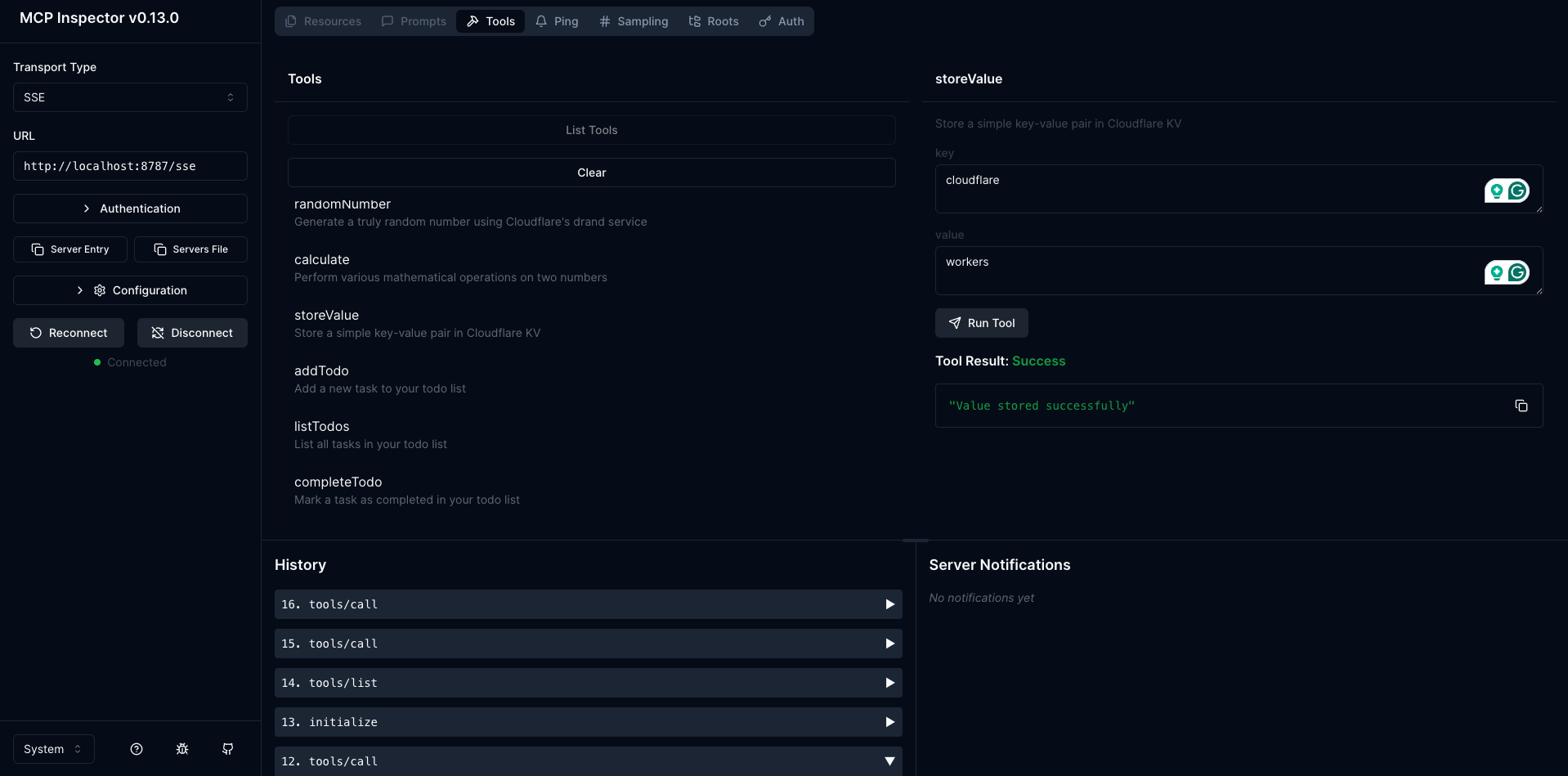
You can also use cloudflare playground which is a platform provided by cloudflare to connect
an MCP server
Deploying
You can deploy this server to cloudflare workers with a single command, the first time you might
be needed to establish a connection to workers via wrangler but it is straight forward
npm run deploy
This will deploy your MCP server to a Cloudflare Workers URL like:
https://my-mcp-server.<your-account>.workers.dev/sse
Credits
Thanks to Ricky Robinett from Cloudflare for connecting these amazing technolgies to showcase, how easy it is to deploy our own
Sign in to leave a review
Use Google, GitHub, or an email account so ratings stay tied to real people.
No reviews posted yet.




