
WinWright
About
Playwright-style MCP server for Windows desktop, browser, and system automation. 110 tools for WPF, WinForms, Win32, Chrome/Edge via UIA3 and CDP. Record once with an AI agent, replay forever with deterministic JSON scripts. Self-healing selectors via winwright heal. Single self-
Details
- Author
- civyk-official
- Downloads
- 541
- Categories
- Automation, Developer Tools
Jump to
- Record AI sessions as portable JSON scripts
- Replay scripts without an AI agent or LLM calls
- Self-heal broken UI selectors automatically
- ~59 consolidated tools with action/mode parameters
- Permissions-based security, dangerous ops disabled by default
- Supports both stdio and HTTP MCP transports

Setting up with Highlight
This MCP is not yet compatible with Highlight’s one-click setup. However, you can still use it with Highlight by following these steps:
- Download and install Highlight from highlightai.com/download
- Navigate to the plugins tab and select "Add Custom Plugin"
-
Configure the plugin with the settings below
Plugin Name
WinWrightCommand (node, npx, python, etc.)Please refer to the README for specific instructions on how to obtain API keys or other required environment variables.
- Enable "Start Automatically" if you want the plugin to start when Highlight launches





From the repository
Install as a Claude Code plugin or download a self-contained binary from GitHub Releases. Configure an MCP client (Claude Code, VSCode, or Claude Desktop) to connect via stdio or HTTP. Then describe a task in plain English to an AI agent, which calls WinWright tools to execute it. Tools can also be replayed deterministically with winwright run <script.json> or repaired with winwright heal.
Claude Desktop / Cursor
Paste into your MCP client config file to install this server.
{
    "mcpServers": {
        "winwright": {
            "winwright": {
                "command": "C:/path/to/Civyk.WinWright.Mcp.exe",
                "args": [
                    "mcp"
                ]
            }
        }
    }
}McpServers
{
    "winwright": {
        "command": "C:/path/to/Civyk.WinWright.Mcp.exe",
        "args": [
            "mcp"
        ]
    }
}
WinWright




Windows automation server for the Model Context Protocol.
~59 consolidated tools for desktop (WPF, WinForms, Win32), browser (Chrome/Edge via CDP),
and system management — all accessible to AI agents over MCP.
Describe tests in plain English — the AI agent does the rest
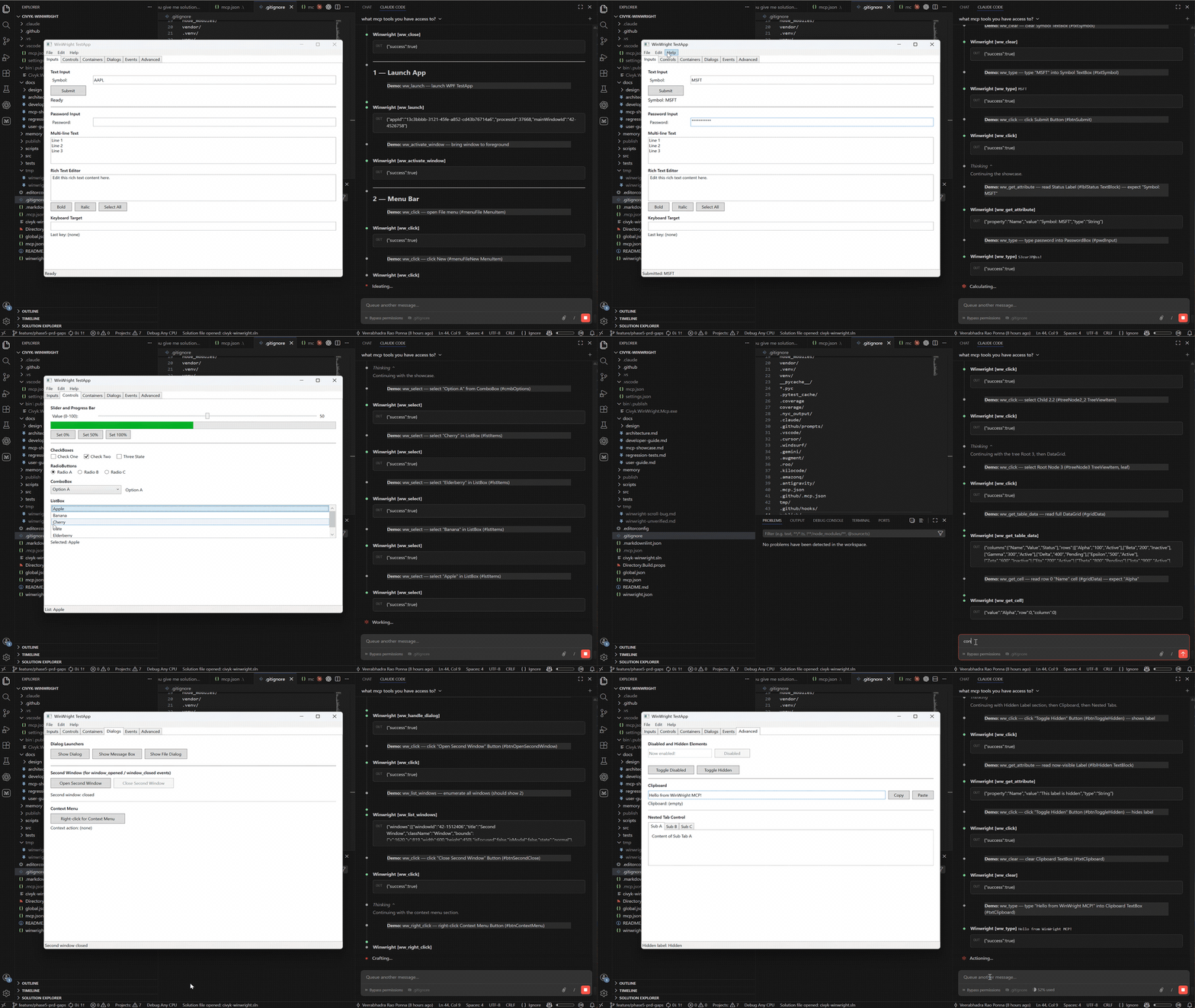
You write test cases in plain English. The AI agent uses WinWright's MCP tools to
discover UI controls, perform actions, and record everything as a portable JSON script.
Replay recorded scripts — no AI agent needed
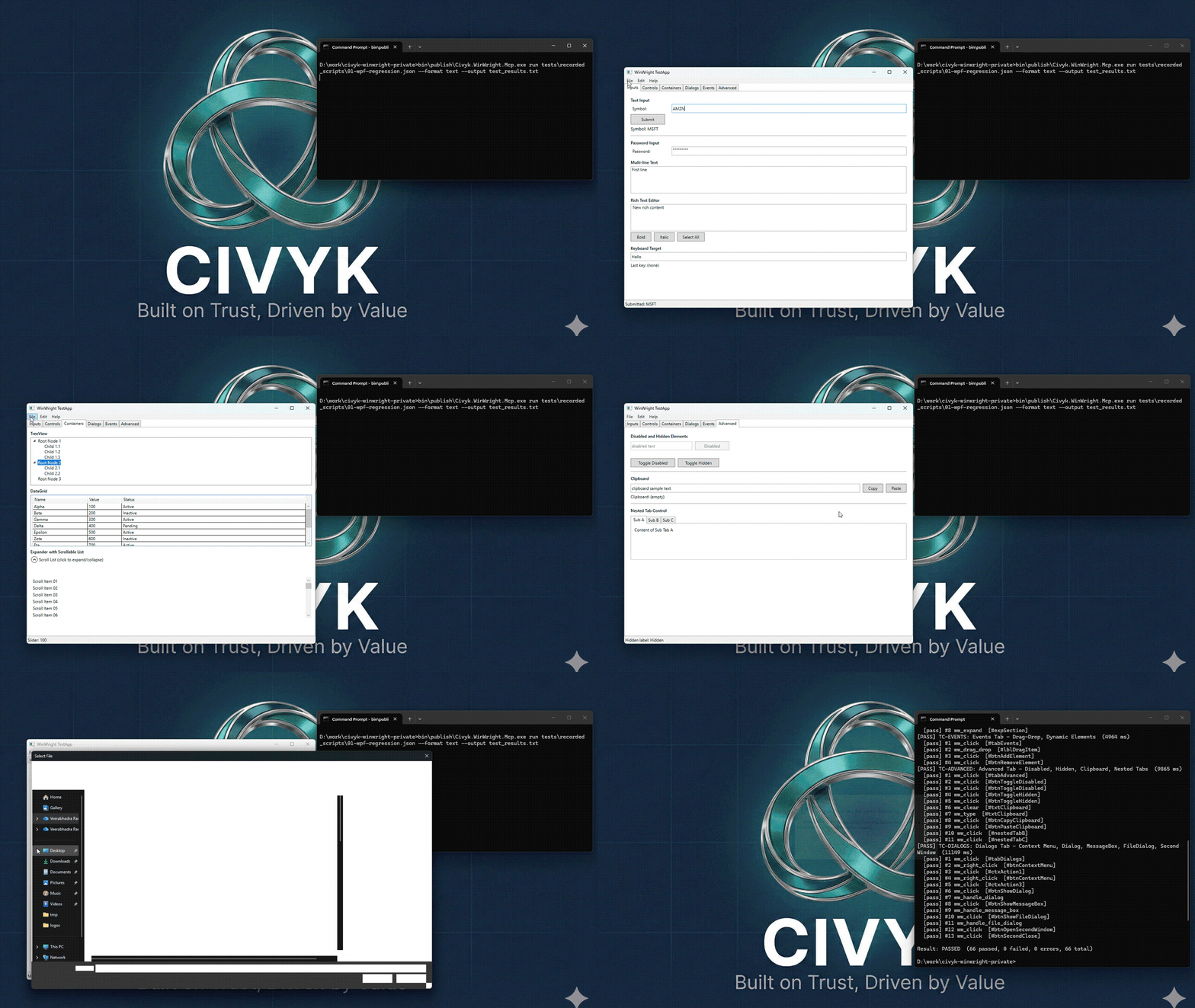
Once recorded, scripts run deterministically with winwright run — no AI agent,
no LLM calls, no token costs. Results are the same every time.
If the UI layout changes, WinWright can self-heal broken selectors automatically
(winwright heal). For larger UI redesigns, ask the AI agent to update the script —
still faster than rewriting tests from scratch.
Why this matters:
- Save AI costs — the agent records once, scripts replay for free
- Deterministic results — every run produces identical, reproducible outcomes
- Easy maintenance — self-healing selectors and AI-assisted script repair
Contents
- Quick Start
- Install
- MCP Client Configuration
- Use Cases
- Tools
- Configuration
- Who Is This For
- How It Compares
- Support
- License
Quick Start
Install, configure your MCP client, then ask the agent to do something:
> "Launch Notepad, type 'Hello from WinWright', then read back what you typed."
The agent calls WinWright tools and returns results:
ww_launch    → { "processId": 12840, "mainWindowTitle": "Untitled - Notepad" }
ww_type      → { "success": true }
ww_get_value → { "value": "Hello from WinWright" }
Every tool returns structured JSON. The agent decides which tools to call and in what order —
you describe the goal in plain language.
Install
Claude Code Plugin
From inside Claude Code, add the marketplace and install:
/plugin marketplace add civyk-official/civyk-winwright
/plugin install winwright@civyk-winwright
The plugin's install script downloads the latest binary automatically.
> Note: WinWright has been submitted to the official Claude Code plugin directory and is pending review. Until approved, use the marketplace commands above to install.
Binary Download
Download from GitHub Releases:
| Asset | Architecture |
|-------|-------------|
| winwright--win-x64.zip | Intel/AMD 64-bit |
| winwright--win-arm64.zip | ARM64 (Surface Pro, etc.) |
MCP Client Configuration
Claude Code / VSCode (stdio)
{
  "servers": {
    "winwright": {
      "type": "stdio",
      "command": "C:/path/to/Civyk.WinWright.Mcp.exe",
      "args": ["mcp"]
    }
  }
}
Claude Code / VSCode (HTTP)
Start the server first: Civyk.WinWright.Mcp.exe serve --port 8765
{
  "servers": {
    "winwright": {
      "type": "http",
      "url": "http://localhost:8765/mcp"
    }
  }
}
Claude Desktop
{
  "mcpServers": {
    "winwright": {
      "command": "C:/path/to/Civyk.WinWright.Mcp.exe",
      "args": ["mcp"]
    }
  }
}
Use Cases
> Each card links to a detailed walkthrough with real prompts, tool call parameters,
> and example output. Browse all guides in docs/use-cases/.
Scripted UI Test Automation for CI
Record an AI session once — the agent discovers the UI, performs actions, embeds assertions —
then export a portable JSON script that replays in CI without an AI agent. Describe your app
or paste your existing manual test suite; the agent scripts it automatically.
Autonomous Desktop Automation
Give an AI agent access to your desktop. It launches apps, moves data between them,
fills forms, and takes screenshots for verification — no scripts to write or maintain.
Legacy App Data Extraction
Many enterprise apps have no API. If Windows UI Automation can see a control,
WinWright can read its value. Extract data from apps that were never built for integration.
Scripted Desktop Automation for Repeated Tasks
Record a repetitive daily workflow once. Export as an RPA script and replay on demand —
no AI agent required after the recording. Ideal for report exports, data imports,
and any multi-step task that runs the same way every time.
AI-Powered UI Testing
An AI agent explores your WinForms or WPF app, finds elements, and asserts state.
No brittle XPath selectors to maintain — the agent adapts when UI changes.
Bulk Data Validation
Drive an app through 50+ records automatically. Compare each displayed value against
a reference table and get a structured pass/fail report with discrepancy details.
Cross-App Workflows
Automate workflows that span desktop apps and browser — read from an accounting app,
submit to a web portal, screenshot the confirmation.
Application Health Monitoring
Verify a running app is alive and responsive — process running, connection status showing
'Connected', service healthy. Pair with Windows Task Scheduler for scheduled checks.
Remote Administration
Manage processes, services, registry, and scheduled tasks on remote machines over HTTP.
Five-layer security: IP allowlist, Windows Negotiate auth, AD group authorization,
rate limiting, and per-user session limits.
Accessibility Auditing
Traverse the full UIA element tree. Check that controls have names, buttons have labels,
and keyboard paths exist. The AI agent generates a compliance report.
Dialog and Modal Handling
Detect unexpected confirmation dialogs, file-save prompts, and Win32 MessageBox popups
after every click. Handle or dismiss them without breaking the automation flow.
Tools
~59 consolidated tools across five categories (merged from 110 via action/mode parameters):
| Category | Tools | What it does |
|----------|-------|-------------|
| Desktop Automation | ~30 | Launch apps, click, type, read values, screenshots, tree navigation, dialogs, test case recording, CI script export (UIA3) |
| System | ~12 | Processes, registry, environment variables, file system, network, services, scheduled tasks |
| Browser | 4 | Chrome/Edge via CDP — sessions, pages, elements, advanced (eval/forms/dialogs). No Selenium dependency |
| AI Agent | ~10 | Snapshots, state diffing, event watching, action recording, ww_get_schema for tool discovery |
| Security | — | Runtime permission guards with AD group overrides, JSONL audit logging |
Each tool supports multiple actions via an action parameter (e.g., ww_service(action="list"), ww_service(action="start")), reducing the total tool count while maintaining full functionality.
Configuration
Create winwright.json next to the binary (or %APPDATA%\WinWright\winwright.json):
{
  "permissions": {
    "allowShell": false,
    "allowRegistryWrite": false,
    "allowProcessKill": false,
    "allowFileWrite": false,
    "allowServiceControl": false,
    "allowTaskScheduler": false,
    "allowEnvironmentWrite": false,
    "allowBrowserEval": false,
    "allowNetworkProbe": true
  },
  "audit": {
    "enabled": true,
    "logPath": "audit.jsonl"
  }
}
All dangerous operations are disabled by default. Enable only what you need.
CLI
winwright mcp                                    Start MCP server (stdio)
winwright serve --port N                         Start MCP server (HTTP, default 8765)
winwright run <script.json> [--format text|junit] [--output <file>]
                                                 Replay a recorded automation script
winwright heal <script.json> [--app <path>|--pid <n>] [--output <file>] [--min-confidence <0-1>]
                                                 Probe broken selectors against a live UI and repair them
winwright inspect <pid>                          Dump UIA element tree for a process
winwright doctor                                 Verify environment prerequisites
Requirements
- Windows 10 or 11 (x64 or ARM64)
- No .NET runtime needed for the binary download — it's self-contained
Who Is This For
Good fit:
- QA engineers testing WinForms, WPF, or Win32 apps who want AI-assisted test creation
- Developers building AI agents that need to interact with the Windows desktop
- Teams extracting data from legacy enterprise apps that have no API
- Anyone automating repetitive multi-app workflows on Windows
Not a good fit:
- Linux or macOS automation — WinWright is Windows-only (UIA is a Windows API)
- Web-only testing — use Playwright instead; WinWright's browser tools are for mixed desktop+browser workflows
- High-throughput data pipelines — UIA reads controls one at a time; if you need bulk data transfer, a proper API or database connection is better
How It Compares
| | WinWright | UiPath | Power Automate Desktop | Playwright |
| - | --------- | ------ | ---------------------- | ---------- |
| What it automates | Desktop + browser + system | Desktop + browser + system | Desktop + browser + cloud | Browser only |
| How you use it | AI agent via MCP (natural language) | Visual workflow designer | Visual workflow designer | Code (JS/Python/C#) |
| Desktop support | WPF, WinForms, Win32 (UIA3) | WPF, WinForms, Win32, Java, SAP | WPF, WinForms, Win32 | None |
| Browser support | Chrome/Edge via CDP | Chrome, Edge, Firefox | Chrome, Edge, Firefox | Chrome, Edge, Firefox, Safari |
| Selector model | AI picks elements by name/type | Visual selector recorder | Visual selector recorder | CSS/XPath selectors |
| Cost | Free | Licensed (per-user/bot) | Free (desktop), licensed (cloud) | Free |
| Setup | Single binary, no runtime | Full install + studio | Windows store app | npm install |
| Designed for | AI agents and MCP clients | Enterprise RPA | Business user automation | Developer testing |
WinWright is not an RPA platform. It's a tool server that gives AI agents access to Windows.
If you need a visual workflow builder or enterprise orchestration, UiPath or Power Automate
are better choices. If you need browser-only testing, Playwright is more mature.
WinWright fits where those tools don't — when an AI agent needs to see and operate
the Windows desktop, or when you need desktop + browser in one MCP session.
Support
Help keep this project alive and growing!
If WinWright has helped your development workflow, consider supporting its continued development. Your contribution helps with:
- Ongoing maintenance and bug fixes
- New feature development
- Infrastructure costs
50% of all donations go directly to children's charities helping those in need. The remaining funds support project maintenance and feature upgrades.


> Every contribution, no matter the size, makes a difference.
- Issues: GitHub Issues
- Changelog: GitHub Releases
License
Free to use for any purpose — personal, academic, commercial.
See LICENSE for full terms. Attribution required when redistributing.
---
Built on Trust, Driven by Value — Civyk
Sign in to leave a review
Use Google, GitHub, or an email account so ratings stay tied to real people.
No reviews posted yet.




