
Memclaw
About
MemClaw — persistent memory for AI agent fleets (OSS) — Trending history, engagement metrics, and Reddit & Hacker News discussions on Trendshift
Details
- Author
- caura-ai
- Downloads
- 328
- Categories
- AI, Knowledge Base
Jump to
- Multi‑tenant, multi‑agent governed memory.
- Agents write plain text; enriched with LLM‑inferred fields.
- Cross‑agent outcome propagation and fleet‑wide trust tiers.
- Open‑source, self‑hosted or managed platform.
- MCP and REST API with scoped credentials.

Setting up with Highlight
This MCP is not yet compatible with Highlight’s one-click setup. However, you can still use it with Highlight by following these steps:
- Download and install Highlight from highlightai.com/download
- Navigate to the plugins tab and select "Add Custom Plugin"
-
Configure the plugin with the settings below
Plugin Name
MemclawCommand (node, npx, python, etc.)Please refer to the README for specific instructions on how to obtain API keys or other required environment variables.
- Enable "Start Automatically" if you want the plugin to start when Highlight launches





From the repository
Clone the repository, configure a .env file (e.g., with an OpenAI API key), and run docker compose up -d to start Postgres + pgvector + Redis + the API. Write a memory via curl to /api/v1/memories and search with /api/v1/search. Alternatively, connect an MCP client using the server URL https://memclaw.net/mcp with an API key from the dashboard. Three deployment paths are offered: managed platform, self-hosted Docker, and OpenClaw plugin.
Claude Desktop / Cursor
Paste into your MCP client config file to install this server.
{
    "mcpServers": {
        "memclaw": {
            "memclaw": {
                "url": "http://localhost:8000/mcp",
                "headers": {
                    "X-API-Key": "standalone"
                }
            }
        }
    }
}McpServers
{
    "memclaw": {
        "url": "http://localhost:8000/mcp",
        "headers": {
            "X-API-Key": "standalone"
        }
    }
}
<p align="center">

</p>
<h3 align="center">Fleet memory for AI agents — governed, shared, self-improving.</h3>
<p align="center">
<a href="LICENSE"> </a>
</a>
<a href="https://github.com/caura-ai/caura-memclaw/stargazers">
<a href="https://github.com/caura-ai/caura-memclaw/actions">
<a href="https://github.com/caura-ai/caura-memclaw/releases">
<a href="https://discord.com/invite/aNfpgfpj">
</p>
<p align="center">
<a href="#quick-start">Quick Start</a> ·
<a href="#features">Features</a> ·
<a href="#performance">Performance</a> ·
<a href="#mcp-model-context-protocol">MCP</a> ·
<a href="#api-reference">API Reference</a> ·
<a href="static/docs/integration-guide.md">Plugin Docs</a> ·
<a href="CONTRIBUTING.md">Contributing</a> ·
<a href="https://discord.com/invite/aNfpgfpj">Discord</a>
</p>
---
MemClaw — Fleet memory for AI agents
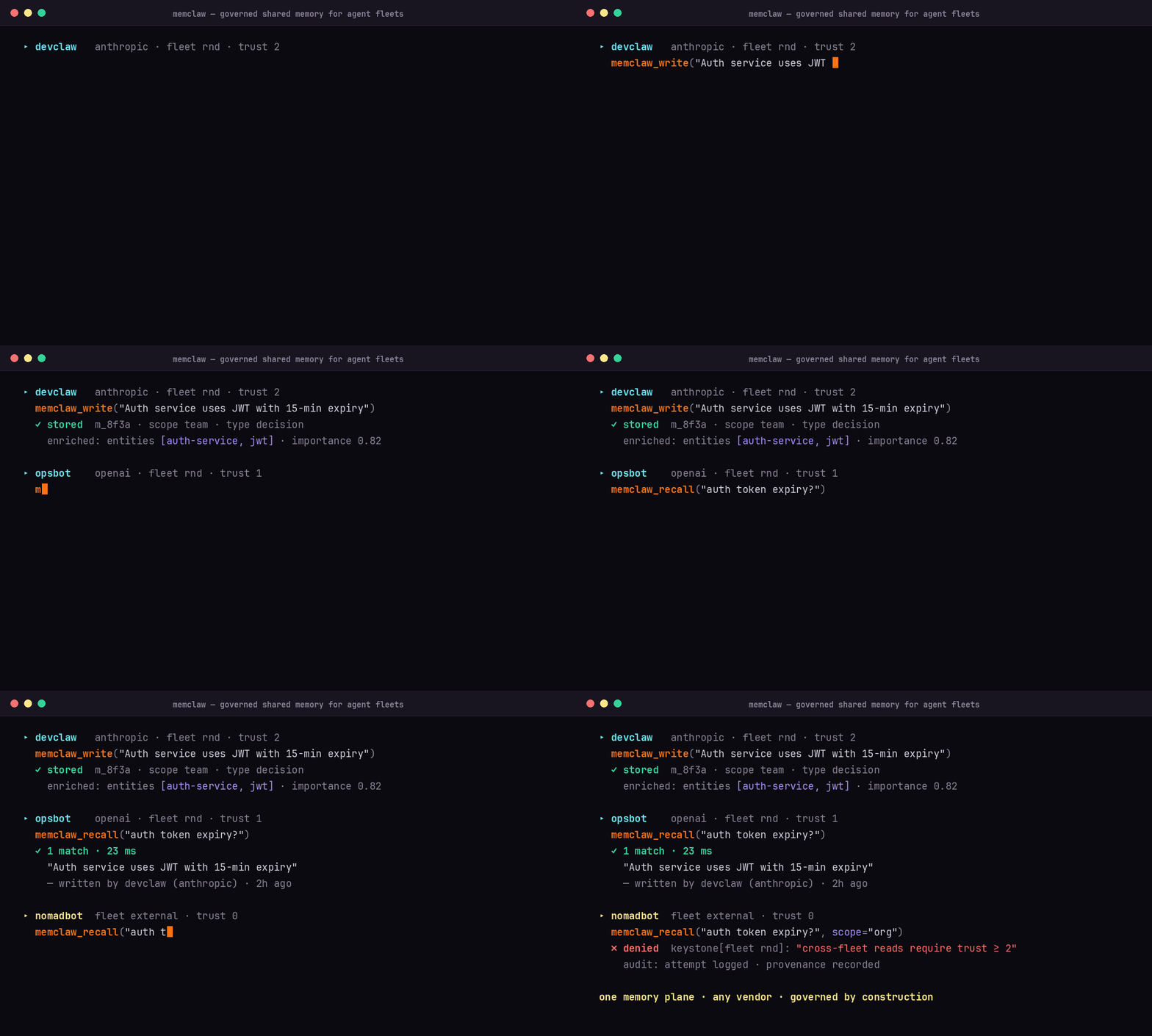
MemClaw is open-source memory for multi-tenant, multi-agent AI fleets. Your agents store what they learn, find what the fleet knows, and get smarter with every interaction — learning from each other instead of repeating mistakes.
Agents write plain text. MemClaw turns it into searchable, governed, self-improving memory.
One loop, three pillars: write, recall, compound — every interaction makes the next one smarter.
Built for fleets, not single agents. Public agent-memory benchmarks (LoCoMo, LongMemEval) measure one agent, one user, one long conversation — the single-chatbot shape. The deployment shape we see in production is the opposite: dozens or thousands of agents working on behalf of a company, sharing what they learn under governance. MemClaw is architected around that shape from day one — scoped memory, cross-agent outcome propagation, fleet-wide trust tiers — and competes on the axes that compound with agent count: latency, token efficiency, and governance. See Performance for the numbers, or read the benchmarks write-up.
> In production at eToro (NASDAQ: ETOR): 300+ AI agents on one governed
> memory — 26,500+ memories, 1,372 shared skills, 23 ms p50 search.
> Architecture deep-dive →
<p align="center">

</p>
<p align="center">
</p>
---
Quick Start
Try it locally — no API key, no signup
The fastest way to see MemClaw work. Standalone mode runs single-tenant with auth bypassed — write and recall a memory in four commands. (It boots with dummy embeddings so there's nothing to configure; add an AI provider key for semantic search — see Self-Hosted below.)
git clone https://github.com/caura-ai/caura-memclaw.git
cd caura-memclaw
cp .env.example .env && echo "IS_STANDALONE=true" >> .env   # single-tenant, no API key
docker compose up -d                                        # Postgres + pgvector + Redis + API (~30s)
Write a memory — no API key needed
curl -X POST http://localhost:8000/api/v1/memories \
  -H "X-API-Key: standalone" -H "Content-Type: application/json" \
  -d '{"tenant_id": "default", "content": "Our auth service uses JWT with 15-minute expiry."}'
Search for it
curl -X POST http://localhost:8000/api/v1/search \
  -H "X-API-Key: standalone" -H "Content-Type: application/json" \
  -d '{"tenant_id": "default", "query": "authentication token lifetime"}'
The write response comes back enriched with an LLM-inferred memory_type, title, summary, tags, status, and weight — all from a single content field.
Ready for semantic recall, multi-tenant, a managed host, or an OpenClaw fleet? Pick a path below.
---
Three paths — pick the one that matches your setup:
| Path | When | Time to first memory |
|---|---|---|
| Managed platform | Quickest. We host the DB + scaling. | ~2 min |
| Self-hosted (Docker) | Privacy / on-prem / air-gapped. | ~5 min |
| OpenClaw plugin | You already run an OpenClaw fleet — install MemClaw as a plugin against any of the above. | ~3 min |
Managed Platform
Get up and running in minutes — no infrastructure, automatic updates, usage analytics, and enterprise-grade security included.
1. Sign up free on memclaw.net
2. Grab your API key from the dashboard
3. Connect via MCP or REST:
{
  "mcpServers": {
    "memclaw": {
      "url": "https://memclaw.net/mcp",
      "headers": { "X-API-Key": "mc_your_api_key_here" }
    }
  }
}
> Production / team use: the quickstart key above is a tenant-scoped credential — fine for personal use, but a fleet of agents should bind each one to its own agent-scoped credential for trust gating, fleet membership, and per-agent keystones. Provision agent-scoped credentials atomically via POST /api/v1/admin/agent-keys/provision, or through the dashboard at /settings/organization/api-credentials. Both kinds use the mc_ prefix on the wire — scope is bound at mint time on the credential itself. The MCP server accepts the credential on either X-API-Key: mc_… or Authorization: Bearer mc_…. (Pre-existing mca_… and mci_… keys continue to authenticate via back-compat.)
>
> Using a tenant-scoped credential? Pass an explicit agent_id on every MCP tool call — the gateway refuses the reserved default (mcp-agent) on the tenant-scoped path.
Self-Hosted (Open Source)
The fastest path is Docker Compose — one command brings up Postgres + pgvector + Redis + the API.
> Prefer not to use Docker? Skip to Manual deployment (Python + Postgres) below for the bare-Python path.
>
> No cloud API key, no external calls? v2.0+ supports a self-hosted local embedder (BAAI/bge-m3 via HuggingFace TEI) — see docs/local-embedder.md. The setup below walks through the OpenAI default; the local-embedder doc walks through the alternative.
Prerequisites
- Docker Engine 24+ (Linux) or Docker Desktop (macOS / Windows). Confirm with docker --version.
- Docker Compose v2 (built into modern Docker). Confirm with docker compose version.
- Git for cloning.
- ~2 GB free disk for images + Postgres data volume.
1. Clone and configure
git clone https://github.com/caura-ai/caura-memclaw.git
cd caura-memclaw
cp .env.example .env
Set your AI provider in .env — minimal setup with OpenAI:
EMBEDDING_PROVIDER=openai
ENTITY_EXTRACTION_PROVIDER=openai
USE_LLM_FOR_MEMORY_CREATION=true
OPENAI_API_KEY=sk-...
> Without any AI keys the stack still starts — dummy providers return non-semantic embeddings, useful for testing the API surface.
…
Sign in to leave a review
Use Google, GitHub, or an email account so ratings stay tied to real people.
No reviews posted yet.





