
Catalyst Center MCP
About
A Python-based MCP (Model Context Protocol) server for Cisco Catalyst Center (formerly DNA Center) that provides tools for device management and monitoring.
Details
- Author
- richbibby
- Downloads
- 376
- Categories
- Other
Jump to
- Authentication with Cisco Catalyst Center
- Site, device, and interface discovery
- Simple MCP server implementation
- Extensible tool structure
- Environment-based credential configuration

Setting up with Highlight
This MCP is not yet compatible with Highlight’s one-click setup. However, you can still use it with Highlight by following these steps:
- Download and install Highlight from highlightai.com/download
- Navigate to the plugins tab and select "Add Custom Plugin"
-
Configure the plugin with the settings below
Plugin Name
Catalyst Center MCPCommand (node, npx, python, etc.)Please refer to the README for specific instructions on how to obtain API keys or other required environment variables.
- Enable "Start Automatically" if you want the plugin to start when Highlight launches





From the repository
Clone the repository, create a Python virtual environment, and install dependencies. Copy .env.example to .env and set CCC_HOST, CCC_USER, and CCC_PWD. For Claude Desktop, add the server configuration to claude_desktop_config.json specifying the fastmcp command and the path to the server script, then restart Claude Desktop. You can then ask Claude questions such as "Show me all devices in my network" or "What interfaces are down on device Y?"
Claude Desktop / Cursor
Paste into your MCP client config file to install this server.
{
    "mcpServers": {
        "catalyst center mcp": {
            "catalyst-center-mcp": {
                "command": "python",
                "args": [
                    "-m",
                    "venv",
                    "venv"
                ]
            }
        }
    }
}McpServers
{
    "catalyst-center-mcp": {
        "command": "python",
        "args": [
            "-m",
            "venv",
            "venv"
        ]
    }
}
Catalyst Center MCP
A Python-based MCP (Model Context Protocol) server for Cisco Catalyst Center (formerly DNA Center) that provides tools for device management and monitoring.
Features
- Authentication with Catalyst Center
- Device discovery and listing
- Interface information retrieval
- Simple and extensible MCP server implementation
Installation
1. Clone the repository:
git clone https://github.com/richbibby/catalyst-center-mcp.git

cd catalyst-center-mcp
2. Create a virtual environment and activate it:
python -m venv venv

source venv/bin/activate  # On Windows: venv\Scripts\activate
3. Install dependencies:
pip install -r requirements.txt
Configuration
1. Copy the example environment file:
cp .env.example .env
2. Update the .env file with your Catalyst Center credentials:
CCC_HOST=your-catalyst-center-host

CCC_USER=your-username

CCC_PWD=your-password
Usage With Claude Desktop Client
1. Configure Claude Desktop to use this MCP server:
- Open Claude Desktop
- Go to Settings > Developer > Edit Config
- Add the following configuration file claude_desktop_config.json
`` `
{

  "mcpServers": {

    "catalyst-center-mcp": {

      "command": "/Users/rich/dev/ccc_mcp/venv/bin/fastmcp",

      "args": [

        "run",

        "/Users/rich/dev/ccc_mcp/catalyst-center-mcp.py"

      ]

    }

  }

}
- Replace the path's above to reflect your local environment.
2. Restart Claude Desktop
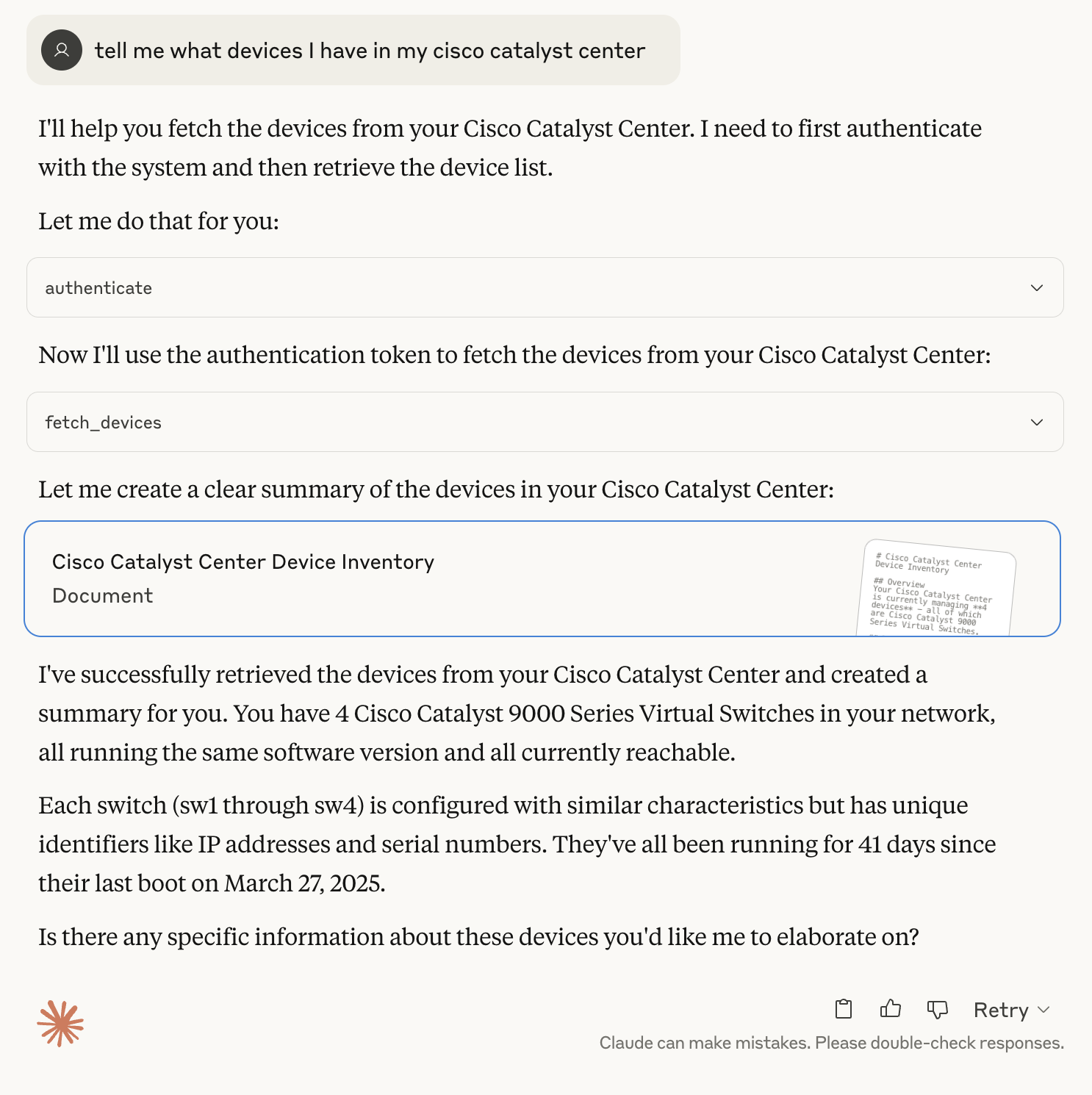
3. Interact with Claude Desktop:
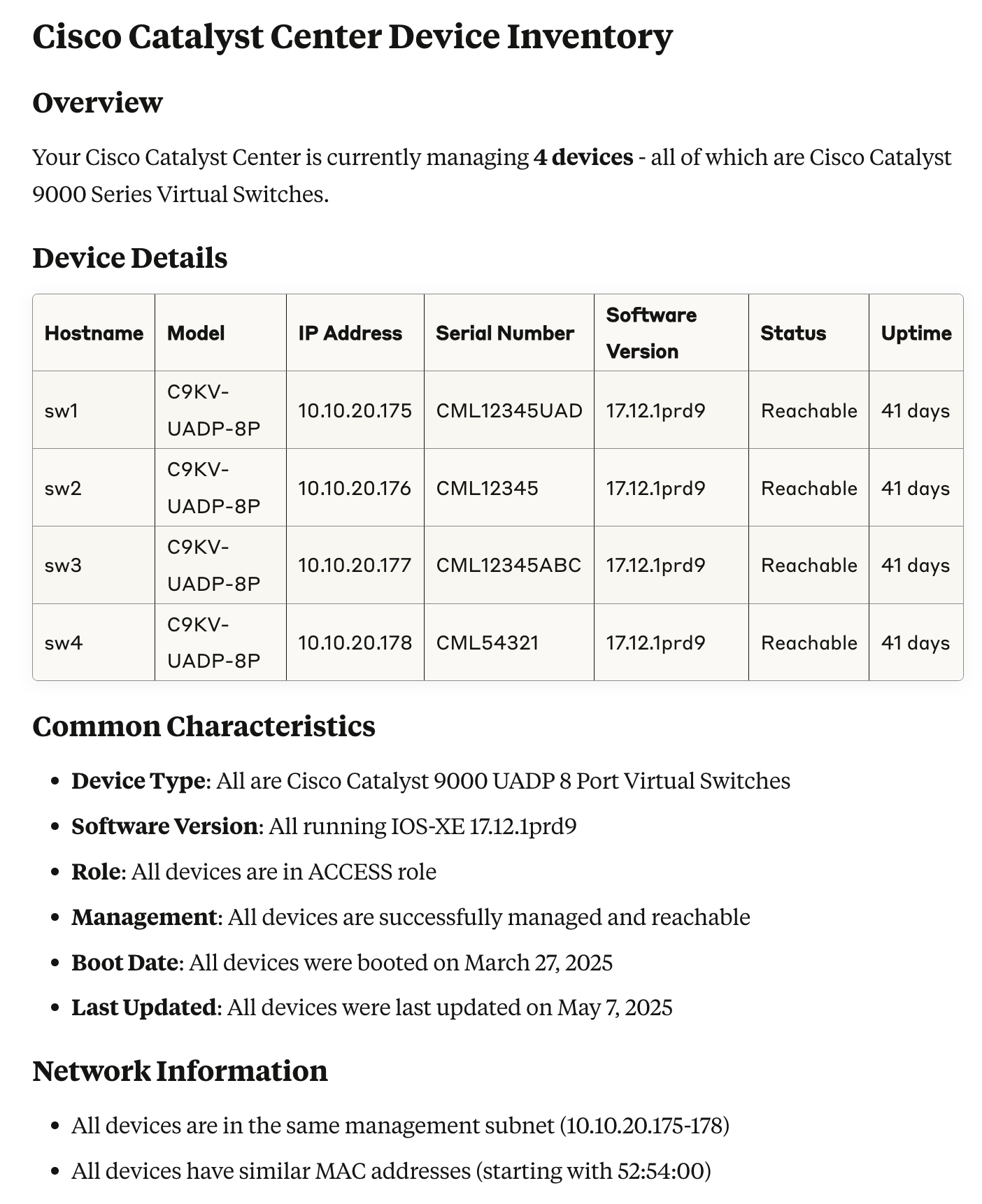
- Ask Claude to perform actions like "Show me the devices in my Cisco Catalyst Center"
- Claude will use the MCP server to authenticate and fetch device information
Example Questions
Here are some example questions you can ask Claude to interact with your Catalyst Center:
Device Information
- "Show me all devices in my network" - "List all switches in my network" - "What devices are currently unreachable?" - "Show me devices with hostname containing 'switch'" - "What's the status of device with IP 10.1.1.1?"Interface Information
- "Show me all interfaces for device X" - "What interfaces are down on device Y?" - "List all Gigabit interfaces on device Z" - "Show me interfaces with IP addresses" - "What's the status of interface GigabitEthernet1/0/1 on device X?"Site Information
- "Show me all sites in my network" - "What devices are in site X?" - "List all buildings in my network" - "Show me the site hierarchy" - "What's the address of site Y?"Combined Queries
- "Show me all devices in site X and their interfaces" - "List all down interfaces across all devices" - "What devices in building Y have unreachable interfaces?" - "Show me the network topology for site Z" - "What's the status of all devices in area A?"Available Tools
- authenticate: Authenticates with Cisco Catalyst Center and returns a tokenfetch_sites
- : Fetches a list of sites from Cisco Catalyst Centerfetch_devices
- : Fetches a list of devices from Cisco Catalyst Centerfetch_interfaces
- : Fetches interface information for a specific device
Contributing
1. Fork the repository
2. Create your feature branch (git checkout -b feature/amazing-feature)git commit -m 'Add some amazing feature'
3. Commit your changes ()git push origin feature/amazing-feature`)
4. Push to the branch (
5. Open a Pull Request
Sign in to leave a review
Use Google, GitHub, or an email account so ratings stay tied to real people.
No reviews posted yet.





