
catalog-api-mcp-server
Description
# catalog-api-mcp-server Piloto de herramienta para validar o gestionar el estado de P&C ### Configuración Inicialmente, se debera activar en VSC el agente de MCP  Después, dentro del VSC en el fichero settings.json agregar la siguiente configuración: ```…
About
# catalog-api-mcp-server Piloto de herramienta para validar o gestionar el estado de P&C ### Configuración Inicialmente, se debera activar en VSC el agente de MCP  Después, dentro del VSC en el fichero settings.json agregar la siguiente configuración: ``` "mcp": { "servers": {…
Details
- Author
- davidlbl
- Downloads
- 176
- Categories
- Developer Tools
Jump to
- Validates or manages P&C state.
- Integrates with VS Code MCP agent.
- Exposes Java-based tools via MCP protocol.
- Requires Java runtime and JAR file.
- Enables local MCP server interaction.
Enable the MCP agent in VS Code, then add the provided configuration in settings.json using the Java executable and the JAR file path. Start the server via the VS Code MCP interface, then select the agent to see available tools.
catalog-api-mcp-server
Piloto de herramienta para validar o gestionar el estado de P&CConfiguración
Inicialmente, se debera activar en VSC el agente de MCP

Después, dentro del VSC en el fichero settings.json agregar la siguiente configuración:
"mcp": {
        "servers": {
            "test-catalog-status": {
                "command": "{{JAVA_HOME}}",
                    "args": [
                        "-jar",
                        "{{LOCAL_PATH}}\\catalog-api-mcp-server\\target\\catalog-api-mcp-server-0.0.1-SNAPSHOT.jar"
                    ]
            }
        }
    }
Se debera iniciar el servidor MCP dandole a start
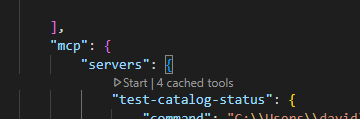
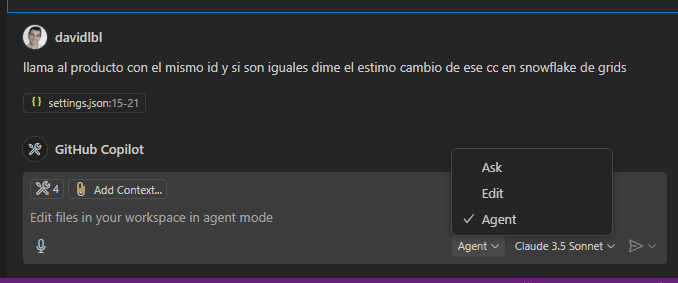
Al iniciar, se debera seleccionar la opción de agent y aparecerán todas las tools configuradas, la cuales permitirá interactuar con el servidor MCP en local
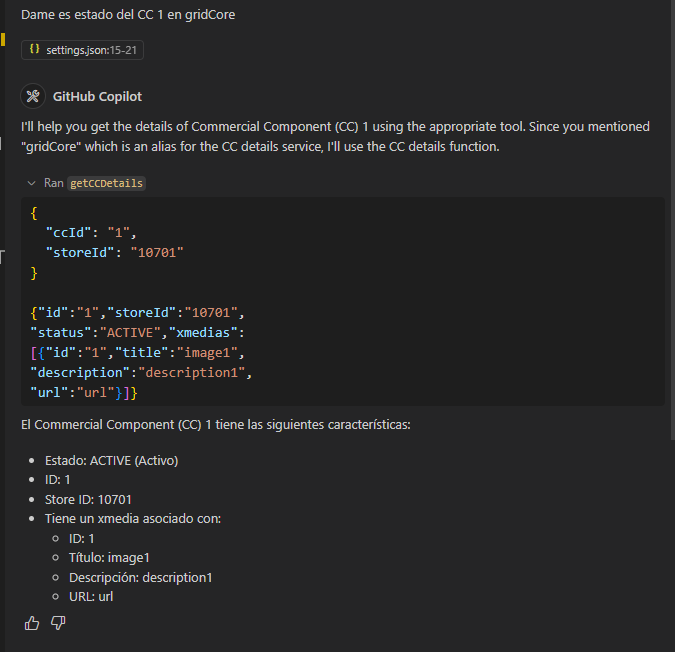
Validación
Ya teniendo todo, se podrá preguntar información que tenga el MCP, según lo configurado en las tools definidas
Documentación relacionada
https://docs.spring.io/spring-ai/reference/api/tools.html
Sign in to leave a review
Use Google, GitHub, or an email account so ratings stay tied to real people.
No reviews posted yet.





