
Blog Publisher
About
Enables AI assistants to publish blog content to external platforms through a Python-based server with standard and local execution modes for automated content publishing workflows.
Details
- Author
- carrie-l
- Repository
- Carrie-L/blog_publisher_mcp_server
- Downloads
- 168
- Categories
- Productivity, Design, Developer Tools, AI, Infrastructure, Other, Automation
- Tags
- #integration
Jump to
- Triggered by user input "blog+文章名".
- Copies Markdown files from Obsidian to blog directory.
- Detects and copies images from Obsidian attachments folder.
- Updates image paths in the copied Markdown file.
- Commits and pushes changes to GitHub automatically.

Setting up with Highlight
This MCP is not yet compatible with Highlight’s one-click setup. However, you can still use it with Highlight by following these steps:
- Download and install Highlight from highlightai.com/download
- Navigate to the plugins tab and select "Add Custom Plugin"
-
Configure the plugin with the settings below
Plugin Name
Blog PublisherCommand (node, npx, python, etc.)npxArguments-
Argument 1
-y -
Argument 2
@highlight/mcp-server
Please refer to the README for specific instructions on how to obtain API keys or other required environment variables.
-
Argument 1
- Enable "Start Automatically" if you want the plugin to start when Highlight launches





From the repository
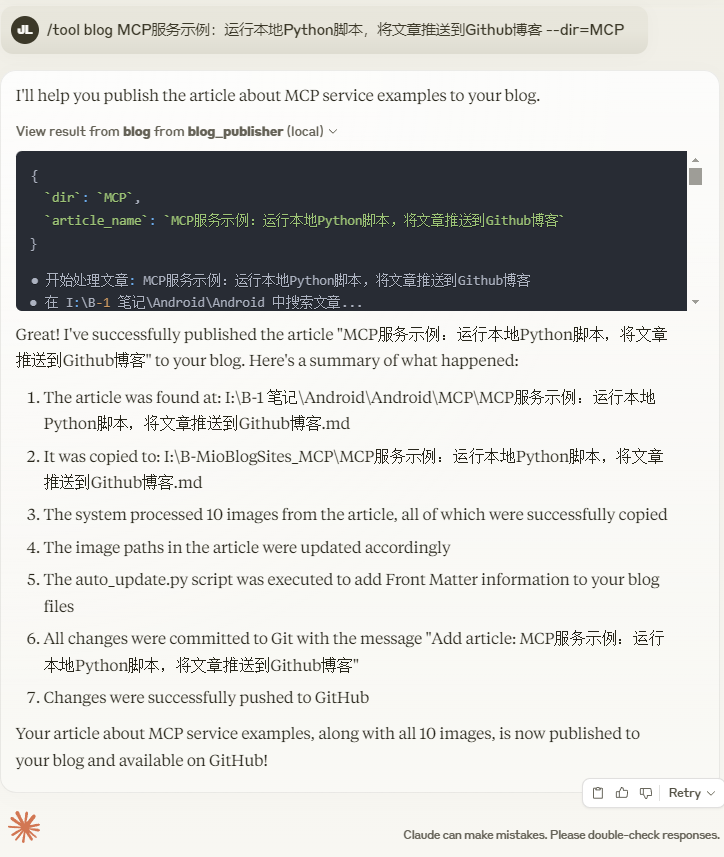
Trigger the server by entering "blog+文章名" (where "文章名" is the name of the Markdown file). The server will locate the file in the Obsidian local directory, copy it to the specified target path (default I:\B-MioBlogSites\_Android), copy referenced images to I:\B-MioBlogSites\assets\images, update image paths in the Markdown file, and finally push all changes to GitHub.
Claude Desktop / Cursor
Paste into your MCP client config file to install this server.
{
    "mcpServers": {
        "blog publisher": {
            "env": {},
            "args": [
                "-y",
                "@highlight/mcp-server"
            ],
            "command": "npx"
        }
    }
}Linux
{
    "env": [],
    "args": [
        "-y",
        "@highlight/mcp-server"
    ],
    "command": "npx"
}
Macos
{
    "env": [],
    "args": [
        "-y",
        "@highlight/mcp-server"
    ],
    "command": "npx"
}
Windows
{
    "env": [],
    "args": [
        "/c",
        "npx",
        "-y",
        "@highlight/mcp-server"
    ],
    "command": "cmd"
}
需求
在用户输入 "blog+文章名" 时,自动将 Obsidian 本地目录下的指定 Markdown 文件复制到指定目录,处理图片链接并复制图片到目标文件夹,然后将更改推送到 GitHub。功能
创建一个 MCP(Model Context Protocol)博客上传服务,具体功能如下:- 触发条件:用户输入 "blog+文章名"。
- 文件复制:将 Obsidian 本地目录下的某个 Markdown 文件(*.md,例如 "文章名.md")复制到 I:\B-MioBlogSites 下的指定目录(默认 I:\B-MioBlogSites\_Android)。
- 图片处理:检测 Markdown 文件中的图片链接,将图片从 I:\B-1 笔记\Android\Android\z. attachments 复制到 I:\B-MioBlogSites\assets\images,并更新 Markdown 文件中的图片路径。
- GitHub 推送:将更改提交并推送到 GitHub。
返回结果
Sign in to leave a review
Use Google, GitHub, or an email account so ratings stay tied to real people.
No reviews posted yet.





