
Cairn
About
Persistent memory for agents and humans. Semantic, episodic and frictionless via an automated three tier capture.
Details
- Author
- jasondostal
- Downloads
- 202
- Categories
- Knowledge Base
Jump to
- Persistent memory across sessions and projects
- Hybrid search (vector + keyword + recency + tags) via Reciprocal Rank Fusion
- Optional knowledge graph in Neo4j for entity and fact connections
- Hierarchical work items with dependency tracking and gates
- Web dashboard with analytics, chat, and graph exploration
- Code intelligence with tree-sitter (Python, TypeScript/TSX) and architecture enforcement
- Session capture hooks for IDE tool call logging

Setting up with Highlight
This MCP is not yet compatible with Highlight’s one-click setup. However, you can still use it with Highlight by following these steps:
- Download and install Highlight from highlightai.com/download
- Navigate to the plugins tab and select "Add Custom Plugin"
-
Configure the plugin with the settings below
Plugin Name
CairnCommand (node, npx, python, etc.)Please refer to the README for specific instructions on how to obtain API keys or other required environment variables.
- Enable "Start Automatically" if you want the plugin to start when Highlight launches





From the repository
Deploy with a single command: curl -O https://raw.githubusercontent.com/jasondostal/cairn-mcp/main/docker-compose.yml && docker compose up -d. Then add the MCP server to your IDE config (e.g., Claude Code, Cursor) with { "mcpServers": { "cairn": { "type": "http", "url": "http://localhost:8000/mcp" } } }. Use tools like store, search, recall, orient, work_items, code_index, and arch_check to save and retrieve memories, manage work, and analyze code.
Claude Desktop / Cursor
Paste into your MCP client config file to install this server.
{
    "mcpServers": {
        "cairn": {
            "cairn": {
                "type": "http",
                "url": "http://localhost:8000/mcp"
            }
        }
    }
}McpServers
{
    "cairn": {
        "type": "http",
        "url": "http://localhost:8000/mcp"
    }
}
<p align="center">

</p>
<p align="center">
<a href="https://github.com/jasondostal/cairn-mcp/releases">
<a href="LICENSE">
</p>


---
Yet another MCP, right? Yeah, it's that. But here's why this one exists.
I'm a t-shaped engineer. PMP, SAFe Agilist, Certified Product Owner. But before any of that, I'm a systems person. Data centers, orchestration, automation. The kind of work that crosses 13 disciplines and stretches back to something you last touched 10 years ago.
I built Cairn for my workflow. At 1am, when I'm deep in something and I know the answer exists somewhere in the last three weeks of work but I don't want to spend 30 minutes digging and correlating. That emergency call, the panicked user coming to you as their only hope, and it's an issue buried in 6 systems you last touched in 2014.
Cairn is there.
"Where did I put that singularity again? Let me just spawn a couple..."
Sure, dedicated tools will probably beat a given Cairn feature when it's all they do. Cairn isn't built for single-purpose depth — but it still scores 81.6% on LoCoMo. It's built for the systems person. The curious. The t-shaped. The ones who need a memory that works the way they do, across everything, all at once.
It's a self-hosted memory and orchestration layer for AI agents and humans. Store something once, find it later, across sessions, across projects. Four containers. docker compose up. Done.
<p align="center">
<br>
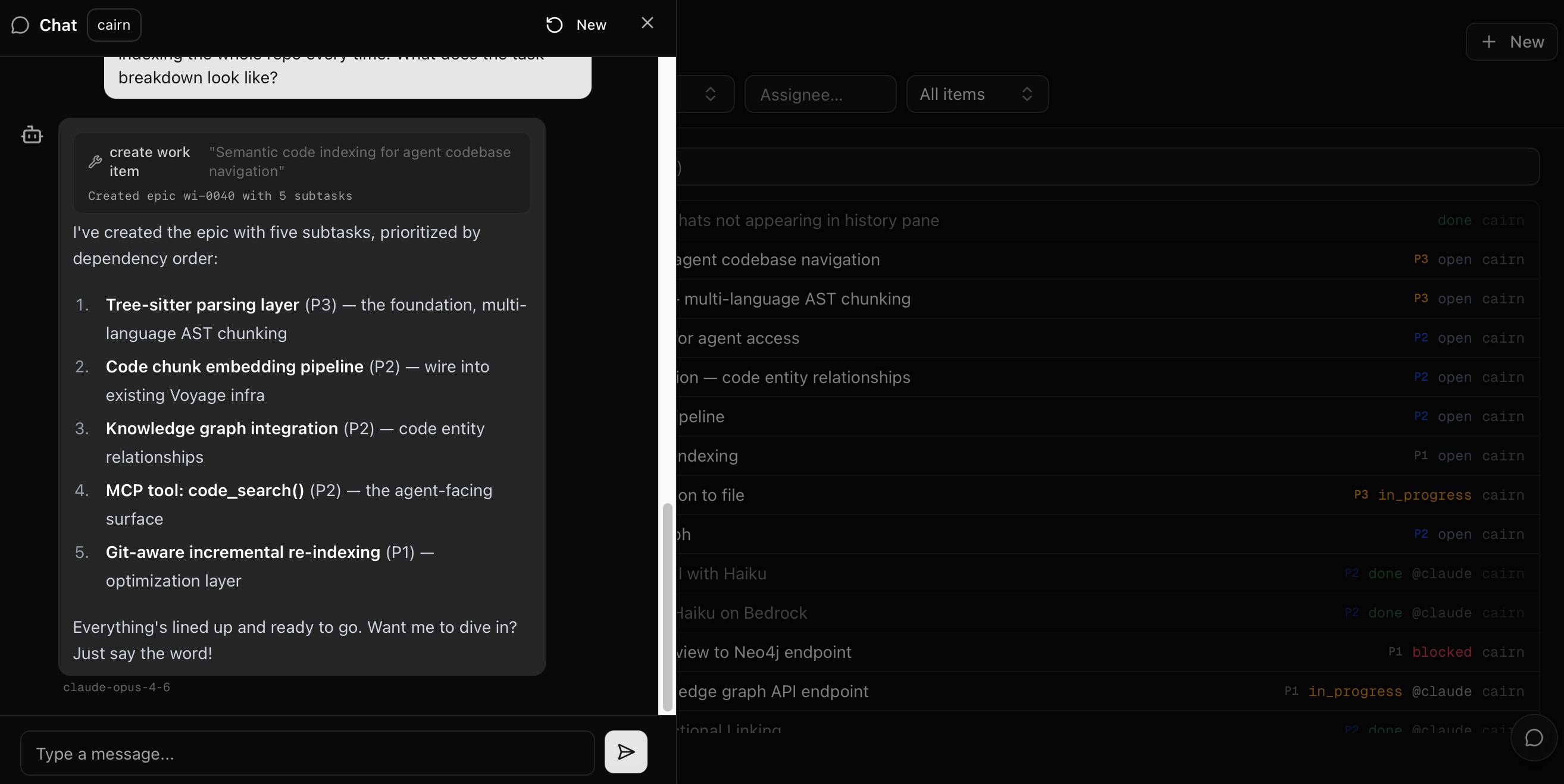
<sub>Chat creates a work item. Agent breaks it into subtasks. You review from your phone.</sub>
</p>
Quick Start
1. Pull and run
curl -O https://raw.githubusercontent.com/jasondostal/cairn-mcp/main/docker-compose.yml
docker compose up -d
Four containers start:
- cairn on port 8000 (MCP server + REST API)
- cairn-ui on port 3000 (web dashboard)
- cairn-db (PostgreSQL 16 + pgvector)
- cairn-graph (Neo4j 5, knowledge graph)
Migrations run on first boot. Ready in about a minute.
2. Connect your IDE
Add this to your MCP config:
{
  "mcpServers": {
    "cairn": {
      "type": "http",
      "url": "http://localhost:8000/mcp"
    }
  }
}
Where that goes:
| IDE | Config file |
|-----|------------|
| Claude Code | .mcp.json in your project root |
| Cursor | .cursor/mcp.json |
| Windsurf | .windsurf/mcp.json |
| Cline | MCP settings panel in VS Code |
| Continue | .continue/config.yaml |
Or run the setup script:
git clone https://github.com/jasondostal/cairn-mcp.git && ./cairn-mcp/scripts/setup.sh
3. Use it
Tell your agent to remember something:
> "Remember that we chose PostgreSQL for storage because it handles hybrid search without a separate vector DB."
Search for it later:
> "What did we decide about the storage layer?"
That's it. 20 tools available. The ones you'll use most:
| Tool | What it does |
|------|-------------|
| store | Save a memory with auto-enrichment |
| search | Find memories (vector + keyword + recency + tags) |
| recall | Get full content for specific memory IDs |
| orient | Boot a session with rules, recent activity, and open work |
| rules | Load behavioral guardrails (global or per-project) |
| work_items | Create, claim, and complete tasks with dependencies and gates |
| projects | Manage project docs (briefs, PRDs, plans) |
| code_index | Parse a codebase with tree-sitter, build a code graph in Neo4j |
| code_query | Structural queries: dependents, impact, hotspots, cross-project search |
| code_describe | Generate NL descriptions of code symbols for semantic search |
| arch_check | Validate architecture boundary rules against imports |
The rest: modify, insights, tasks, think, status, consolidate, drift_check, ingest, dispatch.
What's in the box
Memory that persists across sessions. Your agent makes a decision at 2am. Next morning, different session, it finds that decision. That's the core.
Search that fuses signals. Vector similarity, recency, keyword matching, and tag overlap blended via Reciprocal Rank Fusion. Filter by project, type, or time range.
Knowledge graph. With Neo4j enabled, entities and facts get extracted into a graph that connects memories through shared people, places, projects, and concepts. Optional, but powerful when you're working across domains.
Work management. Hierarchical work items, dependency tracking, a dispatch queue for agents, and gates that pause for human decisions. For when you have agents that need to coordinate.
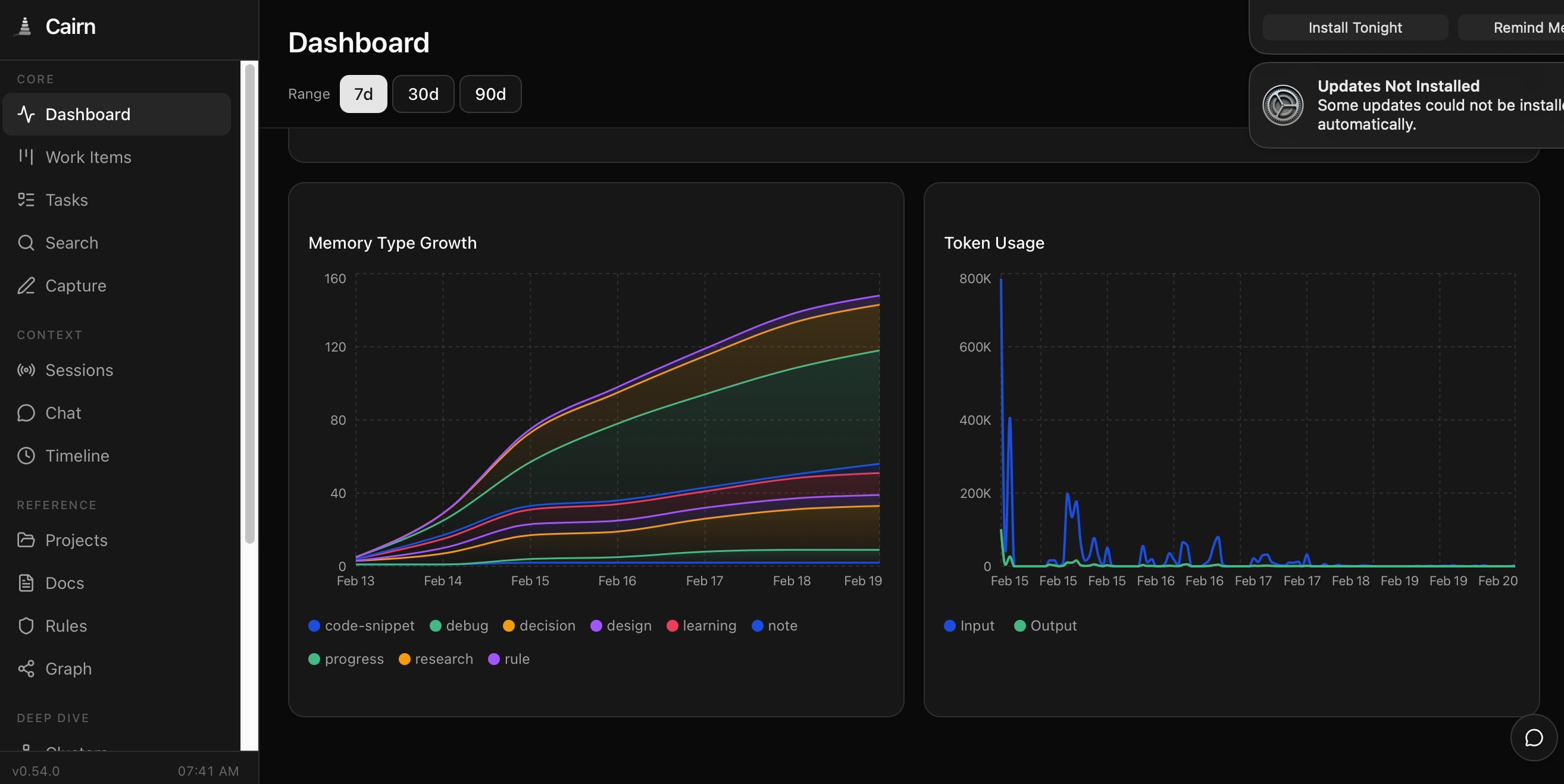
Web dashboard. Browse memories, explore the knowledge graph, view analytics, manage work items, chat with your memory. Port 3000.
<p align="center">
<br>
<sub>Memory growth by type, token usage tracking, and the full nav.</sub>
</p>
Code intelligence. Index any codebase with tree-sitter (Python, TypeScript/TSX). Ask structural questions — "what depends on this file?", "what's the blast radius?" — and get answers from the code graph. Enforce architecture boundaries with YAML rules. Search code by natural language description. Works across projects.
Session capture. IDE hooks (Claude Code, Cursor, Cline, Windsurf) log every tool call. Next session boots warm. See examples/hooks/README.md.
Do I need an LLM?
No. Store, search, recall, and rules work without one. You lose auto-enrichment (summaries, tags, importance scoring), knowledge extraction, and chat.
If you want enrichment:
| Backend | Setup |
|---------|-------|
| Ollama (default) | Install Ollama, pull a model. Cairn connects to host.docker.internal:11434. |
| AWS Bedrock | Set CAIRN_LLM_BACKEND=bedrock, export AWS creds. |
| Google Gemini | Set CAIRN_LLM_BACKEND=gemini, add CAIRN_GEMINI_API_KEY. Free tier available. |
| OpenAI-compatible | Set CAIRN_LLM_BACKEND=openai, add key. Works with OpenAI, Groq, Together, LM Studio, vLLM. |
Configuration
All via environment variables. The ones that matter:
| Variable | Default | What it does |
|----------|---------|-------------|
| CAIRN_LLM_BACKEND | ollama | LLM provider: ollama, bedrock, gemini, openai |
| CAIRN_DB_PASS | cairn-dev-password | Database password. Change this for anything beyond local. |
| CAIRN_AUTH_ENABLED | false | API key auth on /api routes |
| CAIRN_API_KEY | (empty) | The API key when auth is enabled |
| CAIRN_GRAPH_BACKEND | (disabled) | Set to neo4j to enable knowledge graph |
| CAIRN_KNOWLEDGE_EXTRACTION | false | Entity/statement extraction on store |
| CAIRN_EMBEDDING_BACKEND | local | local (MiniLM, 384-dim) or bedrock (Titan V2, 1024-dim) |
Full reference is in docker-compose.yml. Every variable has a sensible default.
Architecture
MCP clients (Claude Code, Cursor, etc.)     REST clients (curl, web UI, hooks)
        |                                            |
        | MCP (stdio or HTTP)                        | REST API
        |                                            |
+-------v--------------------------------------------v--------+
|  cairn.server (MCP tools)     cairn.api (FastAPI endpoints) |
|                                                             |
|  core: memory, search, enrichment, extraction, clustering   |
|        work items, projects, tasks, thinking, code intel    |
|                                                             |
|  graph: Neo4j (entities, statements, triples, code graph)   |
|  embedding: local (MiniLM) or Bedrock (Titan V2)            |
|  llm: Ollama, Bedrock, Gemini, OpenAI-compatible            |
+------+----------------------------------------------+-------+
       |                                              |
       v                                              v
  PostgreSQL 16 + pgvector                    Neo4j 5 (optional)
Benchmark
Tested against LoCoMo, a long-conversation memory benchmark with 1,986 questions across five categories.
| System | Score | LLM |
|--------|-------|-----|
| Cairn | 81.6% | Llama-3.3-70B |
| Human baseline | 87.9% | — |
| Letta/MemGPT | 74.0% | GPT-4o-mini |
| Mem0 | 66.9% | GPT-4o |
Test configuration: Titan V2 embeddings (Bedrock, 1024-dim), episodic ingestion (raw turns + two-pass fact extraction), Search V2 with graph-primary retrieval, type routing, cross-encoder reranking, LLM-as-judge evaluation. Full results and methodology in eval/.
Development
git clone https://github.com/jasondostal/cairn-mcp.git
cd cairn-mcp
cp .env.example .env
docker compose up -d --build
Status
Cairn is under active development. It's a real system used daily in production, and it's evolving as I learn what actually works for agent memory. Migrations handle schema changes. If something breaks, open an issue.
License
Sign in to leave a review
Use Google, GitHub, or an email account so ratings stay tied to real people.
No reviews posted yet.





