An MCP Server implementation that integrates the Balldontlie API, to provide information about players, teams and games for the NBA, NFL and MLB
Details
Author
mikechao
GitHub stars
25
Downloads
521
Categories
Other
Jump to
- Get teams for NBA, MLB, or NFL leagues
- Search players with optional first/last name filters
- Retrieve games by date(s), team IDs, and pagination cursor
- Fetch details of a single game by its ID
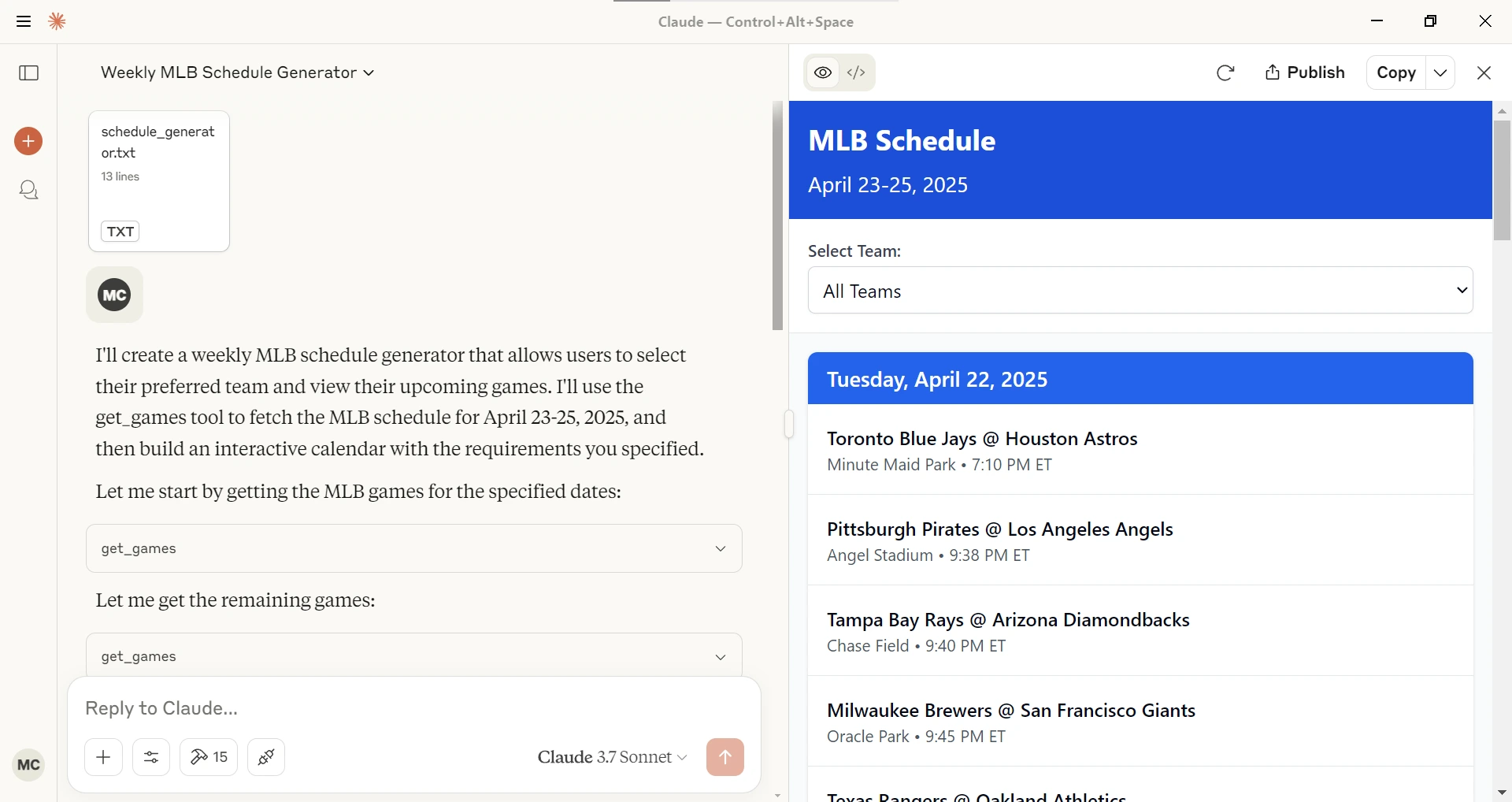
- Interactive schedule generator prompt for Claude Desktop
Setting up with Highlight
This MCP is not yet compatible with Highlight’s one-click setup. However, you can still use it with Highlight by following these steps:
Install via Smithery (npx -y @smithery/cli install @mikechao/balldontlie-mcp --client claude), a Desktop Extension (DXT) file, or manual configuration in claude_desktop_config.json with the command npx -y balldontlie-mcp and environment variable BALLDONTLIE_API_KEY. LibreChat users can add a YAML configuration.
Claude Desktop / Cursor
Paste into your MCP client config file to install this server.
# Balldontlie MCP Server
[](https://archestra.ai/mcp-catalog/mikechao__balldontlie-mcp)
[](https://smithery.ai/server/@mikechao/balldontlie-mcp)
[](https://mseep.ai/app/07e29bcd-3fb7-46e6-b4b9-8908b3ef18f2)
[](https://mseep.ai/app/mikechao-balldontlie-mcp)
<a href="https://glama.ai/mcp/servers/@mikechao/balldontlie-mcp">
<img width="380" height="200" src="https://glama.ai/mcp/servers/@mikechao/balldontlie-mcp/badge" alt="balldontlie-mcp MCP server" />
</a>
An MCP Server implementation that integrates the [Balldontlie API](https://www.balldontlie.io/), to provide information about players, teams and games for the NBA, NFL and MLB.
## Tools
- **get_teams**
- Gets the list of team from one of the following leagues NBA (National Basketball Association), MLB (Major League Baseball), NFL (National Football League)
- Inputs:
- `league` (enum ['NBA', 'NFL', 'MLB']): The sports league to get teams for
- **get_players**
- Gets the list of players from one of the following leagues NBA (National Basketball Association), MLB (Major League Baseball), NFL (National Football League)
- Inputs:
- `league` (enum ['NBA', 'NFL', 'MLB']): The sports league to get players for
- `firstName` (string, optional): The first name of the player to search for
- `lastName` (string, optional): The last name of the player to search for
- `cursor` (number, optional): Cursor for pagination
- **get_games**
- Gets the list of games from one of the following leagues NBA (National Basketball Association), MLB (Major League Baseball), NFL (National Football League)
- Inputs:
- `league` (enum ['NBA', 'NFL', 'MLB']): The sports league to get games for
- `dates` (string[], optional): Get games for specific dates, format: YYYY-MM-DD
- `teamIds` (string[], optional): Get games for specific games
- `cursor` (number, optional): Cursor for pagination
- **get_game**
- Get a specific game from one of the following leagues NBA (National Basketball Association), MLB (Major League Baseball), NFL (National Football League)
- Inputs:
- `league` (enum ['NBA', 'NFL', 'MLB']): The sports league to get the game for
- `gameId` (number): The id of the game from the get_games tool
## Prompts
- **schedule_generator**
Given a league (NBA, MLB, NFL), a starting date and ending date generates an interactive schedule in Claude Desktop.
## Sample queries
With this MCP Server installed you can ask Claude or other LLM questions like the following.
```
Show me today's baseball games.
Can you find football players with the last name Purdy?
How many NBA players have the last name Ming?
```
## Configuration
### Getting an API Key
1. Sign up for account at [Balldontlie.io](https://www.balldontlie.io/)
2. The free plan is enough for this MCP Server
### Installing using Desktop Extension (DXT)
1. Download the `dxt` file from the [Releases](https://github.com/mikechao/balldontlie-mcp/releases)
2. Open it with Claude Desktop
or
Go to File -> Settings -> Extensions and drag the .DXT file to the window to install it
### Installing via Smithery
To install balldontlie-mcp for Claude Desktop automatically via [Smithery](https://smithery.ai/server/@mikechao/balldontlie-mcp):
```bash
npx -y @smithery/cli install @mikechao/balldontlie-mcp --client claude
```
### Usage with Claude Desktop
Add this to your `claude_desktop_config.json`:
```json
{
"mcp-servers": {
"balldontlie": {
"command": "npx",
"args": [
"-y",
"balldontlie-mcp"
],
"env": {
"BALLDONTLIE_API_KEY": "YOUR API KEY HERE"
}
}
}
}
```
### Usage with LibreChat
```yaml
mcpServers:
balldontlie:
command: sh
args:
- -c
- BALLDONTLIE_API_KEY=your-api-key-here npx -y balldontlie-mcp
```
## License
This MCP server is licensed under the MIT License. This means you are free to use, modify, and distribute the software, subject to the terms and conditions of the MIT License. For more details, please see the LICENSE file in the project repository.
## Disclaimer
This library is not officially associated with balldontlie.io. It is a third-party implementation of the balldontlie api with a MCP Server.
## Hosted deployment
A hosted deployment is available on [Fronteir AI](https://fronteir.ai/mcp/mikechao-balldontlie-mcp).
No reviews yet — be the first
Sign in to leave a review
Use Google, GitHub, or an email account so ratings stay tied to real people.
Social sign-in isn’t configured yet. You can still create an account with email below, or ask an admin to add Google/GitHub/Discord OAuth credentials.
Sequential Thinking is an MCP server that provides a tool for dynamic and reflective problem-solving through a structured, step-by-step thinking process. It is…
Filesystem is a Node.js server that implements the Model Context Protocol (MCP) for filesystem operations. It enables AI assistants to read, write, and manage…
A one-of-a-kind resume builder that keeps your privacy in mind. Completely secure, customizable, portable, open-source and free forever. Try it out today!
A collection of reference implementations for the Model Context Protocol (MCP), demonstrating secure and controlled access to tools and data sources for Large…












