
🧠 Azure Self Help MCP Server
About
This is MCP server for Azure Help APIs for Guided Troubleshooter
Details
- Author
- akshaykokane
- Downloads
- 239
- Categories
- Cloud Service
Jump to
- Exposes Azure Self Help API as MCP tools
- Start, continue, and end troubleshooter sessions
- View current troubleshooting step instructions
- Restart a session from the beginning
- Uses DefaultAzureCredential for authentication
- Works with any MCP-compatible host
Clone the project, install the required NuGet packages (ModelContextProtocol, Microsoft.Extensions.Hosting, Azure.ResourceManager.SelfHelp, Azure.Identity), and configure the server with a Stdio transport. Then add the server to your MCP host’s config (e.g., Claude Desktop’s mcpServers block) and restart the host. The tools are automatically registered and ready for use.
🧠 Azure Self Help MCP Server
Welcome to the Azure Troubleshooter MCP Server – a hands-on implementation of Model Context Protocol (MCP), designed to enable intelligent agents (like Claude or Semantic Kernel) to troubleshoot Azure resources step-by-step using the Azure Self Help API.
In short: it lets your AI app talk to Azure’s Guided Troubleshooter, automating common diagnostic workflows.
---
💡 What Is This?
This project implements an MCP Server that exposes Azure's Self Help API as a toolset. Once connected to an MCP Host (like Claude Desktop or an SK App), you can ask the agent to:
- Create a troubleshooter session
- View its current step
- Continue the flow with your response
- End or restart the session
Think of this as your interactive AI assistant for Azure diagnostics.
---
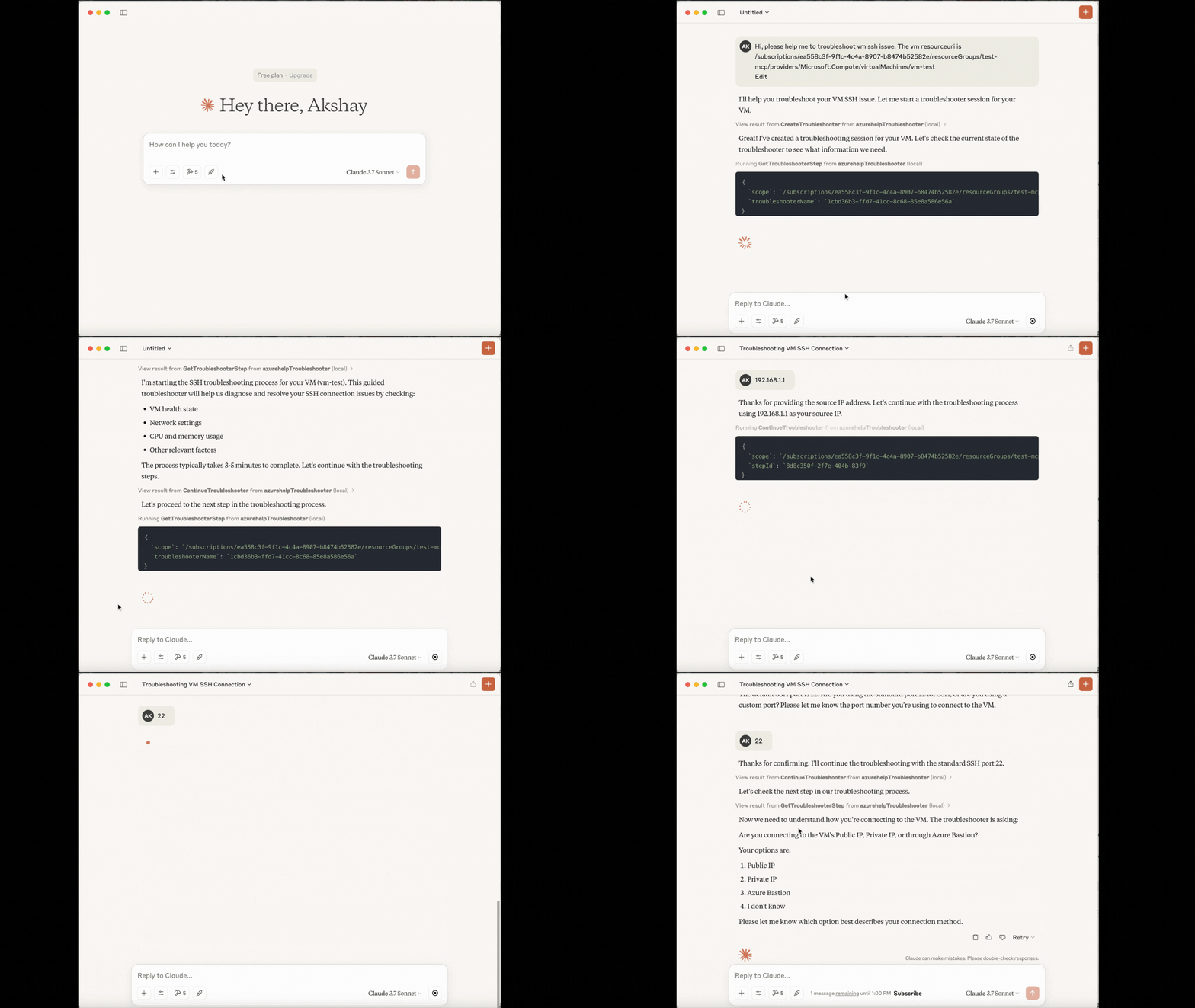
✨ Live Demo Use Case
> ❓ “I can’t SSH into my Azure VM.”
This tool lets an LLM walk you through possible causes and fixes interactively using Microsoft’s Guided Troubleshooter API.
---
🧰 Prerequisites
- .NET 8 SDK
- Azure CLI (logged in)
- Claude App or any MCP Host
- IDE / Terminal
---
📦 Setup
Step 1: Install Packages
dotnet add package ModelContextProtocol --prerelease
dotnet add package Microsoft.Extensions.Hosting
dotnet add package Azure.ResourceManager.SelfHelp
dotnet add package Azure.Identity
---
Step 2: Create Your MCP Server
In Program.cs:
var builder = Host.CreateEmptyApplicationBuilder(settings: null);
builder.Services.AddMcpServer()

    .WithStdioServerTransport()

    .WithToolsFromAssembly(); // Registers [McpServerTool] methods
var app = builder.Build();

await app.RunAsync();
---
Step 3: Write Your MCP Tools
In AzureTroubleshooterTools.cs:
[McpServerToolType]
public static class AzureTroubleshooterTools
{
    [McpServerTool, Description("Create a troubleshooter session")]
    public static async Task<string> CreateTroubleshooter([Description("Resource Uri of the azure resource")]string scope)
    {
        string solutionId = "e104dbdf-9e14-4c9f-bc78-21ac90382231"; // this is solutionId for vm ssh issue. This id can be found using Discovery API of Azure Help, which will also be part of this MCP Server
        string troubleshooterName = Guid.NewGuid().ToString();
        var client = new ArmClient(new DefaultAzureCredential());
var troubleshooterId = SelfHelpTroubleshooterResource.CreateResourceIdentifier(scope, troubleshooterName);

        var troubleshooter = client.GetSelfHelpTroubleshooterResource(troubleshooterId);
var data = new SelfHelpTroubleshooterData

        {

            SolutionId = solutionId,

            Parameters = { ["ResourceURI"] = scope }

        };
ArmOperation<SelfHelpTroubleshooterResource> lro = await troubleshooter.UpdateAsync(WaitUntil.Completed, data);

        return $"Troubleshooter created with ID: {lro.Value.Data.Id}";

    }
// Tools: Get, Continue, End, Restart...

}
---
🤖 MCP Config for Claude or Other Hosts
To connect your MCP Server with an MCP-compatible app like Claude, update your config file (in Claude Desktop: Settings > Developer):
{
  "mcpServers": {
    "azurehelpTroubleshooter": {
      "command": "dotnet",
      "args": [
        "run",
        "--project",
        "/Users/yourname/Projects/AzureTroubleshooterServer",
        "--no-build"
      ]
    }
  }
}
Once saved and restarted, Claude will detect your tools — ready to assist with Azure diagnostics! ✅
---
🧪 Available Tools
| Method | Description |
|--------------------------|---------------------------------------------------|
| CreateTroubleshooter | Start a new troubleshooter session for a resource |
| GetTroubleshooterStep | View current step & instructions |
| ContinueTroubleshooter | Respond to the current step's question |
| EndTroubleshooter | End the session |
| RestartTroubleshooter | Start over from step one |
---
🛡 Authentication
Uses DefaultAzureCredential, so it works out-of-the-box with:
- Azure CLI
- Environment variables
- Managed Identity
---
🧠 Why This Matters
Model Context Protocol (MCP) is revolutionizing how LLMs communicate with tools. By building an MCP Server for Azure Help APIs, you can:
- Make Azure debugging agent-native
- Empower AI apps with cloud intelligence
- Extend to other Microsoft APIs with the same structure
---
📎 Related Blogs
- Build an AI App That Can Browse the Internet Using Playwright MCP Server
- Step-by-Step Guide to MCP Servers
---
🙌 Acknowledgements
Thanks to the amazing Azure SDK team and the creators of MCP for making this kind of developer magic possible. ✨
- https://learn.microsoft.com/en-us/rest/api/help/
- https://docs.anthropic.com/en/docs/agents-and-tools/mcp
---
Sign in to leave a review
Use Google, GitHub, or an email account so ratings stay tied to real people.
No reviews posted yet.




