
powergentic/azd-mcp-ts
About
An AZD template to deploy a Model Context Protocol (MCP) server written in TypeScript to Azure Container Apps using SSE Transport.
Details
- Author
- powergentic
- GitHub stars
- 3
- Downloads
- 325
- Categories
- Cloud Service, AI
Jump to
- Deploys an MCP server to Azure Container Apps via SSE transport.
- Written in TypeScript and includes a ready-to-use Dockerfile.
- Uses the Azure Developer CLI for one-command provisioning and deployment.
- Deploys Container Apps Environment, Container App, Log Analytics, Application Insights, and Container Registry.
- Provides a foundational template that can be customized for any MCP server.
Use the Azure Developer CLI (azd) to initialize and deploy the template. First run azd auth login, then azd init --template powergentic/azd-mcp-ts. Ensure Docker Engine is running, then run azd up to provision Azure resources and deploy the MCP server. After deployment, verify the server is running by navigating to the /sse endpoint in a browser.
powergentic/azd-mcp-ts 
An azd template to deploy a Model Context Protocol (MCP) server written in TypeScript to Azure Container Apps using SSE Transport.
Prerequisites
To deploy this template you will need to have the following installed:
- Azure Developer CLI
- Docker
Deployment
To use this template, follow these steps using the Azure Developer CLI:
1. Log in to Azure Developer CLI. This is only required once per-install.
azd auth login
2. Initialize this template using azd init:
azd init --template powergentic/azd-mcp-ts
3. Ensure Docker Engine is running on your machine. This will be needed by azd to build the Docker image for the app prior to deployment to Azure Container Apps.
4. Use azd up to provision your Azure infrastructure and deploy the web application to Azure.
azd up
5. Once the template has finished provisioning all resources, and Azure Container Apps has completed deploying the app container _(this can take a minute or so after azd up completes to finish)_, the MCP server will be running.

6. To verify the MCP server is running, navigate your browser to the /sse url for the app within your browser.
Example URL:
https://ca-mcp-vnv7lqmg46722.bravebeach-29a82758.eastus2.azurecontainerapps.io/sse
This will open a streaming output within the browser that will look similar to the following:

7. Congratulations, you now have a simple MCP Server written in TypeScript up and running in Azure! You can now customize this app to build the specific MCP server you need for your AI solution.
Architecture Diagram
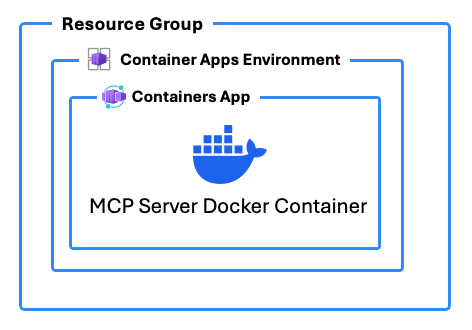
In addition to deploying Azure Resources to host the MCP server, this template includes a DOCKERFILE that builds the MCP server app with TypeScript.
Azure Resources
These are the Azure resources that are deployed with this template:
- Container Apps Environment - The environment for hosting the Container App
- Container App - The hosting for the MCP server app
- Log Analytics and Application Insights - Logging for the Container Apps Environment
- Container Registry - Used to deploy the custom Docker container for the app
Resource Links
Here are some additional resource links that help explain the topics around building custom MCP Servers in TypeScript and about what MCP and SSE are:
- How to Build and Deploy an MCP Server with TypeScript and Azure Developer CLI (azd) using Azure Container Apps and Docker by Chris Pietschmann
Author
This azd template was written by Chris Pietschmann, founder of Powergentic.ai, Microsoft MVP, HashiCorp Ambassador, and Microsoft Certified Trainer (MCT).
Sign in to leave a review
Use Google, GitHub, or an email account so ratings stay tied to real people.
No reviews posted yet.




