
MCP server for working with AWS Blog and News articles
About
This MCP server provides tools for retrieving and filtering AWS blog articles and news from all AWS categories. The server is built using the FastMCP framework and supports SSE transport on port 8807.
Details
- Author
- mirecekd
- Downloads
- 269
- Categories
- Cloud Service
Jump to
- Retrieves articles published today or within a date range
- Filters by article type (News, Blog, or Both) and category
- Full‑text search across titles, URLs, and slugs
- Lists available categories and popular articles
- Downloads full article content with metadata
- Built‑in 5‑minute cache and structured JSON responses
- Fully Dockerized with SSE transport on port 8807

Setting up with Highlight
This MCP is not yet compatible with Highlight’s one-click setup. However, you can still use it with Highlight by following these steps:
- Download and install Highlight from highlightai.com/download
- Navigate to the plugins tab and select "Add Custom Plugin"
-
Configure the plugin with the settings below
Plugin Name
MCP server for working with AWS Blog and News articlesCommand (node, npx, python, etc.)Please refer to the README for specific instructions on how to obtain API keys or other required environment variables.
- Enable "Start Automatically" if you want the plugin to start when Highlight launches





From the repository
Docker is the recommended method: run docker run -p 8807:8807 ghcr.io/mirecekd/awsblogs-mcp or build locally. For local development, install dependencies with pip install -e . and start the server with python main_sse.py --host 0.0.0.0 --port 8807. Configure your MCP client (e.g., Cline) with type: "sse" and URL http://localhost:8807/sse/.
Claude Desktop / Cursor
Paste into your MCP client config file to install this server.
{
    "mcpServers": {
        "mcp server for working with aws blog and news articles": {
            "awsblogs-mcp": {
                "command": "docker",
                "args": [
                    "run",
                    "-p",
                    "8807:8807",
                    "ghcr.io/mirecekd/awsblogs-mcp"
                ]
            }
        }
    }
}McpServers
{
    "awsblogs-mcp": {
        "command": "docker",
        "args": [
            "run",
            "-p",
            "8807:8807",
            "ghcr.io/mirecekd/awsblogs-mcp"
        ]
    }
}
AWS Blogs MCP Server
MCP server for working with AWS Blog and News articles from api.aws-news.com.
<div align="center">

</div>
Description
This MCP server provides tools for retrieving and filtering AWS blog articles and news from all AWS categories. The server is built using the FastMCP framework and supports SSE transport on port 8807.
Available MCP Tools
1. get_todays_posts
Gets articles published today.
Parameters:
- post_type: "News", "Blog", or "Both" (default)
- limit: Maximum number of articles (default 20)
2. get_posts_by_date
Gets articles from a specific date range.
Parameters:
- from_date: From date in YYYY-MM-DD format (optional)
- to_date: To date in YYYY-MM-DD format (optional)
- days_back: Number of days back from today (alternative to from_date)
- post_type: "News", "Blog", or "Both" (default)
- limit: Maximum number of articles (default 50)
3. get_posts_by_category
Gets articles from a specific category.
Parameters:
- category: Category name (e.g., "Big Data", "Machine Learning", "Industries")
- post_type: "News", "Blog", or "Both" (default)
- days_back: Number of days back from today (default 30)
- limit: Maximum number of articles (default 30)
4. search_posts
Searches articles by text query.
Parameters:
- query: Search query (searches in title, URL, and slug)
- post_type: "News", "Blog", or "Both" (default)
- days_back: Number of days back from today (default 90)
- limit: Maximum number of articles (default 25)
5. get_categories
Gets a list of all available article categories.
6. get_latest_posts
Gets the latest articles.
Parameters:
- post_type: "News", "Blog", or "Both" (default)
- limit: Maximum number of articles (default 20)
- days_back: Number of days back from today (default 7)
7. get_popular_posts
Gets popular articles (marked as popular=true).
Parameters:
- post_type: "News", "Blog", or "Both" (default)
- days_back: Number of days back from today (default 30)
- limit: Maximum number of articles (default 15)
8. get_article_content
Downloads full article content from a given URL.
Parameters:
- url: Article URL (can be obtained from other tools)
Return values:
- title: Article title
- content: Full article text
- description: Meta description
- author: Author (if available)
- published_date: Publication date
- content_length: Content length in characters
- word_count: Word count
Available Categories
The server supports filtering by these categories:
- Architecture
- AWS Cloud Operations
- AWS for Games
- AWS Insights
- AWS Marketplace
- AWS News
- AWS Partner Network
- AWS Smart Business
- Big Data
- Business Intelligence
- Business Productivity
- Cloud Enterprise Strategy
- Cloud Financial Management
- Compute
- Contact Center
- Containers
- Database
- Desktop & Application Streaming
- Developer Tools
- DevOps & Developer Productivity
- Front-End Web & Mobile
- HPC
- IBM and Red Hat
- Industries
- Integration & Automation
- Internet of Things
- Machine Learning
- Media
- Messaging & Targeting
- Microsoft Workloads on AWS
- Migration and Modernization
- .NET on AWS
- Networking & Content Delivery
- Open Source
- Public Sector
- Quantum Computing
- SAP
- Security
- Spatial Computing
- Startups
- Storage
- Supply Chain & Logistics
- Training & Certification
Installation and Running
Docker (recommended)
1. Run from GitHub Container Registry:
docker run -p 8807:8807 ghcr.io/mirecekd/awsblogs-mcp
2. Build Docker image locally:
   chmod +x build.sh

   ./build.sh
3. Run using docker-compose:
docker-compose up awsblogs-mcp-sse
4. Or local Docker build:
docker run -p 8807:8807 awsblogs-mcp-server:sse
Local Development
1. Install dependencies:
pip install -e .
2. Run server:
python main_sse.py --host 0.0.0.0 --port 8807
MCP Client Configuration
To use in an MCP client (e.g., Cline), add to configuration:
{
  "mcpServers": {
    "awsblogs": {
      "type": "sse",
      "url": "http://localhost:8807/sse/"
    }
  }
}
API Endpoint
The server uses the public API: https://api.aws-news.com/articles
Features
- ✅ SSE transport on port 8807
- ✅ Filter by article type (News/Blog)
- ✅ Filter by category
- ✅ Date filtering (date range, days back)
- ✅ Text search
- ✅ Cache mechanism (5 minutes)
- ✅ Structured responses
- ✅ Docker support
Project Structure
awsblogs-mcp/
├── src/awsblogs_mcp_server/
│   ├── __init__.py
│   ├── server_sse.py          # SSE MCP server
│   └── data_processor.py      # API client and data processing
├── main_sse.py               # SSE entry point
├── Dockerfile.sse            # Docker image for SSE
├── docker-compose.yml        # Docker Compose configuration
├── build.sh                  # Build script
├── pyproject.toml            # Python project configuration
└── README.md                 # This file
Development
For development we recommend:
1. Fork the repository
2. Create a new branch for the feature
3. Test locally using python main_sse.py
4. Test Docker build using ./build.sh
5. Create a pull request
License
MIT License - see LICENSE file.
Author
Miroslav Dvořák (mirecekd@gmail.com)
Usage Examples
N8N Workflow Integration
This MCP server can be easily integrated with N8N workflows for automated AWS news processing and notifications.
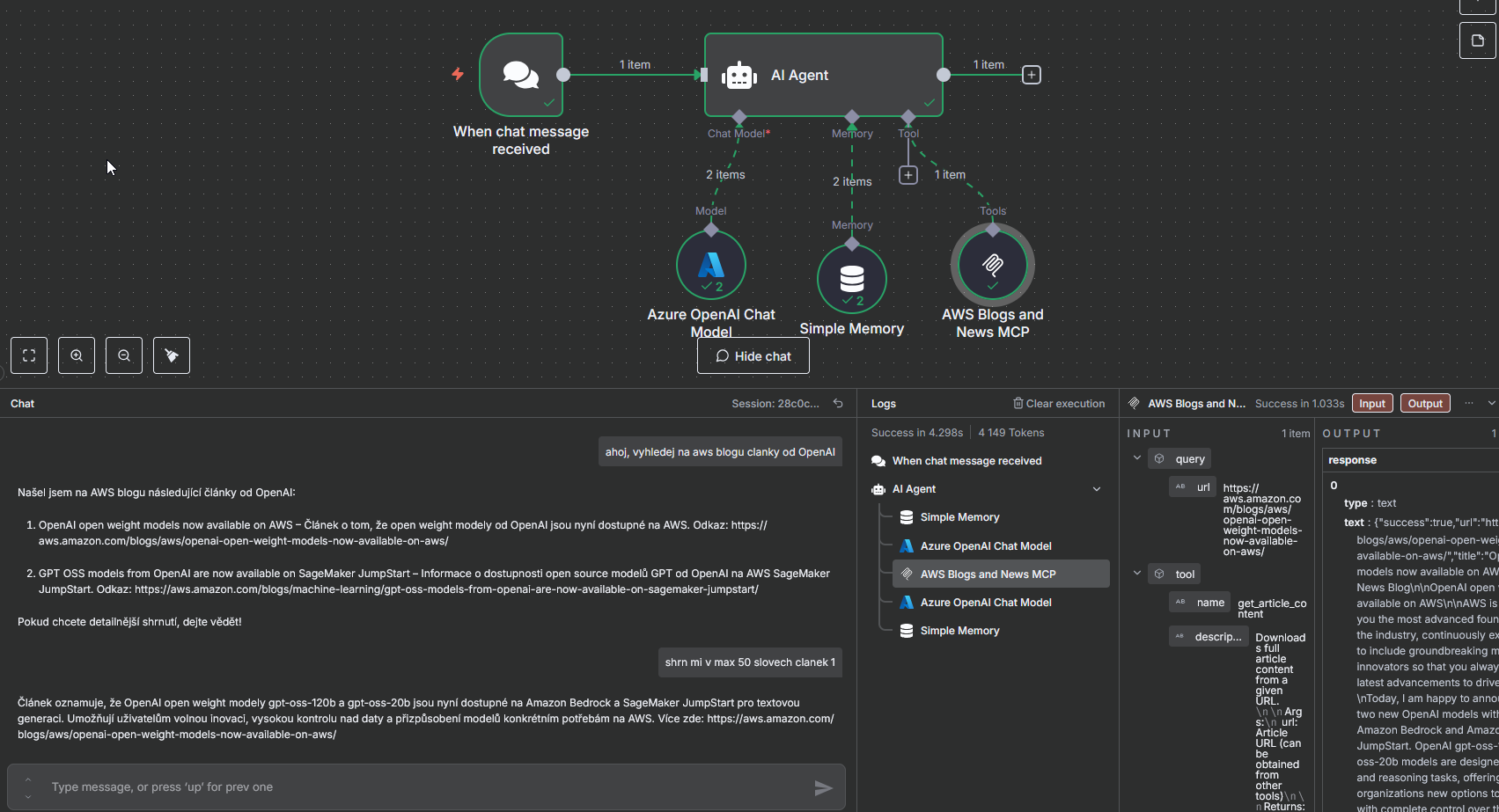
The screenshot above shows a real-world N8N workflow where the AWS Blogs MCP server is used as a tool within an AI Agent. The workflow consists of:
1. Chat Trigger - Receives user messages
2. AI Agent - Processes requests using Azure OpenAI
3. AWS Blogs MCP Tool - Fetches AWS articles based on user queries
4. Memory Buffer - Maintains conversation context
Example N8N Workflow: You can find a complete N8N workflow configuration in ./assets/n8n-workflow.json
How it works in practice:
- User asks: "Show me latest AWS articles about Machine Learning"
- AI Agent uses the MCP server to call search_posts with query "Machine Learning"
- Server returns relevant AWS ML articles with titles, URLs, and summaries
- AI Agent formats the response for the user with clickable links
- Conversation context is maintained for follow-up questions
This integration allows for natural language interactions with AWS content, making it easy to stay updated with the latest AWS developments through conversational AI.
Inspiration
Project inspired by aws-news-mcp-server by jritsema.
Sign in to leave a review
Use Google, GitHub, or an email account so ratings stay tied to real people.
No reviews posted yet.




