
Notion
About
Enables AI systems to create, update, and manage Notion pages and blocks through a Node.js bridge to the Notion API, supporting efficient batch operations for documentation and knowledge base maintenance.
Details
- Author
- awkoy
- Repository
- awkoy/notion-mcp-server
- GitHub stars
- 92
- Downloads
- 2,903
- License
- MIT License
- Categories
- Productivity, Other, Project Management, Developer Tools, Design, Workplace, File Management, AI, Search, Frontend, Knowledge Base, Infrastructure, API
Jump to
- Two-tool surface — notion_execute (do it) + notion_describe (learn the shape). The whole API is one schema deep.
- Universal batch envelope — every mutating op accepts { items: [...], atomic?, idempotency_key?, concurrency? } with per-item validation and results.
- Atomic batches with best-effort rollback — atomic: true aborts on first failure and archives anything created earlier in the batch.
- Idempotency keys — same (operation, idempotency_key) returns the cached result for 5 minutes. Safe to retry on flaky networks.
- Rate-limit + retry baked in — token-bucket limiter (3 req/s default, NOTION_RATE_LIMIT to change) with exponential backoff on 429/5xx/timeouts, honoring Retry-After.
- Self-healing validation errors — failures return { schema, example, fix } so the model corrects bad payloads in one round-trip.
- Markdown everywhere — create_page / append_blocks / update_block / comment bodies accept a markdown string (full GFM: headings 1–4, lists, nested to-dos, blockquotes, fenced code with language detection, images, dividers, inline formatting), plus full round-trip via get_page_markdown / update_page_markdown.
- Notion templates — create_page can apply a data source's template (template: { type: "template_id" | "default" }), with list_data_source_templates to discover template IDs.
- Database views — list/get/query/create/update/delete views; query_view runs a view's stored filters/sorts and returns hydrated rows.
- Typed where filter shorthand — query_database takes {Status: {equals: "Done"}, AND: [...]} and compiles it to Notion filter JSON (raw filter still accepted for edge cases).
- Slim responses + flattened rows — noisy fields dropped by default, query_database rows flattened to name → primitive maps, compact JSON wire format (~30% smaller). verbose: true opts out per call.
- File uploads — single-part and multi-part (5 MB chunks) transparently; MIME inferred from filename.
- Opt-in auto-pagination — paginate: true on search_pages / list_comments / query_database walks next_cursor for you (default cap ≈ 1000 items).
- HTTP(S) proxy support — standard HTTPS_PROXY / HTTP_PROXY env vars for corporate networks.
- Access control — NOTION_READ_ONLY one-switch read-only mode plus per-operation allow/block lists.

Setting up with Highlight
This MCP is not yet compatible with Highlight’s one-click setup. However, you can still use it with Highlight by following these steps:
- Download and install Highlight from highlightai.com/download
- Navigate to the plugins tab and select "Add Custom Plugin"
-
Configure the plugin with the settings below
Plugin Name
NotionCommand (node, npx, python, etc.)npxArguments-
Argument 1
-y -
Argument 2
notion-mcp-server
Environment-
NOTION_TOKEN
ntn_paste_your_token_here
Please refer to the README for specific instructions on how to obtain API keys or other required environment variables.
-
Argument 1
- Enable "Start Automatically" if you want the plugin to start when Highlight launches





From the repository
Step 1 — get a Notion token (1 minute). Open app.notion.com/developers/tokens (the Personal access tokens page of Notion's developer portal) → + New token → name it, pick your workspace → Create token → copy the ntn_… value. That's it — a PAT sees everything you can see, no per-page sharing required. (Page missing or empty? Your admin disabled PATs — see auth alternatives.)
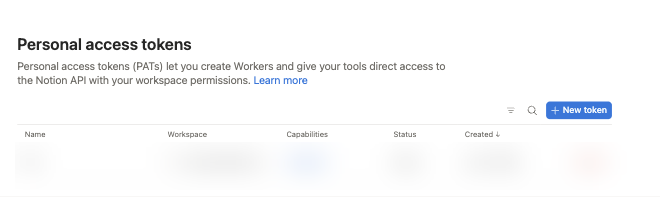
Step 2 — add the server to your client.
Both use the same NOTION_TOKEN env var — only where you get the token differs.
| | Personal Access Token (recommended) | Internal Integration (scoped) |
| --- | --- | --- |
| Where | app.notion.com/developers/tokens → + New token | app.notion.com/developers/connections → + New connection |
| Scope | Everything you can see | Only pages where you clicked • • • → Connect → \<integration\> |
| Friction | None | Per-page Connect step for every page/database |
| Use when | Default: personal + team workspaces, prototyping | Admin requires explicit per-resource scoping, or shared production bots |
> 💡 Most object_not_found errors are a wrong auth choice, not a bug: an Internal Integration token that was never Connected to the page. Switch to a PAT.
<details>
<summary><b>PAT details: capabilities, expiry, revocation, admin-disabled fallback</b></summary>
Can: read every page you have access to; create/update pages and databases where you have edit rights; comment as you; upload files.
Can't: access pages you can't see; bypass workspace permissions; act as another user; change admin settings. A PAT's scope = your account — if you lose access to a page, so does the PAT. Issue separate tokens per teammate.
Expiry: PATs expire 1 year after creation (Notion docs); set a reminder for ~11 months.
Revoking: app.notion.com/developers/tokens → Revoke next to the token (immediate). Workspace admins can revoke anyone's from Settings & members → Connections → All personal access tokens.
Admin disabled PATs? Ask them to enable, or create an Internal Integration at app.notion.com/developers/connections (+ New connection) and • • • → Connect it to every page the agent should touch — same NOTION_TOKEN env var.
Official reference: PAT guide · Authorization overview.
</details>
| Env var | Required | Default | Meaning |
| --- | --- | --- | --- |
| NOTION_TOKEN | ✅ | — | PAT (ntn_…, recommended) or Internal Integration secret (secret_… / ntn_…) |
| NOTION_PAGE_ID | — | — | Default parent for create_page / create_database when no parent is passed (page → Share → Copy link; ID = last 32 chars) |
| NOTION_RATE_LIMIT | — | 3 | Requests/second for the shared limiter (Notion's documented per-integration limit) |
| NOTION_READ_ONLY | — | — | true/1/yes disables every write operation in one switch |
| NOTION_ALLOWED_OPERATIONS | — | all | Comma-separated allowlist of operations or group presets — see Restricting operations |
| NOTION_BLOCKED_OPERATIONS | — | — | Comma-separated blocklist (same vocabulary); wins over the allowlist |
| NOTION_UPLOAD_ROOT | — | — | Confine upload_file's path source to one directory. Unset, a path source can read any file the server process can — set this if a model composes the path. Relative paths resolve inside it; symlinks are resolved before the check, so they can't point out |
| HTTPS_PROXY / HTTP_PROXY | — | — | Route Notion API traffic through an HTTP(S) proxy (standard env vars, lowercase also accepted) |
| NOTION_DAILY_LOG_PAGE_ID | — | — | Only used by the daily-log MCP prompt |
HTTP-transport variables (MCP_TRANSPORT, PORT, HOST, MCP_AUTH_TOKEN, …) are covered in Remote / HTTP transport.
> Upgrading from v1.x? Your env vars all still work unchanged. The only break is the tool surface (v1's five tools became notion_execute + notion_describe); modern clients rediscover tools automatically. Details: MIGRATION.md.
It serves MCP Streamable HTTP at POST/GET/DELETE /mcp (stateful sessions via the mcp-session-id header) plus an unauthenticated GET /health. It's single-tenant — every request acts as the one NOTION_TOKEN the process started with.
| env | default | meaning |
| --- | --- | --- |
| MCP_TRANSPORT | stdio | set to http to enable HTTP |
| PORT | 3000 | listen port (0 = OS-assigned) |
| HOST | 127.0.0.1 | bind address; set 0.0.0.0 to expose externally (only with MCP_AUTH_TOKEN) |
| MCP_AUTH_TOKEN | — | when set, every /mcp request must send Authorization: Bearer <token> |
| MCP_ALLOWED_HOSTS | localhost + bound host | comma-list for DNS-rebinding Host allowlist |
| MCP_ALLOWED_ORIGINS | localhost origins | comma-list for browser Origin allowlist |
> ⚠️ Whoever reaches /mcp acts as your NOTION_TOKEN. On loopback (the default) that's just local processes. Before binding a non-loopback HOST, set MCP_AUTH_TOKEN (the server warns if you don't) and/or front it with an authenticating reverse proxy.
Connect from clients that support headers (Claude Code, Cursor, VS Code):
claude mcp add --transport http notion https://your-host/mcp \
--header "Authorization: Bearer <MCP_AUTH_TOKEN>"
Try it locally:
curl http://127.0.0.1:3000/health
notion_execute
Run any operation with a payload. Supports both single and batch operations, where the payload can be a single object or an array of items for batch processing.
notion_describe
Returns the JSON Schema and a working example for one operation, useful for understanding the structure of the operation before making complex calls.
Claude Desktop / Cursor
Paste into your MCP client config file to install this server.
{
    "mcpServers": {
        "notion": {
            "env": {
                "NOTION_TOKEN": "ntn_paste_your_token_here"
            },
            "args": [
                "-y",
                "notion-mcp-server"
            ],
            "command": "npx"
        }
    }
}Linux
{
    "env": {
        "NOTION_TOKEN": "ntn_paste_your_token_here"
    },
    "args": [
        "-y",
        "notion-mcp-server"
    ],
    "command": "npx"
}
Macos
{
    "env": {
        "NOTION_TOKEN": "ntn_paste_your_token_here"
    },
    "args": [
        "-y",
        "notion-mcp-server"
    ],
    "command": "npx"
}
Windows
{
    "env": {
        "NOTION_TOKEN": "ntn_paste_your_token_here"
    },
    "args": [
        "/c",
        "npx",
        "-y",
        "notion-mcp-server"
    ],
    "command": "cmd"
}
Notion MCP Server — Connect Claude, Cursor & VS Code to Notion





Give your AI full read/write access to Notion with one token and one paste. This is an agent-first Notion MCP server: your AI client (Claude Code, Claude Desktop, Cursor, VS Code, Cline, Zed — anything that speaks MCP) can create pages, query databases, append blocks, apply templates, comment, and upload files in natural language.
Three reasons it exists when Notion ships its own MCP:
- Built for agents, not humans-in-the-loop. Notion's hosted MCP is OAuth-only — it cannot run headless. This server authenticates with a token, so it works in CI, cron jobs, background agents, and self-hosted deployments where nobody can click "Authorize".
- 97% smaller tool footprint at connection. Two MCP tools (422 tokens) instead of one schema per endpoint — the official open-source server loads 17,163 tokens of tool schemas before you do anything. Operation schemas load on demand via notion_describe, so even a typical multi-operation task stays 85–95% lighter. Measured, reproducible →
- The operational stuff is built in. Batched mutations with atomic rollback, idempotency keys, automatic retry on rate limits, slim token-efficient responses, full markdown round-trip, and self-healing validation errors that let the model fix its own bad payloads in one turn.
<a href="https://glama.ai/mcp/servers/zrh07hteaa">
</a>
⚡ Quick start
Step 1 — get a Notion token (1 minute). Open app.notion.com/developers/tokens (the Personal access tokens page of Notion's developer portal) → + New token → name it, pick your workspace → Create token → copy the ntn_… value. That's it — a PAT sees everything you can see, no per-page sharing required. (Page missing or empty? Your admin disabled PATs — see auth alternatives.)
Step 2 — add the server to your client.
Claude Code
claude mcp add notion -s user \
  -e NOTION_TOKEN=ntn_paste_your_token_here \
  -- npx -y notion-mcp-server
Cursor

Click the badge (then replace YOUR_NOTION_TOKEN in the generated entry), or add to ~/.cursor/mcp.json yourself:
{
  "mcpServers": {
    "notion": {
      "command": "npx",
      "args": ["-y", "notion-mcp-server"],
      "env": { "NOTION_TOKEN": "ntn_paste_your_token_here" }
    }
  }
}
VS Code (Copilot agent mode)

VS Code prompts for the token on install and stores it as a secret input.
Claude Desktop
Easiest: the one-click extension. Download notion-mcp-server.mcpb from the latest release, double-click it (or drag into Claude Desktop → Settings → Extensions), paste your Notion token when prompted — done. No config files, Node.js not required.
Or via the config file: Settings → Developer → Edit Config, then add:
{
  "mcpServers": {
    "notion": {
      "command": "npx",
      "args": ["-y", "notion-mcp-server"],
      "env": { "NOTION_TOKEN": "ntn_paste_your_token_here" }
    }
  }
}
Quit Claude Desktop fully (Cmd+Q / tray → Quit) and reopen. Never used a config file before? Follow the step-by-step walkthrough for non-developers — it assumes nothing.
Docker / Podman / OrbStack
claude mcp add notion -s user \
  -e NOTION_TOKEN=ntn_paste_your_token_here \
  -- docker run --rm -i -e NOTION_TOKEN ghcr.io/awkoy/notion-mcp-server:latest
The -i flag is required (stdio transport). The image is OCI-compliant — Podman, OrbStack, colima, Rancher Desktop, Finch, and nerdctl all work with the same flags.
Step 3 — try it. In a new chat:
> "Use Notion to make a page called 'Hello from my agent' and add a checklist of three things to try today."
Your AI calls notion_execute and replies with a live page link.
💡 What your AI can do with it
- "Find every row in my Tasks database where Status is 'Doing' and tell me which are overdue." — typed where filters, flattened rows
- "Rename these 50 pages to the new convention." — one batched call, 10-way parallel, idempotent retry
- "Create a page from my 'Weekly review' template and fill in this summary." — Notion templates support
- "Rewrite that spec page: fix the headings and add a code sample." — full markdown round-trip (get_page_markdown → edit → update_page_markdown)
- "Comment on yesterday's meeting notes with a one-paragraph summary."
- "Upload this diagram to the design page." — single- and multi-part file uploads
Full capability list in Features; the complete operation catalog (43 ops) is in the Operations menu.
🧭 Which Notion MCP should you use?
Three options exist. Honest guidance:
| | Best for | Auth | Headless / CI | Notes |
| --- | --- | --- | --- | --- |
| Notion hosted MCP (mcp.notion.com) | Interactive chat in claude.ai, ChatGPT, Cursor | OAuth (human must click) | ❌ | First-party, 18 markdown tools, some plan-gated |
| Official open-source server | — | Token | ✅ | Notion has soft-deprecated it (“may sunset this repository… issues and PRs not actively monitored”) |
| This server | Agents, automation, CI, self-hosting, token-sensitive workloads | Token (PAT) | ✅ | Actively maintained, agent-first design below |
If you just want to chat with your Notion in claude.ai's web UI, use Notion's hosted connector — it's one click. Use this server when your agent runs unattended, when context/token cost matters, or when you want batch/idempotent semantics and self-hosting.
<details>
<summary><b>Detailed comparison vs. the official open-source server</b></summary>
| Capability | Official Notion MCP (open source) | This server |
| --- | --- | --- |
| Tool surface | 24 tools (one per endpoint), 17,163 tokens loaded into context | 2 tools, 422 tokens — 97% less schema at connection |
| Operations covered | ~24 endpoints | 43 operations (plus a trash_page alias) across pages, blocks, databases, data sources, views, templates, comments, users, files |
| Batch mutations | Not documented | ✅ Universal { items: [...] } envelope; up to 10 in parallel |
| Atomic batches + rollback | Not documented | ✅ atomic: true aborts on first failure, best-effort archives entities created earlier |
| Idempotency | Not documented | ✅ idempotency_key — same key + op returns the cached result for 5 minutes |
| Rate-limit handling | 429s bubble up | ✅ Token-bucket limiter (3 req/s default) + exponential backoff, honors Retry-After |
| Response shapes | Raw Notion SDK JSON | Slim shapers drop noise by default; verbose: true opts out |
| Database queries | Raw properties bag per row | Flattened name → primitive map (all 20+ property types) |
| Wire format | Default SDK serialization | Compact JSON — ~30% smaller payloads |
| Markdown | Page-level markdown tools | ✅ Markdown accepted by create_page / append_blocks / update_block / comments + full round-trip (get_page_markdown / update_page_markdown), full GFM |
| Templates | — | ✅ create_page from a Notion template + list_data_source_templates discovery |
| File uploads | Not in the documented tool surface | ✅ Single- and multi-part (5 MB chunks), MIME inferred |
| Validation errors | Plain error string | Self-healing: { code, message, path, issues, schema, example, fix } — corrected in one round-trip |
| Notion API version | — | Pinned 2026-03-11 (data sources, views, templates) |
Real-world impact:
- Renaming 50 pages — one notion_execute call with { items: [...], concurrency: 10 } instead of 50 separate tool calls through the agent's reasoning loop: roughly an order of magnitude faster, and the prompt-token savings are the bigger win.
- Tool list in context — 2 schema blobs per conversation instead of ~24, no matter which of the 43 operations get called.
- Reading a 100-row database — flattened rows are typically 5–10× fewer tokens than the raw properties bag, with no information loss.
</details>
🪄 Complete walkthrough (no coding required)
<details>
<summary><b>Set up Claude Desktop + Notion in 5 minutes — assumes you've never seen a config file</b></summary>
What you'll need
1. A Notion account.
2. The Claude Desktop app.
3. About 5 minutes.
Step 1 — Get your Notion token
A Personal Access Token (PAT) is like a key that lets the AI act as you inside Notion — it sees every page you can see, with no per-page setup.
1. Open app.notion.com/developers/tokens while logged into Notion — that's the Personal access tokens page of Notion's developer portal (also reachable from the app via Settings → Connections → Develop or manage integrations → Personal access tokens in the sidebar).
2. Click + New token.
3. Name it (e.g. Claude), pick the workspace, leave the default Notion API capability checked, click Create token.
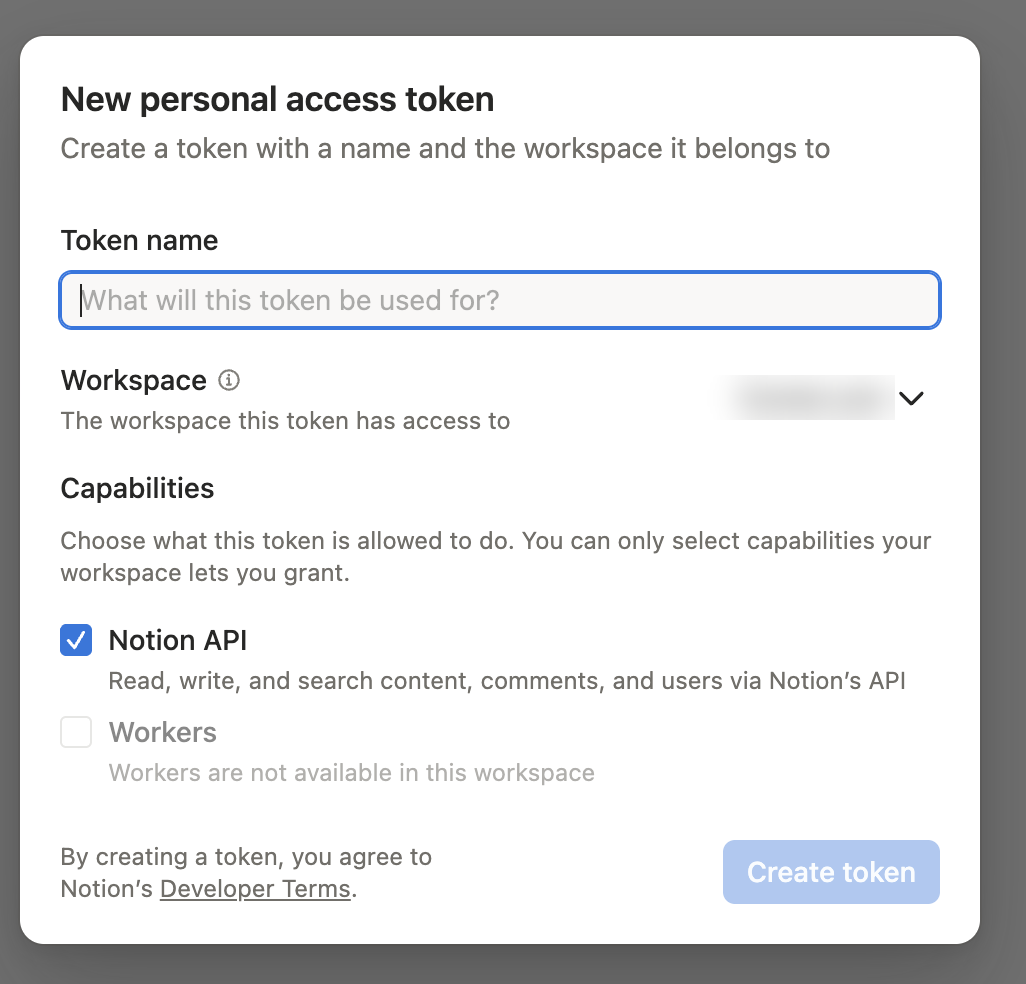
4. Copy the token now — Notion shows it only once. It starts with ntn_. Treat it like a password.
> PATs expire 1 year after creation — set a reminder to rotate. No "Personal access tokens" tab? Your admin disabled them; use the Internal Integration alternative.
Step 2 — Tell Claude Desktop about the server
1. Open Claude Desktop → Claude menu (top-left on Mac, hamburger on Windows) → Settings → Developer → Edit Config.
2. A file named claude_desktop_config.json opens. Don't panic at the curly braces — it's just text.
3. Select all (Cmd+A / Ctrl+A), delete, and paste:
{
  "mcpServers": {
    "notion": {
      "command": "npx",
      "args": ["-y", "notion-mcp-server"],
      "env": {
        "NOTION_TOKEN": "ntn_paste_your_token_here"
      }
    }
  }
}
> This block tells Claude Desktop how to launch the connector. npx downloads and runs it automatically the first time. The only thing you change is the token.
4. Replace ntn_paste_your_token_here with your token — keep the quotation marks.
5. Save (Cmd+S / Ctrl+S).
6. Quit Claude Desktop completely (Mac: Cmd+Q; Windows: tray icon → Quit) and reopen it.
Step 3 — Check and try
Type / in a new chat — you should see notion_execute and notion_describe in the list. Then ask:
> "Use Notion to make a new page called 'Hello from Claude' and add a checklist of three things I want to try today."
Claude calls the tool and replies with a page link. If something's off, it's almost always a token typo or Claude Desktop not fully quit — see Troubleshooting.
</details>
🔧 Configuration
Authentication: PAT (recommended) vs. Internal Integration
Both use the same NOTION_TOKEN env var — only where you get the token differs.
| | Personal Access Token (recommended) | Internal Integration (scoped) |
| --- | --- | --- |
| Where | app.notion.com/developers/tokens → + New token | app.notion.com/developers/connections → + New connection |
| Scope | Everything you can see | Only pages where you clicked • • • → Connect → \<integration\> |
| Friction | None | Per-page Connect step for every page/database |
| Use when | Default: personal + team workspaces, prototyping | Admin requires explicit per-resource scoping, or shared production bots |
> 💡 Most object_not_found errors are a wrong auth choice, not a bug: an Internal Integration token that was never Connected to the page. Switch to a PAT.
<details>
<summary><b>PAT details: capabilities, expiry, revocation, admin-disabled fallback</b></summary>
Can: read every page you have access to; create/update pages and databases where you have edit rights; comment as you; upload files.
Can't: access pages you can't see; bypass workspace permissions; act as another user; change admin settings. A PAT's scope = your account — if you lose access to a page, so does the PAT. Issue separate tokens per teammate.
Expiry: PATs expire 1 year after creation (Notion docs); set a reminder for ~11 months.
Revoking: app.notion.com/developers/tokens → Revoke next to the token (immediate). Workspace admins can revoke anyone's from Settings & members → Connections → All personal access tokens.
Admin disabled PATs? Ask them to enable, or create an Internal Integration at app.notion.com/developers/connections (+ New connection) and • • • → Connect it to every page the agent should touch — same NOTION_TOKEN env var.
Official reference: PAT guide · Authorization overview.
</details>
Environment variables
| Env var | Required | Default | Meaning |
| --- | --- | --- | --- |
| NOTION_TOKEN | ✅ | — | PAT (ntn_…, recommended) or Internal Integration secret (secret_… / ntn_…) |
| NOTION_PAGE_ID | — | — | Default parent for create_page / create_database when no parent is passed (page → Share → Copy link; ID = last 32 chars) |
| NOTION_RATE_LIMIT | — | 3 | Requests/second for the shared limiter (Notion's documented per-integration limit) |
| NOTION_READ_ONLY | — | — | true/1/yes disables every write operation in one switch |
| NOTION_ALLOWED_OPERATIONS | — | all | Comma-separated allowlist of operations or group presets — see Restricting operations |
| NOTION_BLOCKED_OPERATIONS | — | — | Comma-separated blocklist (same vocabulary); wins over the allowlist |
| NOTION_UPLOAD_ROOT | — | — | Confine upload_file's path source to one directory. Unset, a path source can read any file the server process can — set this if a model composes the path. Relative paths resolve inside it; symlinks are resolved before the check, so they can't point out |
| HTTPS_PROXY / HTTP_PROXY | — | — | Route Notion API traffic through an HTTP(S) proxy (standard env vars, lowercase also accepted) |
| NOTION_DAILY_LOG_PAGE_ID | — | — | Only used by the daily-log MCP prompt |
HTTP-transport variables (MCP_TRANSPORT, PORT, HOST, MCP_AUTH_TOKEN, …) are covered in Remote / HTTP transport.
> Upgrading from v1.x? Your env vars all still work unchanged. The only break is the tool surface (v1's five tools became notion_execute + notion_describe); modern clients rediscover tools automatically. Details: MIGRATION.md.
Restricting operations
Limit what an agent can do with NOTION_ALLOWED_OPERATIONS (allowlist) and/or NOTION_BLOCKED_OPERATIONS (blocklist) — each a comma-separated list of group presets or exact operation names.
| Preset | Expands to |
| --- | --- |
| read | every non-mutating operation |
| write | every mutating operation |
| destructive | operations whose purpose is removal (archive_page/trash_page, delete_block, batch_mixed_blocks, delete_comment, delete_view) |
| pages blocks databases data_sources views comments users files | every operation in that family (read and write) |
Read-only deployment (most common):
{ "env": { "NOTION_TOKEN": "ntn_xxx", "NOTION_ALLOWED_OPERATIONS": "read" } }
Everything except destructive ops:
{ "env": { "NOTION_BLOCKED_OPERATIONS": "destructive" } }
Mix presets and individual ops:
{ "env": { "NOTION_ALLOWED_OPERATIONS": "read,append_blocks,add_page_comment" } }
Rules: case-insensitive; unknown tokens ignored with a warning; blocklist wins; an allowlist that resolves to zero operations disables everything (fail-closed). Disabled operations disappear from notion_describe and the notion://operations menu, and notion_execute rejects them with operation_not_allowed.
On startup the server logs one line to stderr summarizing what resolved — check it first if the config doesn't behave as expected:
Operation access: 20/44 enabled (allow=read; block=(none))
<details>
<summary><b>Per-operation reference & limitations</b></summary>
| Domain | Read | Write |
| --- | --- | --- |
| pages | search_pages get_page get_page_markdown | create_page set_page_title set_page_property set_page_properties update_page_markdown move_page restore_page archive_page† trash_page† |
| blocks | get_block get_block_children | append_blocks update_block delete_block† batch_mixed_blocks† |
| databases | query_database | create_database update_database |
| data_sources | list_data_sources get_data_source list_data_source_templates | update_data_source |
| views | list_views get_view query_view | create_view update_view delete_view† |
| comments | list_comments get_comment | add_page_comment add_discussion_comment update_comment delete_comment† |
| users | list_users get_user get_bot_user get_self | — |
| files | list_file_uploads get_file_upload | upload_file |
† = also in the destructive group.
Limitations (control is per-operation, not per-parameter): a few write ops can remove content via a parameter — update_database / update_data_source accept in_trash, and update_page_markdown can replace a page body. Blocking destructive does not disable those. For a guaranteed no-mutation deployment use NOTION_ALLOWED_OPERATIONS=read or NOTION_READ_ONLY=true. MCP prompts may still mention disabled operations, but execution is rejected.
</details>
🌐 Remote / HTTP transport
By default the server speaks stdio (the local path above). To run it as a remote/hosted endpoint — web clients, networked agents, shared deployments — set MCP_TRANSPORT=http:
```bash
MCP_TRANSPORT=http PORT=3000 NOTION_TOKEN=ntn_xxx npx -y notion-mcp-server
Sign in to leave a review
Use Google, GitHub, or an email account so ratings stay tied to real people.
No reviews posted yet.





