
Armor Crypto MCP

by armorwallet

168 stars
616 downloads
Not rated
GitHub

About

Enables direct blockchain operations, crypto trading, and wallet management through the Armor Wallet API with JWT authentication and detailed logging for portfolio monitoring and trading strategy execution.

Details

Author
armorwallet
Repository
armorwallet/armor-crypto-mcp
GitHub stars
168
Downloads
616
License
GNU General Public License v3.0
Categories
Developer Tools, Other, Finance, Design, AI, API, Infrastructure, Frontend, Security

🧠 AI Native

📙 Wallet Management

🔃 Swaps

🌈 Specialized trades (DCA, Stop Loss etc.)

⛓️ Multi-chain

↔️ Cross-chain transations

🥩 Staking

🤖 Fast intergration to Agentic frameworks

👫 Social Sentiment

🔮 Prediction
<br />
<br />
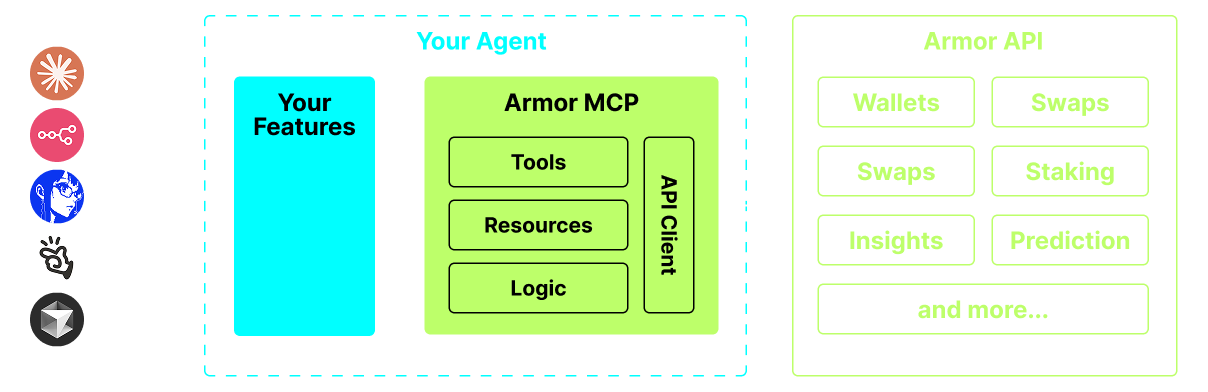
Armor MCP Diagram
<br />
<br />
<br />
<br />
<br />
<br />

Setting up with Highlight

This MCP is not yet compatible with Highlight’s one-click setup. However, you can still use it with Highlight by following these steps:

  1. Download and install Highlight from highlightai.com/download
  2. Navigate to the plugins tab and select "Add Custom Plugin"
  3. Configure the plugin with the settings below
    Plugin Name Armor Crypto MCP
    Command (node, npx, python, etc.) uvx
    Arguments
    • Argument 1 armor-crypto-mcp@latest
    • Argument 2 --version
    Environment
    • ARMOR_API_KEY <PUT-YOUR-KEY-HERE>

    Please refer to the README for specific instructions on how to obtain API keys or other required environment variables.

  4. Enable "Start Automatically" if you want the plugin to start when Highlight launches

From the repository

<br />

Linux / Windows

pip install uv
Mac
brew install uv
<br />

Currently you need to have the Armor NFT to get an API Key.
Get it here

To use the Armor MCP with your agent, you need the following configuration, replace <PUT-YOUR-KEY-HERE> with your API key:

{
"mcpServers": {
"armor-crypto-mcp": {
"command": "uvx",
"args": ["armor-crypto-mcp@latest", "--version"],
"env": {
"ARMOR_API_KEY": "<PUT-YOUR-KEY-HERE>"
}
}
}
}

<br />
<br />
<br />
<br />
<br />
<br />

Claude Desktop / Cursor

Paste into your MCP client config file to install this server.

{
    "mcpServers": {
        "armor crypto mcp": {
            "env": {
                "ARMOR_API_KEY": "<PUT-YOUR-KEY-HERE>"
            },
            "args": [
                "armor-crypto-mcp@latest",
                "--version"
            ],
            "command": "uvx"
        }
    }
}

Linux

{
    "env": {
        "ARMOR_API_KEY": "<PUT-YOUR-KEY-HERE>"
    },
    "args": [
        "armor-crypto-mcp@latest",
        "--version"
    ],
    "command": "uvx"
}

Macos

{
    "env": {
        "ARMOR_API_KEY": "<PUT-YOUR-KEY-HERE>"
    },
    "args": [
        "armor-crypto-mcp@latest",
        "--version"
    ],
    "command": "uvx"
}

Windows

{
    "env": {
        "ARMOR_API_KEY": "<PUT-YOUR-KEY-HERE>"
    },
    "args": [
        "armor-crypto-mcp@latest",
        "--version"
    ],
    "command": "uvx"
}
- **Create and manage Solana wallets**— Generate new wallets, organize them into groups, and archive unused ones via wallet management tools. - **Execute token swaps**— Perform normal swaps on Solana using the swap tool. - **Set up automated trading strategies**— Place, list, and cancel DCA orders, limit orders, and scheduled trades. - **Stake and unstake tokens**— Use staking tools to stake assets or withdraw staked positions. - **Discover trending tokens**— Search for tokens and retrieve trending token data on Solana. - **Run statistical analysis**— Apply the statistical calculator tool for accurate on-chain data analysis. A single source for integrating AI Agents with the Crypto ecosystem. This includes Wallet creation and management, swaps, transfers, event-based trades like DCA, stop loss and take profit, and much more. The Armor MCP supports Solana in Alpha and, when in beta, will support more than a dozen blockchains, including Ethereum. Base, Avalanche, Bitcoin, Sui, Berachain, megaETH, Optimism, Ton, BNB, and Arbitrum, among others. Using Armor's MCP you can bring all of crypto into your AI Agent with unified logic and a complete set of tools. 🌈 Specialized trades (DCA, Stop Loss etc.) 🤖 Fast intergration to Agentic frameworks ### 3. Claude Desktop or your AI Agent will run the MCP See[Usage & Configurationfor details. We are currently in pre-alpha, and we are testing the capabilities of various agents and agentic frameworks like Claude Desktop, Cline, Cursor, n8n, etc. - Wallet Management - Grouping & Organization - Archiving - Normal swap - DCA (place / list / cancel) - Scheduled Orders - Limit Orders (place / list / cancel) - More Blockchain Support - Minting - Armor Agents as a Tool (or A2A) Currently you need to have the Armor NFT to get an API Key. Get it](#usage--configuration)[here To use the Armor MCP with your agent, you need the following configuration, replace`<PUT-YOUR-KEY-HERE>`with your API key: ``` `{ "mcpServers": { "armor-crypto-mcp": { "command": "uvx", "args": ](https://codex.armorwallet.ai/)["armor-crypto-mcp@latest", "--version"], "env": { "ARMOR_API_KEY": "<PUT-YOUR-KEY-HERE>" } } } }` ``` - Must have Developer Mode enabled - Open Claude Desktop's File Menu top left of the window. - Go to File > Settings - Under Developer, click Edit Configuration - In the config file, insert the`armor-wallet-mcp`section from above - Make sure to replace the placeholder with your API key - Save the file and start a new Chat in Claude Desktop - Click on the`MCP Servers`button in the Cline tab in VSCode on the left panel - Scroll to the bottom of the left panel and click on`Configure MCP Servers` - In the config file, insert`armor-wallet-mcp`section from above - Make sure to replace the placeholder with your API key - Save the file, click`Done`under the`MCP Servers`tab and start chatting with Cline - Open the n8n app - Bottom-left of screen click`...`next to your username and click`Settings` - On the left panel, click`Community nodes`and then`Install a Community Node`button - In the search field for`npm Package Name`type in*mcp* - Install`MCP Nodes` - Add any MCP node, for example:`List Tools` - In the MCP Client`Parameters`tab, click`Select Credential`and click`Create new credential` - Under`Command`enter`uvx` - Under`Arguments`enter`armor-crypto-mcp` - Under`Environments`enter`ARMOR_API_KEY=eyJhbGciOiJIUzI1NiIsIn...`paste the full API Key value after the`=` - Back in the`Parameters`tab you can choose the MCP`Operation`for that Node Once you have setup the Armor MCP[here are some prompts you can use to get started Bitcoin-native MCP server for AI agents: BTC/STX wallets, DeFi yield, sBTC peg, NFTs, and x402 payments. MCP server for dry-run EVM transaction simulation via Crypto APIs MCP server for DeFi data — real-time crypto prices, token analytics, wallet balances, and on-chain data across multiple chains. Cross-protocol DeFi yield opportunities with risk metrics via DefiLlama. 16,000+ pools across 60+ chains. Risk classification, APY trends, and yield comparison. Live cross-DEX crypto prices read from on-chain pool state: per-venue price, liquidity depth and gross cross-venue spread across BSC, Polygon, Arbitrum, Base, Avalanche and Optimism. Works keyless, no account. An AI gateway for the Blend Protocol on Stellar, enabling DeFi actions like lending, borrowing, and pool creation through AI assistants or apps. Real-time DeFi lending rates across 14+ protocols (Aave, Morpho, Spark, Compound, Venus, etc). Query borrow/supply rates, c ompare platforms, calculate looping strategies on 6 chains (Ethereum, Arbitrum, Base, BSC, Solana, HyperEVM). DeFi execution on Base, Citrea, HyperEVM and Monad via Fibrous aggregation: swap quotes, swaps, transfers, cross-chain portfolio and Aave V3. Access blockchain transaction data in natural language, providing human-readable descriptions for AI assistants. DeFi liquidity-pool scores and Enter/Hold/Exit verdicts for Solana and EVM, with a public miss-inclusive track record. Free keyless API and MCP server.](https://github.com/armorwallet/armor-crypto-mcp/blob/main/README_prompts.md)
No reviews yet — be the first

Sign in to leave a review

Use Google, GitHub, or an email account so ratings stay tied to real people.

Email sign in

No reviews posted yet.







